mirror of
https://github.com/affaan-m/everything-claude-code.git
synced 2026-06-11 02:33:10 +08:00
Compare commits
226 Commits
pr-1969-lo
...
patch-1
| Author | SHA1 | Date | |
|---|---|---|---|

|
5ecee70196 | ||
|
|
ba0c4d13a8 | ||
|
|
e989c0ef0e | ||
|
|
f93e8f6869 | ||
|
|
116e61d8cb | ||
|
|
d904edc615 | ||
|
|
5acb01a276 | ||
|
|
7c2f71315b | ||
|
|
28548f67ba | ||
|
|
33ed494adf | ||
|
|
b068069b9b | ||
|
|
e3483fda15 | ||
|
|
cb81f1b0fe | ||
|
|
7e2cdeaeb5 | ||
|
|
4470e2e670 | ||
|
|
67e63e63f9 | ||
|
|
fe7b4f2ba3 | ||
|
|
0f1775e30b | ||
|
|
12ac22e674 | ||
|
|
c032e07b1e | ||
|
|
97567a91e7 | ||
|
|
7911af4a39 | ||
|
|
386326df8e | ||
|
|
b41e6fb3d0 | ||
|
|
99e01ded7d | ||
|
|
2ba0c62d8a | ||
|
|
9abe721bfe | ||
|
|
680aeff0fb | ||
|
|
6c0fbfb6c5 | ||
|
|
0e88e6a4dd | ||
|
|
cdc92de42a | ||
|
|
25dc518e1d | ||
|
|
08807e7fd6 | ||
|
|
feeaa97511 | ||
|
|
5e8f412cb5 | ||
|
|
4d6fc194ea | ||
|
|
aae735d458 | ||
|
|
ff3eaff137 | ||
|
|
922d2d8f8b | ||
|
|
bf17737969 | ||
|
|
f92f15199c | ||
|
|
fb4b0c8dce | ||
|
|
aa634df9e5 | ||
|
|
742bc58d97 | ||
|
|
04d4d81938 | ||
|
|
99e9f118bd | ||
|
|
f010f78332 | ||
|
|
e53933de1b | ||
|
|
10313d847a | ||
|
|
aa4ae863f8 | ||
|
|
80f6c27957 | ||
|
|
eb0d893948 | ||
|
|
cc62e89152 | ||
|
|
044d1863d0 | ||
|
|
43822b9c1a | ||
|
|
c276639bc7 | ||
|
|
804f8ab79a | ||
|
|
34cc0c1856 | ||
|
|
efda22657b | ||
|
|
81fca2cea6 | ||
|
|
812d4d060a | ||
|
|
25ac57ac40 | ||
|
|
d14191bed8 | ||
|
|
d1c4ca4c7f | ||
|
|
5475db4f97 | ||
|
|
523c3d7476 | ||
|
|
ec171300c6 | ||
|
|
3b7e0ba30a | ||
|
|
caee7cf79c | ||
|
|
2e5f30f695 | ||
|
|
8b6aed0b80 | ||
|
|
9b1d891870 | ||
|
|
4cafdb8304 | ||
|
|
2de0ce45d4 | ||
|
|
086e44c964 | ||
|
|
63c9788f50 | ||
|
|
4f21ed2acf | ||
|
|
7bb3172041 | ||
|
|
e06d038257 | ||
|
|
cdbc925d89 | ||
|
|
7f971b7e6f | ||
|
|
f318e91b23 | ||
|
|
666b4e2261 | ||
|
|
71aedad889 | ||
|
|
519c592a12 | ||
|
|
b113edac4b | ||
|
|
a9c8c3ed76 | ||
|
|
e6c16b40b8 | ||
|
|
36d390aa7d | ||
|
|
6b282aaa43 | ||
|
|
989559a728 | ||
|
|
3539bdbef6 | ||
|
|
27dc2918a2 | ||
|
|
822ed726a8 | ||
|
|
fd7c7cf47f | ||
|
|
3215e655ef | ||
|
|
1a384dc533 | ||
|
|
355c4f12cf | ||
|
|
5c135fb846 | ||
|
|
f397216aa0 | ||
|
|
7b2f0125bb | ||
|
|
f9bf94b246 | ||
|
|
ffcde01e4b | ||
|
|
4ca31057c6 | ||
|
|
fa7f8e2287 | ||
|
|
3aab0a67f4 | ||
|
|
ddc1e45f2a | ||
|
|
c8a66e13d4 | ||
|
|
3dc884acf2 | ||
|
|
c40b6c0cf5 | ||
|
|
744f416997 | ||
|
|
2371a3cf05 | ||
|
|
fb6d4a7104 | ||
|
|
98592ab6b8 | ||
|
|
1b9ecb9004 | ||
|
|
bf1ccb0a65 | ||
|
|
0dd78387c6 | ||
|
|
a9edd20462 | ||
|
|
99dd6ac0db | ||
|
|
afe0ae8d72 | ||
|
|
9495b109e2 | ||
|
|
b98f007a51 | ||
|
|
6b59276d76 | ||
|
|
fabb4d0c11 | ||
|
|
d66b5fa480 | ||
|
|
5a5a47e710 | ||
|
|
ec9ace9c54 | ||
|
|
b66ae3fbe0 | ||
|
|
09a1cf1df0 | ||
|
|
344a9bdf9c | ||
|
|
99e5a2f4d4 | ||
|
|
b47dfa95a3 | ||
|
|
471dee27ec | ||
|
|
cde0b12180 | ||
|
|
d6d1adbb2f | ||
|
|
cc5c255529 | ||
|
|
6d130cfcd5 | ||
|
|
0df46ec870 | ||
|
|
609eb25898 | ||
|
|
aaabe5949e | ||
|
|
039c7f111a | ||
|
|
7420441512 | ||
|
|
eb59afb590 | ||
|
|
fc2d23de80 | ||
|
|
efd05409c3 | ||
|
|
6976a2a7dd | ||
|
|
7ac506036c | ||
|
|
fb28e469f1 | ||
|
|
257aa67b61 | ||
|
|
a1cf97e3f2 | ||
|
|
10b1222fc8 | ||
|
|
cc83a85eb8 | ||
|
|
1c5c5d2389 | ||
|
|
fe49a31e9a | ||
|
|
6bced468d7 | ||
|
|
1eb7b0809d | ||
|
|
6c8e909d63 | ||
|
|
cecab59747 | ||
|
|
9e973b29fb | ||
|
|
d0303f4538 | ||
|
|
4b96af8f6a | ||
|
|
50ac061f9e | ||
|
|
4093d1bb0b | ||
|
|
714200fd20 | ||
|
|
2b387fb761 | ||
|
|
5b1a5e6433 | ||
|
|
a8e3bcb00f | ||
|
|
2d46c00763 | ||
|
|
3315f0ed61 | ||
|
|
1a7306acbe | ||
|
|
e26b5132c2 | ||
|
|
5157ee63f0 | ||
|
|
50f375bc2c | ||
|
|
bfffc33869 | ||
|
|
f7035b5644 | ||
|
|
6951b8d5d2 | ||
|
|
6887f2952d | ||
|
|
0b6763463f | ||
|
|
c0f8c3bc81 | ||
|
|
1949d75e18 | ||
|
|
6b8a49a6ee | ||
|
|
c2c54e7c0b | ||
|
|
c0bac4d6ce | ||
|
|
553d507ea6 | ||
|
|
e4fa157d12 | ||
|
|
701b350f6f | ||
|
|
5b617787d8 | ||
|
|
1c079908e2 | ||
|
|
1f901ab582 | ||
|
|
acbc152375 | ||
|
|
13585f1092 | ||
|
|
ee85e1482e | ||
|
|
5b9acd1d92 | ||
|
|
f04702bdac | ||
|
|
4774946db5 | ||
|
|
c211791e95 | ||
|
|
e8e9df52a6 | ||
|
|
5349d991c2 | ||
|
|
381e6cd16a | ||
|
|
8af4b5dafb | ||
|
|
9af04f3965 | ||
|
|
4546a2c144 | ||
|
|
8cfadfea28 | ||
|
|
e2992860ae | ||
|
|
f7315016c0 | ||
|
|
375d750b4c | ||
|
|
d1710bd2e7 | ||
|
|
7d15a2282b | ||
|
|
0e66c838c7 | ||
|
|
cb9702ca99 | ||
|
|
f9384427b8 | ||
|
|
4423f10cfb | ||
|
|
3b12fb273f | ||
|
|
4fb80d8861 | ||
|
|
a27831c13e | ||
|
|
b24d762caa | ||
|
|
f94478e524 | ||
|
|
6cdac19764 | ||
|
|
af3a206412 | ||
|
|
20f00c1410 | ||
|
|
e7a6f137e5 | ||
|
|
7596502092 | ||
|
|
c04baa8c25 | ||
|
|
9082bdedac | ||
|
|
3243a1c5d3 | ||
|
|
69401b28b3 |
@@ -9,7 +9,7 @@
|
||||
"version": "2.0.0-rc.1",
|
||||
"source": {
|
||||
"source": "local",
|
||||
"path": "../.."
|
||||
"path": "./"
|
||||
},
|
||||
"policy": {
|
||||
"installation": "AVAILABLE",
|
||||
|
||||
@@ -11,7 +11,7 @@
|
||||
{
|
||||
"name": "ecc",
|
||||
"source": "./",
|
||||
"description": "The most comprehensive Claude Code plugin — 60 agents, 228 skills, 75 legacy command shims, selective install profiles, and production-ready hooks for TDD, security scanning, code review, and continuous learning",
|
||||
"description": "The most comprehensive Claude Code plugin — 60 agents, 232 skills, 75 legacy command shims, selective install profiles, and production-ready hooks for TDD, security scanning, code review, and continuous learning",
|
||||
"version": "2.0.0-rc.1",
|
||||
"author": {
|
||||
"name": "Affaan Mustafa",
|
||||
|
||||
@@ -1,7 +1,7 @@
|
||||
{
|
||||
"name": "ecc",
|
||||
"version": "2.0.0-rc.1",
|
||||
"description": "Battle-tested Claude Code plugin for engineering teams — 60 agents, 228 skills, 75 legacy command shims, production-ready hooks, and selective install workflows evolved through continuous real-world use",
|
||||
"description": "Battle-tested Claude Code plugin for engineering teams — 60 agents, 232 skills, 75 legacy command shims, production-ready hooks, and selective install workflows evolved through continuous real-world use",
|
||||
"author": {
|
||||
"name": "Affaan Mustafa",
|
||||
"url": "https://x.com/affaanmustafa"
|
||||
|
||||
@@ -18,18 +18,28 @@ This directory contains the **Codex plugin manifest** for Everything Claude Code
|
||||
|
||||
## Installation
|
||||
|
||||
Codex plugin support is currently in preview. Once generally available:
|
||||
Codex plugin support is currently marketplace-backed. The repo exposes a
|
||||
repo-scoped marketplace at `.agents/plugins/marketplace.json`; Codex can add and
|
||||
track that marketplace source from the CLI:
|
||||
|
||||
```bash
|
||||
# Install from Codex CLI
|
||||
codex plugin install affaan-m/everything-claude-code
|
||||
# Add the public repo marketplace
|
||||
codex plugin marketplace add affaan-m/everything-claude-code
|
||||
|
||||
# Or reference locally during development
|
||||
codex plugin install ./
|
||||
|
||||
Run this from the repository root so `./` points to the repo root and `.mcp.json` resolves correctly.
|
||||
# Or add a local checkout while developing
|
||||
codex plugin marketplace add /absolute/path/to/everything-claude-code
|
||||
```
|
||||
|
||||
The marketplace entry points at the repository root so `.codex-plugin/plugin.json`,
|
||||
`skills/`, and `.mcp.json` resolve from one shared source of truth. After adding
|
||||
or updating the marketplace, restart Codex and install or enable `ecc` from the
|
||||
plugin directory.
|
||||
|
||||
Official Plugin Directory publishing is coming soon in Codex. Until self-serve
|
||||
publishing exists, treat the public repo marketplace as the supported Codex
|
||||
distribution path and keep release copy framed as repo-marketplace/manual
|
||||
installation.
|
||||
|
||||
The installed plugin registers under the short slug `ecc` so tool and command names
|
||||
stay below provider length limits.
|
||||
|
||||
|
||||
117
.github/workflows/ci.yml
vendored
117
.github/workflows/ci.yml
vendored
@@ -45,7 +45,7 @@ jobs:
|
||||
# Package manager setup
|
||||
- name: Setup pnpm
|
||||
if: matrix.pm == 'pnpm' && matrix.node != '18.x'
|
||||
uses: pnpm/action-setup@91ab88e2619ed1f46221f0ba42d1492c02baf788 # v6.0.6
|
||||
uses: pnpm/action-setup@0e279bb959325dab635dd2c09392533439d90093 # v6.0.8
|
||||
with:
|
||||
# Keep an explicit pnpm major because this repo's packageManager is Yarn.
|
||||
version: 10
|
||||
@@ -68,73 +68,6 @@ jobs:
|
||||
if: matrix.pm == 'bun'
|
||||
uses: oven-sh/setup-bun@0c5077e51419868618aeaa5fe8019c62421857d6 # v2
|
||||
|
||||
# Cache configuration
|
||||
- name: Get npm cache directory
|
||||
if: matrix.pm == 'npm'
|
||||
id: npm-cache-dir
|
||||
shell: bash
|
||||
run: echo "dir=$(npm config get cache)" >> $GITHUB_OUTPUT
|
||||
|
||||
- name: Cache npm
|
||||
if: matrix.pm == 'npm'
|
||||
continue-on-error: true
|
||||
uses: actions/cache@27d5ce7f107fe9357f9df03efb73ab90386fccae # v5.0.5
|
||||
with:
|
||||
path: ${{ steps.npm-cache-dir.outputs.dir }}
|
||||
key: ${{ runner.os }}-node-${{ matrix.node }}-npm-${{ hashFiles('**/package-lock.json') }}
|
||||
restore-keys: |
|
||||
${{ runner.os }}-node-${{ matrix.node }}-npm-
|
||||
|
||||
- name: Get pnpm store directory
|
||||
if: matrix.pm == 'pnpm'
|
||||
id: pnpm-cache-dir
|
||||
shell: bash
|
||||
env:
|
||||
COREPACK_ENABLE_STRICT: '0'
|
||||
run: echo "dir=$(pnpm store path)" >> $GITHUB_OUTPUT
|
||||
|
||||
- name: Cache pnpm
|
||||
if: matrix.pm == 'pnpm'
|
||||
continue-on-error: true
|
||||
uses: actions/cache@27d5ce7f107fe9357f9df03efb73ab90386fccae # v5.0.5
|
||||
with:
|
||||
path: ${{ steps.pnpm-cache-dir.outputs.dir }}
|
||||
key: ${{ runner.os }}-node-${{ matrix.node }}-pnpm-${{ hashFiles('**/pnpm-lock.yaml') }}
|
||||
restore-keys: |
|
||||
${{ runner.os }}-node-${{ matrix.node }}-pnpm-
|
||||
|
||||
- name: Get yarn cache directory
|
||||
if: matrix.pm == 'yarn'
|
||||
id: yarn-cache-dir
|
||||
shell: bash
|
||||
run: |
|
||||
# Try Yarn Berry first, fall back to Yarn v1
|
||||
if yarn config get cacheFolder >/dev/null 2>&1; then
|
||||
echo "dir=$(yarn config get cacheFolder)" >> $GITHUB_OUTPUT
|
||||
else
|
||||
echo "dir=$(yarn cache dir)" >> $GITHUB_OUTPUT
|
||||
fi
|
||||
|
||||
- name: Cache yarn
|
||||
if: matrix.pm == 'yarn'
|
||||
continue-on-error: true
|
||||
uses: actions/cache@27d5ce7f107fe9357f9df03efb73ab90386fccae # v5.0.5
|
||||
with:
|
||||
path: ${{ steps.yarn-cache-dir.outputs.dir }}
|
||||
key: ${{ runner.os }}-node-${{ matrix.node }}-yarn-${{ hashFiles('**/yarn.lock') }}
|
||||
restore-keys: |
|
||||
${{ runner.os }}-node-${{ matrix.node }}-yarn-
|
||||
|
||||
- name: Cache bun
|
||||
if: matrix.pm == 'bun'
|
||||
continue-on-error: true
|
||||
uses: actions/cache@27d5ce7f107fe9357f9df03efb73ab90386fccae # v5.0.5
|
||||
with:
|
||||
path: ~/.bun/install/cache
|
||||
key: ${{ runner.os }}-bun-${{ hashFiles('**/bun.lockb') }}
|
||||
restore-keys: |
|
||||
${{ runner.os }}-bun-
|
||||
|
||||
# Install dependencies
|
||||
# COREPACK_ENABLE_STRICT=0 allows pnpm to install even though
|
||||
# package.json declares "packageManager": "yarn@..."
|
||||
@@ -142,16 +75,18 @@ jobs:
|
||||
shell: bash
|
||||
env:
|
||||
COREPACK_ENABLE_STRICT: '0'
|
||||
npm_config_ignore_scripts: 'true'
|
||||
YARN_ENABLE_SCRIPTS: 'false'
|
||||
run: |
|
||||
case "${{ matrix.pm }}" in
|
||||
npm) npm ci ;;
|
||||
npm) npm ci --ignore-scripts ;;
|
||||
# pnpm v10 can fail CI on ignored native build scripts
|
||||
# (for example msgpackr-extract) even though this repo is Yarn-native
|
||||
# and pnpm is only exercised here as a compatibility lane.
|
||||
pnpm) pnpm install --config.strict-dep-builds=false --no-frozen-lockfile ;;
|
||||
pnpm) pnpm install --ignore-scripts --config.strict-dep-builds=false --no-frozen-lockfile ;;
|
||||
# Yarn Berry (v4+) removed --ignore-engines; engine checking is no longer a core feature
|
||||
yarn) yarn install ;;
|
||||
bun) bun install ;;
|
||||
yarn) yarn install --mode=skip-build ;;
|
||||
bun) bun install --ignore-scripts ;;
|
||||
*) echo "Unsupported package manager: ${{ matrix.pm }}" && exit 1 ;;
|
||||
esac
|
||||
|
||||
@@ -220,6 +155,10 @@ jobs:
|
||||
run: node scripts/ci/catalog.js --text
|
||||
continue-on-error: false
|
||||
|
||||
- name: Validate command registry
|
||||
run: npm run command-registry:check
|
||||
continue-on-error: false
|
||||
|
||||
- name: Check unicode safety
|
||||
run: node scripts/ci/check-unicode-safety.js
|
||||
continue-on-error: false
|
||||
@@ -242,11 +181,43 @@ jobs:
|
||||
with:
|
||||
node-version: '20.x'
|
||||
|
||||
- name: Install audit dependencies
|
||||
run: npm ci --ignore-scripts
|
||||
|
||||
- name: Run npm audit
|
||||
run: |
|
||||
npm audit signatures
|
||||
npm audit --audit-level=high
|
||||
continue-on-error: true # Allows PR to proceed, but marks job as failed if vulnerabilities found
|
||||
|
||||
- name: Run supply-chain IOC scan
|
||||
run: npm run security:ioc-scan
|
||||
|
||||
coverage:
|
||||
name: Coverage
|
||||
runs-on: ubuntu-latest
|
||||
timeout-minutes: 10
|
||||
|
||||
steps:
|
||||
- name: Checkout
|
||||
uses: actions/checkout@de0fac2e4500dabe0009e67214ff5f5447ce83dd # v6.0.2
|
||||
|
||||
- name: Setup Node.js
|
||||
uses: actions/setup-node@53b83947a5a98c8d113130e565377fae1a50d02f # v6.3.0
|
||||
with:
|
||||
node-version: '20.x'
|
||||
|
||||
- name: Install dependencies
|
||||
run: npm ci --ignore-scripts
|
||||
|
||||
- name: Run coverage
|
||||
run: npm run coverage
|
||||
|
||||
- name: Upload coverage report
|
||||
if: always()
|
||||
uses: actions/upload-artifact@043fb46d1a93c77aae656e7c1c64a875d1fc6a0a # v7.0.1
|
||||
with:
|
||||
name: coverage-ubuntu-node20-npm
|
||||
path: coverage/
|
||||
|
||||
lint:
|
||||
name: Lint
|
||||
|
||||
54
.github/workflows/release.yml
vendored
54
.github/workflows/release.yml
vendored
@@ -5,13 +5,16 @@ on:
|
||||
tags: ['v*']
|
||||
|
||||
permissions:
|
||||
contents: write
|
||||
id-token: write
|
||||
contents: read
|
||||
|
||||
jobs:
|
||||
release:
|
||||
name: Create Release
|
||||
verify:
|
||||
name: Verify Release
|
||||
runs-on: ubuntu-latest
|
||||
outputs:
|
||||
already_published: ${{ steps.npm_publish_state.outputs.already_published }}
|
||||
dist_tag: ${{ steps.npm_publish_state.outputs.dist_tag }}
|
||||
package_file: ${{ steps.pack.outputs.package_file }}
|
||||
|
||||
steps:
|
||||
- name: Checkout
|
||||
@@ -29,6 +32,9 @@ jobs:
|
||||
- name: Install dependencies
|
||||
run: npm ci --ignore-scripts
|
||||
|
||||
- name: Run supply-chain IOC scan
|
||||
run: npm run security:ioc-scan
|
||||
|
||||
- name: Verify OpenCode package payload
|
||||
run: node tests/scripts/build-opencode.test.js
|
||||
|
||||
@@ -94,6 +100,42 @@ jobs:
|
||||
- For migration tips and compatibility notes, see README and CHANGELOG.
|
||||
EOF
|
||||
|
||||
- name: Pack npm artifact
|
||||
id: pack
|
||||
run: |
|
||||
npm pack --json > npm-pack.json
|
||||
PACKAGE_FILE=$(node -e "const fs = require('fs'); const data = JSON.parse(fs.readFileSync('npm-pack.json', 'utf8')); console.log(data[0].filename)")
|
||||
echo "package_file=${PACKAGE_FILE}" >> "$GITHUB_OUTPUT"
|
||||
|
||||
- name: Upload release artifacts
|
||||
uses: actions/upload-artifact@043fb46d1a93c77aae656e7c1c64a875d1fc6a0a # v7.0.1
|
||||
with:
|
||||
name: ecc-release-artifacts
|
||||
path: |
|
||||
release_body.md
|
||||
${{ steps.pack.outputs.package_file }}
|
||||
if-no-files-found: error
|
||||
|
||||
publish:
|
||||
name: Publish Release
|
||||
runs-on: ubuntu-latest
|
||||
needs: verify
|
||||
permissions:
|
||||
contents: write
|
||||
id-token: write
|
||||
|
||||
steps:
|
||||
- name: Download release artifacts
|
||||
uses: actions/download-artifact@3e5f45b2cfb9172054b4087a40e8e0b5a5461e7c # v8.0.1
|
||||
with:
|
||||
name: ecc-release-artifacts
|
||||
|
||||
- name: Setup Node.js
|
||||
uses: actions/setup-node@53b83947a5a98c8d113130e565377fae1a50d02f # v6.3.0
|
||||
with:
|
||||
node-version: '20.x'
|
||||
registry-url: 'https://registry.npmjs.org'
|
||||
|
||||
- name: Create GitHub Release
|
||||
uses: softprops/action-gh-release@b4309332981a82ec1c5618f44dd2e27cc8bfbfda # v3.0.0
|
||||
with:
|
||||
@@ -103,7 +145,7 @@ jobs:
|
||||
make_latest: ${{ contains(github.ref_name, '-') && 'false' || 'true' }}
|
||||
|
||||
- name: Publish npm package
|
||||
if: steps.npm_publish_state.outputs.already_published != 'true'
|
||||
if: needs.verify.outputs.already_published != 'true'
|
||||
env:
|
||||
NODE_AUTH_TOKEN: ${{ secrets.NPM_TOKEN }}
|
||||
run: npm publish --access public --provenance --tag "${{ steps.npm_publish_state.outputs.dist_tag }}"
|
||||
run: npm publish "${{ needs.verify.outputs.package_file }}" --access public --provenance --tag "${{ needs.verify.outputs.dist_tag }}"
|
||||
|
||||
54
.github/workflows/reusable-release.yml
vendored
54
.github/workflows/reusable-release.yml
vendored
@@ -28,13 +28,16 @@ on:
|
||||
default: true
|
||||
|
||||
permissions:
|
||||
contents: write
|
||||
id-token: write
|
||||
contents: read
|
||||
|
||||
jobs:
|
||||
release:
|
||||
name: Create Release
|
||||
verify:
|
||||
name: Verify Release
|
||||
runs-on: ubuntu-latest
|
||||
outputs:
|
||||
already_published: ${{ steps.npm_publish_state.outputs.already_published }}
|
||||
dist_tag: ${{ steps.npm_publish_state.outputs.dist_tag }}
|
||||
package_file: ${{ steps.pack.outputs.package_file }}
|
||||
|
||||
steps:
|
||||
- name: Checkout
|
||||
@@ -53,6 +56,9 @@ jobs:
|
||||
- name: Install dependencies
|
||||
run: npm ci --ignore-scripts
|
||||
|
||||
- name: Run supply-chain IOC scan
|
||||
run: npm run security:ioc-scan
|
||||
|
||||
- name: Verify OpenCode package payload
|
||||
run: node tests/scripts/build-opencode.test.js
|
||||
|
||||
@@ -111,6 +117,42 @@ jobs:
|
||||
- Claude marketplace/plugin identifier: \`everything-claude-code@everything-claude-code\`
|
||||
EOF
|
||||
|
||||
- name: Pack npm artifact
|
||||
id: pack
|
||||
run: |
|
||||
npm pack --json > npm-pack.json
|
||||
PACKAGE_FILE=$(node -e "const fs = require('fs'); const data = JSON.parse(fs.readFileSync('npm-pack.json', 'utf8')); console.log(data[0].filename)")
|
||||
echo "package_file=${PACKAGE_FILE}" >> "$GITHUB_OUTPUT"
|
||||
|
||||
- name: Upload release artifacts
|
||||
uses: actions/upload-artifact@043fb46d1a93c77aae656e7c1c64a875d1fc6a0a # v7.0.1
|
||||
with:
|
||||
name: ecc-release-artifacts
|
||||
path: |
|
||||
release_body.md
|
||||
${{ steps.pack.outputs.package_file }}
|
||||
if-no-files-found: error
|
||||
|
||||
publish:
|
||||
name: Publish Release
|
||||
runs-on: ubuntu-latest
|
||||
needs: verify
|
||||
permissions:
|
||||
contents: write
|
||||
id-token: write
|
||||
|
||||
steps:
|
||||
- name: Download release artifacts
|
||||
uses: actions/download-artifact@3e5f45b2cfb9172054b4087a40e8e0b5a5461e7c # v8.0.1
|
||||
with:
|
||||
name: ecc-release-artifacts
|
||||
|
||||
- name: Setup Node.js
|
||||
uses: actions/setup-node@53b83947a5a98c8d113130e565377fae1a50d02f # v6.3.0
|
||||
with:
|
||||
node-version: '20.x'
|
||||
registry-url: 'https://registry.npmjs.org'
|
||||
|
||||
- name: Create GitHub Release
|
||||
uses: softprops/action-gh-release@b4309332981a82ec1c5618f44dd2e27cc8bfbfda # v3.0.0
|
||||
with:
|
||||
@@ -121,7 +163,7 @@ jobs:
|
||||
make_latest: ${{ contains(inputs.tag, '-') && 'false' || 'true' }}
|
||||
|
||||
- name: Publish npm package
|
||||
if: steps.npm_publish_state.outputs.already_published != 'true'
|
||||
if: needs.verify.outputs.already_published != 'true'
|
||||
env:
|
||||
NODE_AUTH_TOKEN: ${{ secrets.NPM_TOKEN }}
|
||||
run: npm publish --access public --provenance --tag "${{ steps.npm_publish_state.outputs.dist_tag }}"
|
||||
run: npm publish "${{ needs.verify.outputs.package_file }}" --access public --provenance --tag "${{ needs.verify.outputs.dist_tag }}"
|
||||
|
||||
78
.github/workflows/reusable-test.yml
vendored
78
.github/workflows/reusable-test.yml
vendored
@@ -36,7 +36,7 @@ jobs:
|
||||
|
||||
- name: Setup pnpm
|
||||
if: inputs.package-manager == 'pnpm' && inputs.node-version != '18.x'
|
||||
uses: pnpm/action-setup@91ab88e2619ed1f46221f0ba42d1492c02baf788 # v6.0.6
|
||||
uses: pnpm/action-setup@0e279bb959325dab635dd2c09392533439d90093 # v6.0.8
|
||||
with:
|
||||
# Keep an explicit pnpm major because this repo's packageManager is Yarn.
|
||||
version: 10
|
||||
@@ -59,88 +59,24 @@ jobs:
|
||||
if: inputs.package-manager == 'bun'
|
||||
uses: oven-sh/setup-bun@0c5077e51419868618aeaa5fe8019c62421857d6 # v2
|
||||
|
||||
- name: Get npm cache directory
|
||||
if: inputs.package-manager == 'npm'
|
||||
id: npm-cache-dir
|
||||
shell: bash
|
||||
run: echo "dir=$(npm config get cache)" >> $GITHUB_OUTPUT
|
||||
|
||||
- name: Cache npm
|
||||
if: inputs.package-manager == 'npm'
|
||||
continue-on-error: true
|
||||
uses: actions/cache@27d5ce7f107fe9357f9df03efb73ab90386fccae # v5.0.5
|
||||
with:
|
||||
path: ${{ steps.npm-cache-dir.outputs.dir }}
|
||||
key: ${{ runner.os }}-node-${{ inputs.node-version }}-npm-${{ hashFiles('**/package-lock.json') }}
|
||||
restore-keys: |
|
||||
${{ runner.os }}-node-${{ inputs.node-version }}-npm-
|
||||
|
||||
- name: Get pnpm store directory
|
||||
if: inputs.package-manager == 'pnpm'
|
||||
id: pnpm-cache-dir
|
||||
shell: bash
|
||||
env:
|
||||
COREPACK_ENABLE_STRICT: '0'
|
||||
run: echo "dir=$(pnpm store path)" >> $GITHUB_OUTPUT
|
||||
|
||||
- name: Cache pnpm
|
||||
if: inputs.package-manager == 'pnpm'
|
||||
continue-on-error: true
|
||||
uses: actions/cache@27d5ce7f107fe9357f9df03efb73ab90386fccae # v5.0.5
|
||||
with:
|
||||
path: ${{ steps.pnpm-cache-dir.outputs.dir }}
|
||||
key: ${{ runner.os }}-node-${{ inputs.node-version }}-pnpm-${{ hashFiles('**/pnpm-lock.yaml') }}
|
||||
restore-keys: |
|
||||
${{ runner.os }}-node-${{ inputs.node-version }}-pnpm-
|
||||
|
||||
- name: Get yarn cache directory
|
||||
if: inputs.package-manager == 'yarn'
|
||||
id: yarn-cache-dir
|
||||
shell: bash
|
||||
run: |
|
||||
# Try Yarn Berry first, fall back to Yarn v1
|
||||
if yarn config get cacheFolder >/dev/null 2>&1; then
|
||||
echo "dir=$(yarn config get cacheFolder)" >> $GITHUB_OUTPUT
|
||||
else
|
||||
echo "dir=$(yarn cache dir)" >> $GITHUB_OUTPUT
|
||||
fi
|
||||
|
||||
- name: Cache yarn
|
||||
if: inputs.package-manager == 'yarn'
|
||||
continue-on-error: true
|
||||
uses: actions/cache@27d5ce7f107fe9357f9df03efb73ab90386fccae # v5.0.5
|
||||
with:
|
||||
path: ${{ steps.yarn-cache-dir.outputs.dir }}
|
||||
key: ${{ runner.os }}-node-${{ inputs.node-version }}-yarn-${{ hashFiles('**/yarn.lock') }}
|
||||
restore-keys: |
|
||||
${{ runner.os }}-node-${{ inputs.node-version }}-yarn-
|
||||
|
||||
- name: Cache bun
|
||||
if: inputs.package-manager == 'bun'
|
||||
continue-on-error: true
|
||||
uses: actions/cache@27d5ce7f107fe9357f9df03efb73ab90386fccae # v5.0.5
|
||||
with:
|
||||
path: ~/.bun/install/cache
|
||||
key: ${{ runner.os }}-bun-${{ hashFiles('**/bun.lockb') }}
|
||||
restore-keys: |
|
||||
${{ runner.os }}-bun-
|
||||
|
||||
# COREPACK_ENABLE_STRICT=0 allows pnpm to install even though
|
||||
# package.json declares "packageManager": "yarn@..."
|
||||
- name: Install dependencies
|
||||
shell: bash
|
||||
env:
|
||||
COREPACK_ENABLE_STRICT: '0'
|
||||
npm_config_ignore_scripts: 'true'
|
||||
YARN_ENABLE_SCRIPTS: 'false'
|
||||
run: |
|
||||
case "${{ inputs.package-manager }}" in
|
||||
npm) npm ci ;;
|
||||
npm) npm ci --ignore-scripts ;;
|
||||
# pnpm v10 can fail CI on ignored native build scripts
|
||||
# (for example msgpackr-extract) even though this repo is Yarn-native
|
||||
# and pnpm is only exercised here as a compatibility lane.
|
||||
pnpm) pnpm install --config.strict-dep-builds=false --no-frozen-lockfile ;;
|
||||
pnpm) pnpm install --ignore-scripts --config.strict-dep-builds=false --no-frozen-lockfile ;;
|
||||
# Yarn Berry (v4+) removed --ignore-engines; engine checking is no longer a core feature
|
||||
yarn) yarn install ;;
|
||||
bun) bun install ;;
|
||||
yarn) yarn install --mode=skip-build ;;
|
||||
bun) bun install --ignore-scripts ;;
|
||||
*) echo "Unsupported package manager: ${{ inputs.package-manager }}" && exit 1 ;;
|
||||
esac
|
||||
|
||||
|
||||
65
.github/workflows/supply-chain-watch.yml
vendored
Normal file
65
.github/workflows/supply-chain-watch.yml
vendored
Normal file
@@ -0,0 +1,65 @@
|
||||
name: Supply-Chain Watch
|
||||
|
||||
on:
|
||||
schedule:
|
||||
- cron: '17 */6 * * *'
|
||||
workflow_dispatch:
|
||||
|
||||
concurrency:
|
||||
group: ${{ github.workflow }}-${{ github.ref }}
|
||||
cancel-in-progress: false
|
||||
|
||||
permissions:
|
||||
contents: read
|
||||
|
||||
jobs:
|
||||
ioc-watch:
|
||||
name: IOC watch
|
||||
runs-on: ubuntu-latest
|
||||
timeout-minutes: 10
|
||||
|
||||
steps:
|
||||
- name: Checkout
|
||||
uses: actions/checkout@de0fac2e4500dabe0009e67214ff5f5447ce83dd # v6.0.2
|
||||
with:
|
||||
persist-credentials: false
|
||||
|
||||
- name: Setup Node.js
|
||||
uses: actions/setup-node@53b83947a5a98c8d113130e565377fae1a50d02f # v6.3.0
|
||||
with:
|
||||
node-version: '20.x'
|
||||
|
||||
- name: Install dependencies without lifecycle scripts
|
||||
run: npm ci --ignore-scripts
|
||||
|
||||
- name: Verify registry signatures and advisories
|
||||
run: |
|
||||
npm audit signatures
|
||||
npm audit --audit-level=high
|
||||
|
||||
- name: Validate IOC scanner fixtures
|
||||
run: node tests/ci/scan-supply-chain-iocs.test.js
|
||||
|
||||
- name: Validate advisory source fixtures
|
||||
run: node tests/ci/supply-chain-advisory-sources.test.js
|
||||
|
||||
- name: Generate IOC report
|
||||
run: |
|
||||
mkdir -p artifacts
|
||||
node scripts/ci/scan-supply-chain-iocs.js --json > artifacts/supply-chain-ioc-report.json
|
||||
|
||||
- name: Generate advisory source report
|
||||
run: node scripts/ci/supply-chain-advisory-sources.js --refresh --json > artifacts/supply-chain-advisory-sources.json
|
||||
|
||||
- name: Validate workflow hardening rules
|
||||
run: node scripts/ci/validate-workflow-security.js
|
||||
|
||||
- name: Upload IOC report
|
||||
if: always()
|
||||
uses: actions/upload-artifact@043fb46d1a93c77aae656e7c1c64a875d1fc6a0a # v7.0.1
|
||||
with:
|
||||
name: supply-chain-ioc-report
|
||||
path: |
|
||||
artifacts/supply-chain-ioc-report.json
|
||||
artifacts/supply-chain-advisory-sources.json
|
||||
retention-days: 14
|
||||
@@ -15,7 +15,8 @@
|
||||
"sourceMap": true,
|
||||
"resolveJsonModule": true,
|
||||
"isolatedModules": true,
|
||||
"verbatimModuleSyntax": true
|
||||
"verbatimModuleSyntax": true,
|
||||
"types": ["node"]
|
||||
},
|
||||
"include": [
|
||||
"plugins/**/*.ts",
|
||||
|
||||
41
.zed/settings.json
Normal file
41
.zed/settings.json
Normal file
@@ -0,0 +1,41 @@
|
||||
{
|
||||
"agent": {
|
||||
"tool_permissions": {
|
||||
"default": "confirm",
|
||||
"tools": {
|
||||
"terminal": {
|
||||
"default": "confirm",
|
||||
"always_deny": [
|
||||
{
|
||||
"pattern": "rm\\s+-rf\\s+(/|~)"
|
||||
},
|
||||
{
|
||||
"pattern": "(^|\\s)(cat|sed|grep|rg)\\s+.*\\.(env|pem|key)(\\s|$)"
|
||||
}
|
||||
],
|
||||
"always_confirm": [
|
||||
{
|
||||
"pattern": "sudo\\s"
|
||||
},
|
||||
{
|
||||
"pattern": "(npm|pnpm|yarn|bun)\\s+(install|add|dlx|exec|x)\\b"
|
||||
},
|
||||
{
|
||||
"pattern": "gh\\s+(auth|api|repo|release|pr|issue)\\b"
|
||||
}
|
||||
]
|
||||
},
|
||||
"edit_file": {
|
||||
"always_deny": [
|
||||
{
|
||||
"pattern": "\\.env"
|
||||
},
|
||||
{
|
||||
"pattern": "\\.(pem|key|p12|pfx)$"
|
||||
}
|
||||
]
|
||||
}
|
||||
}
|
||||
}
|
||||
}
|
||||
}
|
||||
@@ -1,6 +1,6 @@
|
||||
# Everything Claude Code (ECC) — Agent Instructions
|
||||
|
||||
This is a **production-ready AI coding plugin** providing 60 specialized agents, 228 skills, 75 commands, and automated hook workflows for software development.
|
||||
This is a **production-ready AI coding plugin** providing 60 specialized agents, 232 skills, 75 commands, and automated hook workflows for software development.
|
||||
|
||||
**Version:** 2.0.0-rc.1
|
||||
|
||||
@@ -150,7 +150,7 @@ Troubleshoot failures: check test isolation → verify mocks → fix implementat
|
||||
|
||||
```
|
||||
agents/ — 60 specialized subagents
|
||||
skills/ — 228 workflow skills and domain knowledge
|
||||
skills/ — 232 workflow skills and domain knowledge
|
||||
commands/ — 75 slash commands
|
||||
hooks/ — Trigger-based automations
|
||||
rules/ — Always-follow guidelines (common + per-language)
|
||||
|
||||
161
README.md
161
README.md
@@ -1,12 +1,12 @@
|
||||
**Language:** English | [Português (Brasil)](docs/pt-BR/README.md) | [简体中文](README.zh-CN.md) | [繁體中文](docs/zh-TW/README.md) | [日本語](docs/ja-JP/README.md) | [한국어](docs/ko-KR/README.md) | [Türkçe](docs/tr/README.md) | [Русский](docs/ru/README.md) | [Tiếng Việt](docs/vi-VN/README.md)
|
||||
**Language:** English | [Português (Brasil)](docs/pt-BR/README.md) | [简体中文](README.zh-CN.md) | [繁體中文](docs/zh-TW/README.md) | [日本語](docs/ja-JP/README.md) | [한국어](docs/ko-KR/README.md) | [Türkçe](docs/tr/README.md) | [Русский](docs/ru/README.md) | [Tiếng Việt](docs/vi-VN/README.md) | [ไทย](docs/th/README.md)
|
||||
|
||||
# Everything Claude Code
|
||||
|
||||

|
||||
|
||||
[](https://github.com/affaan-m/everything-claude-code/stargazers)
|
||||
[](https://github.com/affaan-m/everything-claude-code/network/members)
|
||||
[](https://github.com/affaan-m/everything-claude-code/graphs/contributors)
|
||||
[](https://github.com/affaan-m/ECC/stargazers)
|
||||
[](https://github.com/affaan-m/ECC/network/members)
|
||||
[](https://github.com/affaan-m/ECC/graphs/contributors)
|
||||
[](https://www.npmjs.com/package/ecc-universal)
|
||||
[](https://www.npmjs.com/package/ecc-agentshield)
|
||||
[](https://github.com/marketplace/ecc-tools)
|
||||
@@ -19,7 +19,7 @@
|
||||

|
||||

|
||||
|
||||
> **140K+ stars** | **21K+ forks** | **170+ contributors** | **12+ language ecosystems** | **Anthropic Hackathon Winner**
|
||||
> **182K+ stars** | **28K+ forks** | **170+ contributors** | **12+ language ecosystems** | **Anthropic Hackathon Winner**
|
||||
|
||||
---
|
||||
|
||||
@@ -28,7 +28,7 @@
|
||||
**Language / 语言 / 語言 / Dil / Язык / Ngôn ngữ**
|
||||
|
||||
[**English**](README.md) | [Português (Brasil)](docs/pt-BR/README.md) | [简体中文](README.zh-CN.md) | [繁體中文](docs/zh-TW/README.md) | [日本語](docs/ja-JP/README.md) | [한국어](docs/ko-KR/README.md)
|
||||
| [Türkçe](docs/tr/README.md) | [Русский](docs/ru/README.md) | [Tiếng Việt](docs/vi-VN/README.md)
|
||||
| [Türkçe](docs/tr/README.md) | [Русский](docs/ru/README.md) | [Tiếng Việt](docs/vi-VN/README.md) | [ไทย](docs/th/README.md)
|
||||
|
||||
</div>
|
||||
|
||||
@@ -38,12 +38,46 @@
|
||||
|
||||
Not just configs. A complete system: skills, instincts, memory optimization, continuous learning, security scanning, and research-first development. Production-ready agents, skills, hooks, rules, MCP configurations, and legacy command shims evolved over 10+ months of intensive daily use building real products.
|
||||
|
||||
Works across **Claude Code**, **Codex**, **Cursor**, **OpenCode**, **Gemini**, **GitHub Copilot**, and other AI agent harnesses.
|
||||
Works across **Claude Code**, **Codex**, **Cursor**, **OpenCode**, **Gemini**, **Zed**, **GitHub Copilot**, and other AI agent harnesses.
|
||||
|
||||
ECC v2.0.0-rc.1 adds the public Hermes operator story on top of that reusable layer: start with the [Hermes setup guide](docs/HERMES-SETUP.md), then review the [rc.1 release notes](docs/releases/2.0.0-rc.1/release-notes.md) and [cross-harness architecture](docs/architecture/cross-harness.md).
|
||||
|
||||
---
|
||||
|
||||
<table>
|
||||
<tr>
|
||||
<td width="25%" align="center">
|
||||
<a href="https://ecc.tools/pricing">
|
||||
<strong> ECC Pro</strong><br />
|
||||
<sub>Private repos · GitHub App · $19/seat/mo</sub>
|
||||
</a>
|
||||
</td>
|
||||
<td width="25%" align="center">
|
||||
<a href="https://github.com/sponsors/affaan-m">
|
||||
<strong> Sponsor</strong><br />
|
||||
<sub>Fund the OSS · From $5/mo</sub>
|
||||
</a>
|
||||
</td>
|
||||
<td width="25%" align="center">
|
||||
<a href="https://github.com/affaan-m/ECC/discussions">
|
||||
<strong>Community</strong>
|
||||
<br />
|
||||
<sub>Discussions · Q&A · Show & Tell</sub>
|
||||
</a>
|
||||
</td>
|
||||
<td width="25%" align="center">
|
||||
<a href="https://github.com/apps/ecc-tools">
|
||||
<strong> GitHub App</strong><br />
|
||||
<sub>Install · PR audits · Free tier</sub>
|
||||
</a>
|
||||
</td>
|
||||
</tr>
|
||||
</table>
|
||||
|
||||
<sub>**OSS stays free.** This repo is MIT-licensed forever. ECC Pro is the hosted GitHub App for private repos. <a href="https://github.com/sponsors/affaan-m">Sponsors</a> and <a href="https://ecc.tools/pricing">Pro subscribers</a> fund the work — that's why a single maintainer ships weekly across 7 harnesses.</sub>
|
||||
|
||||
---
|
||||
|
||||
## The Guides
|
||||
|
||||
This repo is the raw code only. The guides explain everything.
|
||||
@@ -89,7 +123,7 @@ This repo is the raw code only. The guides explain everything.
|
||||
### v2.0.0-rc.1 — Surface Refresh, Operator Workflows, and ECC 2.0 Alpha (Apr 2026)
|
||||
|
||||
- **Dashboard GUI** — New Tkinter-based desktop application (`ecc_dashboard.py` or `npm run dashboard`) with dark/light theme toggle, font customization, and project logo in header and taskbar.
|
||||
- **Public surface synced to the live repo** — metadata, catalog counts, plugin manifests, and install-facing docs now match the actual OSS surface: 55 agents, 208 skills, and 72 legacy command shims.
|
||||
- **Public surface synced to the live repo** — metadata, catalog counts, plugin manifests, and install-facing docs now match the actual OSS surface: 60 agents, 232 skills, and 75 legacy command shims.
|
||||
- **Operator and outbound workflow expansion** — `brand-voice`, `social-graph-ranker`, `connections-optimizer`, `customer-billing-ops`, `ecc-tools-cost-audit`, `google-workspace-ops`, `project-flow-ops`, and `workspace-surface-audit` round out the operator lane.
|
||||
- **Media and launch tooling** — `manim-video`, `remotion-video-creation`, and upgraded social publishing surfaces make technical explainers and launch content part of the same system.
|
||||
- **Framework and product surface growth** — `nestjs-patterns`, richer Codex/OpenCode install surfaces, and expanded cross-harness packaging keep the repo usable beyond Claude Code alone.
|
||||
@@ -138,7 +172,7 @@ This repo is the raw code only. The guides explain everything.
|
||||
|
||||
### v1.4.1 — Bug Fix (Feb 2026)
|
||||
|
||||
- **Fixed instinct import content loss** — `parse_instinct_file()` was silently dropping all content after frontmatter (Action, Evidence, Examples sections) during `/instinct-import`. ([#148](https://github.com/affaan-m/everything-claude-code/issues/148), [#161](https://github.com/affaan-m/everything-claude-code/pull/161))
|
||||
- **Fixed instinct import content loss** — `parse_instinct_file()` was silently dropping all content after frontmatter (Action, Evidence, Examples sections) during `/instinct-import`. ([#148](https://github.com/affaan-m/ECC/issues/148), [#161](https://github.com/affaan-m/ECC/pull/161))
|
||||
|
||||
### v1.4.0 — Multi-Language Rules, Installation Wizard & PM2 (Feb 2026)
|
||||
|
||||
@@ -162,7 +196,7 @@ This repo is the raw code only. The guides explain everything.
|
||||
- **Session management** — `/sessions` command for session history
|
||||
- **Continuous learning v2** — Instinct-based learning with confidence scoring, import/export, evolution
|
||||
|
||||
See the full changelog in [Releases](https://github.com/affaan-m/everything-claude-code/releases).
|
||||
See the full changelog in [Releases](https://github.com/affaan-m/ECC/releases).
|
||||
|
||||
---
|
||||
|
||||
@@ -231,7 +265,7 @@ npx ecc install --profile minimal --target claude --with capability:machine-lear
|
||||
|
||||
```bash
|
||||
# Add marketplace
|
||||
/plugin marketplace add https://github.com/affaan-m/everything-claude-code
|
||||
/plugin marketplace add https://github.com/affaan-m/ECC
|
||||
|
||||
# Install plugin
|
||||
/plugin install ecc@ecc
|
||||
@@ -241,7 +275,7 @@ npx ecc install --profile minimal --target claude --with capability:machine-lear
|
||||
|
||||
ECC now has three public identifiers, and they are not interchangeable:
|
||||
|
||||
- GitHub source repo: `affaan-m/everything-claude-code`
|
||||
- GitHub source repo: `affaan-m/ECC`
|
||||
- Claude marketplace/plugin identifier: `ecc@ecc`
|
||||
- npm package: `ecc-universal`
|
||||
|
||||
@@ -261,8 +295,8 @@ This is intentional. Anthropic marketplace/plugin installs are keyed by a canoni
|
||||
|
||||
```bash
|
||||
# Clone the repo first
|
||||
git clone https://github.com/affaan-m/everything-claude-code.git
|
||||
cd everything-claude-code
|
||||
git clone https://github.com/affaan-m/ECC.git
|
||||
cd ECC
|
||||
|
||||
# Install dependencies (pick your package manager)
|
||||
npm install # or: pnpm install | yarn install | bun install
|
||||
@@ -358,7 +392,7 @@ If you stacked methods, clean up in this order:
|
||||
/plugin list ecc@ecc
|
||||
```
|
||||
|
||||
**That's it!** You now have access to 60 agents, 228 skills, and 75 legacy command shims.
|
||||
**That's it!** You now have access to 60 agents, 232 skills, and 75 legacy command shims.
|
||||
|
||||
### Dashboard GUI
|
||||
|
||||
@@ -395,7 +429,7 @@ python3 ./ecc_dashboard.py
|
||||
|
||||
## Cross-Platform Support
|
||||
|
||||
This plugin now fully supports **Windows, macOS, and Linux**, alongside tight integration across major IDEs (Cursor, OpenCode, Antigravity) and CLI harnesses. All hooks and scripts have been rewritten in Node.js for maximum compatibility.
|
||||
This plugin now fully supports **Windows, macOS, and Linux**, alongside tight integration across major IDEs (Cursor, Zed, OpenCode, Antigravity) and CLI harnesses. All hooks and scripts have been rewritten in Node.js for maximum compatibility.
|
||||
|
||||
### Package Manager Detection
|
||||
|
||||
@@ -442,6 +476,15 @@ export ECC_SESSION_START_MAX_CHARS=4000
|
||||
|
||||
# Disable SessionStart additional context entirely for low-context/local-model setups
|
||||
export ECC_SESSION_START_CONTEXT=off
|
||||
|
||||
# Keep context/scope/loop warnings but suppress API-rate cost estimates
|
||||
export ECC_CONTEXT_MONITOR_COST_WARNINGS=off
|
||||
```
|
||||
|
||||
Windows PowerShell:
|
||||
|
||||
```powershell
|
||||
[Environment]::SetEnvironmentVariable('ECC_CONTEXT_MONITOR_COST_WARNINGS', 'off', 'User')
|
||||
```
|
||||
|
||||
---
|
||||
@@ -451,7 +494,7 @@ export ECC_SESSION_START_CONTEXT=off
|
||||
This repo is a **Claude Code plugin** - install it directly or copy components manually.
|
||||
|
||||
```
|
||||
everything-claude-code/
|
||||
ECC/
|
||||
|-- .claude-plugin/ # Plugin and marketplace manifests
|
||||
| |-- plugin.json # Plugin metadata and component paths
|
||||
| |-- marketplace.json # Marketplace catalog for /plugin marketplace add
|
||||
@@ -769,7 +812,7 @@ Claude Code v2.1+ **automatically loads** `hooks/hooks.json` from any installed
|
||||
Duplicate hooks file detected: ./hooks/hooks.json resolves to already-loaded file
|
||||
```
|
||||
|
||||
**History:** This has caused repeated fix/revert cycles in this repo ([#29](https://github.com/affaan-m/everything-claude-code/issues/29), [#52](https://github.com/affaan-m/everything-claude-code/issues/52), [#103](https://github.com/affaan-m/everything-claude-code/issues/103)). The behavior changed between Claude Code versions, leading to confusion. We now have a regression test to prevent this from being reintroduced.
|
||||
**History:** This has caused repeated fix/revert cycles in this repo ([#29](https://github.com/affaan-m/ECC/issues/29), [#52](https://github.com/affaan-m/ECC/issues/52), [#103](https://github.com/affaan-m/ECC/issues/103)). The behavior changed between Claude Code versions, leading to confusion. We now have a regression test to prevent this from being reintroduced.
|
||||
|
||||
---
|
||||
|
||||
@@ -781,7 +824,7 @@ The easiest way to use this repo - install as a Claude Code plugin:
|
||||
|
||||
```bash
|
||||
# Add this repo as a marketplace
|
||||
/plugin marketplace add https://github.com/affaan-m/everything-claude-code
|
||||
/plugin marketplace add https://github.com/affaan-m/ECC
|
||||
|
||||
# Install the plugin
|
||||
/plugin install ecc@ecc
|
||||
@@ -795,7 +838,7 @@ Or add directly to your `~/.claude/settings.json`:
|
||||
"ecc": {
|
||||
"source": {
|
||||
"source": "github",
|
||||
"repo": "affaan-m/everything-claude-code"
|
||||
"repo": "affaan-m/ECC"
|
||||
}
|
||||
}
|
||||
},
|
||||
@@ -811,20 +854,21 @@ This gives you instant access to all commands, agents, skills, and hooks.
|
||||
>
|
||||
> ```bash
|
||||
> # Clone the repo first
|
||||
> git clone https://github.com/affaan-m/everything-claude-code.git
|
||||
> git clone https://github.com/affaan-m/ECC.git
|
||||
> cd ECC
|
||||
>
|
||||
> # Option A: User-level rules (applies to all projects)
|
||||
> mkdir -p ~/.claude/rules/ecc
|
||||
> cp -r everything-claude-code/rules/common ~/.claude/rules/ecc/
|
||||
> cp -r everything-claude-code/rules/typescript ~/.claude/rules/ecc/ # pick your stack
|
||||
> cp -r everything-claude-code/rules/python ~/.claude/rules/ecc/
|
||||
> cp -r everything-claude-code/rules/golang ~/.claude/rules/ecc/
|
||||
> cp -r everything-claude-code/rules/php ~/.claude/rules/ecc/
|
||||
> cp -r rules/common ~/.claude/rules/ecc/
|
||||
> cp -r rules/typescript ~/.claude/rules/ecc/ # pick your stack
|
||||
> cp -r rules/python ~/.claude/rules/ecc/
|
||||
> cp -r rules/golang ~/.claude/rules/ecc/
|
||||
> cp -r rules/php ~/.claude/rules/ecc/
|
||||
>
|
||||
> # Option B: Project-level rules (applies to current project only)
|
||||
> mkdir -p .claude/rules/ecc
|
||||
> cp -r everything-claude-code/rules/common .claude/rules/ecc/
|
||||
> cp -r everything-claude-code/rules/typescript .claude/rules/ecc/ # pick your stack
|
||||
> cp -r rules/common .claude/rules/ecc/
|
||||
> cp -r rules/typescript .claude/rules/ecc/ # pick your stack
|
||||
> ```
|
||||
|
||||
---
|
||||
@@ -835,34 +879,35 @@ If you prefer manual control over what's installed:
|
||||
|
||||
```bash
|
||||
# Clone the repo
|
||||
git clone https://github.com/affaan-m/everything-claude-code.git
|
||||
git clone https://github.com/affaan-m/ECC.git
|
||||
cd ECC
|
||||
|
||||
# Copy agents to your Claude config
|
||||
cp everything-claude-code/agents/*.md ~/.claude/agents/
|
||||
cp agents/*.md ~/.claude/agents/
|
||||
|
||||
# Copy rules directories (common + language-specific)
|
||||
mkdir -p ~/.claude/rules/ecc
|
||||
cp -r everything-claude-code/rules/common ~/.claude/rules/ecc/
|
||||
cp -r everything-claude-code/rules/typescript ~/.claude/rules/ecc/ # pick your stack
|
||||
cp -r everything-claude-code/rules/python ~/.claude/rules/ecc/
|
||||
cp -r everything-claude-code/rules/golang ~/.claude/rules/ecc/
|
||||
cp -r everything-claude-code/rules/php ~/.claude/rules/ecc/
|
||||
cp -r everything-claude-code/rules/arkts ~/.claude/rules/ecc/
|
||||
cp -r rules/common ~/.claude/rules/ecc/
|
||||
cp -r rules/typescript ~/.claude/rules/ecc/ # pick your stack
|
||||
cp -r rules/python ~/.claude/rules/ecc/
|
||||
cp -r rules/golang ~/.claude/rules/ecc/
|
||||
cp -r rules/php ~/.claude/rules/ecc/
|
||||
cp -r rules/arkts ~/.claude/rules/ecc/
|
||||
|
||||
# Copy skills first (primary workflow surface)
|
||||
# Recommended (new users): core/general skills only
|
||||
mkdir -p ~/.claude/skills/ecc
|
||||
cp -r everything-claude-code/.agents/skills/* ~/.claude/skills/ecc/
|
||||
cp -r everything-claude-code/skills/search-first ~/.claude/skills/ecc/
|
||||
cp -r .agents/skills/* ~/.claude/skills/ecc/
|
||||
cp -r skills/search-first ~/.claude/skills/ecc/
|
||||
|
||||
# Optional: add niche/framework-specific skills only when needed
|
||||
# for s in django-patterns django-tdd laravel-patterns springboot-patterns quarkus-patterns; do
|
||||
# cp -r everything-claude-code/skills/$s ~/.claude/skills/ecc/
|
||||
# cp -r skills/$s ~/.claude/skills/ecc/
|
||||
# done
|
||||
|
||||
# Optional: keep maintained slash-command compatibility during migration
|
||||
mkdir -p ~/.claude/commands
|
||||
cp everything-claude-code/commands/*.md ~/.claude/commands/
|
||||
cp commands/*.md ~/.claude/commands/
|
||||
|
||||
# Retired shims live in legacy-command-shims/commands/.
|
||||
# Copy individual files from there only if you still need old names such as /tdd.
|
||||
@@ -1040,7 +1085,7 @@ This shows all available agents, commands, and skills from the plugin.
|
||||
<details>
|
||||
<summary><b>My hooks aren't working / I see "Duplicate hooks file" errors</b></summary>
|
||||
|
||||
This is the most common issue. **Do NOT add a `"hooks"` field to `.claude-plugin/plugin.json`.** Claude Code v2.1+ automatically loads `hooks/hooks.json` from installed plugins. Explicitly declaring it causes duplicate detection errors. See [#29](https://github.com/affaan-m/everything-claude-code/issues/29), [#52](https://github.com/affaan-m/everything-claude-code/issues/52), [#103](https://github.com/affaan-m/everything-claude-code/issues/103).
|
||||
This is the most common issue. **Do NOT add a `"hooks"` field to `.claude-plugin/plugin.json`.** Claude Code v2.1+ automatically loads `hooks/hooks.json` from installed plugins. Explicitly declaring it causes duplicate detection errors. See [#29](https://github.com/affaan-m/ECC/issues/29), [#52](https://github.com/affaan-m/ECC/issues/52), [#103](https://github.com/affaan-m/ECC/issues/103).
|
||||
</details>
|
||||
|
||||
<details>
|
||||
@@ -1085,11 +1130,11 @@ Yes. Use Option 2 (manual installation) and copy only what you need:
|
||||
|
||||
```bash
|
||||
# Just agents
|
||||
cp everything-claude-code/agents/*.md ~/.claude/agents/
|
||||
cp agents/*.md ~/.claude/agents/
|
||||
|
||||
# Just rules
|
||||
mkdir -p ~/.claude/rules/ecc/
|
||||
cp -r everything-claude-code/rules/common ~/.claude/rules/ecc/
|
||||
cp -r rules/common ~/.claude/rules/ecc/
|
||||
```
|
||||
|
||||
Each component is fully independent.
|
||||
@@ -1102,11 +1147,12 @@ Yes. ECC is cross-platform:
|
||||
- **Cursor**: Pre-translated configs in `.cursor/`. See [Cursor IDE Support](#cursor-ide-support).
|
||||
- **Gemini CLI**: Experimental project-local support via `.gemini/GEMINI.md` and shared installer plumbing.
|
||||
- **OpenCode**: Full plugin support in `.opencode/`. See [OpenCode Support](#opencode-support).
|
||||
- **Codex**: First-class support for both macOS app and CLI, with adapter drift guards and SessionStart fallback. See PR [#257](https://github.com/affaan-m/everything-claude-code/pull/257).
|
||||
- **Codex**: First-class support for both macOS app and CLI, with adapter drift guards and SessionStart fallback. See PR [#257](https://github.com/affaan-m/ECC/pull/257).
|
||||
- **GitHub Copilot (VS Code)**: Instruction and prompt layer via `.github/copilot-instructions.md`, `.vscode/settings.json`, and `.github/prompts/`. See [GitHub Copilot Support](#github-copilot-support).
|
||||
- **Antigravity**: Tightly integrated setup for workflows, skills, and flattened rules in `.agent/`. See [Antigravity Guide](docs/ANTIGRAVITY-GUIDE.md).
|
||||
- **JoyCode / CodeBuddy**: Project-local selective install adapters for commands, agents, skills, and flattened rules. See [JoyCode Adapter Guide](docs/JOYCODE-GUIDE.md).
|
||||
- **Qwen CLI**: Home-directory selective install adapter for commands, agents, skills, rules, and Qwen config. See [Qwen CLI Adapter Guide](docs/QWEN-GUIDE.md).
|
||||
- **Zed**: Project-local selective install adapter for `.zed/settings.json`, flattened rules, commands, agents, and skills.
|
||||
- **Non-native harnesses**: Manual fallback path for Grok and similar interfaces. See [Manual Adaptation Guide](docs/MANUAL-ADAPTATION-GUIDE.md).
|
||||
- **Claude Code**: Native — this is the primary target.
|
||||
</details>
|
||||
@@ -1341,6 +1387,22 @@ ECC ships three sample role configs:
|
||||
|
||||
---
|
||||
|
||||
## Zed Support
|
||||
|
||||
ECC provides Zed project support through a conservative `.zed` adapter for project-local settings, flattened rules, agents, commands, and skills.
|
||||
|
||||
```bash
|
||||
./install.sh --profile minimal --target zed
|
||||
```
|
||||
|
||||
```powershell
|
||||
.\install.ps1 --profile minimal --target zed
|
||||
```
|
||||
|
||||
The adapter writes ECC-managed files under `.zed/` and keeps BYOK/OpenRouter credentials out of the repo. Configure Zed account or API keys through Zed's own settings UI or your local user settings.
|
||||
|
||||
---
|
||||
|
||||
## OpenCode Support
|
||||
|
||||
ECC provides **full OpenCode support** including plugins and hooks.
|
||||
@@ -1363,7 +1425,7 @@ The configuration is automatically detected from `.opencode/opencode.json`.
|
||||
|---------|-------------|----------|--------|
|
||||
| Agents | PASS: 60 agents | PASS: 12 agents | **Claude Code leads** |
|
||||
| Commands | PASS: 75 commands | PASS: 35 commands | **Claude Code leads** |
|
||||
| Skills | PASS: 228 skills | PASS: 37 skills | **Claude Code leads** |
|
||||
| Skills | PASS: 232 skills | PASS: 37 skills | **Claude Code leads** |
|
||||
| Hooks | PASS: 8 event types | PASS: 11 events | **OpenCode has more!** |
|
||||
| Rules | PASS: 29 rules | PASS: 13 instructions | **Claude Code leads** |
|
||||
| MCP Servers | PASS: 14 servers | PASS: Full | **Full parity** |
|
||||
@@ -1428,7 +1490,7 @@ OpenCode's plugin system is MORE sophisticated than Claude Code with 20+ event t
|
||||
|
||||
**Option 1: Use directly**
|
||||
```bash
|
||||
cd everything-claude-code
|
||||
cd ECC
|
||||
opencode
|
||||
```
|
||||
|
||||
@@ -1525,7 +1587,7 @@ ECC is the **first plugin to maximize every major AI coding tool**. Here's how e
|
||||
|---------|------------|------------|-----------|----------|----------------|
|
||||
| **Agents** | 60 | Shared (AGENTS.md) | Shared (AGENTS.md) | 12 | N/A |
|
||||
| **Commands** | 75 | Shared | Instruction-based | 35 | 6 prompts |
|
||||
| **Skills** | 228 | Shared | 10 (native format) | 37 | Via instructions |
|
||||
| **Skills** | 232 | Shared | 10 (native format) | 37 | Via instructions |
|
||||
| **Hook Events** | 8 types | 15 types | None yet | 11 types | None |
|
||||
| **Hook Scripts** | 20+ scripts | 16 scripts (DRY adapter) | N/A | Plugin hooks | N/A |
|
||||
| **Rules** | 34 (common + lang) | 34 (YAML frontmatter) | Instruction-based | 13 instructions | 1 always-on file |
|
||||
@@ -1576,6 +1638,7 @@ Add to `~/.claude/settings.json`:
|
||||
| `model` | opus | **sonnet** | ~60% cost reduction; handles 80%+ of coding tasks |
|
||||
| `MAX_THINKING_TOKENS` | 31,999 | **10,000** | ~70% reduction in hidden thinking cost per request |
|
||||
| `CLAUDE_AUTOCOMPACT_PCT_OVERRIDE` | 95 | **50** | Compacts earlier — better quality in long sessions |
|
||||
| `ECC_CONTEXT_MONITOR_COST_WARNINGS` | on | **off for subscription users** | Suppresses agent-facing API-rate estimate warnings while keeping context/scope/loop warnings |
|
||||
|
||||
Switch to Opus only when you need deep architectural reasoning:
|
||||
```
|
||||
@@ -1592,6 +1655,8 @@ Switch to Opus only when you need deep architectural reasoning:
|
||||
| `/compact` | At logical task breakpoints (research done, milestone complete) |
|
||||
| `/cost` | Monitor token spending during session |
|
||||
|
||||
If you use a Claude subscription and the context monitor's API-rate estimates are not useful, set `ECC_CONTEXT_MONITOR_COST_WARNINGS=off`. This only suppresses the agent-facing cost warnings; it does not disable context exhaustion, scope, or loop warnings.
|
||||
|
||||
### Strategic Compaction
|
||||
|
||||
The `strategic-compact` skill (included in this plugin) suggests `/compact` at logical breakpoints instead of relying on auto-compaction at 95% context. See `skills/strategic-compact/SKILL.md` for the full decision guide.
|
||||
@@ -1675,7 +1740,7 @@ This project is free and open source. Sponsors help keep it maintained and growi
|
||||
|
||||
## Star History
|
||||
|
||||
[](https://star-history.com/#affaan-m/everything-claude-code&Date)
|
||||
[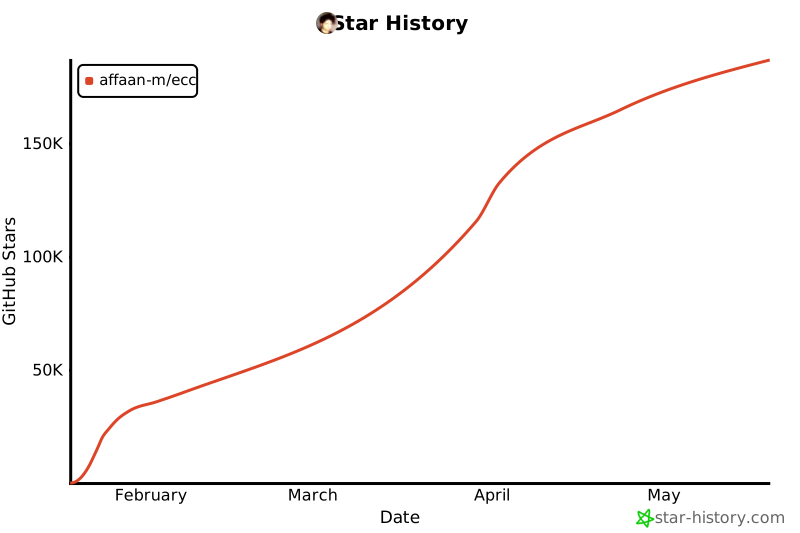](https://star-history.com/#affaan-m/ECC&Date)
|
||||
|
||||
---
|
||||
|
||||
|
||||
@@ -23,7 +23,7 @@
|
||||
|
||||
**Language / 语言 / 語言 / Dil / Язык / Ngôn ngữ**
|
||||
|
||||
[**English**](README.md) | [Português (Brasil)](docs/pt-BR/README.md) | [简体中文](README.zh-CN.md) | [繁體中文](docs/zh-TW/README.md) | [日本語](docs/ja-JP/README.md) | [한국어](docs/ko-KR/README.md) | [Türkçe](docs/tr/README.md) | [Русский](docs/ru/README.md) | [Tiếng Việt](docs/vi-VN/README.md)
|
||||
[**English**](README.md) | [Português (Brasil)](docs/pt-BR/README.md) | [简体中文](README.zh-CN.md) | [繁體中文](docs/zh-TW/README.md) | [日本語](docs/ja-JP/README.md) | [한국어](docs/ko-KR/README.md) | [Türkçe](docs/tr/README.md) | [Русский](docs/ru/README.md) | [Tiếng Việt](docs/vi-VN/README.md) | [ไทย](docs/th/README.md)
|
||||
|
||||
</div>
|
||||
|
||||
@@ -160,7 +160,7 @@ Copy-Item -Recurse rules/typescript "$HOME/.claude/rules/"
|
||||
/plugin list ecc@ecc
|
||||
```
|
||||
|
||||
**完成!** 你现在可以使用 60 个代理、228 个技能和 75 个命令。
|
||||
**完成!** 你现在可以使用 60 个代理、232 个技能和 75 个命令。
|
||||
|
||||
### multi-* 命令需要额外配置
|
||||
|
||||
|
||||
93
SPONSORS.md
93
SPONSORS.md
@@ -1,59 +1,76 @@
|
||||
# Sponsors
|
||||
|
||||
Thank you to everyone who sponsors this project! Your support keeps the ECC ecosystem growing.
|
||||
Thank you to everyone funding ECC's open-source work. Your sponsorship is what lets the OSS layer stay free while the GitHub App, hosted security scans, and continuous improvements ship every week.
|
||||
|
||||
## Enterprise Sponsors
|
||||
## Enterprise Sponsors — $2,500/mo
|
||||
|
||||
*Become an [Enterprise sponsor](https://github.com/sponsors/affaan-m) to be featured here*
|
||||
*Become an [Enterprise sponsor](https://github.com/sponsors/affaan-m) to be featured here.*
|
||||
|
||||
## Business Sponsors
|
||||
## Business Sponsors — $500/mo
|
||||
|
||||
*Become a [Business sponsor](https://github.com/sponsors/affaan-m) to be featured here*
|
||||
| Sponsor | Logo | Since |
|
||||
|---------|------|-------|
|
||||
| [**CodeRabbit**](https://coderabbit.ai) | <img src="https://avatars.githubusercontent.com/u/132028505?s=120" width="60" alt="CodeRabbit" /> | 2026 |
|
||||
|
||||
## Team Sponsors
|
||||
*[Become a Business sponsor](https://github.com/sponsors/affaan-m) to be featured here with logo placement in the main README hero and a quarterly case study.*
|
||||
|
||||
*Become a [Team sponsor](https://github.com/sponsors/affaan-m) to be featured here*
|
||||
## Team Sponsors — $200/mo
|
||||
|
||||
## Individual Sponsors
|
||||
| Sponsor | Since |
|
||||
|---------|-------|
|
||||
| [Mike Morgan](https://github.com/mikejmorgan-ai) | 2026 |
|
||||
|
||||
*Become a [sponsor](https://github.com/sponsors/affaan-m) to be listed here*
|
||||
*[Become a Team sponsor](https://github.com/sponsors/affaan-m) to get small logo placement and 5 ECC Pro seats.*
|
||||
|
||||
## Pro Sponsors — $50/mo
|
||||
|
||||
*[Become a Pro sponsor](https://github.com/sponsors/affaan-m) to be listed here with your name in the main README sponsor row.*
|
||||
|
||||
## Builder Sponsors — $25/mo
|
||||
|
||||
- @jasonwu513 (grandfathered at $10)
|
||||
- @1anter (grandfathered at $10)
|
||||
- @massimotodaro (grandfathered at $10)
|
||||
- @meadmccabe (grandfathered at $10)
|
||||
|
||||
*[Become a Builder sponsor](https://github.com/sponsors/affaan-m) to support the project and get your name in this list + a private monthly progress note.*
|
||||
|
||||
## Supporters — $5/mo
|
||||
|
||||
*[Become a Supporter](https://github.com/sponsors/affaan-m) to back the project with a profile badge and a thank-you in our release notes.*
|
||||
|
||||
---
|
||||
|
||||
## Sponsorship Tiers
|
||||
|
||||
| Tier | Monthly | Perks |
|
||||
|------|--------:|-------|
|
||||
| Supporter | $5 | Sponsor badge on profile, thank-you in release notes |
|
||||
| Builder | $25 | Above + name in SPONSORS.md + private monthly progress note |
|
||||
| Pro Sponsor | $50 | Above + name in main README + 1 quarterly roadmap vote |
|
||||
| Team | $200 | Above + small org logo in README + 5 ECC Pro seats |
|
||||
| Business | $500 | Above + featured logo in README hero + quarterly case study + Discord sponsors-lounge access |
|
||||
| Enterprise | $2,500 | Above + unlimited Pro seats + 30 min/mo founder time + SLA + dedicated channel |
|
||||
|
||||
[**Become a Sponsor →**](https://github.com/sponsors/affaan-m)
|
||||
|
||||
For corporate sponsorship inquiries, custom partnerships, or PR integrations, email **[affaan@ecc.tools](mailto:affaan@ecc.tools)** with your company name and intended tier. We'll move fast — most agreements close within 48 hours.
|
||||
|
||||
---
|
||||
|
||||
## Why Sponsor?
|
||||
|
||||
Your sponsorship helps:
|
||||
Your sponsorship directly funds:
|
||||
|
||||
- **Ship faster** — More time dedicated to building tools and features
|
||||
- **Keep it free** — Premium features fund the free tier for everyone
|
||||
- **Better support** — Sponsors get priority responses
|
||||
- **Shape the roadmap** — Pro+ sponsors vote on features
|
||||
- **OSS work that stays free** — the core repo, AgentShield, install scripts, and skills library remain MIT
|
||||
- **Weekly releases** — full-time work on the harness, not a side project
|
||||
- **Independent maintenance** — no acquisition pressure, no rug pulls, no enshittification
|
||||
- **Sponsor-driven roadmap** — Pro+ sponsors vote on direction, Business+ get case studies and integration support
|
||||
|
||||
## Sponsor Readiness Signals
|
||||
## Existing Sponsors Are Grandfathered
|
||||
|
||||
Use these proof points in sponsor conversations:
|
||||
|
||||
- Live npm install/download metrics for `ecc-universal` and `ecc-agentshield`
|
||||
- GitHub App distribution via Marketplace installs
|
||||
- Public adoption signals: stars, forks, contributors, release cadence
|
||||
- Cross-harness support: Claude Code, Cursor, OpenCode, Codex app/CLI
|
||||
|
||||
See [`docs/business/metrics-and-sponsorship.md`](docs/business/metrics-and-sponsorship.md) for a copy/paste metrics pull workflow.
|
||||
|
||||
## Sponsor Tiers
|
||||
|
||||
| Tier | Price | Benefits |
|
||||
|------|-------|----------|
|
||||
| Supporter | $5/mo | Name in README, early access |
|
||||
| Builder | $10/mo | Premium tools access |
|
||||
| Pro | $25/mo | Priority support, office hours |
|
||||
| Team | $100/mo | 5 seats, team configs |
|
||||
| Harness Partner | $200/mo | Monthly roadmap sync, prioritized maintainer feedback, release-note mention |
|
||||
| Business | $500/mo | 25 seats, consulting credit |
|
||||
| Enterprise | $2K/mo | Unlimited seats, custom tools |
|
||||
|
||||
[**Become a Sponsor →**](https://github.com/sponsors/affaan-m)
|
||||
If you sponsored before May 2026, you keep your original perks at your original price. New tiers apply to new sponsors only.
|
||||
|
||||
---
|
||||
|
||||
*Updated automatically. Last sync: February 2026*
|
||||
*Auto-updated by Hermes on every release. Last sync: 2026-05-14*
|
||||
|
||||
898
docs/COMMAND-REGISTRY.json
Normal file
898
docs/COMMAND-REGISTRY.json
Normal file
@@ -0,0 +1,898 @@
|
||||
{
|
||||
"schemaVersion": 1,
|
||||
"totalCommands": 75,
|
||||
"commands": [
|
||||
{
|
||||
"command": "aside",
|
||||
"description": "Answer a quick side question without interrupting or losing context from the current task. Resume work automatically after answering.",
|
||||
"type": "testing",
|
||||
"primaryAgents": [],
|
||||
"allAgents": [],
|
||||
"skills": [],
|
||||
"path": "commands/aside.md"
|
||||
},
|
||||
{
|
||||
"command": "auto-update",
|
||||
"description": "Pull the latest ECC repo changes and reinstall the current managed targets.",
|
||||
"type": "testing",
|
||||
"primaryAgents": [],
|
||||
"allAgents": [],
|
||||
"skills": [],
|
||||
"path": "commands/auto-update.md"
|
||||
},
|
||||
{
|
||||
"command": "build-fix",
|
||||
"description": "Detect the project build system and incrementally fix build/type errors with minimal safe changes.",
|
||||
"type": "refactoring",
|
||||
"primaryAgents": [],
|
||||
"allAgents": [],
|
||||
"skills": [],
|
||||
"path": "commands/build-fix.md"
|
||||
},
|
||||
{
|
||||
"command": "checkpoint",
|
||||
"description": "Create, verify, or list workflow checkpoints after running verification checks.",
|
||||
"type": "testing",
|
||||
"primaryAgents": [],
|
||||
"allAgents": [],
|
||||
"skills": [],
|
||||
"path": "commands/checkpoint.md"
|
||||
},
|
||||
{
|
||||
"command": "code-review",
|
||||
"description": "Code review — local uncommitted changes or GitHub PR (pass PR number/URL for PR mode)",
|
||||
"type": "testing",
|
||||
"primaryAgents": [],
|
||||
"allAgents": [],
|
||||
"skills": [],
|
||||
"path": "commands/code-review.md"
|
||||
},
|
||||
{
|
||||
"command": "cost-report",
|
||||
"description": "Generate a local Claude Code cost report from a cost-tracker SQLite database.",
|
||||
"type": "testing",
|
||||
"primaryAgents": [],
|
||||
"allAgents": [],
|
||||
"skills": [],
|
||||
"path": "commands/cost-report.md"
|
||||
},
|
||||
{
|
||||
"command": "cpp-build",
|
||||
"description": "Fix C++ build errors, CMake issues, and linker problems incrementally. Invokes the cpp-build-resolver agent for minimal, surgical fixes.",
|
||||
"type": "testing",
|
||||
"primaryAgents": [
|
||||
"cpp-build-resolver"
|
||||
],
|
||||
"allAgents": [
|
||||
"cpp-build-resolver"
|
||||
],
|
||||
"skills": [
|
||||
"cpp-coding-standards"
|
||||
],
|
||||
"path": "commands/cpp-build.md"
|
||||
},
|
||||
{
|
||||
"command": "cpp-review",
|
||||
"description": "Comprehensive C++ code review for memory safety, modern C++ idioms, concurrency, and security. Invokes the cpp-reviewer agent.",
|
||||
"type": "testing",
|
||||
"primaryAgents": [
|
||||
"cpp-reviewer"
|
||||
],
|
||||
"allAgents": [
|
||||
"cpp-reviewer"
|
||||
],
|
||||
"skills": [
|
||||
"cpp-coding-standards",
|
||||
"cpp-testing"
|
||||
],
|
||||
"path": "commands/cpp-review.md"
|
||||
},
|
||||
{
|
||||
"command": "cpp-test",
|
||||
"description": "Enforce TDD workflow for C++. Write GoogleTest tests first, then implement. Verify coverage with gcov/lcov.",
|
||||
"type": "testing",
|
||||
"primaryAgents": [],
|
||||
"allAgents": [],
|
||||
"skills": [
|
||||
"cpp-testing",
|
||||
"tdd-workflow"
|
||||
],
|
||||
"path": "commands/cpp-test.md"
|
||||
},
|
||||
{
|
||||
"command": "ecc-guide",
|
||||
"description": "Navigate ECC's current agents, skills, commands, hooks, install profiles, and docs from the live repository surface.",
|
||||
"type": "review",
|
||||
"primaryAgents": [],
|
||||
"allAgents": [],
|
||||
"skills": [
|
||||
"ecc-guide",
|
||||
"security-scan"
|
||||
],
|
||||
"path": "commands/ecc-guide.md"
|
||||
},
|
||||
{
|
||||
"command": "evolve",
|
||||
"description": "Analyze instincts and suggest or generate evolved structures",
|
||||
"type": "testing",
|
||||
"primaryAgents": [],
|
||||
"allAgents": [],
|
||||
"skills": [
|
||||
"continuous-learning-v2"
|
||||
],
|
||||
"path": "commands/evolve.md"
|
||||
},
|
||||
{
|
||||
"command": "fastapi-review",
|
||||
"description": "Review a FastAPI application for architecture, async correctness, dependency injection, Pydantic schemas, security, performance, and testability.",
|
||||
"type": "testing",
|
||||
"primaryAgents": [],
|
||||
"allAgents": [],
|
||||
"skills": [],
|
||||
"path": "commands/fastapi-review.md"
|
||||
},
|
||||
{
|
||||
"command": "feature-dev",
|
||||
"description": "Guided feature development with codebase understanding and architecture focus",
|
||||
"type": "testing",
|
||||
"primaryAgents": [],
|
||||
"allAgents": [],
|
||||
"skills": [],
|
||||
"path": "commands/feature-dev.md"
|
||||
},
|
||||
{
|
||||
"command": "flutter-build",
|
||||
"description": "Fix Dart analyzer errors and Flutter build failures incrementally. Invokes the dart-build-resolver agent for minimal, surgical fixes.",
|
||||
"type": "testing",
|
||||
"primaryAgents": [
|
||||
"dart-build-resolver"
|
||||
],
|
||||
"allAgents": [
|
||||
"dart-build-resolver"
|
||||
],
|
||||
"skills": [
|
||||
"flutter-dart-code-review"
|
||||
],
|
||||
"path": "commands/flutter-build.md"
|
||||
},
|
||||
{
|
||||
"command": "flutter-review",
|
||||
"description": "Review Flutter/Dart code for idiomatic patterns, widget best practices, state management, performance, accessibility, and security. Invokes the flutter-reviewer agent.",
|
||||
"type": "testing",
|
||||
"primaryAgents": [
|
||||
"flutter-reviewer"
|
||||
],
|
||||
"allAgents": [
|
||||
"flutter-reviewer"
|
||||
],
|
||||
"skills": [
|
||||
"flutter-dart-code-review"
|
||||
],
|
||||
"path": "commands/flutter-review.md"
|
||||
},
|
||||
{
|
||||
"command": "flutter-test",
|
||||
"description": "Run Flutter/Dart tests, report failures, and incrementally fix test issues. Covers unit, widget, golden, and integration tests.",
|
||||
"type": "testing",
|
||||
"primaryAgents": [
|
||||
"dart-build-resolver",
|
||||
"flutter-reviewer"
|
||||
],
|
||||
"allAgents": [
|
||||
"dart-build-resolver",
|
||||
"flutter-reviewer"
|
||||
],
|
||||
"skills": [
|
||||
"flutter-dart-code-review"
|
||||
],
|
||||
"path": "commands/flutter-test.md"
|
||||
},
|
||||
{
|
||||
"command": "gan-build",
|
||||
"description": "Run a generator/evaluator build loop for implementation tasks with bounded iterations and scoring.",
|
||||
"type": "orchestration",
|
||||
"primaryAgents": [],
|
||||
"allAgents": [],
|
||||
"skills": [],
|
||||
"path": "commands/gan-build.md"
|
||||
},
|
||||
{
|
||||
"command": "gan-design",
|
||||
"description": "Run a generator/evaluator design loop for frontend or visual work with bounded iterations and scoring.",
|
||||
"type": "planning",
|
||||
"primaryAgents": [],
|
||||
"allAgents": [],
|
||||
"skills": [],
|
||||
"path": "commands/gan-design.md"
|
||||
},
|
||||
{
|
||||
"command": "go-build",
|
||||
"description": "Fix Go build errors, go vet warnings, and linter issues incrementally. Invokes the go-build-resolver agent for minimal, surgical fixes.",
|
||||
"type": "testing",
|
||||
"primaryAgents": [
|
||||
"go-build-resolver"
|
||||
],
|
||||
"allAgents": [
|
||||
"go-build-resolver"
|
||||
],
|
||||
"skills": [
|
||||
"golang-patterns"
|
||||
],
|
||||
"path": "commands/go-build.md"
|
||||
},
|
||||
{
|
||||
"command": "go-review",
|
||||
"description": "Comprehensive Go code review for idiomatic patterns, concurrency safety, error handling, and security. Invokes the go-reviewer agent.",
|
||||
"type": "testing",
|
||||
"primaryAgents": [
|
||||
"go-reviewer"
|
||||
],
|
||||
"allAgents": [
|
||||
"go-reviewer"
|
||||
],
|
||||
"skills": [
|
||||
"golang-patterns",
|
||||
"golang-testing"
|
||||
],
|
||||
"path": "commands/go-review.md"
|
||||
},
|
||||
{
|
||||
"command": "go-test",
|
||||
"description": "Enforce TDD workflow for Go. Write table-driven tests first, then implement. Verify 80%+ coverage with go test -cover.",
|
||||
"type": "testing",
|
||||
"primaryAgents": [],
|
||||
"allAgents": [],
|
||||
"skills": [
|
||||
"golang-testing",
|
||||
"tdd-workflow"
|
||||
],
|
||||
"path": "commands/go-test.md"
|
||||
},
|
||||
{
|
||||
"command": "gradle-build",
|
||||
"description": "Fix Gradle build errors for Android and KMP projects",
|
||||
"type": "build",
|
||||
"primaryAgents": [],
|
||||
"allAgents": [],
|
||||
"skills": [],
|
||||
"path": "commands/gradle-build.md"
|
||||
},
|
||||
{
|
||||
"command": "harness-audit",
|
||||
"description": "Run a deterministic repository harness audit and return a prioritized scorecard.",
|
||||
"type": "testing",
|
||||
"primaryAgents": [],
|
||||
"allAgents": [],
|
||||
"skills": [],
|
||||
"path": "commands/harness-audit.md"
|
||||
},
|
||||
{
|
||||
"command": "hookify-configure",
|
||||
"description": "Enable or disable hookify rules interactively",
|
||||
"type": "general",
|
||||
"primaryAgents": [],
|
||||
"allAgents": [],
|
||||
"skills": [],
|
||||
"path": "commands/hookify-configure.md"
|
||||
},
|
||||
{
|
||||
"command": "hookify-help",
|
||||
"description": "Get help with the hookify system",
|
||||
"type": "testing",
|
||||
"primaryAgents": [],
|
||||
"allAgents": [],
|
||||
"skills": [],
|
||||
"path": "commands/hookify-help.md"
|
||||
},
|
||||
{
|
||||
"command": "hookify-list",
|
||||
"description": "List all configured hookify rules",
|
||||
"type": "general",
|
||||
"primaryAgents": [],
|
||||
"allAgents": [],
|
||||
"skills": [],
|
||||
"path": "commands/hookify-list.md"
|
||||
},
|
||||
{
|
||||
"command": "hookify",
|
||||
"description": "Create hooks to prevent unwanted behaviors from conversation analysis or explicit instructions",
|
||||
"type": "general",
|
||||
"primaryAgents": [],
|
||||
"allAgents": [],
|
||||
"skills": [],
|
||||
"path": "commands/hookify.md"
|
||||
},
|
||||
{
|
||||
"command": "instinct-export",
|
||||
"description": "Export instincts from project/global scope to a file",
|
||||
"type": "testing",
|
||||
"primaryAgents": [],
|
||||
"allAgents": [],
|
||||
"skills": [],
|
||||
"path": "commands/instinct-export.md"
|
||||
},
|
||||
{
|
||||
"command": "instinct-import",
|
||||
"description": "Import instincts from file or URL into project/global scope",
|
||||
"type": "testing",
|
||||
"primaryAgents": [],
|
||||
"allAgents": [],
|
||||
"skills": [
|
||||
"continuous-learning-v2"
|
||||
],
|
||||
"path": "commands/instinct-import.md"
|
||||
},
|
||||
{
|
||||
"command": "instinct-status",
|
||||
"description": "Show learned instincts (project + global) with confidence",
|
||||
"type": "review",
|
||||
"primaryAgents": [],
|
||||
"allAgents": [],
|
||||
"skills": [
|
||||
"continuous-learning-v2"
|
||||
],
|
||||
"path": "commands/instinct-status.md"
|
||||
},
|
||||
{
|
||||
"command": "jira",
|
||||
"description": "Retrieve a Jira ticket, analyze requirements, update status, or add comments. Uses the jira-integration skill and MCP or REST API.",
|
||||
"type": "testing",
|
||||
"primaryAgents": [],
|
||||
"allAgents": [],
|
||||
"skills": [
|
||||
"jira-integration"
|
||||
],
|
||||
"path": "commands/jira.md"
|
||||
},
|
||||
{
|
||||
"command": "kotlin-build",
|
||||
"description": "Fix Kotlin/Gradle build errors, compiler warnings, and dependency issues incrementally. Invokes the kotlin-build-resolver agent for minimal, surgical fixes.",
|
||||
"type": "testing",
|
||||
"primaryAgents": [
|
||||
"kotlin-build-resolver"
|
||||
],
|
||||
"allAgents": [
|
||||
"kotlin-build-resolver"
|
||||
],
|
||||
"skills": [
|
||||
"kotlin-patterns"
|
||||
],
|
||||
"path": "commands/kotlin-build.md"
|
||||
},
|
||||
{
|
||||
"command": "kotlin-review",
|
||||
"description": "Comprehensive Kotlin code review for idiomatic patterns, null safety, coroutine safety, and security. Invokes the kotlin-reviewer agent.",
|
||||
"type": "testing",
|
||||
"primaryAgents": [
|
||||
"kotlin-reviewer"
|
||||
],
|
||||
"allAgents": [
|
||||
"kotlin-reviewer"
|
||||
],
|
||||
"skills": [
|
||||
"kotlin-patterns",
|
||||
"kotlin-testing"
|
||||
],
|
||||
"path": "commands/kotlin-review.md"
|
||||
},
|
||||
{
|
||||
"command": "kotlin-test",
|
||||
"description": "Enforce TDD workflow for Kotlin. Write Kotest tests first, then implement. Verify 80%+ coverage with Kover.",
|
||||
"type": "testing",
|
||||
"primaryAgents": [],
|
||||
"allAgents": [],
|
||||
"skills": [
|
||||
"kotlin-testing",
|
||||
"tdd-workflow"
|
||||
],
|
||||
"path": "commands/kotlin-test.md"
|
||||
},
|
||||
{
|
||||
"command": "learn-eval",
|
||||
"description": "Extract reusable patterns from the session, self-evaluate quality before saving, and determine the right save location (Global vs Project).",
|
||||
"type": "testing",
|
||||
"primaryAgents": [],
|
||||
"allAgents": [],
|
||||
"skills": [],
|
||||
"path": "commands/learn-eval.md"
|
||||
},
|
||||
{
|
||||
"command": "learn",
|
||||
"description": "Extract reusable patterns from the current session and save them as candidate skills or guidance.",
|
||||
"type": "review",
|
||||
"primaryAgents": [],
|
||||
"allAgents": [],
|
||||
"skills": [],
|
||||
"path": "commands/learn.md"
|
||||
},
|
||||
{
|
||||
"command": "loop-start",
|
||||
"description": "Start a managed autonomous loop pattern with safety defaults and explicit stop conditions.",
|
||||
"type": "testing",
|
||||
"primaryAgents": [],
|
||||
"allAgents": [],
|
||||
"skills": [],
|
||||
"path": "commands/loop-start.md"
|
||||
},
|
||||
{
|
||||
"command": "loop-status",
|
||||
"description": "Inspect active loop state, progress, failure signals, and recommended intervention.",
|
||||
"type": "general",
|
||||
"primaryAgents": [],
|
||||
"allAgents": [],
|
||||
"skills": [],
|
||||
"path": "commands/loop-status.md"
|
||||
},
|
||||
{
|
||||
"command": "model-route",
|
||||
"description": "Recommend the best model tier for the current task based on complexity, risk, and budget.",
|
||||
"type": "review",
|
||||
"primaryAgents": [],
|
||||
"allAgents": [],
|
||||
"skills": [],
|
||||
"path": "commands/model-route.md"
|
||||
},
|
||||
{
|
||||
"command": "multi-backend",
|
||||
"description": "Run a backend-focused multi-model workflow for APIs, algorithms, data, and business logic.",
|
||||
"type": "orchestration",
|
||||
"primaryAgents": [],
|
||||
"allAgents": [],
|
||||
"skills": [],
|
||||
"path": "commands/multi-backend.md"
|
||||
},
|
||||
{
|
||||
"command": "multi-execute",
|
||||
"description": "Execute a multi-model implementation plan while preserving Claude as the only filesystem writer.",
|
||||
"type": "orchestration",
|
||||
"primaryAgents": [],
|
||||
"allAgents": [],
|
||||
"skills": [],
|
||||
"path": "commands/multi-execute.md"
|
||||
},
|
||||
{
|
||||
"command": "multi-frontend",
|
||||
"description": "Run a frontend-focused multi-model workflow for components, layouts, animation, and UI polish.",
|
||||
"type": "orchestration",
|
||||
"primaryAgents": [],
|
||||
"allAgents": [],
|
||||
"skills": [],
|
||||
"path": "commands/multi-frontend.md"
|
||||
},
|
||||
{
|
||||
"command": "multi-plan",
|
||||
"description": "Create a multi-model implementation plan without modifying production code.",
|
||||
"type": "orchestration",
|
||||
"primaryAgents": [],
|
||||
"allAgents": [],
|
||||
"skills": [
|
||||
"accessibility"
|
||||
],
|
||||
"path": "commands/multi-plan.md"
|
||||
},
|
||||
{
|
||||
"command": "multi-workflow",
|
||||
"description": "Run a full multi-model development workflow with research, planning, execution, optimization, and review.",
|
||||
"type": "orchestration",
|
||||
"primaryAgents": [],
|
||||
"allAgents": [],
|
||||
"skills": [],
|
||||
"path": "commands/multi-workflow.md"
|
||||
},
|
||||
{
|
||||
"command": "plan-prd",
|
||||
"description": "Generate a lean, problem-first PRD and hand off to /plan for implementation planning.",
|
||||
"type": "testing",
|
||||
"primaryAgents": [],
|
||||
"allAgents": [],
|
||||
"skills": [],
|
||||
"path": "commands/plan-prd.md"
|
||||
},
|
||||
{
|
||||
"command": "plan",
|
||||
"description": "Restate requirements, assess risks, and create step-by-step implementation plan. WAIT for user CONFIRM before touching any code.",
|
||||
"type": "testing",
|
||||
"primaryAgents": [
|
||||
"planner"
|
||||
],
|
||||
"allAgents": [
|
||||
"planner"
|
||||
],
|
||||
"skills": [],
|
||||
"path": "commands/plan.md"
|
||||
},
|
||||
{
|
||||
"command": "pm2",
|
||||
"description": "Analyze a project and generate PM2 service commands for detected frontend, backend, or database services.",
|
||||
"type": "general",
|
||||
"primaryAgents": [],
|
||||
"allAgents": [],
|
||||
"skills": [],
|
||||
"path": "commands/pm2.md"
|
||||
},
|
||||
{
|
||||
"command": "pr",
|
||||
"description": "Create a GitHub PR from current branch with unpushed commits — discovers templates, analyzes changes, pushes",
|
||||
"type": "testing",
|
||||
"primaryAgents": [],
|
||||
"allAgents": [],
|
||||
"skills": [],
|
||||
"path": "commands/pr.md"
|
||||
},
|
||||
{
|
||||
"command": "project-init",
|
||||
"description": "Detect a project's stack and produce a dry-run ECC onboarding plan using the repository's install manifests and stack mappings.",
|
||||
"type": "testing",
|
||||
"primaryAgents": [],
|
||||
"allAgents": [],
|
||||
"skills": [
|
||||
"ecc-guide"
|
||||
],
|
||||
"path": "commands/project-init.md"
|
||||
},
|
||||
{
|
||||
"command": "projects",
|
||||
"description": "List known projects and their instinct statistics",
|
||||
"type": "general",
|
||||
"primaryAgents": [],
|
||||
"allAgents": [],
|
||||
"skills": [
|
||||
"continuous-learning-v2"
|
||||
],
|
||||
"path": "commands/projects.md"
|
||||
},
|
||||
{
|
||||
"command": "promote",
|
||||
"description": "Promote project-scoped instincts to global scope",
|
||||
"type": "review",
|
||||
"primaryAgents": [],
|
||||
"allAgents": [],
|
||||
"skills": [
|
||||
"continuous-learning-v2"
|
||||
],
|
||||
"path": "commands/promote.md"
|
||||
},
|
||||
{
|
||||
"command": "prp-commit",
|
||||
"description": "Quick commit with natural language file targeting — describe what to commit in plain English",
|
||||
"type": "testing",
|
||||
"primaryAgents": [],
|
||||
"allAgents": [],
|
||||
"skills": [],
|
||||
"path": "commands/prp-commit.md"
|
||||
},
|
||||
{
|
||||
"command": "prp-implement",
|
||||
"description": "Execute an implementation plan with rigorous validation loops",
|
||||
"type": "testing",
|
||||
"primaryAgents": [],
|
||||
"allAgents": [],
|
||||
"skills": [],
|
||||
"path": "commands/prp-implement.md"
|
||||
},
|
||||
{
|
||||
"command": "prp-plan",
|
||||
"description": "Create comprehensive feature implementation plan with codebase analysis and pattern extraction",
|
||||
"type": "testing",
|
||||
"primaryAgents": [],
|
||||
"allAgents": [],
|
||||
"skills": [],
|
||||
"path": "commands/prp-plan.md"
|
||||
},
|
||||
{
|
||||
"command": "prp-pr",
|
||||
"description": "Create a GitHub PR from current branch with unpushed commits — discovers templates, analyzes changes, pushes",
|
||||
"type": "testing",
|
||||
"primaryAgents": [],
|
||||
"allAgents": [],
|
||||
"skills": [],
|
||||
"path": "commands/prp-pr.md"
|
||||
},
|
||||
{
|
||||
"command": "prp-prd",
|
||||
"description": "Interactive PRD generator - problem-first, hypothesis-driven product spec with back-and-forth questioning",
|
||||
"type": "testing",
|
||||
"primaryAgents": [],
|
||||
"allAgents": [],
|
||||
"skills": [],
|
||||
"path": "commands/prp-prd.md"
|
||||
},
|
||||
{
|
||||
"command": "prune",
|
||||
"description": "Delete pending instincts older than 30 days that were never promoted",
|
||||
"type": "review",
|
||||
"primaryAgents": [],
|
||||
"allAgents": [],
|
||||
"skills": [
|
||||
"continuous-learning-v2"
|
||||
],
|
||||
"path": "commands/prune.md"
|
||||
},
|
||||
{
|
||||
"command": "python-review",
|
||||
"description": "Comprehensive Python code review for PEP 8 compliance, type hints, security, and Pythonic idioms. Invokes the python-reviewer agent.",
|
||||
"type": "testing",
|
||||
"primaryAgents": [
|
||||
"python-reviewer"
|
||||
],
|
||||
"allAgents": [
|
||||
"python-reviewer"
|
||||
],
|
||||
"skills": [
|
||||
"python-patterns",
|
||||
"python-testing"
|
||||
],
|
||||
"path": "commands/python-review.md"
|
||||
},
|
||||
{
|
||||
"command": "quality-gate",
|
||||
"description": "Run the ECC quality pipeline for a file or project scope and report remediation steps.",
|
||||
"type": "general",
|
||||
"primaryAgents": [],
|
||||
"allAgents": [],
|
||||
"skills": [],
|
||||
"path": "commands/quality-gate.md"
|
||||
},
|
||||
{
|
||||
"command": "refactor-clean",
|
||||
"description": "Safely identify and remove dead code with verification after each change.",
|
||||
"type": "testing",
|
||||
"primaryAgents": [],
|
||||
"allAgents": [],
|
||||
"skills": [],
|
||||
"path": "commands/refactor-clean.md"
|
||||
},
|
||||
{
|
||||
"command": "resume-session",
|
||||
"description": "Load the most recent session file from ~/.claude/session-data/ and resume work with full context from where the last session ended.",
|
||||
"type": "testing",
|
||||
"primaryAgents": [],
|
||||
"allAgents": [],
|
||||
"skills": [],
|
||||
"path": "commands/resume-session.md"
|
||||
},
|
||||
{
|
||||
"command": "review-pr",
|
||||
"description": "Comprehensive PR review using specialized agents",
|
||||
"type": "testing",
|
||||
"primaryAgents": [],
|
||||
"allAgents": [],
|
||||
"skills": [],
|
||||
"path": "commands/review-pr.md"
|
||||
},
|
||||
{
|
||||
"command": "rust-build",
|
||||
"description": "Fix Rust build errors, borrow checker issues, and dependency problems incrementally. Invokes the rust-build-resolver agent for minimal, surgical fixes.",
|
||||
"type": "testing",
|
||||
"primaryAgents": [
|
||||
"rust-build-resolver"
|
||||
],
|
||||
"allAgents": [
|
||||
"rust-build-resolver"
|
||||
],
|
||||
"skills": [
|
||||
"rust-patterns"
|
||||
],
|
||||
"path": "commands/rust-build.md"
|
||||
},
|
||||
{
|
||||
"command": "rust-review",
|
||||
"description": "Comprehensive Rust code review for ownership, lifetimes, error handling, unsafe usage, and idiomatic patterns. Invokes the rust-reviewer agent.",
|
||||
"type": "testing",
|
||||
"primaryAgents": [
|
||||
"rust-reviewer"
|
||||
],
|
||||
"allAgents": [
|
||||
"rust-reviewer"
|
||||
],
|
||||
"skills": [
|
||||
"rust-patterns",
|
||||
"rust-testing"
|
||||
],
|
||||
"path": "commands/rust-review.md"
|
||||
},
|
||||
{
|
||||
"command": "rust-test",
|
||||
"description": "Enforce TDD workflow for Rust. Write tests first, then implement. Verify 80%+ coverage with cargo-llvm-cov.",
|
||||
"type": "testing",
|
||||
"primaryAgents": [],
|
||||
"allAgents": [],
|
||||
"skills": [
|
||||
"rust-patterns",
|
||||
"rust-testing"
|
||||
],
|
||||
"path": "commands/rust-test.md"
|
||||
},
|
||||
{
|
||||
"command": "santa-loop",
|
||||
"description": "Adversarial dual-review convergence loop — two independent model reviewers must both approve before code ships.",
|
||||
"type": "review",
|
||||
"primaryAgents": [],
|
||||
"allAgents": [],
|
||||
"skills": [],
|
||||
"path": "commands/santa-loop.md"
|
||||
},
|
||||
{
|
||||
"command": "save-session",
|
||||
"description": "Save current session state to a dated file in ~/.claude/session-data/ so work can be resumed in a future session with full context.",
|
||||
"type": "testing",
|
||||
"primaryAgents": [],
|
||||
"allAgents": [],
|
||||
"skills": [],
|
||||
"path": "commands/save-session.md"
|
||||
},
|
||||
{
|
||||
"command": "security-scan",
|
||||
"description": "Run AgentShield against agent, hook, MCP, permission, and secret surfaces.",
|
||||
"type": "review",
|
||||
"primaryAgents": [
|
||||
"security-reviewer"
|
||||
],
|
||||
"allAgents": [
|
||||
"security-reviewer"
|
||||
],
|
||||
"skills": [
|
||||
"security-scan"
|
||||
],
|
||||
"path": "commands/security-scan.md"
|
||||
},
|
||||
{
|
||||
"command": "sessions",
|
||||
"description": "Manage Claude Code session history, aliases, and session metadata.",
|
||||
"type": "general",
|
||||
"primaryAgents": [],
|
||||
"allAgents": [],
|
||||
"skills": [],
|
||||
"path": "commands/sessions.md"
|
||||
},
|
||||
{
|
||||
"command": "setup-pm",
|
||||
"description": "Configure your preferred package manager (npm/pnpm/yarn/bun)",
|
||||
"type": "build",
|
||||
"primaryAgents": [],
|
||||
"allAgents": [],
|
||||
"skills": [],
|
||||
"path": "commands/setup-pm.md"
|
||||
},
|
||||
{
|
||||
"command": "skill-create",
|
||||
"description": "Analyze local git history to extract coding patterns and generate SKILL.md files. Local version of the Skill Creator GitHub App.",
|
||||
"type": "testing",
|
||||
"primaryAgents": [],
|
||||
"allAgents": [],
|
||||
"skills": [],
|
||||
"path": "commands/skill-create.md"
|
||||
},
|
||||
{
|
||||
"command": "skill-health",
|
||||
"description": "Show skill portfolio health dashboard with charts and analytics",
|
||||
"type": "review",
|
||||
"primaryAgents": [],
|
||||
"allAgents": [],
|
||||
"skills": [],
|
||||
"path": "commands/skill-health.md"
|
||||
},
|
||||
{
|
||||
"command": "test-coverage",
|
||||
"description": "Analyze coverage, identify gaps, and generate missing tests toward the target threshold.",
|
||||
"type": "testing",
|
||||
"primaryAgents": [],
|
||||
"allAgents": [],
|
||||
"skills": [],
|
||||
"path": "commands/test-coverage.md"
|
||||
},
|
||||
{
|
||||
"command": "update-codemaps",
|
||||
"description": "Scan project structure and generate token-lean architecture codemaps.",
|
||||
"type": "planning",
|
||||
"primaryAgents": [],
|
||||
"allAgents": [],
|
||||
"skills": [],
|
||||
"path": "commands/update-codemaps.md"
|
||||
},
|
||||
{
|
||||
"command": "update-docs",
|
||||
"description": "Sync documentation from source-of-truth files such as scripts, schemas, routes, and exports.",
|
||||
"type": "testing",
|
||||
"primaryAgents": [],
|
||||
"allAgents": [],
|
||||
"skills": [],
|
||||
"path": "commands/update-docs.md"
|
||||
}
|
||||
],
|
||||
"statistics": {
|
||||
"byType": {
|
||||
"build": 2,
|
||||
"general": 8,
|
||||
"orchestration": 6,
|
||||
"planning": 2,
|
||||
"refactoring": 1,
|
||||
"review": 9,
|
||||
"testing": 47
|
||||
},
|
||||
"topAgents": [
|
||||
{
|
||||
"agent": "dart-build-resolver",
|
||||
"count": 2
|
||||
},
|
||||
{
|
||||
"agent": "flutter-reviewer",
|
||||
"count": 2
|
||||
},
|
||||
{
|
||||
"agent": "cpp-build-resolver",
|
||||
"count": 1
|
||||
},
|
||||
{
|
||||
"agent": "cpp-reviewer",
|
||||
"count": 1
|
||||
},
|
||||
{
|
||||
"agent": "go-build-resolver",
|
||||
"count": 1
|
||||
},
|
||||
{
|
||||
"agent": "go-reviewer",
|
||||
"count": 1
|
||||
},
|
||||
{
|
||||
"agent": "kotlin-build-resolver",
|
||||
"count": 1
|
||||
},
|
||||
{
|
||||
"agent": "kotlin-reviewer",
|
||||
"count": 1
|
||||
},
|
||||
{
|
||||
"agent": "planner",
|
||||
"count": 1
|
||||
},
|
||||
{
|
||||
"agent": "python-reviewer",
|
||||
"count": 1
|
||||
}
|
||||
],
|
||||
"topSkills": [
|
||||
{
|
||||
"skill": "continuous-learning-v2",
|
||||
"count": 6
|
||||
},
|
||||
{
|
||||
"skill": "flutter-dart-code-review",
|
||||
"count": 3
|
||||
},
|
||||
{
|
||||
"skill": "rust-patterns",
|
||||
"count": 3
|
||||
},
|
||||
{
|
||||
"skill": "tdd-workflow",
|
||||
"count": 3
|
||||
},
|
||||
{
|
||||
"skill": "cpp-coding-standards",
|
||||
"count": 2
|
||||
},
|
||||
{
|
||||
"skill": "cpp-testing",
|
||||
"count": 2
|
||||
},
|
||||
{
|
||||
"skill": "ecc-guide",
|
||||
"count": 2
|
||||
},
|
||||
{
|
||||
"skill": "golang-patterns",
|
||||
"count": 2
|
||||
},
|
||||
{
|
||||
"skill": "golang-testing",
|
||||
"count": 2
|
||||
},
|
||||
{
|
||||
"skill": "kotlin-patterns",
|
||||
"count": 2
|
||||
}
|
||||
]
|
||||
}
|
||||
}
|
||||
@@ -1,39 +1,105 @@
|
||||
# ECC 2.0 GA Roadmap
|
||||
|
||||
This roadmap is the durable repo mirror for the Linear project:
|
||||
This roadmap is the durable repo mirror for the active Linear project:
|
||||
|
||||
<https://linear.app/ecctools/project/ecc-20-ga-harness-os-security-platform-de2a0ecace6f>
|
||||
<https://linear.app/itomarkets/project/ecc-platform-roadmap-52b328ee03e1>
|
||||
|
||||
Linear issue creation is currently blocked by the workspace active issue limit,
|
||||
so the live execution truth is split across:
|
||||
Linear issue creation is available again in the Ito Markets workspace. The live
|
||||
execution truth is split across:
|
||||
|
||||
- the Linear project description, status updates, and milestones;
|
||||
- the Linear project documents, issue lanes, dependencies, and milestones;
|
||||
- this repo document;
|
||||
- merged PR evidence;
|
||||
- handoffs under `~/.cluster-swarm/handoffs/`.
|
||||
|
||||
## Current Evidence
|
||||
|
||||
As of 2026-05-13:
|
||||
As of 2026-05-18:
|
||||
|
||||
- GitHub queues are clean across `affaan-m/everything-claude-code`,
|
||||
`affaan-m/agentshield`, `affaan-m/JARVIS`, `ECC-Tools/ECC-Tools`, and
|
||||
`ECC-Tools/ECC-website`: the latest sweep found 0 open PRs and 0 open
|
||||
issues across all five repos.
|
||||
- GitHub discussions are also clean across those tracked repos:
|
||||
the latest GraphQL sweep found 52 total trunk discussions with 0 open,
|
||||
and 0 total/open discussions on AgentShield, JARVIS, ECC-Tools, and the
|
||||
ECC-Tools website.
|
||||
- The final open public GitHub issue, #1314, was closed as a non-actionable
|
||||
external badge/listing notification with a courtesy comment.
|
||||
- Linear issue creation for this project was re-tested after GitHub cleanup and
|
||||
is still blocked by the workspace free issue limit. Seven roadmap-lane issue
|
||||
creation attempts all returned the same limit error, so this repo mirror and
|
||||
Linear project status updates remain the active tracking surfaces until the
|
||||
workspace is upgraded or issue capacity is freed.
|
||||
`ECC-Tools/ECC-website`: the latest `platform-audit` sweep found 0 open PRs,
|
||||
0 open issues, 0 discussion maintainer-touch gaps, 0 answerable Q&A missing
|
||||
accepted answers, and 0 blocking dirty files when allowing the unrelated
|
||||
local `docs/drafts/` directory. The May 18 sync also refreshed
|
||||
`scripts/work-items.js sync-github` across all five tracked repos, leaving
|
||||
no open or blocked local work items.
|
||||
- Owner-wide queue cleanup is also inside the requested budget:
|
||||
`docs/releases/2.0.0-rc.1/owner-queue-cleanup-2026-05-18.md` records the
|
||||
live `gh search` sweep that closed 24 stale dependency-bot PRs and 72 stale
|
||||
legacy payments/0EM roadmap issues, then closed the 9 remaining stale,
|
||||
generated, conflicting, or test/noise PRs and the 5 remaining legacy,
|
||||
outreach, or placeholder issues. The broader `affaan-m` owner namespace is
|
||||
now at 0 open PRs and 0 open issues by live `gh search`. Archived repos
|
||||
touched during closure were restored to archived state.
|
||||
- GitHub discussions are current across those tracked repos:
|
||||
`affaan-m/everything-claude-code` has 58 total discussions and 0 without
|
||||
maintainer touch after May 15 maintainer updates on #73 and #1239; AgentShield,
|
||||
JARVIS, ECC Tools, and the ECC Tools website have discussions disabled or 0
|
||||
total discussions. `docs/architecture/discussion-response-playbook.md` now
|
||||
supplies the ITO-59 response categories, public templates, security-escalation
|
||||
path, and readback rules for future discussion batches.
|
||||
- The current Linear roadmap contains 16 issue lanes (`ITO-44` through
|
||||
`ITO-59`) and five milestones: Security and Access Baseline, ECC 2.0 Preview
|
||||
and Publication, AgentShield Enterprise Iteration, ECC Tools Next-Level
|
||||
Platform, and Legacy Audit and Salvage.
|
||||
- Linear live sync is current for the May 18 merge and supply-chain batch:
|
||||
ITO-57 has a final emergency supply-chain refresh comment
|
||||
(`3fe5b2b7-c4fe-401c-a317-b40d72119cb3`), and the ECC platform project has
|
||||
the latest operator progress comment (`e32e5b7a-287b-4bf4-9ed7-314389a157e1`).
|
||||
Linear project status updates are disabled in this workspace, so the project
|
||||
comment is the supported external status surface.
|
||||
- The latest May 18 merge batch on `main` includes PR #1970 workflow-security
|
||||
validator bypass fixes, PR #1971 metrics bridge cost-reporting and warning
|
||||
de-dup fixes, PR #1972 `uncloud` skill activation structure, PR #1976
|
||||
OpenAI/AstraFlow provider response guards, ECC-Tools Wrangler OAuth billing
|
||||
readback mirror evidence, the `04d4d819` defensive-deny IOC scanner hardening
|
||||
recheck, `7911af4a` release OIDC publishing-scope hardening, `97567a91`
|
||||
release workflow line-ending normalization, and release evidence with a
|
||||
refreshed operator dashboard.
|
||||
- `docs/releases/2.0.0-rc.1/publication-evidence-2026-05-18.md` records the
|
||||
May 18 queue-zero state, current-head TanStack/Mini Shai-Hulud protection
|
||||
recheck, no-lifecycle npm install, npm audit/signature checks, AgentShield
|
||||
project `.claude` scan, Linear sync, work-items sync, operator dashboard
|
||||
refresh, PR #1976 provider-guard validation, ECC-Tools Wrangler OAuth billing
|
||||
readback evidence, defensive-deny IOC scanner coverage, and current-head CI
|
||||
success for `97567a91`; a detached clean-worktree preview-pack smoke from
|
||||
`680aeff0` passed 5/5 with digest `0ed831dbd0cf`.
|
||||
- `docs/releases/2.0.0-rc.1/operator-readiness-dashboard-2026-05-18.md`
|
||||
regenerates the ITO-44 prompt-to-artifact dashboard from live platform audit
|
||||
evidence: PR queue, issue queue, discussion queue, local worktree gate,
|
||||
dashboard generation, and supply-chain loop are current; publication, plugin,
|
||||
billing, AgentShield, ECC Tools, legacy, and Linear/productized sync lanes
|
||||
remain the next work.
|
||||
- `docs/releases/2.0.0-rc.1/publication-evidence-2026-05-17.md` records the
|
||||
May 17 queue-zero state, Japanese localization merge, Dependabot TypeScript
|
||||
and Node type merges, post-merge ja-JP lint repair, Mini Shai-Hulud/TanStack
|
||||
local protection recheck, npm audit/signature checks, current operator
|
||||
dashboard, and GitHub CI success for `99dd6ac0`.
|
||||
- `docs/releases/2.0.0-rc.1/publication-evidence-2026-05-16.md` records the
|
||||
queue, discussion, Linear roadmap, ECC Tools access, Mini Shai-Hulud/TanStack
|
||||
full-campaign follow-up, scheduled supply-chain watch coverage, no-lifecycle
|
||||
CI install hardening, GitHub Actions cache purge, AgentShield #85
|
||||
registry-signature verification, AgentShield #86 evidence-pack CI provenance,
|
||||
AgentShield #87 plugin-cache runtime-confidence classification, AgentShield
|
||||
#88 evidence-pack inspect/readback, AgentShield #89 evidence-pack fleet
|
||||
routing, AgentShield #90 fleet review items, AgentShield #91
|
||||
checksum-backed policy export, AgentShield #92 checksum-verified policy
|
||||
promotion, ECC-Tools #75 billing-gate tightening,
|
||||
ECC-Tools #76 AgentShield fleet-summary consumption, ECC-Tools #77 hosted
|
||||
finding evidence paths, ECC-Tools #78 harness policy-route linking, PR #1947
|
||||
supply-chain protection, and May 16 release-evidence
|
||||
refresh.
|
||||
- `npm run harness:audit -- --format json` reports 70/70 on current `main`.
|
||||
- `npm run observability:ready` reports 21/21 readiness on current `main`,
|
||||
including the GitHub/Linear/handoff/roadmap progress-sync contract.
|
||||
- GitHub CI run `26017368895` completed successfully for
|
||||
`04d4d81938b20ac2bac1f0025145ab77d6a59f5f`, including Validate Components,
|
||||
Coverage, Lint, Security Scan, and the full Node/package-manager matrix.
|
||||
- Supply-Chain Watch run `26009825837` completed successfully for
|
||||
`3b7e0ba30a027ffd3319c2f145c63076c296d80a`, including no-lifecycle install,
|
||||
npm audit/signature verification, scanner fixtures, advisory-source
|
||||
fixtures, IOC/advisory artifact generation, and workflow-security validation.
|
||||
- PR #1846 merged as `797f283036904128bb1b348ae62019eb9f08cf39` and made
|
||||
npm registry signature verification a durable workflow-security gate:
|
||||
workflows that run `npm audit` now need `npm audit signatures`.
|
||||
@@ -41,6 +107,12 @@ As of 2026-05-13:
|
||||
`docs/security/supply-chain-incident-response.md`, plus a workflow-security
|
||||
validator rule blocking `pull_request_target` workflows from restoring or
|
||||
saving shared dependency caches.
|
||||
- PR #1940 merged as `6951b8d5d29d13cac6b89b461104ad03838553de` and added a
|
||||
scheduled supply-chain watch workflow that emits a durable IOC report.
|
||||
- PR #1941 merged as `f7035b5644ffc857879b71c39353b2141f17c3f0` and hardened
|
||||
CI dependency installs against lifecycle-hook compromise by disabling package
|
||||
manager lifecycle scripts, removing Actions dependency cache use, and adding
|
||||
validator coverage so those patterns cannot be reintroduced silently.
|
||||
- PR #1850 merged as `248673271455e9dc85b8add2a6ab76107b718639` and removed
|
||||
shell access from read-only analyzer agents and zh-CN copies, reducing
|
||||
AgentShield high findings on that surface without changing operator agents.
|
||||
@@ -69,6 +141,24 @@ As of 2026-05-13:
|
||||
and expanded the built-in attack corpus with an env proxy hijack scenario
|
||||
covering proxy/runtime mutation, env-token exfiltration, DNS exfiltration,
|
||||
credential-store access, and clipboard access.
|
||||
- AgentShield PR #87 merged as `26bb44650663816d07180e0d20c1895e431a326c`
|
||||
and added installed Claude plugin-cache runtime confidence. Cached plugin
|
||||
findings now emit `runtimeConfidence: plugin-cache`, non-secret score impact
|
||||
stays at the intended `0.5x`, repository-local non-Claude `plugins/cache`
|
||||
paths are not downgraded, and cached hook implementations no longer appear as
|
||||
active top-level `hook-code`.
|
||||
- AgentShield PR #88 merged as `65ed6e2a87545dc99d962b58413f49096a4d70ec`
|
||||
and added `agentshield evidence-pack inspect` for downstream consumers.
|
||||
Evidence-pack bundles now have compact JSON/text readback for report score,
|
||||
finding counts, runtime confidence, policy, baseline, supply-chain, CI
|
||||
context, remediation phases, and malformed artifact errors without manually
|
||||
opening every bundle file.
|
||||
- AgentShield PR #89 merged as `521ada9091bb6d818511ab8589ae675b920c106a`
|
||||
and added `agentshield evidence-pack fleet <dirs...> [--json]` for
|
||||
downstream fleet routing. Multiple verified evidence packs now aggregate into
|
||||
ready, security-blocker, policy-review, baseline-regression,
|
||||
supply-chain-review, and invalid routes with finding, policy, baseline,
|
||||
supply-chain, and remediation totals.
|
||||
- JARVIS PR #13 merged as `127efabbfb5033ae53d7a53e1546aa3c33d6f962`
|
||||
and hardened CI/deploy workflows with npm registry signature verification,
|
||||
disabled persisted checkout credentials in write-permission jobs, and pinned
|
||||
@@ -80,6 +170,195 @@ As of 2026-05-13:
|
||||
and made `/ecc-tools followups sync-linear` track copy-ready PR drafts in
|
||||
the Linear/project backlog when `open-pr-drafts` is not used, preserving
|
||||
useful stale-PR salvage work without opening extra PR shells.
|
||||
- ECC-Tools PR #55 merged as `5d8c112cce4794cfa089d5b0ea661ba87a178be1`
|
||||
and added analysis-depth readiness to `/ecc-tools analyze` comments,
|
||||
separating commit-history-only repos from evidence-backed and deep-ready repos
|
||||
using CI/CD, security, harness, reference/eval, AI routing/cost-control, and
|
||||
team handoff evidence.
|
||||
- ECC-Tools PR #56 merged as `5b729c88641eafe80f65364bab3fc74d0270f57b`
|
||||
and added the authenticated `/api/analysis/depth-plan` contract that maps
|
||||
analysis-depth readiness into concrete hosted jobs for CI diagnostics,
|
||||
security evidence review, harness compatibility, reference-set evaluation,
|
||||
AI routing/cost review, and team backlog routing.
|
||||
- ECC-Tools PR #57 merged as `4cc61112a4cc9feec7b07af09321f360e34af6a4`
|
||||
and added the first executable hosted analysis job:
|
||||
`/api/analysis/jobs/ci-diagnostics` now gates on CI/CD readiness, inspects
|
||||
workflow/test-runner/failure-evidence artifacts, returns CI hardening
|
||||
findings and next actions, and charges usage only after successful execution.
|
||||
- ECC-Tools PR #58 merged as `ce09dd8d9b46f65c6b88dc4f48cfb6b6227ae0bf`
|
||||
and added the second executable hosted analysis job:
|
||||
`/api/analysis/jobs/security-evidence-review` now gates on security-evidence
|
||||
readiness, inspects capped AgentShield evidence-pack, policy, baseline,
|
||||
SBOM, SARIF, and security-scan artifacts, returns supply-chain evidence
|
||||
findings and next actions, and charges usage only after successful execution.
|
||||
- ECC-Tools PR #59 merged as `505b372dbd8f75f996d9e2ed079effd30cec5ba5`
|
||||
and added the third executable hosted analysis job:
|
||||
`/api/analysis/jobs/harness-compatibility-audit` now gates on harness-config
|
||||
readiness, inspects capped Claude, Codex, OpenCode, MCP, plugin, and
|
||||
cross-harness documentation artifacts, excludes local secret-bearing config
|
||||
paths from fetches, returns portability findings and next actions, and
|
||||
charges usage only after successful execution.
|
||||
- ECC-Tools PR #60 merged as `b75e0a49ba5672b1ec9a2a4880ddcfa2d07dc557`
|
||||
and added the fourth executable hosted analysis job:
|
||||
`/api/analysis/jobs/reference-set-evaluation` now gates on reference-evidence
|
||||
readiness, evaluates analyzer corpus, RAG/evaluator, PR salvage/review,
|
||||
harness, security, and CI failure-mode evidence, excludes obvious
|
||||
secret-bearing fixture paths from fetches, returns reference coverage
|
||||
findings and next actions, and charges usage only after successful execution.
|
||||
- ECC-Tools PR #61 merged as `7b01b67cae0b80774b311cb515b7eca0aa038c65`
|
||||
and added the fifth executable hosted analysis job:
|
||||
`/api/analysis/jobs/ai-routing-cost-review` now gates on AI routing/cost
|
||||
readiness, evaluates model routing, token budget, usage-limit, rate-limit,
|
||||
billing/entitlement, cost-regression, and cost-policy evidence, excludes
|
||||
obvious secret-bearing paths from fetches, returns cost-control findings and
|
||||
next actions, and charges usage only after successful execution.
|
||||
- ECC-Tools PR #62 merged as `781d6733e56f7556edb43fb96bdfb00b1f0a3aa6`
|
||||
and added the sixth executable hosted analysis job:
|
||||
`/api/analysis/jobs/team-backlog-routing` now gates on team handoff/project
|
||||
tracking readiness, evaluates roadmap, runbook, handoff, release-plan,
|
||||
issue-template, ownership, project-tracker, backlog, and follow-up evidence,
|
||||
excludes obvious secret-bearing paths from fetches, returns team-routing
|
||||
findings and next actions, and charges usage only after successful execution.
|
||||
- ECC-Tools PR #63 merged as `fb9e4c5ceb9ccde50da74c7a69c3fa4bd321fc07`
|
||||
and made the hosted execution plan operator-visible on queued PR analysis:
|
||||
the queue now publishes a non-blocking `ECC Tools / Hosted Depth Plan`
|
||||
check-run on the PR head SHA with ready/blocked hosted executor commands
|
||||
and next action text, while keeping check-run publication best-effort so
|
||||
bundle generation and analysis comments are not blocked.
|
||||
- ECC-Tools PR #64 merged as `72020ef94db94840812977ea7ac37e9344036668`
|
||||
and added PR-facing hosted job dispatch controls:
|
||||
`/ecc-tools analyze --job ...` comments now queue hosted jobs against the
|
||||
PR head SHA, execute them through the existing hosted readiness/evidence
|
||||
gates, post artifacts/findings/next actions back to the PR, and scope
|
||||
idempotency keys by job id so hosted jobs do not collide with bundle
|
||||
analysis.
|
||||
- ECC-Tools PR #65 merged as `bacd4adf6a3a629e8d403865456d15f127baaf4e`
|
||||
and added hosted job result history/check-run summaries:
|
||||
queued hosted jobs now cache both the latest result and immutable run records
|
||||
for completed or blocked runs, then publish a non-blocking per-job check-run
|
||||
on the PR head SHA with artifacts, findings, readiness blockers, and next
|
||||
actions.
|
||||
- ECC-Tools PR #66 merged as `4e1db48252d068ea5dcf4308b0bc11b0dfe0c9ce`
|
||||
and added a read-only hosted status command:
|
||||
`/ecc-tools analyze --job status` now reads the #65 latest-result cache for
|
||||
the current PR head and posts a compact completed/blocked/not-run table with
|
||||
the next hosted job command, without queueing work or billing usage.
|
||||
- ECC-Tools PR #67 merged as `f20e6bec2b0bf49e4cc36e08b7285c795973b73d`
|
||||
and made the hosted depth-plan check-run status-aware:
|
||||
queued PR analysis now reads the #65/#66 latest-result cache when publishing
|
||||
`ECC Tools / Hosted Depth Plan`, includes the latest hosted run status in
|
||||
the plan table, and recommends the next unrun ready job before reruns.
|
||||
- ECC-Tools PR #68 merged as `2cde524b5ef8f34ab7bb1af973248fe4be4359f8`
|
||||
and added deterministic hosted promotion readiness:
|
||||
opened/synchronized PRs now publish a non-blocking
|
||||
`ECC Tools / Hosted Promotion Readiness` check-run that compares changed
|
||||
files against the checked-in evaluator/RAG corpus, warns on missing
|
||||
hosted-job promotion evidence, and can be disabled with
|
||||
`PR_HOSTED_PROMOTION_READINESS_CHECK_MODE=off`.
|
||||
- ECC-Tools PR #69 merged as `d0112dac7cef807ae27def41f057682ef0772cce`
|
||||
and extended hosted promotion readiness with deterministic output scoring:
|
||||
the check now reads cached completed hosted job results for the current PR
|
||||
head, scores their artifacts and findings against evaluator/RAG corpus
|
||||
expectations, and treats matching hosted artifacts as promotion evidence
|
||||
before reporting a gap.
|
||||
- ECC-Tools PR #70 merged as `7001d805ac981fe220b4575159f469fbea9dbb76`
|
||||
and added retrieval planning for hosted promotion:
|
||||
the check now emits ranked retrieval candidates from cached hosted artifacts,
|
||||
hosted findings, expected evidence paths, and changed source paths, plus a
|
||||
model prompt seed that tells the later hosted judge not to promote from
|
||||
changed paths alone.
|
||||
- ECC-Tools PR #71 merged as `d41e59ff00fe1bd0b0c96386e56bc5269d7b9c15`
|
||||
and added the first model-backed hosted promotion judge contract:
|
||||
the check now emits a provider-neutral `hosted-promotion-judge.v1` request
|
||||
contract and fails closed unless hosted retrieval evidence, entitlement,
|
||||
remaining budget, and provider configuration are present. It still does not
|
||||
make live model calls.
|
||||
- ECC-Tools PR #72 merged as `973bc51e5436dd279ae5a890cce9811485eef0b5`
|
||||
and executes the hosted promotion model judge behind explicit gates:
|
||||
`PR_HOSTED_PROMOTION_MODEL_JUDGE_MODE=execute` now calls the configured
|
||||
provider only after hosted retrieval evidence, entitlement, budget, provider,
|
||||
and executor gates pass; the check remains non-blocking, strict-JSON-only,
|
||||
and rejects uncited or non-hosted model output without echoing raw responses.
|
||||
- ECC-Tools commit `05d4e8296e37ba72e471beaa23ea4c81eb2aa31f`
|
||||
adds operator-readable audit traces to hosted promotion model judging:
|
||||
check-runs now render a deterministic request fingerprint and
|
||||
allowed-citation count alongside the accepted decision, without exposing raw
|
||||
provider output.
|
||||
- ECC-Tools PR #73 merged as `7d0538c9354e18adbfc72ef00d858949a817fa48`
|
||||
and added a fail-closed native-payments announcement gate to
|
||||
`/api/billing/readiness`: public payment claims now require
|
||||
`announcementGate.ready === true` from a Marketplace-managed test account
|
||||
before launch copy can move past release review.
|
||||
- ECC-Tools commit `91a441b92342b842832ac28b018ee46f0c4a906f`
|
||||
adds `npm run billing:announcement-gate -- --preflight` so operators can
|
||||
verify the Marketplace test account, internal API token presence, and
|
||||
billing-readiness endpoint before making the privileged readback call.
|
||||
- ECC-Tools commit `eb6941290b2fa70db01a51084e9e79a160238468`
|
||||
recorded the first live production readback state: Cloudflare Worker secret
|
||||
names include `INTERNAL_API_SECRET`, but no Marketplace-managed account could
|
||||
pass the announcement gate yet.
|
||||
- ECC-Tools commit `95d0bec69dbcf364ed084e983a40d0a94d443d16`
|
||||
adds repeatable aggregate production KV readback with
|
||||
`npm run billing:kv-readback`: the latest API-authenticated run found 253
|
||||
`account-billing:*` records and 253 `billing-state:*` records, but 0
|
||||
Marketplace-managed Pro `billing-state:*` records, so native-payments copy
|
||||
remains blocked until `--require-ready` and the official internal
|
||||
announcement gate pass.
|
||||
- ECC-Tools commit `285967807ea7b5eb3146bc984fb2229db67d4290`
|
||||
requires GitHub Marketplace webhook provenance on Pro billing-state records
|
||||
before native-payments announcement readiness can pass. The CI run
|
||||
`26013559229` succeeded for the pushed head.
|
||||
- ECC-Tools commit `42653f9140c232961280d961ed76a6142433cfa1`
|
||||
adds `npm run billing:kv-readback -- --wrangler` so operators can run the
|
||||
aggregate production KV readback through an authenticated Wrangler OAuth
|
||||
session instead of requiring a separate Cloudflare API token/global key. CI
|
||||
run `26016223013` succeeded, and the latest live readback found 253
|
||||
`account-billing:*` records and 253 `billing-state:*` records with 194
|
||||
marketplace/free states, 59 Stripe/pro states, 0 Marketplace Pro states, 0
|
||||
ready-like Marketplace Pro states, and 0 parse failures. Native-payments
|
||||
copy remains blocked until a real Marketplace-managed Pro webhook creates
|
||||
billing-state provenance and `--require-ready` plus the official internal
|
||||
announcement gate pass.
|
||||
- ECC-Tools commit `632e059e51b6e1297ba118807c8b5b2adbac74ce`
|
||||
adds target account billing readback with `npm run billing:kv-readback -- --account <github-login> --require-ready`.
|
||||
The report redacts the account login and raw KV keys, emits only a stable
|
||||
fingerprint plus sanitized readiness booleans, and now requires both
|
||||
`account-billing:<login>` and `billing-state:<login>` before a target
|
||||
Marketplace Pro test account can pass the native-payments announcement
|
||||
readback gate. CI run `26018941515` succeeded. The 2026-05-18 live recheck
|
||||
split out Linear ITO-61 for the target-account blocker.
|
||||
- ECC-Tools commit `d5f60db` adds sanitized Marketplace-source provenance
|
||||
counts to `npm run billing:kv-readback`, including
|
||||
`marketplaceSourceRecords`, `marketplaceSourceWithWebhookEvidence`,
|
||||
`marketplaceSourceWithoutWebhookEvidence`, `byMarketplacePlanName`, and
|
||||
`byMarketplaceEventAction`. The 2026-05-18 live Wrangler OAuth readback now
|
||||
works and found 256 account-billing records, 256 billing-state records, 197
|
||||
Marketplace-source records, 59 Stripe-source records, 53 Pro records, 0
|
||||
Marketplace Pro records, 4 Marketplace webhook-provenance records, all
|
||||
`Open Source` purchases, and 193 Marketplace-source records without webhook
|
||||
provenance. Native-payments copy remains blocked by Linear ITO-61 until a
|
||||
real Marketplace-managed Pro webhook creates target account provenance and
|
||||
`billing:kv-readback -- --wrangler --wrangler-bin ./node_modules/.bin/wrangler --account <github-login> --require-ready`
|
||||
plus the official internal announcement gate pass.
|
||||
- ECC-Tools commit `13cd3fc` normalizes billing-state key casing so
|
||||
Marketplace webhook writes and announcement readbacks agree on GitHub login
|
||||
case; current-head CI `26037611421` passed. The code-side readback hardening
|
||||
remains green, but it does not create live Marketplace Pro state.
|
||||
- ECC-Tools commit `69ca535` surfaces hosted team-learning feedback controls:
|
||||
harness compatibility and team-backlog routing now show retention days,
|
||||
deletion route/SLA, and opt-out route before adaptive recommendations are
|
||||
routed into team-owned queues. Linear ITO-52 is Done with CI `26054455434`.
|
||||
- ECC-Tools commit `e56fc1a` updates the lockfile for
|
||||
`brace-expansion@5.0.6` and fixed Dependabot alert 44 for CVE-2026-45149;
|
||||
GitHub API reported `state: fixed` at `2026-05-18T19:10:15Z` and current-head
|
||||
CI `26054671308` passed.
|
||||
- The latest ITO-61 readback retry narrowed the blocker: Wrangler OAuth now
|
||||
works, the safe aggregate readback has 0 parse failures and still reports 0
|
||||
Marketplace Pro records, and `billing:announcement-gate -- --preflight` is
|
||||
missing the target Marketplace account plus `INTERNAL_API_SECRET`.
|
||||
Native-payments copy remains blocked until the target Pro readback and live
|
||||
announcement gate pass. Linear comment
|
||||
`6904e4fb-bec7-4787-90e2-759f077a628c` records the redacted readback counts.
|
||||
- Handoff `ecc-supply-chain-audit-20260513-0645.md` under
|
||||
`~/.cluster-swarm/handoffs/`
|
||||
records the May 13 supply-chain sweep: no active lockfile/manifest hit for
|
||||
@@ -139,8 +418,8 @@ As of 2026-05-13:
|
||||
and classifies `legacy-command-shims/` as an opt-in archive/no-action
|
||||
surface.
|
||||
- `docs/stale-pr-salvage-ledger.md` records stale PR salvage outcomes,
|
||||
skipped PRs, superseded work, and the remaining #1687 translator/manual
|
||||
review tail.
|
||||
skipped PRs, superseded work, and the remaining #1687, #1609, #1563, #1564,
|
||||
and #1565 translator/manual review tail now attached to Linear ITO-55.
|
||||
- AgentShield PR #53 reduced two context-rule false positives and closed the
|
||||
remaining AgentShield issues.
|
||||
- AgentShield PR #55 added GitHub Action organization-policy enforcement with
|
||||
@@ -263,6 +542,137 @@ As of 2026-05-13:
|
||||
artifact contract so canonical bundle files now satisfy the taxonomy and
|
||||
generated follow-up PRs point maintainers at
|
||||
`agentshield scan --evidence-pack <dir>`.
|
||||
- ECC-Tools PR #55 added the first hosted/deeper-analysis readiness signal:
|
||||
analysis comments now classify a repo as commit-history-only,
|
||||
evidence-backed, or deep-ready before routing work into CI, AgentShield,
|
||||
harness, reference-set, RAG/evaluator, AI-routing, cost-control, and
|
||||
Linear/project-tracking lanes.
|
||||
- ECC-Tools PR #56 turned that signal into a hosted execution-plan contract:
|
||||
`/api/analysis/depth-plan` returns ready/blocked jobs and next action text
|
||||
without charging analysis usage or creating bundle PRs.
|
||||
- ECC-Tools PR #57 implemented the first job-specific hosted executor:
|
||||
`/api/analysis/jobs/ci-diagnostics` reuses the depth-readiness gate, internal
|
||||
API auth, installation ownership, repo-access billing checks, capped workflow
|
||||
file reads, and usage accounting to return concrete CI hardening findings.
|
||||
- ECC-Tools PR #58 implemented the second job-specific hosted executor:
|
||||
`/api/analysis/jobs/security-evidence-review` applies the same hosted gates
|
||||
to AgentShield evidence-pack, policy, baseline, SBOM, SARIF, and security
|
||||
scanner artifacts.
|
||||
- ECC-Tools PR #59 implemented the third job-specific hosted executor:
|
||||
`/api/analysis/jobs/harness-compatibility-audit` applies the same hosted
|
||||
gates to Claude, Codex, OpenCode, MCP, plugin, and cross-harness evidence
|
||||
while avoiding local secret-bearing harness config fetches.
|
||||
- ECC-Tools PR #60 implemented the fourth job-specific hosted executor:
|
||||
`/api/analysis/jobs/reference-set-evaluation` applies the same hosted gates
|
||||
to analyzer corpus, RAG/evaluator, PR salvage, harness, security, and CI
|
||||
failure-mode reference evidence while avoiding obvious secret-bearing fixture
|
||||
fetches.
|
||||
- ECC-Tools PR #61 implemented the fifth job-specific hosted executor:
|
||||
`/api/analysis/jobs/ai-routing-cost-review` applies the same hosted gates to
|
||||
model-routing, token-budget, usage-limit, rate-limit, billing/entitlement,
|
||||
cost-regression, and cost-policy evidence while avoiding obvious
|
||||
secret-bearing path fetches.
|
||||
- ECC-Tools PR #62 implemented the sixth job-specific hosted executor:
|
||||
`/api/analysis/jobs/team-backlog-routing` applies the same hosted gates to
|
||||
roadmap, runbook, handoff, release-plan, issue-template, ownership,
|
||||
project-tracker, backlog, and follow-up evidence while avoiding obvious
|
||||
secret-bearing path fetches.
|
||||
- ECC-Tools PR #63 publishes the hosted depth-plan check-run after queued PR
|
||||
analysis completes, making the six hosted executor commands visible on the
|
||||
PR head SHA without turning the check into a merge blocker.
|
||||
- ECC-Tools PR #64 wires those commands into the queue: maintainers can comment
|
||||
`/ecc-tools analyze --job ci-diagnostics`, `security-evidence`,
|
||||
`harness-compatibility`, `reference-set-evaluation`, `ai-routing-cost`, or
|
||||
`team-backlog` on a PR and receive hosted job results in a PR comment.
|
||||
- ECC-Tools PR #65 persists completed and blocked hosted job results to the
|
||||
analysis cache for 30 days and publishes non-blocking `ECC Tools / Hosted
|
||||
Job: ...` check-runs so maintainers can scan hosted outcomes from the PR
|
||||
checks surface instead of rereading older comments.
|
||||
- ECC-Tools PR #66 exposes the cached results from PR comments with
|
||||
`/ecc-tools analyze --job status`, summarizing completed, blocked, and
|
||||
not-yet-run hosted jobs for the PR head and recommending the next hosted job
|
||||
command.
|
||||
- ECC-Tools PR #67 feeds those cached results back into the hosted depth-plan
|
||||
check-run so queued analysis recommends the next unrun ready hosted job from
|
||||
cache state instead of repeating the static readiness order.
|
||||
- ECC-Tools PR #68 adds the first evaluator-backed hosted promotion gate:
|
||||
opened/synchronized PRs get a non-blocking Hosted Promotion Readiness
|
||||
check-run that turns the evaluator/RAG corpus into warnings when changed
|
||||
files match fixture scenarios without their expected evidence artifacts.
|
||||
- ECC-Tools PR #69 extends that gate to score cached completed hosted job
|
||||
outputs for the current PR head, so hosted artifacts can satisfy corpus
|
||||
evidence expectations before the check reports a promotion gap.
|
||||
- ECC-Tools PR #76 consumes AgentShield PR #89 fleet output in hosted security
|
||||
review: `agentshield-evidence/fleet-summary.json` is now classified as
|
||||
`evidence-pack-fleet`, invalid packs and security-blocker routes become
|
||||
high-severity hosted findings, and policy, baseline, and supply-chain routes
|
||||
produce owner-ready review findings.
|
||||
- ECC-Tools PR #77 merged as `31fd883b3f0cee135aee4839b01d34855b7867f6`
|
||||
and adds an `Evidence` column to hosted job PR comments and check-run
|
||||
details, surfacing up to three source evidence paths for each finding so
|
||||
AgentShield fleet-derived findings point operators back to the exact bundle
|
||||
artifact.
|
||||
- ECC-Tools PR #78 merged as `0d4eb949aa56f56da88e6654273a22ffb95983a1`
|
||||
and links AgentShield fleet routes into hosted harness compatibility review:
|
||||
fleet summaries are collected as harness evidence, target paths are mapped to
|
||||
Claude, Codex, OpenCode, MCP, plugin, and cross-harness owners, and routed
|
||||
findings carry source evidence paths for operator review.
|
||||
- AgentShield PR #90 merged as `6d1c57c92000541d65a3b6bc366f0322d7d0dacc`
|
||||
and adds durable fleet `reviewItems`: `agentshield evidence-pack fleet --json`
|
||||
now returns owner-ready review items with route, severity, repository/target
|
||||
context, source evidence paths, reason, and recommendation; the text CLI
|
||||
prints the same routed follow-up list for operators.
|
||||
- AgentShield PR #91 merged as `73e1e3586dc4513a462e39c9799f75eea104e110`
|
||||
and adds durable policy pack export: `agentshield policy export` writes one
|
||||
JSON policy per selected pack plus a checksum-backed `manifest.json`, with
|
||||
pack selection, owners, name prefixes, and JSON output for branch-protection
|
||||
review or downstream policy promotion.
|
||||
- AgentShield PR #92 merged as `e7e259dc6212b63a8e03a253ca6b8c1e3c2abff7`
|
||||
and adds the protected promotion gate for those bundles:
|
||||
`agentshield policy promote` verifies the export manifest and selected
|
||||
policy SHA-256 digest, rejects tampered policy JSON, requires explicit pack
|
||||
selection for multi-pack manifests, and supports dry-run JSON review before
|
||||
writing the active `.agentshield/policy.json`.
|
||||
- AgentShield main commit `87aec47fb55d04ea28d494852d4f664c268c5601`
|
||||
extends policy promotion with durable `reviewItems` for manifest digest
|
||||
evidence, policy-owner approval, protected rollout PR handoff, and runtime
|
||||
smoke testing. Local validation passed `npm run typecheck`, `npm run lint`,
|
||||
and `npm test`; GitHub Actions run `25985170621` completed successfully
|
||||
across Node 18, 20, and 22 plus self-scan examples, and the sibling
|
||||
AgentShield Self-Scan/Test GitHub Action runs also completed successfully.
|
||||
- AgentShield main commit `28d08c7f9961eaa54804b26e6352d23b64ae2776`
|
||||
adds package-manager hardening drift detection for `.npmrc`, `.pnpmrc`,
|
||||
`.yarnrc`, `.yarnrc.yml`, `pnpm-workspace.yaml`, and
|
||||
`pnpm-workspace.yml`, including plaintext registry credential detection,
|
||||
explicit lifecycle-script enablement, and missing or weak release-age
|
||||
cooldown findings. Local validation passed focused rule/scanner tests,
|
||||
`npm run typecheck`, `npm run lint`, `npm run build`, full
|
||||
`npm test -- --run`, and `git diff --check`; GitHub Actions run
|
||||
`25986170958` completed successfully, and the sibling AgentShield Self-Scan
|
||||
and Test GitHub Action runs passed.
|
||||
- AgentShield main commit `659f569190f85f6f0808353e096d66c0a6d7817e`
|
||||
updates all workflow action pins to current SHA-pinned
|
||||
`actions/checkout@v6.0.2` and `actions/setup-node@v6.4.0`; GitHub Actions
|
||||
run `25986221319` completed successfully and the prior Node 20 action-runtime
|
||||
deprecation annotation was gone from the final CI watch output.
|
||||
- AgentShield main commit `ee585cd` corrects package-manager hardening
|
||||
guidance after local verification showed npm `10.9.4` rejects
|
||||
`min-release-age`: npm configs are now scanned for lifecycle/token drift and
|
||||
unsupported release-age keys, while enforceable cooldown findings stay on
|
||||
pnpm `minimumReleaseAge` / `minimum-release-age` and Yarn
|
||||
`npmMinimalAgeGate`. Local validation passed package-manager/scanner tests,
|
||||
`npm run typecheck`, `npm run lint`, `npm run build`, and
|
||||
`git diff --check`; GitHub Actions run `25986719058`, Test GitHub Action run
|
||||
`25986719054`, and AgentShield Self-Scan run `25986719066` completed
|
||||
successfully.
|
||||
- AgentShield main commit `1124535345d7040242ecd3803f65bcd4dcaf6ec2`
|
||||
exposes package-manager hardening through the GitHub Action so CI/hosted
|
||||
consumers can route registry credential, lifecycle-script, and release-age
|
||||
gate drift separately from generic finding counts. Local validation passed
|
||||
focused action tests, `npm run typecheck`, `npm run lint`, `npm run build`,
|
||||
full `npm test`, and `git diff --check`; GitHub Actions CI run
|
||||
`25994354007`, Test GitHub Action run `25994354011`, and AgentShield
|
||||
Self-Scan run `25994354026` completed successfully.
|
||||
- ECC PR #1803 landed the contributor Quarkus handling branch after maintainer
|
||||
cleanup, current-`main` alignment, full local validation, and preservation of
|
||||
the author's removal of incomplete ja-JP and zh-CN Quarkus translations.
|
||||
@@ -305,23 +715,23 @@ is not complete unless the evidence column exists and has been freshly verified.
|
||||
|
||||
| Prompt requirement | Required artifact or gate | Current evidence | Status |
|
||||
| --- | --- | --- | --- |
|
||||
| Keep public PRs below 20 | Repo-family PR recheck | 0 open PRs across `everything-claude-code`, AgentShield, JARVIS, `ECC-Tools/ECC-Tools`, and `ECC-Tools/ECC-website` on 2026-05-13 after merging ECC #1860, AgentShield #78, JARVIS #13, and ECC-Tools #53 | Complete |
|
||||
| Keep public issues below 20 | Repo-family issue recheck | 0 open issues across `everything-claude-code`, AgentShield, JARVIS, `ECC-Tools/ECC-Tools`, and `ECC-Tools/ECC-website` on 2026-05-13 | Complete |
|
||||
| Manage repository discussions | Repo-family discussion recheck | GraphQL sweep returned 52 total trunk discussions with 0 open; AgentShield, JARVIS, ECC-Tools, and ECC-Tools website returned 0 total/open discussions | Complete |
|
||||
| Manage PR discussions | PR review/comment closure plus merge/close state | ECC #1860, AgentShield #78, JARVIS #13, and ECC-Tools #53/#54 merged after current-head CI/builds; no open tracked PRs remain | Complete |
|
||||
| Salvage useful stale work | `docs/stale-pr-salvage-ledger.md` | Ledger records salvaged, superseded, skipped, and manual-review tails; #1815-#1818 added cost tracking, skill scout, frontend design guidance, code-reviewer false-positive guardrails, and the May 12 gap pass | Complete except translation/manual review tail |
|
||||
| ECC 2.0 preview pack ready | Release docs, quickstart, publication readiness, release notes | `docs/releases/2.0.0-rc.1/` and readiness docs are in-tree; May 13 evidence refresh records harness, adapter, observability, Node, lint, release-surface, npm publish-surface, and Rust checks | Needs final clean-checkout release approval |
|
||||
| Keep public PRs below 20 | Repo-family PR recheck | 0 open PRs across `everything-claude-code`, AgentShield, JARVIS, `ECC-Tools/ECC-Tools`, and `ECC-Tools/ECC-website` on 2026-05-18 after merging PR #1976 and refreshing platform audit evidence | Complete |
|
||||
| Keep public issues below 20 | Repo-family issue recheck | 0 open issues across `everything-claude-code`, AgentShield, JARVIS, `ECC-Tools/ECC-Tools`, and `ECC-Tools/ECC-website` on 2026-05-18 after the live platform audit refresh | Complete |
|
||||
| Manage repository discussions | Repo-family discussion recheck plus response playbook | Platform audit reports 0 discussion maintainer-touch gaps and 0 answerable Q&A missing accepted answers; trunk still has 58 total discussions; `docs/architecture/discussion-response-playbook.md` distinguishes support, maintainer coordination, stale/concluded, release, informational, and security-sensitive response paths | Complete |
|
||||
| Manage PR discussions | PR review/comment closure plus merge/close state | ECC #1976 merged after maintainer follow-up validation; no open tracked PRs remain | Complete |
|
||||
| Salvage useful stale work | `docs/stale-pr-salvage-ledger.md` plus `docs/legacy-artifact-inventory.md` | Ledger records salvaged, superseded, skipped, and manual-review tails; #1815-#1818 added cost tracking, skill scout, frontend design guidance, code-reviewer false-positive guardrails, and the May 12 gap pass; #1687, #1609, #1563, #1564, and #1565 localization tails are attached to Linear ITO-55 for language-owner review and no automatic import remains release-blocking | Complete; repeat legacy scan before release |
|
||||
| ECC 2.0 preview pack ready | Release docs, quickstart, publication readiness, release notes | `docs/releases/2.0.0-rc.1/` and readiness docs are in-tree; May 18 evidence records queue-zero state, #1970/#1971/#1972/#1976 merge batch, supply-chain recheck, defensive-deny IOC scanner hardening, npm no-lifecycle install/audit/signature gates, Linear sync, refreshed operator dashboard, provider-guard validation, ECC-Tools Wrangler OAuth billing readback evidence, successful current-head CI on `04d4d819`, and detached clean-worktree preview-pack smoke digest `59bbf2630a44` | Needs final release approval |
|
||||
| Hermes specialized skills included safely | Hermes setup/import docs and sanitized skill surface | Hermes setup and import playbook are public; secrets stay local | Needs final release review |
|
||||
| Naming and rename readiness | Naming matrix across package/plugin/docs/social surfaces | `docs/releases/2.0.0-rc.1/naming-and-publication-matrix.md` records current package, repo, Claude plugin, Codex plugin, OpenCode, and npm availability evidence | Complete for rc.1; post-rc rename remains future work |
|
||||
| Claude and Codex plugin publication | Contact/submission path with required artifacts and status | Publication readiness, naming matrix, and May 12 dry-run evidence document plugin validation, clean-checkout Claude tag/install smoke, and Codex marketplace CLI shape | Needs explicit approval for real tag/push and marketplace submission |
|
||||
| Articles, tweets, and announcements | X thread, LinkedIn copy, GitHub release copy, push checklist | Draft launch collateral exists under rc.1 release docs | Needs URL-backed refresh |
|
||||
| AgentShield enterprise iteration | Policy gates, SARIF, packs, provenance, corpus, HTML reports, exception lifecycle audit, baseline drift Action/CLI surfaces, evidence-pack redaction, harness adapter registry, enterprise research roadmap, supply-chain hardened release path, CI-safe baseline fingerprints, corpus accuracy recommendations, remediation workflow phases, env proxy hijack corpus coverage | PRs #53, #55-#64, #67-#69, and #78-#82 landed with test evidence; native PDF export deferred in favor of self-contained HTML plus print-to-PDF until explicit enterprise demand appears; `docs/architecture/agentshield-enterprise-research-roadmap.md` now has baseline drift, evidence-pack bundle, redaction, adapter-registry, supply-chain hardening, hashed baseline fingerprints, corpus accuracy recommendation, remediation workflow, and env proxy hijack corpus slices landed | Next hosted evidence-pack workflow depth |
|
||||
| ECC Tools next-level app | Billing audit, PR checks, deep analyzer, sync backlog, evaluator/RAG corpus | PRs #26-#43 plus #53/#54 landed with test evidence, including AgentShield evidence-pack gap routing, canonical bundle recognition, supply-chain signature gates, and PR draft follow-up Linear tracking | Needs hosted/deeper analysis follow-up |
|
||||
| AgentShield enterprise iteration | Policy gates, SARIF, packs, provenance, corpus, HTML reports, exception lifecycle audit, baseline drift Action/CLI surfaces, evidence-pack redaction, harness adapter registry, enterprise research roadmap, supply-chain hardened release path, CI-safe baseline fingerprints, corpus accuracy recommendations, remediation workflow phases, env proxy hijack corpus coverage, Mini Shai-Hulud full-campaign package IOCs, CI-provenance evidence packs, plugin-cache runtime-confidence triage, evidence-pack consumer readback, fleet-level evidence-pack routing, fleet review items, fleet review ticket payloads, checksum-backed policy export, checksum-verified policy promotion, policy promotion review items, package-manager hardening drift detection, npm age-gate guidance correction, workflow action-runtime pin refresh, package-manager hardening Action outputs, policy-promotion Action outputs, ECC-Tools hosted consumption of promotion Action outputs, ECC-Tools operator-visible promotion output values, and ECC-Tools hosted promotion judge audit traces | PRs #53, #55-#64, #67-#69, and #78-#92 landed with test evidence, ECC-Tools #76 consumes the fleet-summary output in hosted security review, #77 surfaces source evidence paths in hosted finding output, and #78 links fleet routes to harness owner review; AgentShield #91 adds `agentshield policy export` bundles for branch-protection review and downstream promotion; AgentShield #92 adds `agentshield policy promote` with digest verification, tamper rejection, explicit pack selection, dry-run review, and JSON output before writing active policy; AgentShield commit `87aec47` adds `reviewItems` for digest evidence, owner review, protected rollout PR handoff, and runtime smoke testing with green local and remote CI; AgentShield commit `28d08c7` adds package-manager hardening drift detection for plaintext registry credentials, lifecycle-script enablement, and weak pnpm/Yarn release-age cooldowns with green local and remote CI; AgentShield commit `659f569` refreshes all workflow action runtime pins to SHA-pinned checkout v6.0.2 and setup-node v6.4.0 with green remote CI and no remaining action-runtime deprecation annotation; AgentShield commit `ee585cd` corrects npm release-age guidance by flagging unsupported npm age keys and keeping enforceable cooldown findings on pnpm/Yarn with green local and remote CI; AgentShield commit `1124535` exposes package-manager hardening status/count outputs and a redacted job-summary section for registry credentials, lifecycle scripts, and release-age gates with green local and remote CI; AgentShield commit `1593925` exposes policy-promotion status/count/digest outputs plus job-summary review items for owner approval, protected rollout, and runtime smoke, and marks runtime smoke verified when the same Action job scans with the promoted policy; AgentShield commit `840952a` adds Linear/operator-ready fleet review ticket payloads and expands current Mini Shai-Hulud IOC breadcrumbs with green local and remote CI; ECC-Tools commit `8658951` routes those policy-promotion Action outputs into hosted security review findings and Hosted Promotion Readiness scoring; ECC-Tools commit `16c537f` renders policy-promotion status, pack, review item count, action-required count, and digest in hosted security job comments/check-runs; ECC-Tools commit `05d4e82` renders hosted promotion judge request fingerprints and allowed-citation counts without raw provider output; native PDF export deferred in favor of self-contained HTML plus print-to-PDF until explicit enterprise demand appears; `docs/architecture/agentshield-enterprise-research-roadmap.md` now has baseline drift, evidence-pack bundle, redaction, adapter-registry, supply-chain hardening, hashed baseline fingerprints, corpus accuracy recommendation, remediation workflow, env proxy hijack corpus, Mini Shai-Hulud full-campaign package-table, `ci-context.json` provenance, `plugin-cache` confidence, `evidence-pack inspect` readback, `evidence-pack fleet` routing, fleet `reviewItems`, fleet review ticket payloads, policy export, policy promotion, policy promotion `reviewItems`, package-manager hardening Action outputs, policy-promotion Action outputs, hosted consumption of promotion Action outputs, operator-visible promotion output values, and hosted promotion judge audit traces landed | Next workflow automation should deepen live operator approval/readback after Marketplace/payment gates |
|
||||
| ECC Tools next-level app | Billing audit, PR checks, deep analyzer, sync backlog, evaluator/RAG corpus, analysis-depth readiness, hosted execution planning, hosted CI diagnostics, hosted security evidence review, hosted harness compatibility audit, hosted reference-set evaluation, hosted AI routing/cost review, hosted team backlog routing, hosted depth-plan check-run, PR-comment hosted job dispatch, hosted job result history/check-runs, hosted result status command, status-aware depth-plan recommendations, hosted promotion readiness, hosted promotion output scoring, hosted promotion retrieval planning, hosted promotion judge contract, gated hosted promotion judge execution, hosted promotion judge audit trace, payment-announcement readiness, billing announcement preflight, aggregate production billing KV readback, Marketplace webhook provenance, target-account billing readback, Marketplace-source provenance counts, AgentShield fleet-summary hosted routing, hosted finding evidence paths, harness-route policy linking, policy-promotion Action-output hosted telemetry, and operator-visible promotion output values | PRs #26-#43 plus #53-#78 landed with test evidence, including AgentShield evidence-pack gap routing, canonical bundle recognition, supply-chain signature gates, PR draft follow-up Linear tracking, evidence-backed/deep-ready repository classification, the `/api/analysis/depth-plan` hosted job plan, `/api/analysis/jobs/ci-diagnostics`, `/api/analysis/jobs/security-evidence-review`, `/api/analysis/jobs/harness-compatibility-audit`, `/api/analysis/jobs/reference-set-evaluation`, `/api/analysis/jobs/ai-routing-cost-review`, `/api/analysis/jobs/team-backlog-routing`, the `ECC Tools / Hosted Depth Plan` check-run, `/ecc-tools analyze --job ...` PR-comment dispatch, non-blocking per-hosted-job result check-runs backed by 30-day result cache records, `/ecc-tools analyze --job status` cache lookup, cache-aware next-job recommendations in the depth-plan check-run, the `ECC Tools / Hosted Promotion Readiness` corpus-backed PR check-run, deterministic hosted-output scoring against cached completed job artifacts/findings, ranked retrieval/model-prompt planning, the fail-closed `hosted-promotion-judge.v1` request contract, opt-in live model-judge execution behind hosted evidence, entitlement, budget, provider, executor, strict JSON, and citation gates, hosted promotion judge request fingerprints plus allowed-citation audit trails, a fail-closed `/api/billing/readiness` `announcementGate` for native GitHub payments claims, `npm run billing:announcement-gate` plus `--preflight` as the non-secret operator verifier, hosted security findings for AgentShield fleet summaries, an `Evidence` column in hosted finding comments/check-runs, hosted harness findings that route AgentShield fleet target paths to harness owners, ECC-Tools commit `8658951` routing AgentShield policy-promotion Action outputs into hosted security review and promotion-readiness scoring, ECC-Tools commit `16c537f` rendering policy-promotion status/pack/count/digest values directly in hosted security job comments/check-runs, ECC-Tools commit `05d4e82` rendering model-judge audit traces without exposing raw provider output, ECC-Tools commit `91a441b` adding the safe billing announcement preflight path, ECC-Tools commit `eb69412` recording the initial production readback state, ECC-Tools commit `95d0bec` adding `npm run billing:kv-readback` with aggregate account-billing and billing-state records but 0 Marketplace Pro billing-state records, ECC-Tools commit `2859678` requiring webhook-derived Marketplace provenance before announcement readiness, ECC-Tools commit `42653f9` adding Wrangler OAuth readback, ECC-Tools commit `632e059` adding sanitized target-account readback that requires both target key families before `--require-ready` can pass, and ECC-Tools commit `d5f60db` adding sanitized Marketplace plan/action provenance counts; the latest 2026-05-18 live Wrangler OAuth recheck found 256 account-billing records, 256 billing-state records, 197 Marketplace-source records, 4 Marketplace webhook-provenance records, all `Open Source`, and 0 Marketplace Pro records, then updated Linear ITO-61 with the data/provisioning blocker | Next work is create or verify Marketplace-managed Pro target billing-state with webhook provenance, configure target account plus `INTERNAL_API_SECRET`, then run `billing:kv-readback -- --wrangler --wrangler-bin ./node_modules/.bin/wrangler --account <github-login> --require-ready`, followed by the live announcement gate |
|
||||
| GitGuardian/Dependabot/CodeRabbit-style checks | Non-blocking taxonomy, deterministic follow-up checks, and local supply-chain gates | ECC-Tools risk taxonomy check plus follow-up signals landed, including Skill Quality, Deep Analyzer Evidence, Analyzer Corpus Evidence, RAG/Evaluator Evidence, PR Review/Salvage Evidence, and AgentShield evidence-pack evidence; #1846 added npm registry signature gates; #1848 added the supply-chain incident-response playbook and `pull_request_target` cache-poisoning validator guard; #1851 added the privileged checkout credential-persistence guard; AgentShield #78, JARVIS #13, and ECC-Tools #53 applied the same hardening outside trunk | Current supply-chain gate complete; deeper hosted review features remain future |
|
||||
| Harness-agnostic learning system | Audit, adapter matrix, observability, traces, promotion loop | Audit/adapters/observability gates plus `docs/architecture/evaluator-rag-prototype.md`, `examples/evaluator-rag-prototype/`, and ECC-Tools PR #40 define read-only stale-salvage, billing-readiness, CI-failure-diagnosis, harness-config-quality, AgentShield policy-exception, skill-quality evidence, deep-analyzer evidence, and RAG/evaluator comparison scenarios with trace, report, playbook, verifier, and predictive-check artifacts | Local corpus complete; hosted integration remains future |
|
||||
| Linear roadmap is detailed | Linear project status plus repo mirror | Repo mirror exists; issue creation was retried on 2026-05-12 and remains blocked by the workspace free issue limit; this May 13 sync adds ECC #1860, AgentShield #78/#79, JARVIS #13, ECC-Tools #53/#54, resolved queue/discussion counts, and Linear project status updates `59f630eb`/`c7ea6daf` | Needs recurring status updates after each merge batch |
|
||||
| Harness-agnostic learning system | Audit, adapter matrix, observability, traces, promotion loop | Audit/adapters/observability gates plus `docs/architecture/evaluator-rag-prototype.md`, `examples/evaluator-rag-prototype/`, and ECC-Tools PR #40 define read-only stale-salvage, billing-readiness, CI-failure-diagnosis, harness-config-quality, AgentShield policy-exception, skill-quality evidence, deep-analyzer evidence, and RAG/evaluator comparison scenarios with trace, report, playbook, verifier, and predictive-check artifacts; ECC-Tools PRs #68-#72 now turn that corpus into a deterministic PR check-run gate with cached hosted-output scoring, ranked retrieval candidates, a model prompt seed, a fail-closed hosted model-judge request contract, and opt-in live model execution behind strict hosted-evidence gates | Deterministic hosted PR check, cached output scoring, retrieval planning, judge contract, and gated model execution integrated |
|
||||
| Linear roadmap is detailed | Linear project status plus repo mirror | Repo mirror exists; issue creation was retried on 2026-05-12 and remains blocked by the workspace free issue limit; the May 18 sync adds queue-zero/work-items state, #1970/#1971/#1972/#1976 merge evidence, ITO-57 current-head supply-chain refresh comment `0b9931b9-1556-4ebc-a70c-f3635557625d`, ITO-57 defensive-deny scanner recheck reply `6fa15367-d994-4e53-ade3-9462477e1100`, ECC platform progress comment `e32e5b7a-287b-4bf4-9ed7-314389a157e1`, and generated `operator:dashboard` prompt-to-artifact audit for recurring status updates | Needs recurring status updates after each significant merge batch |
|
||||
| Flow separation and progress tracking | Flow lanes with owner artifacts and update cadence | This roadmap defines lanes below and `docs/architecture/progress-sync-contract.md` makes GitHub/Linear/handoff/roadmap sync part of the readiness gate | Active |
|
||||
| Realtime Linear sync | Project updates while issue limit is blocked; issues later | ECC-Tools #39 implements opt-in Linear API sync for deferred follow-up backlog items, and ECC-Tools #54 adds copy-ready PR drafts to that backlog when draft PR shells are not opened; `docs/architecture/progress-sync-contract.md` defines the local file-backed realtime boundary while issue capacity is blocked | Needs workspace capacity/config rollout |
|
||||
| Realtime Linear sync | Project comments while issue/status capacity is blocked; issues later | ECC-Tools #39 implements opt-in Linear API sync for deferred follow-up backlog items, and ECC-Tools #54 adds copy-ready PR drafts to that backlog when draft PR shells are not opened; `docs/architecture/progress-sync-contract.md` defines the local file-backed realtime boundary while issue capacity is blocked; May 18 live connector comments were posted to ITO-57 and the ECC platform project after project status updates returned disabled | Needs workspace capacity/config rollout for productized issue sync |
|
||||
| Observability for self-use | Local readiness gate, traces, status snapshots, HUD/status contract, risk ledger, progress-sync contract | `npm run observability:ready` reports 21/21 | Complete for local gate |
|
||||
| Proper release and notifications | Release tag, npm publish state, plugin state, social posts | Publication readiness gate exists with May 12 dry-run and May 13 readiness evidence | Not complete; approval/live URLs required |
|
||||
|
||||
@@ -338,10 +748,10 @@ repo evidence and merge commits.
|
||||
| Queue hygiene and salvage | GitHub PR/issue state, salvage ledger | Append ledger entries for any future stale closures | Every cleanup batch |
|
||||
| Release and publication | rc.1 release docs, publication readiness doc | Naming matrix and plugin submission/contact checklist | Before any tag |
|
||||
| Harness OS core | Audit, adapter matrix, observability docs, `ecc2/` | HUD/session-control acceptance spec | Weekly until GA |
|
||||
| Evaluation and RAG | Reference-set validation, harness audit, traces, ECC-Tools corpus | Read-only evaluator/RAG prototype plus stale-salvage, billing-readiness, CI-failure-diagnosis, harness-config-quality, AgentShield policy-exception, skill-quality evidence, deep-analyzer evidence, and RAG/evaluator comparison fixtures | Hosted retrieval/check-run automation plan |
|
||||
| AgentShield enterprise | AgentShield PR evidence and roadmap notes | Remediation workflow depth or corpus expansion follow-up | Next implementation batch |
|
||||
| ECC Tools app | ECC-Tools PR evidence, billing audit, risk taxonomy, evaluator/RAG corpus | ECC-Tools #53 published the supply-chain workflow hardening branch and #54 tracks copy-ready PR drafts in the Linear/project backlog; next work is hosted/deeper analysis follow-up | Next implementation batch |
|
||||
| Linear progress | Linear project status updates, `docs/architecture/progress-sync-contract.md`, and this mirror | Status update with queue/evidence/missing gates | Every significant merge batch |
|
||||
| Evaluation and RAG | Reference-set validation, harness audit, traces, ECC-Tools corpus | Read-only evaluator/RAG prototype plus stale-salvage, billing-readiness, CI-failure-diagnosis, harness-config-quality, AgentShield policy-exception, skill-quality evidence, deep-analyzer evidence, and RAG/evaluator comparison fixtures; ECC-Tools #68 publishes the corpus as a hosted promotion readiness check-run, #69 scores cached hosted job outputs against the same corpus, #70 emits ranked retrieval candidates plus a model prompt seed, #71 adds a fail-closed hosted model-judge request contract, and #72 executes that judge only when explicitly enabled and backed by hosted retrieval citations; ECC-Tools `16c537f` surfaces policy-promotion Action output values in hosted security comments/checks; ECC-Tools `05d4e82` adds hosted model-judge audit traces with request fingerprints and allowed-citation counts | Marketplace Pro billing-state verification with webhook provenance |
|
||||
| AgentShield enterprise | AgentShield PR evidence and roadmap notes | Fleet routing landed in #89 after evidence-pack inspect/readback shipped in #88; #90 emits fleet `reviewItems`; #91 exports checksum-backed policy bundles; #92 promotes checksum-verified policies from those bundles into active policy files; AgentShield `87aec47` adds policy promotion `reviewItems`; `28d08c7` adds package-manager hardening drift detection; `659f569` refreshes workflow action runtime pins; `ee585cd` corrects unsupported npm release-age guidance and keeps enforceable cooldown findings on pnpm/Yarn; `1124535` exposes package-manager hardening Action outputs for CI/hosted routing; `1593925` exposes policy-promotion Action outputs and runtime-smoke job-summary evidence; `840952a` adds fleet review ticket payloads and current Mini Shai-Hulud IOC breadcrumbs; ECC-Tools #76 consumes fleet summaries, #77 surfaces source evidence paths in hosted findings, #78 links fleet routes to harness owners, ECC-Tools `8658951` consumes policy-promotion Action outputs, and ECC-Tools `16c537f` renders operator-visible output values | Deepen live operator approval/readback after Marketplace/payment gates |
|
||||
| ECC Tools app | ECC-Tools PR evidence, billing audit, risk taxonomy, evaluator/RAG corpus | ECC-Tools #53 published the supply-chain workflow hardening branch, #54 tracks copy-ready PR drafts in the Linear/project backlog, #55 classifies analysis-depth readiness, #56 exposes the hosted execution plan, #57 executes the first hosted CI diagnostics job, #58 executes the hosted security evidence review job, #59 executes the hosted harness compatibility audit, #60 executes the hosted reference-set evaluation, #61 executes the hosted AI routing/cost review, #62 executes hosted team backlog routing, #63 publishes the hosted depth-plan check-run, #64 dispatches hosted jobs from PR comments, #65 persists hosted result history/check-runs, #66 exposes hosted job status from PR comments, #67 makes depth-plan recommendations cache-aware, #68 publishes hosted promotion readiness from the evaluator/RAG corpus, #69 scores cached hosted job outputs against that corpus, #70 emits ranked retrieval candidates plus a model prompt seed, #71 emits the gated `hosted-promotion-judge.v1` contract without live model calls, #72 adds opt-in live model-judge execution behind hosted-evidence and strict JSON/citation gates, #73 adds a fail-closed native-payments `announcementGate` to billing readiness, #74 adds `npm run billing:announcement-gate` for operator verification, #75 tightens the billing announcement gate for live Marketplace readback, #76 routes AgentShield fleet-summary evidence into hosted security findings, #77 adds source evidence paths to hosted finding output, #78 links AgentShield fleet target paths to hosted harness owner findings, `8658951` routes AgentShield policy-promotion Action outputs into hosted security review and promotion readiness, `16c537f` renders policy-promotion status/pack/count/digest values in hosted security comments/checks, `05d4e82` renders hosted promotion judge request fingerprints plus allowed-citation audit traces, `91a441b` adds billing announcement preflight output for required readback inputs, `eb69412` records the initial production readback state, `95d0bec` adds aggregate `billing:kv-readback` evidence, `2859678` requires Marketplace webhook provenance in billing readiness, `42653f9` adds Wrangler OAuth readback with live aggregate production counts, and `632e059` adds sanitized target-account billing readback for the exact Marketplace test account | Create or verify Marketplace-managed Pro target billing-state with webhook provenance, then live target readback and announcement gate |
|
||||
| Linear progress | Linear project status updates, `docs/architecture/progress-sync-contract.md`, generated `operator:dashboard` output, and this mirror | Status update with queue/evidence/missing gates | Every significant merge batch |
|
||||
|
||||
The project status update should always include:
|
||||
|
||||
@@ -555,15 +965,62 @@ Acceptance:
|
||||
baselines; PR #80 added prioritized corpus accuracy recommendations for
|
||||
failed regression gates; PR #81 added ordered remediation workflow phases;
|
||||
PR #82 expanded corpus coverage for env proxy hijacks and out-of-band
|
||||
exfiltration; and ECC-Tools PRs #42/#43 now route and recognize evidence
|
||||
packs. The next slice is hosted evidence-pack workflow depth.
|
||||
2. Keep ECC-Tools #53's supply-chain workflow gate and #54's PR-draft backlog
|
||||
tracking in the recurring queue evidence, and use the org-scoped GitHub auth
|
||||
path for future ECC-Tools maintenance while the narrow environment token
|
||||
remains active.
|
||||
exfiltration; PRs #83-#85 hardened Mini Shai-Hulud IOC coverage and
|
||||
release-path supply-chain verification; PR #86 added whitelisted
|
||||
`ci-context.json` workflow, commit, run, and runtime provenance to evidence
|
||||
packs; PR #87 classified installed Claude plugin caches separately from
|
||||
active top-level runtime config, including cached hook implementations; PR
|
||||
#88 added `agentshield evidence-pack inspect` JSON/text readback for
|
||||
downstream consumers; PR #89 added `agentshield evidence-pack fleet`
|
||||
summary/routing across multiple inspected bundles; ECC-Tools PRs #42/#43 now
|
||||
route and recognize evidence packs; ECC-Tools PR #76 consumes fleet
|
||||
summaries in hosted security review; ECC-Tools PR #77 surfaces source
|
||||
evidence paths in hosted PR comments and check-runs; ECC-Tools PR #78
|
||||
links AgentShield fleet target paths into hosted harness owner findings; and
|
||||
AgentShield PR #90 emits fleet `reviewItems` with source evidence paths and
|
||||
owner-ready recommendations; AgentShield PR #91 exports checksum-backed
|
||||
policy bundles for branch-protection review and downstream policy
|
||||
promotion; AgentShield PR #92 promotes checksum-verified policy bundles
|
||||
into active policy files with dry-run JSON review; AgentShield commit
|
||||
`87aec47` adds policy promotion `reviewItems` for digest evidence,
|
||||
owner-review, protected-rollout PR handoff, and runtime smoke testing;
|
||||
AgentShield commit `28d08c7` adds package-manager hardening drift detection;
|
||||
AgentShield commit `659f569` clears the action-runtime deprecation warnings
|
||||
with current SHA-pinned v6 actions; AgentShield commit `ee585cd` corrects
|
||||
npm release-age guidance so unsupported npm age keys are findings while
|
||||
enforceable cooldown findings stay on pnpm/Yarn; AgentShield commit
|
||||
`1124535` exposes package-manager hardening Action outputs for registry
|
||||
credentials, lifecycle-script drift, and release-age gate drift; and
|
||||
AgentShield commit `1593925` exposes policy-promotion Action outputs for
|
||||
owner approval, protected rollout, digest evidence, and runtime-smoke
|
||||
review items, ECC-Tools commit `8658951` consumes those outputs in hosted
|
||||
security review and Hosted Promotion Readiness scoring, and ECC-Tools
|
||||
commit `16c537f` renders promotion status, pack, review item count,
|
||||
remaining action count, and digest in hosted security comments/check-runs.
|
||||
AgentShield commit `840952a` adds Linear/operator-ready fleet review ticket
|
||||
payloads and expands current Mini Shai-Hulud IOC breadcrumbs, with green
|
||||
local and remote CI. AgentShield commit `4e36aab` hardens CI package installs
|
||||
after the expanded Mini Shai-Hulud refresh, with CI, Test GitHub Action,
|
||||
Self-Scan, and Dependabot Update workflows green.
|
||||
ECC-Tools commit `05d4e82` adds hosted promotion judge audit traces with
|
||||
deterministic request fingerprints and allowed-citation counts, without
|
||||
exposing raw provider output.
|
||||
ECC-Tools commit `91a441b` adds a billing announcement preflight command
|
||||
for checking Marketplace readback inputs before privileged API calls.
|
||||
ECC-Tools commit `2859678` requires Marketplace webhook provenance in
|
||||
billing-state before native-payments announcement readiness can pass.
|
||||
ECC-Tools commit `42653f9` adds Wrangler OAuth KV readback and confirms the
|
||||
current blocker is not Cloudflare read access; it is the absence of a
|
||||
ready-like Marketplace Pro billing-state record with webhook provenance.
|
||||
ECC-Tools commit `632e059` adds sanitized target-account readback, so the
|
||||
final operator gate should verify the exact Marketplace test account without
|
||||
printing its login or raw KV key names.
|
||||
2. Run `npm run billing:announcement-gate -- --preflight --account
|
||||
<github-login>`, then run the same command without `--preflight` against a
|
||||
Marketplace-managed test account and require `announcementGate.ready ===
|
||||
true` before any native GitHub payments announcement.
|
||||
3. Enable/configure the merged Linear backlog sync path after workspace issue
|
||||
capacity clears or the Linear workspace is upgraded, then verify PR-draft
|
||||
salvage items land in the expected project.
|
||||
4. Use the ECC-Tools evaluator/RAG corpus as the promotion gate before adding
|
||||
hosted retrieval, vector storage, model-backed judging, or automated
|
||||
check-run promotion.
|
||||
deeper hosted retrieval, vector storage, or automated check-run promotion.
|
||||
|
||||
@@ -229,7 +229,8 @@ Required safeguards:
|
||||
## Near-Term Implementation Order
|
||||
|
||||
1. Extend the harness adapter matrix and public scorecard onramp.
|
||||
2. Add the release/name/plugin publication checklist with evidence fields.
|
||||
2. Keep the release/name/plugin publication checklist current with fresh
|
||||
final-commit evidence before rc.1 publication.
|
||||
3. Define the HUD/status JSON contract and fixture directory.
|
||||
4. Start AgentShield policy schema plus SARIF fixtures.
|
||||
5. Audit ECC Tools billing and check-run surfaces.
|
||||
|
||||
@@ -1,6 +1,7 @@
|
||||
# AgentShield Enterprise Research Roadmap
|
||||
|
||||
Generated: 2026-05-12
|
||||
Generated: 2026-05-12; refreshed with May 18 AgentShield fleet-ticket and
|
||||
Mini Shai-Hulud IOC evidence.
|
||||
|
||||
This is a planning artifact for the next AgentShield enterprise iteration. It
|
||||
does not modify AgentShield code. The goal is to turn the current scanner,
|
||||
@@ -84,12 +85,53 @@ AgentShield is already more than a static lint tool:
|
||||
- Enterprise hooks exist: policy packs, exception metadata, expiring/expired
|
||||
exception reporting, SARIF code scanning, and job-summary output.
|
||||
- Accuracy work is active: `runtimeConfidence`, template/example weighting,
|
||||
docs-example downgrades, hook-manifest resolution, false-positive audit
|
||||
guidance, and corpus readiness.
|
||||
docs-example downgrades, installed Claude plugin-cache confidence,
|
||||
hook-manifest resolution, false-positive audit guidance, and corpus readiness.
|
||||
- Evidence-pack consumption is now first-class enough for downstream tools:
|
||||
`agentshield evidence-pack inspect` verifies a bundle and emits compact
|
||||
JSON/text summaries for report score, finding counts, runtime confidence,
|
||||
policy, baseline, supply-chain, CI context, remediation, and malformed
|
||||
artifact errors.
|
||||
- Fleet-level evidence-pack consumption now has a local routing primitive:
|
||||
`agentshield evidence-pack fleet <dirs...> [--json]` aggregates multiple
|
||||
inspected bundles into ready, security-blocker, policy-review,
|
||||
baseline-regression, supply-chain-review, and invalid routes.
|
||||
- ECC-Tools now consumes that fleet primitive in hosted security review:
|
||||
`agentshield-evidence/fleet-summary.json` routes invalid packs, security
|
||||
blockers, policy reviews, baseline regressions, and supply-chain reviews into
|
||||
hosted findings.
|
||||
|
||||
The next iteration should not be "add more regex rules" by default. The higher
|
||||
leverage move is to make AgentShield remember, compare, route, and enforce
|
||||
security posture across time, repos, teams, and harnesses.
|
||||
May 16 update: AgentShield PR #87 merged as
|
||||
`26bb44650663816d07180e0d20c1895e431a326c`. It classifies installed Claude
|
||||
plugin cache content as `runtimeConfidence: plugin-cache`, keeps non-secret
|
||||
plugin-cache score impact at `0.5x`, avoids downgrading repository-local
|
||||
non-Claude `plugins/cache` paths, and makes plugin-cache classification win
|
||||
before cached hook implementations would otherwise appear as active `hook-code`.
|
||||
AgentShield PR #88 merged as
|
||||
`65ed6e2a87545dc99d962b58413f49096a4d70ec`. It adds
|
||||
`agentshield evidence-pack inspect <dir> [--json]`, validates the bundle before
|
||||
readback, summarizes every consumer-facing evidence artifact, and keeps
|
||||
malformed-but-valid JSON artifacts from crashing inspection.
|
||||
AgentShield PR #89 merged as
|
||||
`521ada9091bb6d818511ab8589ae675b920c106a`. It adds
|
||||
`agentshield evidence-pack fleet <dirs...> [--json]`, verifies each pack through
|
||||
the inspect path, aggregates finding, policy, baseline, supply-chain, and
|
||||
remediation totals, and assigns each pack to a deterministic fleet route.
|
||||
AgentShield commit `840952a7a07f820f24081c43df656d7f7295f23b` adds
|
||||
Linear/operator-ready fleet review ticket payloads with priority, labels,
|
||||
titles, and Markdown bodies. The same commit expands current Mini
|
||||
Shai-Hulud/TanStack IOC coverage for the in-cluster Vault endpoint and
|
||||
temporary lockfile breadcrumb, with local typecheck, lint, full tests,
|
||||
`git diff --check`, and GitHub CI/Self-Scan/Action-test evidence.
|
||||
|
||||
The next iteration after fleet routing should not be "add more regex rules" by
|
||||
default. ECC-Tools follow-up routing now consumes fleet summaries and surfaces
|
||||
source evidence paths in hosted findings, and the first cross-harness policy
|
||||
slice now links AgentShield fleet route target paths to harness-owner review.
|
||||
AgentShield fleet output now also emits `reviewItems` with source evidence paths
|
||||
and owner-ready recommendations plus copy-ready ticket payloads for routed
|
||||
packs. The higher leverage move is durable operator approval/readback and
|
||||
workflow automation for routed fleet findings.
|
||||
|
||||
## Enterprise Gaps
|
||||
|
||||
@@ -323,6 +365,8 @@ The AgentShield enterprise iteration is not complete until these are true:
|
||||
- Built CLI smoke tests cover the new flags or report modes.
|
||||
- GitHub Action self-test covers the new CI-visible output.
|
||||
- Documentation names the free/local path and the paid/team path separately.
|
||||
- Runtime-confidence changes include live scan evidence proving lower-confidence
|
||||
plugin/package surfaces stay visible instead of being suppressed.
|
||||
- Evidence produced by the feature is deterministic enough for CI diffing.
|
||||
- ECC-Tools can consume the finding fingerprints or backlog export without
|
||||
exceeding GitHub/Linear object caps.
|
||||
|
||||
90
docs/architecture/discussion-response-playbook.md
Normal file
90
docs/architecture/discussion-response-playbook.md
Normal file
@@ -0,0 +1,90 @@
|
||||
# Discussion Response Playbook
|
||||
|
||||
This playbook turns GitHub Discussions into the same operating queue as PRs,
|
||||
issues, Linear work, and release evidence. It is an operator guide, not a
|
||||
promise that every informational thread needs a public reply.
|
||||
|
||||
## Audit Loop
|
||||
|
||||
Run these checks before a release, after a major merge batch, and when Linear
|
||||
ITO-59 is refreshed:
|
||||
|
||||
```bash
|
||||
npm run discussion:audit -- --json
|
||||
node scripts/platform-audit.js --json
|
||||
```
|
||||
|
||||
The queue is current only when:
|
||||
|
||||
- discussion fetch errors are explained or fixed;
|
||||
- `needsMaintainerTouch` is zero for support-like discussion categories;
|
||||
- answerable Q&A discussions either have an accepted answer or a clear routing
|
||||
note; and
|
||||
- any product-scope thread is linked to a GitHub issue, Linear issue, roadmap
|
||||
row, or explicit deferral.
|
||||
|
||||
Informational threads such as announcements, references, show-and-tell, or
|
||||
maintainer-authored updates can remain visible without becoming response debt.
|
||||
|
||||
## Categories
|
||||
|
||||
| Category | Route | Required readback |
|
||||
| --- | --- | --- |
|
||||
| Product support or install confusion | Reply with the exact command/doc path; mark accepted answer for Q&A when the fix is complete | Discussion URL plus accepted-answer URL when applicable |
|
||||
| Bug report | Ask for a minimal repro, version, harness, and logs; create or link a GitHub issue when reproducible | Issue URL or deferral reason |
|
||||
| Feature request | Acknowledge the desired outcome and link the closest roadmap issue; do not imply commitment unless scoped | Linear/GitHub roadmap link |
|
||||
| Security concern | Move exploit details and secrets to a private channel; keep the public reply short and non-operational | Private escalation note plus public safety reply |
|
||||
| Release or billing question | Answer from the release URL ledger and publication-readiness gates; do not claim unpublished URLs, billing readiness, or plugin availability | Evidence artifact or blocker link |
|
||||
| Show-and-tell, reference, or announcement | Leave as informational unless there is a direct question or a product-scope signal | Optional roadmap link if useful |
|
||||
| Stale or concluded thread | Summarize the current state and link the durable doc/issue; avoid reviving low-signal threads | Closure note or explicit no-action rationale |
|
||||
|
||||
## Templates
|
||||
|
||||
### Public Support
|
||||
|
||||
Thanks for the report. The current supported path is:
|
||||
|
||||
```bash
|
||||
<command>
|
||||
```
|
||||
|
||||
The relevant doc is `<doc path or URL>`. If this does not match your setup,
|
||||
please reply with the harness, OS, package manager, and the exact error text.
|
||||
|
||||
### Maintainer Coordination
|
||||
|
||||
I am routing this into `<issue or Linear key>` so it does not get lost in the
|
||||
discussion queue. The next decision is `<specific decision>`. Until that lands,
|
||||
the supported workaround is `<workaround or "none">`.
|
||||
|
||||
### Stale Or Concluded
|
||||
|
||||
This thread looks resolved or superseded by `<doc/issue/release>`. I am leaving
|
||||
it visible for history, but it is no longer an active support queue item. New
|
||||
repro details should go to `<issue/discussion path>`.
|
||||
|
||||
### Release Announcement
|
||||
|
||||
The current release status is `<rc/beta/GA state>`. Live URLs are recorded in
|
||||
`docs/releases/2.0.0-rc.1/release-url-ledger-2026-05-18.md`. Anything marked
|
||||
pending there should not be announced as shipped yet.
|
||||
|
||||
### Security Escalation
|
||||
|
||||
Thanks for flagging this. Please do not post exploit steps, tokens, customer
|
||||
data, or secret values in the public thread. I am routing this through the
|
||||
security response path and will keep the public thread limited to safe status
|
||||
updates.
|
||||
|
||||
## Recording Outcomes
|
||||
|
||||
For each high-signal discussion, record one of these outcomes:
|
||||
|
||||
- replied publicly and accepted answer read back;
|
||||
- linked to a GitHub issue or Linear issue;
|
||||
- routed to the security response path;
|
||||
- classified as informational; or
|
||||
- explicitly deferred with a reason.
|
||||
|
||||
Mirror the summary into ITO-59 when the batch closes, and include the counts in
|
||||
the next operator dashboard or publication evidence refresh.
|
||||
@@ -41,7 +41,7 @@ The matrix below is rendered from
|
||||
| OpenCode | Adapter-backed | OpenCode package/plugin metadata; shared skills; MCP config; event adapter patterns | Event names, plugin packaging, and command dispatch differ from Claude Code | OpenCode package or plugin surface from this repo | `node tests/scripts/build-opencode.test.js`; `npm run harness:audit -- --format json` | Keep hook logic in shared scripts and adapt only event shape at the edge. |
|
||||
| Cursor | Adapter-backed | Cursor rules; project-local skills; hook adapter; shared scripts | Cursor hook events and rule loading differ from Claude Code | `./install.sh --profile minimal --target cursor` | `node tests/lib/install-targets.test.js`; `npm run harness:audit -- --format json` | Cursor adapters must preserve existing project rules and avoid silent overwrite. |
|
||||
| Gemini | Instruction-backed | Gemini project-local instructions; shared skills; rules; compatibility docs | No full ECC hook parity; ecosystem ports must document drift from upstream ECC | `./install.sh --profile minimal --target gemini` | `node tests/lib/install-targets.test.js` | Treat Gemini ports as ecosystem adapters until validated end to end inside Gemini CLI. |
|
||||
| Zed-adjacent workflows | Instruction-backed | shared skills; `AGENTS.md` style project instructions; verification loops | Zed agent surfaces vary; no first-party ECC installer is shipped today | Manual copy from shared ECC sources until adapter requirements settle | `npm run harness:audit -- --format json` | Do not claim native Zed support before a real adapter and verification path exist. |
|
||||
| Zed | Adapter-backed | Zed project settings; flattened project rules; shared skills; commands; agents | Zed external agents and native Agent Panel permissions are not Claude hooks | `./install.sh --profile minimal --target zed` | `node tests/lib/install-targets.test.js`; `npm run harness:audit -- --format json` | Keep project settings conservative and do not copy BYOK/OpenRouter secrets into `.zed/`. |
|
||||
| dmux | Adapter-backed | session snapshots; tmux/worktree orchestration status; handoff exports | dmux is an orchestration runtime, not an install target for skills/rules | `node scripts/session-inspect.js --list-adapters`; dmux session target inspection | `node tests/lib/session-adapters.test.js` | Treat dmux events as session/runtime signals, not as a replacement for repo validation. |
|
||||
| Orca | Reference-only | worktree lifecycle; review state; notification; provider-identity design pressure | No ECC installer or direct adapter today | Use as a comparison target for worktree/session state requirements | `npm run observability:ready` | Do not import product-specific assumptions; convert lessons into ECC event fields. |
|
||||
| Superset | Reference-only | workspace presets; parallel-agent review loops; worktree isolation design pressure | No ECC installer or direct adapter today | Use as a comparison target for workspace preset taxonomy | `npm run observability:ready` | Keep ECC portable; do not require a desktop workspace to get basic value. |
|
||||
|
||||
@@ -5,7 +5,7 @@ Use these templates as launch-ready starting points. Review channel tone before
|
||||
## X Post: Release Announcement
|
||||
|
||||
```text
|
||||
ECC v2.0.0-rc.1 is live.
|
||||
ECC v2.0.0-rc.1 preview pack is ready for final release review.
|
||||
|
||||
The repo is moving from a Claude Code config pack into a cross-harness operating system for agentic work.
|
||||
|
||||
@@ -55,7 +55,7 @@ ECC v2.0.0-rc.1 pushes that further: reusable skills, thin harness adapters, and
|
||||
## LinkedIn Post: Partner-Friendly Summary
|
||||
|
||||
```text
|
||||
ECC v2.0.0-rc.1 is live.
|
||||
ECC v2.0.0-rc.1 preview pack is ready for final release review.
|
||||
|
||||
The practical shift: ECC is no longer just a Claude Code config pack. It is becoming a cross-harness operating system for agentic work.
|
||||
|
||||
|
||||
63
docs/drafts/release-1.10.1-announcement.md
Normal file
63
docs/drafts/release-1.10.1-announcement.md
Normal file
@@ -0,0 +1,63 @@
|
||||
# ECC 1.10.1 release announcement draft
|
||||
|
||||
ECC 1.10.1 is the follow-up stabilization release to 1.10.0.
|
||||
|
||||
This release is focused on install correctness, cross-surface naming clarity, Windows/PowerShell recovery, Cursor project install correctness, and Claude Code hook compatibility. It is not a feature-heavy release.
|
||||
|
||||
## What landed in the stabilization pass
|
||||
- npm/package/release surfaces are aligned and `ecc-universal@1.10.0` is live on npm
|
||||
- Windows locale/path and PowerShell install-path regressions fixed
|
||||
- Bash hook process-storm regression fixed
|
||||
- Claude Code 2.1.x hook schema compatibility fixed
|
||||
- Cursor native project install path repaired:
|
||||
- `.cursor/hooks.json` now includes the required schema/version surface
|
||||
- `.cursor/mcp.json` is written in the native Cursor project location
|
||||
- continuous-learning-v2 now accepts `claude-desktop` as a valid entrypoint
|
||||
- Windows observe path now skips `AppInstallerPythonRedirector.exe`
|
||||
- docs now distinguish plugin installs from full manual installs more clearly
|
||||
|
||||
## What 1.10.1 is for
|
||||
- make the current install surfaces predictable
|
||||
- reduce stale naming/install guidance
|
||||
- close the follow-up regressions from 1.10.0
|
||||
- give users one stable update point instead of piecing together fixes across issues and discussions
|
||||
|
||||
## Included release fixes
|
||||
- `#1543` Cursor native project hook + MCP install repair
|
||||
- `#1524` Claude Code v2.1.116 argv-dup mitigation in `settings.local.json`
|
||||
- `#1522` continuous-learning-v2 accepts `claude-desktop` as a valid entrypoint
|
||||
- `#1511` Windows observe path skips `AppInstallerPythonRedirector.exe`
|
||||
- `#1546` continuous-learning-v2 plugin quick start correction
|
||||
- `#1535` hero overflow follow-up
|
||||
|
||||
## Important naming clarification
|
||||
- Claude marketplace/plugin identifier: `everything-claude-code@everything-claude-code`
|
||||
- npm package: `ecc-universal`
|
||||
- GitHub repo: `affaan-m/everything-claude-code`
|
||||
|
||||
Those are intentionally different surfaces. The plugin identifier follows Anthropic marketplace rules; the npm package remains `ecc-universal`.
|
||||
|
||||
## Still being monitored
|
||||
This should be announced as a stabilization release, not as “all edge cases are solved.”
|
||||
|
||||
We are still watching for:
|
||||
- OS-specific edge cases across macOS, Windows, Linux
|
||||
- shell-specific behavior differences
|
||||
- Cursor vs Claude plugin install-path mismatches that only appear in older or mixed installs
|
||||
- third-party provider/tool-name compatibility reports that still need current-main repro
|
||||
|
||||
Current watch-list examples:
|
||||
- `#1520` likely obsolete unless repro returns on the current installer
|
||||
- `#1516` not gating unless reproduced on current `main`
|
||||
- `#1484` remains a Windows umbrella/watch-list issue rather than an active release gate
|
||||
|
||||
## Recommended update guidance
|
||||
If you hit 1.10.0 install/runtime problems:
|
||||
1. update to the latest package/plugin surface
|
||||
2. avoid mixing plugin install plus full manual repo copy unless the docs explicitly say to
|
||||
3. if problems persist, report:
|
||||
- OS + shell
|
||||
- Claude Code/Cursor version
|
||||
- install method used
|
||||
- exact stderr/output
|
||||
- whether the issue is plugin install, npm install, repo sync, or Cursor project install
|
||||
@@ -1,4 +1,4 @@
|
||||
**言語:** [English](../../README.md) | [Português (Brasil)](../pt-BR/README.md) | [简体中文](../../README.zh-CN.md) | [繁體中文](../zh-TW/README.md) | [日本語](README.md) | [한국어](../ko-KR/README.md) | [Türkçe](../tr/README.md) | [Русский](../ru/README.md) | [Tiếng Việt](../vi-VN/README.md)
|
||||
**言語:** [English](../../README.md) | [Português (Brasil)](../pt-BR/README.md) | [简体中文](../../README.zh-CN.md) | [繁體中文](../zh-TW/README.md) | [日本語](README.md) | [한국어](../ko-KR/README.md) | [Türkçe](../tr/README.md) | [Русский](../ru/README.md) | [Tiếng Việt](../vi-VN/README.md) | [ไทย](../th/README.md)
|
||||
|
||||
# Everything Claude Code
|
||||
|
||||
@@ -21,7 +21,7 @@
|
||||
|
||||
**言語 / Language / 語言 / Dil / Язык / Ngôn ngữ**
|
||||
|
||||
[**English**](../../README.md) | [Português (Brasil)](../pt-BR/README.md) | [简体中文](../../README.zh-CN.md) | [繁體中文](../zh-TW/README.md) | [日本語](README.md) | [한국어](../ko-KR/README.md) | [Türkçe](../tr/README.md) | [Русский](../ru/README.md) | [Tiếng Việt](../vi-VN/README.md)
|
||||
[**English**](../../README.md) | [Português (Brasil)](../pt-BR/README.md) | [简体中文](../../README.zh-CN.md) | [繁體中文](../zh-TW/README.md) | [日本語](README.md) | [한국어](../ko-KR/README.md) | [Türkçe](../tr/README.md) | [Русский](../ru/README.md) | [Tiếng Việt](../vi-VN/README.md) | [ไทย](../th/README.md)
|
||||
|
||||
</div>
|
||||
|
||||
@@ -122,12 +122,12 @@
|
||||
git clone https://github.com/affaan-m/everything-claude-code.git
|
||||
|
||||
# 共通ルールをインストール(必須)
|
||||
cp -r everything-claude-code/rules/common/* ~/.claude/rules/
|
||||
cp -r everything-claude-code/rules/common ~/.claude/rules/common
|
||||
|
||||
# 言語固有ルールをインストール(スタックを選択)
|
||||
cp -r everything-claude-code/rules/typescript/* ~/.claude/rules/
|
||||
cp -r everything-claude-code/rules/python/* ~/.claude/rules/
|
||||
cp -r everything-claude-code/rules/golang/* ~/.claude/rules/
|
||||
cp -r everything-claude-code/rules/typescript ~/.claude/rules/typescript
|
||||
cp -r everything-claude-code/rules/python ~/.claude/rules/python
|
||||
cp -r everything-claude-code/rules/golang ~/.claude/rules/golang
|
||||
```
|
||||
|
||||
### ステップ3:使用開始
|
||||
@@ -462,15 +462,15 @@ Duplicate hook file detected: ./hooks/hooks.json is already resolved to a loaded
|
||||
>
|
||||
> # オプション A:ユーザーレベルルール(すべてのプロジェクトに適用)
|
||||
> mkdir -p ~/.claude/rules
|
||||
> cp -r everything-claude-code/rules/common/* ~/.claude/rules/
|
||||
> cp -r everything-claude-code/rules/typescript/* ~/.claude/rules/ # スタックを選択
|
||||
> cp -r everything-claude-code/rules/python/* ~/.claude/rules/
|
||||
> cp -r everything-claude-code/rules/golang/* ~/.claude/rules/
|
||||
> cp -r everything-claude-code/rules/common ~/.claude/rules/common
|
||||
> cp -r everything-claude-code/rules/typescript ~/.claude/rules/typescript # スタックを選択
|
||||
> cp -r everything-claude-code/rules/python ~/.claude/rules/python
|
||||
> cp -r everything-claude-code/rules/golang ~/.claude/rules/golang
|
||||
>
|
||||
> # オプション B:プロジェクトレベルルール(現在のプロジェクトのみ)
|
||||
> mkdir -p .claude/rules
|
||||
> cp -r everything-claude-code/rules/common/* .claude/rules/
|
||||
> cp -r everything-claude-code/rules/typescript/* .claude/rules/ # スタックを選択
|
||||
> cp -r everything-claude-code/rules/common .claude/rules/common
|
||||
> cp -r everything-claude-code/rules/typescript .claude/rules/typescript # スタックを選択
|
||||
> ```
|
||||
|
||||
---
|
||||
@@ -487,10 +487,10 @@ git clone https://github.com/affaan-m/everything-claude-code.git
|
||||
cp everything-claude-code/agents/*.md ~/.claude/agents/
|
||||
|
||||
# ルール(共通 + 言語固有)をコピー
|
||||
cp -r everything-claude-code/rules/common/* ~/.claude/rules/
|
||||
cp -r everything-claude-code/rules/typescript/* ~/.claude/rules/ # スタックを選択
|
||||
cp -r everything-claude-code/rules/python/* ~/.claude/rules/
|
||||
cp -r everything-claude-code/rules/golang/* ~/.claude/rules/
|
||||
cp -r everything-claude-code/rules/common ~/.claude/rules/common
|
||||
cp -r everything-claude-code/rules/typescript ~/.claude/rules/typescript # スタックを選択
|
||||
cp -r everything-claude-code/rules/python ~/.claude/rules/python
|
||||
cp -r everything-claude-code/rules/golang ~/.claude/rules/golang
|
||||
|
||||
# コマンドをコピー
|
||||
cp everything-claude-code/commands/*.md ~/.claude/commands/
|
||||
|
||||
@@ -1,44 +0,0 @@
|
||||
# メモリ永続化フック
|
||||
|
||||
これらのライフサイクルフック定義は、Claude CodeプラグインおよびマニュアルインストールにおけるECCのメモリ永続化コントラクトを文書化します。
|
||||
|
||||
実行可能な実装は `scripts/hooks/` にあります:
|
||||
|
||||
- `session-start.js` は境界付けられた事前コンテキストを読み込み、プロジェクト状態を検出し、セッションメタデータを準備します。
|
||||
- `pre-compact.js` はコンテキスト圧縮前に状態をキャプチャします。
|
||||
- `session-end.js` はトランスクリプトメタデータが利用可能な場合にセッション終了サマリーを永続化します。
|
||||
- `observe-runner.js` は継続学習のためのツール使用観察を記録します。
|
||||
- `session-activity-tracker.js` はECC2のステータスと可観測性のためのツール使用とファイルアクティビティを記録します。
|
||||
|
||||
インストール済みフックグラフは引き続き `hooks/hooks.json` です。このディレクトリは、ハーネス監査と長文ドキュメントが参照する安定した人間が読めるライフサイクル定義サーフェスです。
|
||||
|
||||
## ライフサイクルコントラクト
|
||||
|
||||
| イベント | フック | 目的 | ブロッキング |
|
||||
|---|---|---|---|
|
||||
| `SessionStart` | `session:start` | 境界付けられた事前コンテキストとプロジェクトメタデータを読み込む | いいえ |
|
||||
| `PreCompact` | `pre:compact` | 圧縮前に状態を保存する | いいえ |
|
||||
| `PreToolUse` | `pre:observe:continuous-learning` | 学習シグナルのためのツール意図をキャプチャ | いいえ |
|
||||
| `PostToolUse` | `post:observe:continuous-learning` | 学習シグナルのためのツール結果をキャプチャ | いいえ |
|
||||
| `PostToolUse` | `post:session-activity-tracker` | ECC2メトリクス用のツールとファイルアクティビティを記録 | いいえ |
|
||||
| `Stop` | `stop:format-typecheck` | 編集後のバッチ品質ゲート | フック失敗時にブロック |
|
||||
| `Stop` | `stop:check-console-log` | 変更されたファイルのデバッグログを監査 | フック出力による警告/エラー |
|
||||
|
||||
## オペレーター期待値
|
||||
|
||||
- デフォルトでは永続化をローカルに保つ。
|
||||
- ユーザーが明示的にインテグレーションを有効にしない限り、トランスクリプトやツールトレースをホストサービスに送信しない。
|
||||
- `ECC_SESSION_START_MAX_CHARS` でセッション開始時に読み込まれるコンテキストを制限する。
|
||||
- `ECC_SESSION_START_CONTEXT=off` でオプトアウトを許可する。
|
||||
- `ECC_HOOK_PROFILE` と `ECC_DISABLED_HOOKS` でライフサイクルフックをプロファイルゲート管理する。
|
||||
|
||||
## 関連ファイル
|
||||
|
||||
- `hooks/hooks.json`
|
||||
- `hooks/README.md`
|
||||
- `scripts/hooks/session-start.js`
|
||||
- `scripts/hooks/pre-compact.js`
|
||||
- `scripts/hooks/session-end.js`
|
||||
- `scripts/hooks/observe-runner.js`
|
||||
- `scripts/hooks/session-activity-tracker.js`
|
||||
- `docs/architecture/observability-readiness.md`
|
||||
@@ -1,160 +0,0 @@
|
||||
# Angular アニメーション
|
||||
|
||||
Angularで要素をアニメーションさせる場合は、**まず `package.json` でプロジェクトのAngularバージョンを確認してください**。
|
||||
モダンなアプリケーション(**Angular v20.2以上**)では、`animate.enter` と `animate.leave` を使ったネイティブCSSを優先してください。古いアプリケーションでは、非推奨の `@angular/animations` パッケージを使用する必要がある場合があります。
|
||||
|
||||
## 1. ネイティブCSSアニメーション(v20.2以上 推奨)
|
||||
|
||||
モダンなAngularは `animate.enter` と `animate.leave` を提供し、要素がDOMに追加・削除される際にアニメーションさせます。これらは適切なタイミングでCSSクラスを適用します。
|
||||
|
||||
### `animate.enter` と `animate.leave`
|
||||
|
||||
要素に直接使用して、enter・leaveフェーズ中にCSSクラスを適用します。Angularはアニメーション完了時にenterクラスを自動的に削除します。`animate.leave` の場合、Angularはアニメーションが完了するまで要素をDOMから削除しません。
|
||||
|
||||
`animate.enter` の例:
|
||||
|
||||
```html
|
||||
@if (isShown()) {
|
||||
<div class="enter-container" animate.enter="enter-animation">
|
||||
<p>The box is entering.</p>
|
||||
</div>
|
||||
}
|
||||
```
|
||||
|
||||
```css
|
||||
/* トランジションを使用する場合は開始スタイルを定義してください */
|
||||
.enter-container {
|
||||
border: 1px solid #dddddd;
|
||||
margin-top: 1em;
|
||||
padding: 20px;
|
||||
font-weight: bold;
|
||||
font-size: 20px;
|
||||
}
|
||||
.enter-container p {
|
||||
margin: 0;
|
||||
}
|
||||
.enter-animation {
|
||||
animation: slide-fade 1s;
|
||||
}
|
||||
@keyframes slide-fade {
|
||||
from {
|
||||
opacity: 0;
|
||||
transform: translateY(20px);
|
||||
}
|
||||
to {
|
||||
opacity: 1;
|
||||
transform: translateY(0);
|
||||
}
|
||||
}
|
||||
```
|
||||
|
||||
_注意: `animate.leave` は削除される子要素に追加できます。_
|
||||
|
||||
### イベントバインディングとサードパーティライブラリ
|
||||
|
||||
`(animate.enter)` と `(animate.leave)` にバインドして、関数を呼び出したりGSAPなどのJSライブラリを使用することができます。
|
||||
|
||||
```html
|
||||
@if(show()) {
|
||||
<div (animate.leave)="onLeave($event)">...</div>
|
||||
}
|
||||
```
|
||||
|
||||
```ts
|
||||
import { AnimationCallbackEvent } from '@angular/core';
|
||||
|
||||
onLeave(event: AnimationCallbackEvent) {
|
||||
// カスタムアニメーションロジックをここに記述
|
||||
// 重要: Angularが要素を削除できるよう、完了時に必ず animationComplete() を呼び出してください!
|
||||
event.animationComplete();
|
||||
}
|
||||
```
|
||||
|
||||
## 2. 高度なCSSアニメーション
|
||||
|
||||
CSSは高度なアニメーションシーケンスのための強力なツールを提供しています。
|
||||
|
||||
### 状態とスタイルのアニメーション
|
||||
|
||||
プロパティバインディングを使用して要素のCSSクラスを切り替え、トランジションをトリガーします。
|
||||
|
||||
```html
|
||||
<div [class.open]="isOpen">...</div>
|
||||
```
|
||||
|
||||
```css
|
||||
div {
|
||||
transition: height 0.3s ease-out;
|
||||
height: 100px;
|
||||
}
|
||||
div.open {
|
||||
height: 200px;
|
||||
}
|
||||
```
|
||||
|
||||
### Autoハイトのアニメーション
|
||||
|
||||
`css-grid` を使用してautoハイトへのアニメーションが可能です。
|
||||
|
||||
```css
|
||||
.container {
|
||||
display: grid;
|
||||
grid-template-rows: 0fr;
|
||||
transition: grid-template-rows 0.3s;
|
||||
}
|
||||
.container.open {
|
||||
grid-template-rows: 1fr;
|
||||
}
|
||||
.container > div {
|
||||
overflow: hidden;
|
||||
}
|
||||
```
|
||||
|
||||
### スタッガリングと並列アニメーション
|
||||
|
||||
- **スタッガリング**: リスト内のアイテムに異なる値の `animation-delay` または `transition-delay` を使用します。
|
||||
- **並列**: `animation` ショートハンドで複数のアニメーションを適用します(例:`animation: rotate 3s, fade-in 2s;`)。
|
||||
|
||||
### プログラムによる制御
|
||||
|
||||
標準のWeb APIを使用してアニメーションを直接取得します:
|
||||
|
||||
```ts
|
||||
const animations = element.getAnimations();
|
||||
animations.forEach((anim) => anim.pause());
|
||||
```
|
||||
|
||||
## 3. レガシーアニメーションDSL(非推奨)
|
||||
|
||||
古いプロジェクト(v20.2以前、または `@angular/animations` が既に大量に使用されているプロジェクト)では、コンポーネントメタデータDSLを使用します。
|
||||
|
||||
**重要:** レガシーアニメーションと `animate.enter`/`leave` を同じコンポーネント内で混在させないでください。
|
||||
|
||||
### セットアップ
|
||||
|
||||
```ts
|
||||
bootstrapApplication(App, {
|
||||
providers: [provideAnimationsAsync()],
|
||||
});
|
||||
```
|
||||
|
||||
### トランジションの定義
|
||||
|
||||
```ts
|
||||
import {signal} from '@angular/core';
|
||||
import {trigger, state, style, animate, transition} from '@angular/animations';
|
||||
|
||||
@Component({
|
||||
animations: [
|
||||
trigger('openClose', [
|
||||
state('open', style({opacity: 1})),
|
||||
state('closed', style({opacity: 0})),
|
||||
transition('open <=> closed', [animate('0.5s')]),
|
||||
]),
|
||||
],
|
||||
template: `<div [@openClose]="isOpen() ? 'open' : 'closed'">...</div>`,
|
||||
})
|
||||
export class OpenClose {
|
||||
isOpen = signal(true);
|
||||
}
|
||||
```
|
||||
@@ -1,410 +0,0 @@
|
||||
# Angular Aria
|
||||
|
||||
Angular Aria(`@angular/aria`)は、一般的なWAI-ARIAパターンを実装するヘッドレスでアクセシブルなディレクティブのコレクションです。これらのディレクティブは、キーボードインタラクション、ARIA属性、フォーカス管理、スクリーンリーダーのサポートを処理します。
|
||||
|
||||
**AIエージェントとしての役割は、HTMLの構造とCSSスタイリングを提供すること**であり、ディレクティブが複雑なアクセシビリティロジックを処理します。
|
||||
|
||||
## ヘッドレスコンポーネントのスタイリング
|
||||
|
||||
Angular Ariaコンポーネントはヘッドレスであるため、デフォルトのスタイルは付属していません。ディレクティブが自動的に適用するARIA属性や構造クラスに基づいて、CSSで各状態をスタイリングする**必要があります**。
|
||||
|
||||
CSSでターゲットとする一般的なARIA属性:
|
||||
|
||||
- `[aria-expanded="true"]` / `[aria-expanded="false"]`
|
||||
- `[aria-selected="true"]`
|
||||
- `[aria-disabled="true"]`
|
||||
- `[aria-current="page"]`(ナビゲーション用)
|
||||
|
||||
---
|
||||
|
||||
**重要**: このパッケージを使用する前に、パッケージマネージャーでインストールする必要があります。プロジェクトにインストールされていることを確認してください。必要な場合は `npm install @angular/aria` でインストールしてください。
|
||||
|
||||
## 1. アコーディオン
|
||||
|
||||
関連するコンテンツを展開・折りたたみ可能なセクションに整理します。
|
||||
|
||||
**使用場面:** アコーディオンは、コンテンツの多いページでスクロールを減らすために、ユーザーが一度に1つずつ展開できる論理的なグループにコンテンツを整理するレイアウトコンポーネントです。FAQ、長いフォーム、または情報の段階的な開示に使用しますが、プライマリナビゲーションや、ユーザーが複数のコンテンツセクションを同時に表示する必要があるシナリオには使用しないでください。
|
||||
|
||||
**インポート:** `import { AccordionContent, AccordionGroup, AccordionPanel, AccordionTrigger } from '@angular/aria/accordion';`
|
||||
|
||||
**ディレクティブ:** `ngAccordionGroup`、`ngAccordionTrigger`、`ngAccordionPanel`、`ngAccordionContent`(遅延ロード用)。
|
||||
|
||||
```ts
|
||||
@Component({
|
||||
selector: 'app-cmp',
|
||||
imports: [AccordionContent, AccordionGroup, AccordionPanel, AccordionTrigger],
|
||||
template: `...`,
|
||||
styles: [],
|
||||
})
|
||||
export class App {
|
||||
protected readonly title = signal('angular-app');
|
||||
}
|
||||
```
|
||||
|
||||
```html
|
||||
<div ngAccordionGroup [multiExpandable]="false">
|
||||
<div class="accordion-item">
|
||||
<button ngAccordionTrigger panelId="panel-1" class="accordion-header">
|
||||
Section 1
|
||||
<span class="icon">▼</span>
|
||||
</button>
|
||||
<div ngAccordionPanel panelId="panel-1" class="accordion-panel">
|
||||
<ng-template ngAccordionContent>
|
||||
<p>Lazy loaded content here.</p>
|
||||
</ng-template>
|
||||
</div>
|
||||
</div>
|
||||
</div>
|
||||
```
|
||||
|
||||
**スタイリング戦略:**
|
||||
トリガーの `[aria-expanded]` 属性をターゲットにしてアイコンを回転させ、パネルの表示をスタイリングします。
|
||||
|
||||
```css
|
||||
.accordion-header[aria-expanded='true'] .icon {
|
||||
transform: rotate(180deg);
|
||||
}
|
||||
|
||||
/* パネルディレクティブがDOM削除を処理しますが、トランジションをスタイリングできます */
|
||||
.accordion-panel {
|
||||
padding: 1rem;
|
||||
border-top: 1px solid #ccc;
|
||||
}
|
||||
```
|
||||
|
||||
---
|
||||
|
||||
## 2. リストボックス
|
||||
|
||||
オプションのリストを表示するための基本的なディレクティブです。可視の選択リスト(ドロップダウンではない)に使用します。
|
||||
|
||||
**使用場面:** 可視の選択可能なリスト(単一または複数選択)。
|
||||
|
||||
**インポート:** `import {Listbox, Option} from '@angular/aria/listbox';`
|
||||
|
||||
**ディレクティブ:** `ngListbox`、`ngOption`。
|
||||
|
||||
```ts
|
||||
@Component({
|
||||
selector: 'app-cmp',
|
||||
imports: [Listbox, Option],
|
||||
template: `...`,
|
||||
styles: [],
|
||||
})
|
||||
export class App {
|
||||
protected readonly title = signal('angular-app');
|
||||
}
|
||||
```
|
||||
|
||||
```html
|
||||
<!-- 水平または垂直方向 -->
|
||||
<ul ngListbox [(values)]="selectedItems" orientation="horizontal" [multi]="true">
|
||||
<li ngOption value="apple" class="option">Apple</li>
|
||||
<li ngOption value="banana" class="option">Banana</li>
|
||||
</ul>
|
||||
```
|
||||
|
||||
**スタイリング戦略:**
|
||||
選択状態には `[aria-selected="true"]`、フォーカスされたアイテムには `:focus-visible` または `[data-active]` をターゲットにします(Angular Ariaはroving tabindexまたはactivedescendantを使用します)。
|
||||
|
||||
```css
|
||||
.option {
|
||||
padding: 8px;
|
||||
cursor: pointer;
|
||||
}
|
||||
.option[aria-selected='true'] {
|
||||
background: #e0f7fa;
|
||||
font-weight: bold;
|
||||
}
|
||||
/* フォーカス状態はariaで管理されます */
|
||||
.option:focus-visible {
|
||||
outline: 2px solid blue;
|
||||
}
|
||||
```
|
||||
|
||||
---
|
||||
|
||||
## 3. コンボボックス、セレクト、マルチセレクト
|
||||
|
||||
これらのパターンは、`ngCombobox` とポップアップ内の `ngListbox` を組み合わせます。
|
||||
|
||||
- **コンボボックス**: テキスト入力 + ポップアップ(オートコンプリートに使用)。
|
||||
- **セレクト**: 読み取り専用コンボボックス + 単一選択リストボックス。
|
||||
- **マルチセレクト**: 読み取り専用コンボボックス + 複数選択リストボックス。
|
||||
|
||||
**使用場面:** コンボボックスは、テキスト入力をポップアップと同期させる低レベルのプリミティブディレクティブで、オートコンプリート、セレクト、マルチセレクトパターンの基盤となるロジックとして機能します。カスタムフィルタリング、独自の選択要件、または標準の文書化されたコンポーネントから逸脱した特殊な入力-ポップアップ連携を構築する場合に特に使用してください。
|
||||
|
||||
**インポート:**
|
||||
|
||||
```
|
||||
import {Combobox, ComboboxInput, ComboboxPopupContainer} from '@angular/aria/combobox';
|
||||
import {Listbox, Option} from '@angular/aria/listbox';
|
||||
```
|
||||
|
||||
**ディレクティブ:** `ngCombobox`、`ngComboboxInput`、`ngComboboxPopupContainer`、`ngListbox`、`ngOption`。
|
||||
|
||||
```html
|
||||
<!-- 例:標準セレクト -->
|
||||
<div ngCombobox [readonly]="true">
|
||||
<button ngComboboxInput class="select-trigger">
|
||||
{{ selectedValue() || 'Choose an option' }}
|
||||
</button>
|
||||
|
||||
<ng-template ngComboboxPopupContainer>
|
||||
<ul ngListbox [(values)]="selectedValue" class="dropdown-menu">
|
||||
<li ngOption value="option1">Option 1</li>
|
||||
<li ngOption value="option2">Option 2</li>
|
||||
</ul>
|
||||
</ng-template>
|
||||
</div>
|
||||
```
|
||||
|
||||
**スタイリング戦略:**
|
||||
ポップアップコンテナをコンテンツの上に浮かぶドロップダウンのように見せるスタイリングをします(CDK Overlayと組み合わせることが多い)。
|
||||
|
||||
```css
|
||||
.select-trigger {
|
||||
width: 200px;
|
||||
padding: 8px;
|
||||
text-align: left;
|
||||
}
|
||||
.dropdown-menu {
|
||||
list-style: none;
|
||||
padding: 0;
|
||||
margin: 0;
|
||||
border: 1px solid #ccc;
|
||||
background: white;
|
||||
box-shadow: 0 4px 6px rgba(0, 0, 0, 0.1);
|
||||
}
|
||||
```
|
||||
|
||||
---
|
||||
|
||||
## 4. メニューとメニューバー
|
||||
|
||||
アクション、コマンド、コンテキストメニュー用(フォーム選択には使用しない)。
|
||||
|
||||
**使用場面:** メニューバーは、インターフェース全体に渡って持続するデスクトップスタイルのアプリケーションコマンドバー(例:ファイル、編集、表示)を構築するための高レベルのナビゲーションパターンです。完全な水平キーボードサポートを備えた論理的なトップレベルカテゴリへの複雑なコマンドの整理に最適ですが、シンプルなスタンドアロンアクションリストや水平スペースが制約されるモバイルファーストのレイアウトには避けてください。
|
||||
|
||||
**インポート:** `import {MenuBar, Menu, MenuContent, MenuItem} from '@angular/aria/menu';`
|
||||
|
||||
**ディレクティブ:** `ngMenuBar`、`ngMenu`、`ngMenuItem`、`ngMenuTrigger`。
|
||||
|
||||
```html
|
||||
<!-- メニューバーの例 -->
|
||||
<ul ngMenuBar class="menubar">
|
||||
<li ngMenuItem value="file">
|
||||
<button ngMenuTrigger [menu]="fileMenu">File</button>
|
||||
</li>
|
||||
</ul>
|
||||
|
||||
<ul ngMenu #fileMenu="ngMenu" class="menu">
|
||||
<li ngMenuItem value="new">New</li>
|
||||
<li ngMenuItem value="open">Open</li>
|
||||
</ul>
|
||||
```
|
||||
|
||||
**スタイリング戦略:**
|
||||
メニューバーにはflexboxを使用します。トリガーの状態に基づいてサブメニューを表示・非表示にします。
|
||||
|
||||
```css
|
||||
.menubar {
|
||||
display: flex;
|
||||
gap: 10px;
|
||||
list-style: none;
|
||||
padding: 0;
|
||||
}
|
||||
.menu {
|
||||
background: white;
|
||||
border: 1px solid #ccc;
|
||||
padding: 5px 0;
|
||||
}
|
||||
.menu li {
|
||||
padding: 5px 15px;
|
||||
cursor: pointer;
|
||||
}
|
||||
```
|
||||
|
||||
---
|
||||
|
||||
## 5. タブ
|
||||
|
||||
1つのパネルのみが表示される層状のコンテンツセクション。
|
||||
|
||||
**使用場面:** タブコンポーネントは、関連するコンテンツを明確なナビゲート可能なセクションに整理し、ユーザーがページを離れることなくカテゴリやビューを切り替えられるようにします。設定パネル、複数トピックのドキュメント、ダッシュボードに理想的ですが、順次ワークフロー(ステッパー)や7〜8セクションを超えるナビゲーションには避けてください。
|
||||
|
||||
**インポート:** `import {Tab, Tabs, TabList, TabPanel, TabContent} from '@angular/aria/tabs';`
|
||||
|
||||
**ディレクティブ:** `ngTabs`、`ngTabList`、`ngTab`、`ngTabPanel`、`ngTabContent`。
|
||||
|
||||
```html
|
||||
<div ngTabs>
|
||||
<ul ngTabList class="tab-list">
|
||||
<li ngTab value="profile" class="tab-btn">Profile</li>
|
||||
<li ngTab value="security" class="tab-btn">Security</li>
|
||||
</ul>
|
||||
|
||||
<div ngTabPanel value="profile" class="tab-panel">
|
||||
<ng-template ngTabContent>Profile Settings</ng-template>
|
||||
</div>
|
||||
<div ngTabPanel value="security" class="tab-panel">
|
||||
<ng-template ngTabContent>Security Settings</ng-template>
|
||||
</div>
|
||||
</div>
|
||||
```
|
||||
|
||||
**スタイリング戦略:**
|
||||
タブボタンの `[aria-selected="true"]` をターゲットにします。
|
||||
|
||||
```css
|
||||
.tab-list {
|
||||
display: flex;
|
||||
border-bottom: 2px solid #ccc;
|
||||
list-style: none;
|
||||
padding: 0;
|
||||
}
|
||||
.tab-btn {
|
||||
padding: 10px 20px;
|
||||
cursor: pointer;
|
||||
border-bottom: 2px solid transparent;
|
||||
}
|
||||
.tab-btn[aria-selected='true'] {
|
||||
border-bottom-color: blue;
|
||||
font-weight: bold;
|
||||
}
|
||||
.tab-panel {
|
||||
padding: 20px;
|
||||
}
|
||||
```
|
||||
|
||||
---
|
||||
|
||||
## 6. ツールバー
|
||||
|
||||
関連するコントロールをグループ化します(テキストフォーマットなど)。
|
||||
|
||||
**使用場面:** ツールバーは、頻繁にアクセスされる関連コントロールを1つの論理コンテナにグループ化するための組織コンポーネントです。テキストフォーマットやメディアコントロールなど、繰り返しアクションが必要なワークフローのキーボード効率(矢印キーナビゲーション)と視覚的構造を強化するために最適です。
|
||||
|
||||
**インポート:** `import {Toolbar, ToolbarWidget, ToolbarWidgetGroup} from '@angular/aria/toolbar';`
|
||||
|
||||
**ディレクティブ:** `ngToolbar`、`ngToolbarWidget`、`ngToolbarWidgetGroup`。
|
||||
|
||||
```html
|
||||
<div ngToolbar class="toolbar">
|
||||
<div ngToolbarWidgetGroup [multi]="true" role="group" aria-label="Formatting">
|
||||
<button ngToolbarWidget value="bold" class="tool-btn">B</button>
|
||||
<button ngToolbarWidget value="italic" class="tool-btn">I</button>
|
||||
</div>
|
||||
</div>
|
||||
```
|
||||
|
||||
**スタイリング戦略:**
|
||||
ツールバー内の `[aria-pressed="true"]`(トグルボタン用)または `[aria-checked="true"]`(ラジオグループ用)をターゲットにします。
|
||||
|
||||
```css
|
||||
.toolbar {
|
||||
display: flex;
|
||||
gap: 5px;
|
||||
padding: 8px;
|
||||
background: #f5f5f5;
|
||||
}
|
||||
.tool-btn {
|
||||
padding: 5px 10px;
|
||||
border: 1px solid #ccc;
|
||||
}
|
||||
.tool-btn[aria-pressed='true'],
|
||||
.tool-btn[aria-checked='true'] {
|
||||
background: #ddd;
|
||||
}
|
||||
```
|
||||
|
||||
---
|
||||
|
||||
## 7. ツリー
|
||||
|
||||
階層データを表示します(ファイルシステム、ネストされたナビゲーションなど)。
|
||||
|
||||
**使用場面:** ツリーコンポーネントは、ファイルシステム、組織図、複雑なサイトアーキテクチャなど、深くネストされた階層データ構造のナビゲーションと表示のために設計されています。ユーザーがブランチを展開・折りたたむ必要がある複数レベルの関係に特に使用しますが、フラットリスト、データテーブル、またはシンプルな選択メニューには避けてください。
|
||||
|
||||
**インポート:** `import {Tree, TreeItem, TreeItemGroup} from '@angular/aria/tree';`
|
||||
|
||||
**ディレクティブ:** `ngTree`、`ngTreeItem`、`ngTreeGroup`。
|
||||
|
||||
```html
|
||||
<ul ngTree class="tree">
|
||||
<li ngTreeItem value="documents">
|
||||
<span class="tree-label">Documents</span>
|
||||
<ul ngTreeGroup class="tree-group">
|
||||
<li ngTreeItem value="resume">Resume.pdf</li>
|
||||
</ul>
|
||||
</li>
|
||||
</ul>
|
||||
```
|
||||
|
||||
**スタイリング戦略:**
|
||||
`[aria-expanded]` をターゲットにして子を表示・非表示にするか、シェブロンアイコンを回転させます。ネストされたグループに `padding-left` を使用して階層を表示します。
|
||||
|
||||
```css
|
||||
.tree,
|
||||
.tree-group {
|
||||
list-style: none;
|
||||
padding-left: 20px;
|
||||
}
|
||||
.tree-label::before {
|
||||
content: '> ';
|
||||
display: inline-block;
|
||||
transition: transform 0.2s;
|
||||
}
|
||||
li[aria-expanded='true'] > .tree-label::before {
|
||||
transform: rotate(90deg);
|
||||
}
|
||||
```
|
||||
|
||||
## 8. グリッド
|
||||
|
||||
矢印キーでナビゲーションを可能にする、セルの双方向インタラクティブコレクションです。
|
||||
|
||||
**使用場面:** データテーブル、カレンダー、スプレッドシート、インタラクティブ要素のレイアウトパターン。
|
||||
**ディレクティブ:** `ngGrid`、`ngGridRow`、`ngGridCell`、`ngGridCellWidget`。
|
||||
|
||||
```html
|
||||
<table ngGrid [multi]="true" [enableSelection]="true" class="grid-table">
|
||||
<tr ngGridRow>
|
||||
<th ngGridCell role="columnheader">Name</th>
|
||||
<th ngGridCell role="columnheader">Status</th>
|
||||
</tr>
|
||||
<tr ngGridRow>
|
||||
<td ngGridCell>Project A</td>
|
||||
<td ngGridCell [(selected)]="isSelected">
|
||||
<button ngGridCellWidget (activated)="onActivate()">Active</button>
|
||||
</td>
|
||||
</tr>
|
||||
</table>
|
||||
```
|
||||
|
||||
**スタイリング戦略:**
|
||||
選択されたセルには `[aria-selected="true"]`、アクティブなセルには `:focus-visible`(roving tabindex)または コンテナの `[aria-activedescendant]` をターゲットにします。
|
||||
|
||||
```css
|
||||
.grid-table {
|
||||
border-collapse: collapse;
|
||||
}
|
||||
[ngGridCell] {
|
||||
padding: 8px;
|
||||
border: 1px solid #ddd;
|
||||
}
|
||||
[ngGridCell][aria-selected='true'] {
|
||||
background: #e3f2fd;
|
||||
}
|
||||
/* フォーカス状態はroving tabindexで管理されます */
|
||||
[ngGridCell]:focus-visible {
|
||||
outline: 2px solid #2196f3;
|
||||
outline-offset: -2px;
|
||||
}
|
||||
```
|
||||
|
||||
## エージェントへの一般的なルール
|
||||
|
||||
1. **これらの特定のAriaパターンを実装する際は、`<select>` などのネイティブHTML要素を使用しないでください**。`ng*` ディレクティブを使用してください。
|
||||
2. **CSSは手動で処理してください**: `Angular Aria` はスタイルを提供しません。ディレクティブが自動的に切り替えるネイティブARIA属性(`aria-expanded`、`aria-selected` など)をターゲットにしたCSSを記述する必要があります。
|
||||
3. **遅延ロード**: 重いコンテンツパネルの遅延レンダリングを確保するために、`ng-template` 内で提供されている構造ディレクティブ(`ngAccordionContent`、`ngTabContent`)を常に使用してください。
|
||||
@@ -1,86 +0,0 @@
|
||||
# エージェント向け Angular CLI ガイド
|
||||
|
||||
Angular CLI(`ng`)は Angular ワークスペースを管理するための主要ツールです。プロジェクト構造を変更したり Angular 固有の依存関係を追加したりする際は、手動でのファイル作成や汎用の `npm` コマンドよりも、常に CLI コマンドを優先して使用してください。
|
||||
|
||||
## 1. 依存関係の管理
|
||||
|
||||
**Angular ライブラリには `npm install` ではなく必ず `ng add` を使用してください。** `ng add` はパッケージのインストールに加え、初期化スキーマティクス(例:`angular.json` の設定、ルートプロバイダーの更新)も実行します。
|
||||
|
||||
```bash
|
||||
ng add @angular/material
|
||||
ng add tailwindcss
|
||||
ng add @angular/fire
|
||||
```
|
||||
|
||||
アプリケーションとその依存関係を更新するには(コードマイグレーションが自動的に実行されます):
|
||||
|
||||
```bash
|
||||
ng update @angular/core@<latest or specific version> @angular/cli<latest or specific version>
|
||||
```
|
||||
|
||||
## 2. コード生成(`ng generate` または `ng g`)
|
||||
|
||||
Angular の規約に準拠し、必要な設定ファイルが自動的に更新されるよう、コード生成には必ず CLI を使用してください。
|
||||
|
||||
| 対象 | コマンド | 備考 |
|
||||
| :------------- | :-------------------- | :--------------------------------------------------------------------------------------------- |
|
||||
| コンポーネント | `ng g c path/to/name` | コンポーネントを生成します。要求に応じて `--inline-style`(`-s`)または `--inline-template`(`-t`)を使用してください。 |
|
||||
| サービス | `ng g s path/to/name` | `@Injectable({providedIn: 'root'})` サービスを生成します。 |
|
||||
| ディレクティブ | `ng g d path/to/name` | ディレクティブを生成します。 |
|
||||
| パイプ | `ng g p path/to/name` | パイプを生成します。 |
|
||||
| ガード | `ng g g path/to/name` | 関数型ルートガードを生成します。 |
|
||||
| 環境設定 | `ng g environments` | `src/environments/` を生成し、ファイル置換を含む `angular.json` を更新します。 |
|
||||
|
||||
_注意:単一のルート定義を生成するコマンドはありません。コンポーネントを生成した後、`app.routes.ts` 内の `Routes` 配列に手動で追加してください。_
|
||||
|
||||
## 3. 開発サーバーとプロキシ
|
||||
|
||||
ホットモジュール置換(HMR)を使用してローカル開発サーバーを起動します:
|
||||
|
||||
```bash
|
||||
ng serve
|
||||
```
|
||||
|
||||
### バックエンド API プロキシ
|
||||
|
||||
開発中に API リクエストをプロキシするには(例:`/api` をローカルの Node サーバーにリルーティング):
|
||||
|
||||
1. `src/proxy.conf.json` を作成します:
|
||||
```json
|
||||
{
|
||||
"/api/**": {"target": "http://localhost:3000", "secure": false}
|
||||
}
|
||||
```
|
||||
2. `angular.json` の `serve` ターゲット以下を更新します:
|
||||
```json
|
||||
"serve": {
|
||||
"builder": "@angular/build:dev-server",
|
||||
"options": { "proxyConfig": "src/proxy.conf.json" }
|
||||
}
|
||||
```
|
||||
|
||||
## 4. アプリケーションのビルド
|
||||
|
||||
アプリケーションを出力ディレクトリ(デフォルト:`dist/<project-name>/browser`)にコンパイルします。最新の Angular は esbuild ベースの `@angular/build:application` ビルダーを使用します。
|
||||
|
||||
```bash
|
||||
ng build
|
||||
```
|
||||
|
||||
- `ng build` はデフォルトでプロダクション設定を使用し、Ahead-of-Time(AOT)コンパイル、ミニファイ、ツリーシェイキングを有効にします。
|
||||
- `--configuration` オプションを使用して `angular.json` で定義された特定の設定を対象にできます:`ng build --configuration=staging`。
|
||||
|
||||
## 5. テスト
|
||||
|
||||
- **ユニットテスト**:設定されたテストランナー(例:Karma または Vitest)でユニットテストを実行するには `ng test` を実行します。
|
||||
- **エンドツーエンド(E2E)テスト**:`ng e2e` を実行します。E2E フレームワークが設定されていない場合、CLI がインストールを促します(Cypress、Playwright、Puppeteer など)。
|
||||
|
||||
## 6. デプロイ
|
||||
|
||||
アプリケーションをデプロイするには、まずデプロイメントビルダーを追加してからデプロイコマンドを実行します:
|
||||
|
||||
```bash
|
||||
# Firebase の例
|
||||
ng add @angular/fire
|
||||
ng deploy
|
||||
```
|
||||
@@ -1,59 +0,0 @@
|
||||
# コンポーネントハーネスを使用したテスト
|
||||
|
||||
コンポーネントハーネスは、テストでコンポーネントを操作するための標準的かつ推奨される方法です。コンポーネントの内部 DOM 構造の変更からテストを保護することで、壊れにくく読みやすいテストを実現するユーザー中心の API を提供します。
|
||||
|
||||
## なぜハーネスを使用するのか?
|
||||
|
||||
- **堅牢性:** コンポーネントの内部 HTML や CSS クラスをリファクタリングしてもテストが壊れません。
|
||||
- **可読性:** テストは DOM クエリ(`fixture.nativeElement.querySelector(...)`)を通じてではなく、ユーザーの観点からのインタラクション(例:`button.click()`、`slider.getValue()`)を記述します。
|
||||
- **再利用性:** 同じハーネスをユニットテストと E2E テストの両方で使用できます。
|
||||
|
||||
Angular Material はライブラリ内のすべてのコンポーネントにテストハーネスを提供しています。
|
||||
|
||||
## ユニットテストでのハーネスの使用
|
||||
|
||||
`TestbedHarnessEnvironment` はユニットテストでハーネスを使用するためのエントリーポイントです。
|
||||
|
||||
### 例:`MatButtonHarness` を使用したテスト
|
||||
|
||||
```ts
|
||||
import {TestbedHarnessEnvironment} from '@angular/cdk/testing/testbed';
|
||||
import {MatButtonHarness} from '@angular/material/button/testing';
|
||||
import {MyButtonContainerComponent} from './my-button-container.component';
|
||||
|
||||
describe('MyButtonContainerComponent', () => {
|
||||
let fixture: ComponentFixture<MyButtonContainerComponent>;
|
||||
let loader: HarnessLoader;
|
||||
|
||||
beforeEach(async () => {
|
||||
await TestBed.configureTestingModule({
|
||||
imports: [MyButtonContainerComponent, MatButtonModule],
|
||||
}).compileComponents();
|
||||
|
||||
fixture = TestBed.createComponent(MyButtonContainerComponent);
|
||||
// コンポーネントのフィクスチャ用のハーネスローダーを作成する
|
||||
loader = TestbedHarnessEnvironment.loader(fixture);
|
||||
});
|
||||
|
||||
it('should find a button with specific text', async () => {
|
||||
// "Submit" というテキストを持つ MatButton のハーネスをロードする
|
||||
const submitButton = await loader.getHarness(MatButtonHarness.with({text: 'Submit'}));
|
||||
|
||||
// ハーネス API を使用してコンポーネントを操作する
|
||||
expect(await submitButton.isDisabled()).toBe(false);
|
||||
await submitButton.click();
|
||||
|
||||
// ... アサーション
|
||||
});
|
||||
});
|
||||
```
|
||||
|
||||
### 主要なコンセプト
|
||||
|
||||
1. **`HarnessLoader`**:ハーネスインスタンスを検索して作成するためのオブジェクトです。`TestbedHarnessEnvironment.loader(fixture)` を使用してコンポーネントのフィクスチャ用のローダーを取得します。
|
||||
|
||||
2. **`loader.getHarness(HarnessClass)`**:最初にマッチするコンポーネントのハーネスインスタンスを非同期で検索して返します。
|
||||
|
||||
3. **`HarnessClass.with({ ... })`**:多くのハーネスは静的な `with` メソッドを提供し、`HarnessPredicate` を返します。これにより、テキスト、セレクター、無効状態などのプロパティに基づいてコンポーネントをフィルタリングして検索できます。テストしたいコンポーネントを正確に対象にするために常にこれを使用してください。
|
||||
|
||||
4. **ハーネス API:** ハーネスインスタンスを取得したら、そのメソッド(例:`.click()`、`.getText()`、`.getValue()`)を使用してコンポーネントを操作します。これらのメソッドは非同期操作と変更検出の待機を自動的に処理します。
|
||||
@@ -1,91 +0,0 @@
|
||||
# コンポーネントスタイリング
|
||||
|
||||
Angular コンポーネントは、カプセル化とモジュール性を実現するために、テンプレートに特定のスタイルを定義できます。
|
||||
|
||||
## スタイルの定義
|
||||
|
||||
スタイルはインラインまたは別ファイルで定義できます。
|
||||
|
||||
```ts
|
||||
@Component({
|
||||
selector: 'app-photo',
|
||||
// インラインスタイル
|
||||
styles: `
|
||||
img {
|
||||
border-radius: 50%;
|
||||
}
|
||||
`,
|
||||
// または外部ファイル
|
||||
styleUrl: 'photo.component.css',
|
||||
})
|
||||
export class Photo {}
|
||||
```
|
||||
|
||||
## ビューエンカプセレーション
|
||||
|
||||
すべてのコンポーネントには、スタイルのスコープを決定するビューエンカプセレーション設定があります。
|
||||
|
||||
| モード | 動作 |
|
||||
| :------------------------------ | :-------------------------------------------------------------------------------------------- |
|
||||
| `Emulated`(デフォルト) | 一意の HTML 属性を使用してスタイルをコンポーネントにスコープします。グローバルスタイルは引き続き影響する可能性があります。 |
|
||||
| `ShadowDom` | ブラウザのネイティブ Shadow DOM API を使用してスタイルを完全に分離します。 |
|
||||
| `None` | カプセル化を無効にします。コンポーネントスタイルはグローバルになります。 |
|
||||
| `ExperimentalIsolatedShadowDom` | コンポーネントのスタイルのみが適用されることを厳密に保証します。 |
|
||||
|
||||
### 使用方法
|
||||
|
||||
```ts
|
||||
import { ViewEncapsulation } from '@angular/core';
|
||||
|
||||
@Component({
|
||||
...,
|
||||
encapsulation: ViewEncapsulation.None,
|
||||
})
|
||||
export class GlobalStyled {}
|
||||
```
|
||||
|
||||
## 特殊セレクター
|
||||
|
||||
### `:host`
|
||||
|
||||
コンポーネントのホスト要素(コンポーネントのセレクターに一致する要素)を対象にします。
|
||||
|
||||
```css
|
||||
:host {
|
||||
display: block;
|
||||
border: 1px solid black;
|
||||
}
|
||||
```
|
||||
|
||||
### `:host-context()`
|
||||
|
||||
先祖の何らかの条件に基づいてホスト要素を対象にします。
|
||||
|
||||
```css
|
||||
/* 先祖に 'theme-dark' クラスがある場合にスタイルを適用する */
|
||||
:host-context(.theme-dark) {
|
||||
background-color: #333;
|
||||
}
|
||||
```
|
||||
|
||||
### `::ng-deep`
|
||||
|
||||
特定のルールのビューエンカプセレーションを無効にし、子コンポーネントに「漏れ」させます。
|
||||
**注意:Angular チームは `::ng-deep` の使用を強く推奨しません。** これは後方互換性のためにのみサポートされています。
|
||||
|
||||
## テンプレート内のスタイル
|
||||
|
||||
コンポーネントのテンプレートで直接 `<style>` 要素を使用できます。ビューエンカプセレーションのルールは引き続き適用されます。
|
||||
|
||||
```html
|
||||
<style>
|
||||
.dynamic-class {
|
||||
color: red;
|
||||
}
|
||||
</style>
|
||||
<div class="dynamic-class">Hello</div>
|
||||
```
|
||||
|
||||
## 外部スタイル
|
||||
|
||||
CSS での `<link>` や `@import` の使用は外部スタイルとして扱われます。**外部スタイルはエミュレートされたビューエンカプセレーションの影響を受けません。**
|
||||
@@ -1,117 +0,0 @@
|
||||
# コンポーネント
|
||||
|
||||
Angular コンポーネントはアプリケーションの基本的な構成要素です。各コンポーネントは、振る舞いを持つ TypeScript クラス、HTML テンプレート、CSS セレクターで構成されます。
|
||||
|
||||
## コンポーネントの定義
|
||||
|
||||
`@Component` デコレーターを使用してコンポーネントのメタデータを定義します。
|
||||
|
||||
```ts
|
||||
@Component({
|
||||
selector: 'app-profile',
|
||||
template: `
|
||||
<img src="profile.jpg" alt="Profile photo" />
|
||||
<button (click)="save()">Save</button>
|
||||
`,
|
||||
styles: `
|
||||
img {
|
||||
border-radius: 50%;
|
||||
}
|
||||
`,
|
||||
})
|
||||
export class Profile {
|
||||
save() {
|
||||
/* ... */
|
||||
}
|
||||
}
|
||||
```
|
||||
|
||||
## メタデータオプション
|
||||
|
||||
- `selector`:テンプレート内でこのコンポーネントを識別する CSS セレクター。
|
||||
- `template`:インライン HTML テンプレート(小さなテンプレートに推奨)。
|
||||
- `templateUrl`:外部 HTML ファイルへのパス。
|
||||
- `styles`:インライン CSS スタイル。
|
||||
- `styleUrl` / `styleUrls`:外部 CSS ファイルへのパス(複数可)。
|
||||
- `imports`:このコンポーネントのテンプレートで使用されるコンポーネント、ディレクティブ、パイプのリスト。
|
||||
|
||||
## コンポーネントの使用
|
||||
|
||||
コンポーネントを使用するには、利用側コンポーネントの `imports` 配列に追加し、テンプレートでセレクターを使用します。
|
||||
|
||||
```ts
|
||||
@Component({
|
||||
selector: 'app-root',
|
||||
imports: [Profile],
|
||||
template: `<app-profile />`,
|
||||
})
|
||||
export class App {}
|
||||
```
|
||||
|
||||
## テンプレート制御フロー
|
||||
|
||||
Angular は条件レンダリングとループに組み込みブロックを使用します。
|
||||
|
||||
### 条件レンダリング(`@if`)
|
||||
|
||||
コンテンツを条件付きで表示するには `@if` を使用します。`@else if` と `@else` ブロックを含めることができます。
|
||||
|
||||
```html
|
||||
@if (user.isAdmin) {
|
||||
<admin-dashboard />
|
||||
} @else if (user.isModerator) {
|
||||
<mod-dashboard />
|
||||
} @else {
|
||||
<standard-dashboard />
|
||||
}
|
||||
```
|
||||
|
||||
**結果のエイリアス**:式の結果を保存して再利用できます。
|
||||
|
||||
```html
|
||||
@if (user.settings(); as settings) {
|
||||
<p>Theme: {{ settings.theme }}</p>
|
||||
}
|
||||
```
|
||||
|
||||
### ループ(`@for`)
|
||||
|
||||
`@for` ブロックはコレクションを反復処理します。`track` 式はパフォーマンスと DOM 再利用のために**必須**です。
|
||||
|
||||
```html
|
||||
<ul>
|
||||
@for (item of items(); track item.id; let i = $index, total = $count) {
|
||||
<li>{{ i + 1 }}/{{ total }}: {{ item.name }}</li>
|
||||
} @empty {
|
||||
<li>No items to display.</li>
|
||||
}
|
||||
</ul>
|
||||
```
|
||||
|
||||
**暗黙的変数**:`$index`、`$count`、`$first`、`$last`、`$even`、`$odd`。
|
||||
|
||||
### コンテンツの切り替え(`@switch`)
|
||||
|
||||
`@switch` ブロックは値に基づいてコンテンツをレンダリングします。厳密等価(`===`)を使用し、**フォールスルーはありません**。
|
||||
|
||||
```html
|
||||
@switch (status()) { @case ('loading') { <app-spinner /> } @case ('error') { <app-error-msg /> }
|
||||
@case ('success') { <app-data-grid /> } @default {
|
||||
<p>Unknown status</p>
|
||||
} }
|
||||
```
|
||||
|
||||
**網羅的型チェック**:`@default never;` を使用して、ユニオン型のすべてのケースが処理されることを確認します。
|
||||
|
||||
```html
|
||||
@switch (state) { @case ('on') { ... } @case ('off') { ... } @default never; // 'standby' のような新しい
|
||||
// 状態が追加された場合にエラーになる }
|
||||
```
|
||||
|
||||
## 核心的コンセプト
|
||||
|
||||
- **ホスト要素**:コンポーネントのセレクターに一致する DOM 要素。
|
||||
- **ビュー**:ホスト要素内のコンポーネントのテンプレートによってレンダリングされた DOM。
|
||||
- **スタンドアロン**:デフォルトでコンポーネントはスタンドアロンです(Angular 19 以降、`standalone: true` がデフォルト)。古いバージョンでは `standalone: true` を明示するか、コンポーネントを `NgModule` の一部にする必要があります。
|
||||
- **コンポーネントツリー**:Angular アプリケーションはコンポーネントのツリーとして構成され、各コンポーネントは子コンポーネントをホストできます。
|
||||
- **コンポーネントの命名**:プロジェクトがその命名設定を使用するように構成されていない限り、コンポーネントクラスに `Component` サフィックスを追加しないでください(例:AppComponent)。
|
||||
@@ -1,97 +0,0 @@
|
||||
# サービスの作成と使用
|
||||
|
||||
Angular のサービスは、複数のコンポーネントや他のサービスがアクセスする必要があるデータフェッチ、ビジネスロジック、または状態管理を扱う再利用可能なコードです。
|
||||
|
||||
## サービスの作成
|
||||
|
||||
Angular CLI を使用してサービスを生成できます:
|
||||
|
||||
```bash
|
||||
ng generate service my-data
|
||||
```
|
||||
|
||||
または、TypeScript クラスを手動で作成して `@Injectable()` でデコレートすることもできます。
|
||||
|
||||
```ts
|
||||
import {Injectable} from '@angular/core';
|
||||
|
||||
@Injectable({
|
||||
providedIn: 'root',
|
||||
})
|
||||
export class BasicDataStore {
|
||||
private data: string[] = [];
|
||||
|
||||
addData(item: string): void {
|
||||
this.data.push(item);
|
||||
}
|
||||
|
||||
getData(): string[] {
|
||||
return [...this.data];
|
||||
}
|
||||
}
|
||||
```
|
||||
|
||||
### `providedIn: 'root'` オプション
|
||||
|
||||
ほとんどのサービスには `providedIn: 'root'` の使用が推奨されます。これにより Angular は以下を行います:
|
||||
|
||||
- アプリケーション全体に対して**シングルインスタンス(シングルトン)を作成**します。
|
||||
- `providers` 配列に列挙しなくても**どこからでも自動的に利用可能**にします。
|
||||
- **ツリーシェイキングを有効**にし、サービスが実際にどこかで注入されている場合にのみ最終的な JavaScript バンドルに含まれるようにします。
|
||||
|
||||
## サービスの注入
|
||||
|
||||
サービスを作成したら、`inject()` 関数を使用してコンポーネント、ディレクティブ、または他のサービスに注入できます。
|
||||
|
||||
### コンポーネントへの注入
|
||||
|
||||
```ts
|
||||
import {Component, inject} from '@angular/core';
|
||||
import {BasicDataStore} from './basic-data-store.service';
|
||||
|
||||
@Component({
|
||||
selector: 'app-example',
|
||||
template: `
|
||||
<div>
|
||||
<p>Data items: {{ dataStore.getData().length }}</p>
|
||||
<button (click)="dataStore.addData('New Item')">Add Item</button>
|
||||
</div>
|
||||
`,
|
||||
})
|
||||
export class Example {
|
||||
// サービスをクラスフィールドとして注入する
|
||||
dataStore = inject(BasicDataStore);
|
||||
}
|
||||
```
|
||||
|
||||
### 別のサービスへの注入
|
||||
|
||||
サービスはまったく同じ方法で他のサービスを注入できます。
|
||||
|
||||
```ts
|
||||
import {Injectable, inject} from '@angular/core';
|
||||
import {AdvancedDataStore} from './advanced-data-store.service';
|
||||
|
||||
@Injectable({
|
||||
providedIn: 'root',
|
||||
})
|
||||
export class BasicDataStore {
|
||||
// 別のサービスを注入する
|
||||
private advancedDataStore = inject(AdvancedDataStore);
|
||||
|
||||
private data: string[] = [];
|
||||
|
||||
getData(): string[] {
|
||||
// このサービスと注入されたサービスのデータを結合する
|
||||
return [...this.data, ...this.advancedDataStore.getData()];
|
||||
}
|
||||
}
|
||||
```
|
||||
|
||||
## 高度なサービスパターン
|
||||
|
||||
`providedIn: 'root'` がほとんどのシナリオをカバーしていますが、以下のような場合に他の方法が必要になることがあります:
|
||||
|
||||
- **コンポーネント固有のインスタンス**:コンポーネントがサービスの独立したインスタンスを必要とする場合、コンポーネントの `@Component({ providers: [MyService] })` 配列で直接提供します。
|
||||
- **ファクトリープロバイダー**:動的な作成のため。
|
||||
- **値プロバイダー**:設定オブジェクトを注入するため。
|
||||
@@ -1,69 +0,0 @@
|
||||
# データリゾルバー
|
||||
|
||||
データリゾルバーはルートがアクティブになる前にデータをフェッチし、コンポーネントがレンダリング時に必要なデータを持っていることを保証します。
|
||||
|
||||
## リゾルバーの作成
|
||||
|
||||
`ResolveFn` 型を実装します。
|
||||
|
||||
```ts
|
||||
export const userResolver: ResolveFn<User> = (route, state) => {
|
||||
const userService = inject(UserService);
|
||||
const id = route.paramMap.get('id')!;
|
||||
return userService.getUser(id);
|
||||
};
|
||||
```
|
||||
|
||||
## ルートの設定
|
||||
|
||||
`resolve` キーの下にリゾルバーを追加します。
|
||||
|
||||
```ts
|
||||
{
|
||||
path: 'user/:id',
|
||||
component: UserProfile,
|
||||
resolve: {
|
||||
user: userResolver
|
||||
}
|
||||
}
|
||||
```
|
||||
|
||||
## 解決されたデータへのアクセス
|
||||
|
||||
### 1. `ActivatedRoute` 経由(従来の方法)
|
||||
|
||||
```ts
|
||||
private route = inject(ActivatedRoute);
|
||||
data = toSignal(this.route.data);
|
||||
user = computed(() => this.data().user);
|
||||
```
|
||||
|
||||
### 2. コンポーネント入力経由(モダンな方法)
|
||||
|
||||
`provideRouter` で `withComponentInputBinding()` を有効にすると、解決されたデータを `@Input` または `input()` に直接渡せます。
|
||||
|
||||
```ts
|
||||
// app.config.ts
|
||||
provideRouter(routes, withComponentInputBinding());
|
||||
|
||||
// component.ts
|
||||
user = input.required<User>();
|
||||
```
|
||||
|
||||
## エラーハンドリング
|
||||
|
||||
リゾルバーが失敗するとナビゲーションがブロックされます。
|
||||
|
||||
- グローバルな処理には `withNavigationErrorHandler` を使用します。
|
||||
- リゾルバー内で `catchError` を使用して `RedirectCommand` やフォールバックデータを返します。
|
||||
|
||||
```ts
|
||||
return userService
|
||||
.get(id)
|
||||
.pipe(catchError(() => of(new RedirectCommand(router.parseUrl('/error')))));
|
||||
```
|
||||
|
||||
## ベストプラクティス
|
||||
|
||||
- **軽量に保つ**:重要なデータのみをフェッチします。
|
||||
- **フィードバックを提供する**:リゾルバーが完了するまで UI は古いページに留まるため、ナビゲーション中にグローバルなローディングバーを表示するためにルーターイベントをリッスンします。
|
||||
@@ -1,67 +0,0 @@
|
||||
# ルートの定義
|
||||
|
||||
ルートは特定の URL パスに対してどのコンポーネントをレンダリングするかを定義するオブジェクトです。
|
||||
|
||||
## 基本設定
|
||||
|
||||
`Routes` 配列にルートを定義し、`appConfig` の `provideRouter` を使用して提供します。
|
||||
|
||||
```ts
|
||||
// app.routes.ts
|
||||
export const routes: Routes = [
|
||||
{path: '', component: HomePage},
|
||||
{path: 'admin', component: AdminPage},
|
||||
];
|
||||
|
||||
// app.config.ts
|
||||
export const appConfig: ApplicationConfig = {
|
||||
providers: [provideRouter(routes)],
|
||||
};
|
||||
```
|
||||
|
||||
## URL パス
|
||||
|
||||
- **静的**:完全な文字列に一致します(例:`'admin'`)。
|
||||
- **ルートパラメーター**:コロンが前置された動的セグメント(例:`'user/:id'`)。
|
||||
- **ワイルドカード**:`**` を使用して任意の URL に一致します。「見つかりません」ページに有用です。**常に配列の最後に配置してください。**
|
||||
|
||||
## マッチング戦略
|
||||
|
||||
Angular は**先勝ち**戦略を使用します。具体的なルートは具体性の低いルートより前に記述する必要があります。
|
||||
|
||||
## リダイレクト
|
||||
|
||||
`redirectTo` を使用して一つのパスを別のパスに向けます。
|
||||
|
||||
```ts
|
||||
{ path: 'articles', redirectTo: '/blog' },
|
||||
{ path: 'blog', component: Blog },
|
||||
```
|
||||
|
||||
## ページタイトル
|
||||
|
||||
アクセシビリティのためにルートにタイトルを関連付けます。タイトルは静的または動的(`ResolveFn` またはカスタム `TitleStrategy` 経由)にできます。
|
||||
|
||||
```ts
|
||||
{ path: 'home', component: Home, title: 'Home Page' }
|
||||
```
|
||||
|
||||
## ルートデータとプロバイダー
|
||||
|
||||
- **静的データ**:`data` プロパティを使用してメタデータを付加します。
|
||||
- **ルートプロバイダー**:`providers` 配列を使用して特定のルートとその子に依存関係をスコープします。
|
||||
|
||||
## ネスト(子)ルート
|
||||
|
||||
`children` プロパティを使用してサブビューを定義します。親コンポーネントには `<router-outlet />` が必要です。
|
||||
|
||||
```ts
|
||||
{
|
||||
path: 'product/:id',
|
||||
component: Product,
|
||||
children: [
|
||||
{ path: 'info', component: ProductInfo },
|
||||
{ path: 'reviews', component: ProductReviews },
|
||||
],
|
||||
}
|
||||
```
|
||||
@@ -1,72 +0,0 @@
|
||||
# 依存性プロバイダーの定義
|
||||
|
||||
Angular は依存性注入(DI)システムに依存関係を提供する自動的な方法と手動の方法を提供します。
|
||||
|
||||
## 自動プロビジョン
|
||||
|
||||
サービスを提供する最も一般的な方法は、`@Injectable()` に `providedIn: 'root'` を使用することです。
|
||||
|
||||
### InjectionToken
|
||||
|
||||
非クラスの依存関係(設定オブジェクト、関数、プリミティブ)には `InjectionToken` を使用します。`InjectionToken` は自動的に提供することもできます。
|
||||
|
||||
```ts
|
||||
import {InjectionToken} from '@angular/core';
|
||||
|
||||
export interface AppConfig {
|
||||
apiUrl: string;
|
||||
}
|
||||
|
||||
export const APP_CONFIG = new InjectionToken<AppConfig>('app.config', {
|
||||
providedIn: 'root',
|
||||
factory: () => ({apiUrl: 'https://api.example.com'}),
|
||||
});
|
||||
```
|
||||
|
||||
## 手動プロビジョン
|
||||
|
||||
`providedIn` のないサービス、特定のコンポーネント用の新しいインスタンスが必要な場合、またはランタイム値を設定する場合に `providers` 配列を使用します。
|
||||
|
||||
```ts
|
||||
@Component({
|
||||
providers: [
|
||||
// { provide: LocalService, useClass: LocalService } の省略形
|
||||
LocalService,
|
||||
|
||||
// useClass: 実装を切り替える
|
||||
{provide: Logger, useClass: BetterLogger},
|
||||
|
||||
// useValue: 静的な値を提供する
|
||||
{provide: API_URL_TOKEN, useValue: 'https://api.example.com'},
|
||||
|
||||
// useFactory: 値を動的に生成する
|
||||
{
|
||||
provide: ApiClient,
|
||||
useFactory: (http = inject(HttpClient)) => new ApiClient(http),
|
||||
},
|
||||
|
||||
// useExisting: エイリアスを作成する
|
||||
{provide: OldLogger, useExisting: NewLogger},
|
||||
|
||||
// multi: 同じトークンに複数の値を配列として提供する
|
||||
{provide: INTERCEPTOR_TOKEN, useClass: AuthInterceptor, multi: true},
|
||||
],
|
||||
})
|
||||
export class Example {}
|
||||
```
|
||||
|
||||
## プロバイダーのスコープ
|
||||
|
||||
- **アプリケーションブートストラップ**:グローバルシングルトン。HTTP クライアント、ロギング、アプリ全体の設定に使用します。
|
||||
- **コンポーネント/ディレクティブ**:分離されたインスタンス。コンポーネント固有の状態やフォームに使用します。サービスはコンポーネントが破棄されると破棄されます。
|
||||
- **ルート**:特定のルートでのみロードされる機能固有のサービス。
|
||||
|
||||
## ライブラリパターン:`provide*` 関数
|
||||
|
||||
ライブラリ作者は設定をカプセル化するためにプロバイダー配列を返す関数をエクスポートする必要があります:
|
||||
|
||||
```ts
|
||||
export function provideAnalytics(config: AnalyticsConfig): Provider[] {
|
||||
return [{provide: ANALYTICS_CONFIG, useValue: config}, AnalyticsService];
|
||||
}
|
||||
```
|
||||
@@ -1,120 +0,0 @@
|
||||
# 依存性注入(DI)の基礎
|
||||
|
||||
依存性注入(DI)は、アプリケーションの異なる部分に機能を「注入」することで、コードを整理して共有するための設計パターンです。これにより、コードの保守性、スケーラビリティ、テスト容易性が向上します。
|
||||
|
||||
## Angular における DI の仕組み
|
||||
|
||||
コードが Angular の DI システムと相互作用する主な方法が 2 つあります:
|
||||
|
||||
1. **プロビジョン(提供)**:値(オブジェクト、関数、プリミティブ)を DI システムで利用可能にする。
|
||||
2. **インジェクション(注入)**:DI システムにそれらの値を要求する。
|
||||
|
||||
Angular のコンポーネント、ディレクティブ、サービスは自動的に DI に参加します。
|
||||
|
||||
## サービス
|
||||
|
||||
**サービス**はアプリケーション全体でデータと機能を共有する最も一般的な方法です。`@Injectable()` でデコレートされた TypeScript クラスです。
|
||||
|
||||
### サービスの作成
|
||||
|
||||
`@Injectable` デコレーターで `providedIn: 'root'` オプションを使用すると、アプリケーション全体で利用可能なシングルトンサービスになります。これはほとんどのサービスに推奨されるアプローチです。
|
||||
|
||||
```ts
|
||||
import {Injectable} from '@angular/core';
|
||||
|
||||
@Injectable({
|
||||
providedIn: 'root', // どこでも利用可能なシングルトンにする
|
||||
})
|
||||
export class AnalyticsLogger {
|
||||
trackEvent(category: string, value: string) {
|
||||
console.log('Analytics event logged:', {category, value});
|
||||
}
|
||||
}
|
||||
```
|
||||
|
||||
サービスの一般的な用途:
|
||||
|
||||
- データクライアント(API 呼び出し)
|
||||
- 状態管理
|
||||
- 認証と認可
|
||||
- ロギングとエラーハンドリング
|
||||
- ユーティリティ関数
|
||||
|
||||
## 依存関係の注入
|
||||
|
||||
依存関係を要求するには Angular の `inject()` 関数を使用します。
|
||||
|
||||
### `inject()` 関数
|
||||
|
||||
`inject()` 関数を使用してサービス(または提供された他のトークン)のインスタンスを取得できます。
|
||||
|
||||
```ts
|
||||
import {Component, inject} from '@angular/core';
|
||||
import {Router} from '@angular/router';
|
||||
import {AnalyticsLogger} from './analytics-logger.service';
|
||||
|
||||
@Component({
|
||||
selector: 'app-navbar',
|
||||
template: `<a href="#" (click)="navigateToDetail($event)">Detail Page</a>`,
|
||||
})
|
||||
export class Navbar {
|
||||
// クラスフィールド初期化子を使用して依存関係を注入する
|
||||
private router = inject(Router);
|
||||
private analytics = inject(AnalyticsLogger);
|
||||
|
||||
navigateToDetail(event: Event) {
|
||||
event.preventDefault();
|
||||
this.analytics.trackEvent('navigation', '/details');
|
||||
this.router.navigate(['/details']);
|
||||
}
|
||||
}
|
||||
```
|
||||
|
||||
### `inject()` はどこで使用できるか?(インジェクションコンテキスト)
|
||||
|
||||
`inject()` は**インジェクションコンテキスト**内でコードが実行されている場合に呼び出せます。最も一般的なインジェクションコンテキストは、コンポーネント、ディレクティブ、またはサービスの構築時です。
|
||||
|
||||
`inject()` を呼び出せる有効な場所:
|
||||
|
||||
1. **クラスフィールド初期化子**(推奨)
|
||||
2. **コンストラクター本体**
|
||||
3. **ルートガードとリゾルバー**(インジェクションコンテキスト内で実行される)
|
||||
4. プロバイダーで使用される**ファクトリー関数**
|
||||
|
||||
```typescript
|
||||
import {Component, Directive, Injectable, inject, ElementRef} from '@angular/core';
|
||||
import {HttpClient} from '@angular/common/http';
|
||||
|
||||
// 1. コンポーネント内(フィールド初期化子とコンストラクター)
|
||||
@Component({
|
||||
/*...*/
|
||||
})
|
||||
export class Example {
|
||||
private service1 = inject(MyService); // 有効なフィールド初期化子
|
||||
|
||||
private service2: MyService;
|
||||
constructor() {
|
||||
this.service2 = inject(MyService); // 有効なコンストラクター本体
|
||||
}
|
||||
}
|
||||
|
||||
// 2. ディレクティブ内
|
||||
@Directive({
|
||||
/*...*/
|
||||
})
|
||||
export class MyDirective {
|
||||
private element = inject(ElementRef); // 有効なフィールド初期化子
|
||||
}
|
||||
|
||||
// 3. サービス内
|
||||
@Injectable({providedIn: 'root'})
|
||||
export class MyService {
|
||||
private http = inject(HttpClient); // 有効なフィールド初期化子
|
||||
}
|
||||
|
||||
// 4. ルートガード(関数型)内
|
||||
export const authGuard = () => {
|
||||
const auth = inject(AuthService); // 有効なルートガード
|
||||
return auth.isAuthenticated();
|
||||
};
|
||||
```
|
||||
@@ -1,56 +0,0 @@
|
||||
# エンドツーエンド(E2E)テスト
|
||||
|
||||
実際のブラウザでの重要なユーザージャーニーをカバーするために E2E テストを使用します。Cypress や Playwright など、Angular ワークスペースですでに設定されているフレームワークを優先してください。
|
||||
|
||||
## E2E テストの実行
|
||||
|
||||
プロジェクト固有のコマンドについては `package.json` と `angular.json` を確認してください。一般的なパターンには以下があります:
|
||||
|
||||
```shell
|
||||
npm run e2e
|
||||
pnpm e2e
|
||||
ng e2e
|
||||
```
|
||||
|
||||
アプリをビルドまたはサーブする必要がある場合は、並列テストエントリポイントを新たに作成するのではなく、既存のプロジェクトスクリプトを使用してください。
|
||||
|
||||
## テスト構造
|
||||
|
||||
- E2E スペックは `cypress/e2e/` や `e2e/` など、設定されたテストフレームワークに近い場所に保管してください。
|
||||
- 再利用可能なログイン/セットアップヘルパーはフレームワークのサポートディレクトリに配置してください。
|
||||
- フィクスチャは明示的に小さくして、各テストが依存するユーザー状態を説明できるようにしてください。
|
||||
|
||||
### Cypress の例
|
||||
|
||||
```typescript
|
||||
describe('Login flow', () => {
|
||||
it('redirects to dashboard on valid credentials', () => {
|
||||
cy.visit('/login');
|
||||
cy.get('[data-cy=email]').type('user@example.com');
|
||||
cy.get('[data-cy=password]').type('password123');
|
||||
cy.get('[data-cy=submit]').click();
|
||||
cy.url().should('include', '/dashboard');
|
||||
});
|
||||
});
|
||||
```
|
||||
|
||||
### Playwright の例
|
||||
|
||||
```typescript
|
||||
import {expect, test} from '@playwright/test';
|
||||
|
||||
test('redirects to dashboard on valid credentials', async ({page}) => {
|
||||
await page.goto('/login');
|
||||
await page.getByLabel('Email').fill('user@example.com');
|
||||
await page.getByLabel('Password').fill('password123');
|
||||
await page.getByRole('button', {name: 'Sign in'}).click();
|
||||
await expect(page).toHaveURL(/dashboard/);
|
||||
});
|
||||
```
|
||||
|
||||
## ベストプラクティス
|
||||
|
||||
- アクセシブルなロケーター(`getByRole`、`getByLabel`)または安定した `data-*` 属性を優先してください。
|
||||
- CSS クラス、DOM の深さ、または偶発的なテキストに依存するセレクターは避けてください。
|
||||
- 任意のスリープではなく、特定の UI 状態、ルート、またはネットワークレスポンスを待機してください。
|
||||
- スモークテストは短く保ち、完全なワークフローカバレッジは最も価値の高いパスに限定してください。
|
||||
@@ -1,83 +0,0 @@
|
||||
# `effect` と `afterRenderEffect` によるサイドエフェクト
|
||||
|
||||
Angularにおける**エフェクト**とは、追跡している1つ以上のシグナル値が変化するたびに実行される処理です。
|
||||
|
||||
## `effect` を使うべき場面
|
||||
|
||||
エフェクトは、シグナルの状態を命令的な非シグナルAPIに同期させるために使います。
|
||||
|
||||
**有効なユースケース:**
|
||||
|
||||
- アナリティクスのログ記録。
|
||||
- `localStorage` や `sessionStorage` への状態の同期。
|
||||
- `<canvas>` やサードパーティのチャートライブラリへのカスタムレンダリングの実行。
|
||||
|
||||
**重要なルール: 状態の伝播にエフェクトを使わないこと。**
|
||||
2つのシグナルを同期させるためにエフェクト内でシグナルの `.set()` や `.update()` を呼び出している場合、それは誤りです。`ExpressionChangedAfterItHasBeenChecked` エラーや無限ループを引き起こします。**状態の派生には常に `computed()` または `linkedSignal()` を使用してください。**
|
||||
|
||||
## 基本的な使い方
|
||||
|
||||
エフェクトは変更検出プロセス中に非同期で実行されます。常に少なくとも1回は実行されます。
|
||||
|
||||
```ts
|
||||
import { Component, signal, effect } from '@angular/core';
|
||||
|
||||
@Component({...})
|
||||
export class Example {
|
||||
count = signal(0);
|
||||
|
||||
constructor() {
|
||||
// エフェクトはインジェクションコンテキスト(例: コンストラクター)内で作成する必要があります
|
||||
effect((onCleanup) => {
|
||||
console.log(`Count changed to ${this.count()}`);
|
||||
|
||||
const timer = setTimeout(() => console.log('Timer finished'), 1000);
|
||||
|
||||
// クリーンアップ関数は次回実行前または破棄時に実行されます
|
||||
onCleanup(() => clearTimeout(timer));
|
||||
});
|
||||
}
|
||||
}
|
||||
```
|
||||
|
||||
## `afterRenderEffect` によるDOM操作
|
||||
|
||||
標準の `effect` はAngularがDOMを更新する_前_に実行されます。シグナルの変化に基づいてDOMを手動で検査または変更する必要がある場合(例: サードパーティUIライブラリの統合)は、`afterRenderEffect` を使用してください。
|
||||
|
||||
`afterRenderEffect` はAngularがDOMのレンダリングを完了した後に実行されます。
|
||||
|
||||
### レンダーフェーズ
|
||||
|
||||
リフロー(強制レイアウトスラッシング)を防ぐため、`afterRenderEffect` はDOMの読み取りと書き込みを特定のフェーズに分割することを強制します。
|
||||
|
||||
```ts
|
||||
import { Component, afterRenderEffect, viewChild, ElementRef } from '@angular/core';
|
||||
|
||||
@Component({...})
|
||||
export class Chart {
|
||||
canvas = viewChild.required<ElementRef>('canvas');
|
||||
|
||||
constructor() {
|
||||
afterRenderEffect({
|
||||
// 1. DOMから読み取る
|
||||
earlyRead: () => {
|
||||
return this.canvas().nativeElement.getBoundingClientRect().width;
|
||||
},
|
||||
// 2. DOMに書き込む(前フェーズの結果を受け取る)
|
||||
write: (width) => {
|
||||
// writeフェーズではDOMを読み取らないこと。
|
||||
setupChart(this.canvas().nativeElement, width);
|
||||
}
|
||||
});
|
||||
}
|
||||
}
|
||||
```
|
||||
|
||||
**利用可能なフェーズ(この順序で実行されます):**
|
||||
|
||||
1. `earlyRead`
|
||||
2. `write`(ここでは読み取らないこと)
|
||||
3. `mixedReadWrite`(可能な限り避けること)
|
||||
4. `read`(ここでは書き込まないこと)
|
||||
|
||||
_注意: `afterRenderEffect` はクライアントでのみ実行され、サーバーサイドレンダリング(SSR)中は実行されません。_
|
||||
@@ -1,43 +0,0 @@
|
||||
# 階層的インジェクター
|
||||
|
||||
Angularの依存性注入システムは階層的であり、サービスをアプリケーションの異なるレベルにスコープできます。
|
||||
|
||||
## インジェクター階層の種類
|
||||
|
||||
1. **`EnvironmentInjector` 階層**: `@Injectable({ providedIn: 'root' })` またはブートストラップ時の `ApplicationConfig.providers` で設定されます。これらはグローバルシングルトンです。
|
||||
2. **`ElementInjector` 階層**: 各DOM要素で暗黙的に作成されます。`@Component()` または `@Directive()` の `providers` または `viewProviders` 配列で設定されます。
|
||||
|
||||
## 解決ルール
|
||||
|
||||
依存関係が要求されると、Angularは2つのフェーズで解決します:
|
||||
|
||||
1. リクエスト元のコンポーネント/ディレクティブからルート要素まで、**`ElementInjector`** ツリーを上方向に検索します。
|
||||
2. 見つからない場合、最も近い環境インジェクターからルートまで、**`EnvironmentInjector`** ツリーを検索します。
|
||||
3. それでも見つからない場合、エラーをスローします(オプションとしてマークされている場合を除く)。
|
||||
|
||||
## 解決モディファイアー
|
||||
|
||||
`inject()` のオプションオブジェクトを使用して、Angularが依存関係を検索する方法を変更できます:
|
||||
|
||||
- **`optional`**: 依存関係が見つからない場合、エラーをスローする代わりに `null` を返します。
|
||||
- **`self`**: 現在の `ElementInjector` のみをチェックします。親ツリーを検索しません。
|
||||
- **`skipSelf`**: 現在の要素をスキップして、親の `ElementInjector` から検索を開始します。
|
||||
- **`host`**: ホストコンポーネントのビュー境界に達したら検索を停止します。
|
||||
|
||||
```ts
|
||||
@Component({...})
|
||||
export class Example {
|
||||
// 見つからない場合はクラッシュせずnullを返す
|
||||
optionalService = inject(MyService, { optional: true });
|
||||
|
||||
// このコンポーネントのプロバイダーをスキップして親を参照する
|
||||
parentService = inject(ParentService, { skipSelf: true });
|
||||
}
|
||||
```
|
||||
|
||||
## `providers` と `viewProviders`
|
||||
|
||||
コンポーネントレベルでサービスを提供する場合:
|
||||
|
||||
- **`providers`**: サービスはコンポーネント、そのビュー(テンプレート)、および**プロジェクトされたコンテンツ**(`<ng-content>`)で利用可能です。
|
||||
- **`viewProviders`**: サービスはコンポーネントとそのビューで利用可能ですが、プロジェクトされたコンテンツからは**利用できません**。コンシューマーから渡されたコンテンツからサービスを分離するために使用します。
|
||||
@@ -1,80 +0,0 @@
|
||||
# コンポーネントのホスト要素
|
||||
|
||||
**ホスト要素**とは、コンポーネントのセレクターに一致するDOM要素です。コンポーネントのテンプレートはこの要素の内部にレンダリングされます。
|
||||
|
||||
## ホスト要素へのバインディング
|
||||
|
||||
`@Component` デコレーターの `host` プロパティを使用して、プロパティ、属性、スタイル、イベントをホスト要素にバインドします。これはレガシーデコレーターより**推奨されるアプローチ**です。
|
||||
|
||||
```ts
|
||||
@Component({
|
||||
selector: 'custom-slider',
|
||||
host: {
|
||||
'role': 'slider', // 静的属性
|
||||
'[attr.aria-valuenow]': 'value', // 属性バインディング
|
||||
'[class.active]': 'isActive()', // クラスバインディング
|
||||
'[style.color]': 'color()', // スタイルバインディング
|
||||
'[tabIndex]': 'disabled ? -1 : 0', // プロパティバインディング
|
||||
'(keydown)': 'onKeyDown($event)', // イベントバインディング
|
||||
},
|
||||
})
|
||||
export class CustomSlider {
|
||||
value = 0;
|
||||
disabled = false;
|
||||
isActive = signal(false);
|
||||
color = signal('blue');
|
||||
|
||||
onKeyDown(event: KeyboardEvent) {
|
||||
/* ... */
|
||||
}
|
||||
}
|
||||
```
|
||||
|
||||
## レガシーデコレーター
|
||||
|
||||
`@HostBinding` と `@HostListener` は後方互換性のためにサポートされていますが、新しいコードでは使用を避けてください。
|
||||
|
||||
```ts
|
||||
export class CustomSlider {
|
||||
@HostBinding('tabIndex')
|
||||
get tabIndex() {
|
||||
return this.disabled ? -1 : 0;
|
||||
}
|
||||
|
||||
@HostListener('keydown', ['$event'])
|
||||
onKeyDown(event: KeyboardEvent) {
|
||||
/* ... */
|
||||
}
|
||||
}
|
||||
```
|
||||
|
||||
## バインディングの競合
|
||||
|
||||
コンポーネント(ホストバインディング)とコンシューマー(テンプレートバインディング)の両方が同じプロパティにバインドする場合:
|
||||
|
||||
1. **静的 vs 静的**: インスタンス(コンシューマー)のバインディングが優先されます。
|
||||
2. **静的 vs 動的**: 動的バインディングが優先されます。
|
||||
3. **動的 vs 動的**: コンポーネントのホストバインディングが優先されます。
|
||||
|
||||
## ホスト属性のインジェクト
|
||||
|
||||
`inject` 関数と `HostAttributeToken` を使用して、構築時にホスト要素から静的属性を読み取ります。
|
||||
|
||||
```ts
|
||||
import {Component, HostAttributeToken, inject} from '@angular/core';
|
||||
|
||||
@Component({
|
||||
selector: 'app-btn',
|
||||
template: `<ng-content />`,
|
||||
})
|
||||
export class AppButton {
|
||||
// `{ optional: true }` でインジェクトしない限り、'type'がない場合エラーをスローします
|
||||
type = inject(new HostAttributeToken('type'));
|
||||
}
|
||||
```
|
||||
|
||||
使用例:
|
||||
|
||||
```html
|
||||
<app-btn type="primary">Click Me</app-btn>
|
||||
```
|
||||
@@ -1,63 +0,0 @@
|
||||
# インジェクションコンテキスト
|
||||
|
||||
`inject()` 関数はコードが**インジェクションコンテキスト**内で実行されている場合にのみ使用できます。
|
||||
|
||||
## インジェクションコンテキストが利用可能な場所
|
||||
|
||||
インジェクションコンテキストは以下の場所で自動的に利用可能です:
|
||||
|
||||
1. DI によってインスタンス化されるクラス(`@Injectable`、`@Component`、`@Directive`、`@Pipe`)の**フィールド初期化子**。
|
||||
2. DI によってインスタンス化されるクラスの**コンストラクター**。
|
||||
3. `useFactory` または `InjectionToken` 設定で指定された**ファクトリー関数**。
|
||||
4. Angular によって実行される**関数型 API**(例:関数型ルートガード、リゾルバー、インターセプター)。
|
||||
|
||||
```ts
|
||||
@Component({...})
|
||||
export class Example {
|
||||
// 有効:フィールド初期化子
|
||||
private router = inject(Router);
|
||||
|
||||
constructor() {
|
||||
// 有効:コンストラクター
|
||||
const http = inject(HttpClient);
|
||||
}
|
||||
|
||||
onClick() {
|
||||
// 無効:インジェクションコンテキストではない
|
||||
// const auth = inject(AuthService);
|
||||
}
|
||||
}
|
||||
```
|
||||
|
||||
## `runInInjectionContext`
|
||||
|
||||
インジェクションコンテキスト内で関数を実行する必要がある場合(動的コンポーネントの作成やテストでよく必要になります)、`runInInjectionContext` を使用します。これには既存のインジェクター(`EnvironmentInjector` または `Injector` など)へのアクセスが必要です。
|
||||
|
||||
```ts
|
||||
import {Injectable, inject, EnvironmentInjector, runInInjectionContext} from '@angular/core';
|
||||
|
||||
@Injectable({providedIn: 'root'})
|
||||
export class MyService {
|
||||
private injector = inject(EnvironmentInjector);
|
||||
|
||||
doSomethingDynamic() {
|
||||
runInInjectionContext(this.injector, () => {
|
||||
// ここで inject() を使用することが有効になる
|
||||
const router = inject(Router);
|
||||
});
|
||||
}
|
||||
}
|
||||
```
|
||||
|
||||
## `assertInInjectionContext`
|
||||
|
||||
ユーティリティ関数が有効なコンテキストから呼び出されることを保証するために `assertInInjectionContext` を使用します。そうでない場合は明確なエラーをスローします。
|
||||
|
||||
```ts
|
||||
import {assertInInjectionContext, inject, ElementRef} from '@angular/core';
|
||||
|
||||
export function injectNativeElement<T extends Element>(): T {
|
||||
assertInInjectionContext(injectNativeElement);
|
||||
return inject(ElementRef).nativeElement;
|
||||
}
|
||||
```
|
||||
@@ -1,101 +0,0 @@
|
||||
# 入力(Inputs)
|
||||
|
||||
入力により、親コンポーネントから子コンポーネントにデータを流すことができます。Angular はモダンなアプリケーションにはシグナルベースの `input` API の使用を推奨しています。
|
||||
|
||||
## シグナルベースの入力
|
||||
|
||||
`input()` 関数を使用して入力を宣言します。これは `InputSignal` を返します。
|
||||
|
||||
```ts
|
||||
import {Component, input, computed} from '@angular/core';
|
||||
|
||||
@Component({
|
||||
selector: 'app-user',
|
||||
template: `<p>User: {{ name() }} ({{ age() }})</p>`,
|
||||
})
|
||||
export class User {
|
||||
// デフォルト値を持つオプションの入力
|
||||
name = input('Guest');
|
||||
|
||||
// 必須の入力
|
||||
age = input.required<number>();
|
||||
|
||||
// 入力はリアクティブなシグナル
|
||||
label = computed(() => `Name: ${this.name()}`);
|
||||
}
|
||||
```
|
||||
|
||||
### テンプレートでの使用
|
||||
|
||||
```html
|
||||
<app-user [name]="userName" [age]="25" />
|
||||
```
|
||||
|
||||
## 設定オプション
|
||||
|
||||
`input` 関数は設定オブジェクトを受け取ります:
|
||||
|
||||
- **エイリアス**:テンプレートで使用されるプロパティ名を変更します。
|
||||
- **トランスフォーム**:コンポーネントに到達する前に値を変更します。
|
||||
|
||||
```ts
|
||||
import { input, booleanAttribute } from '@angular/core';
|
||||
|
||||
@Component({...})
|
||||
export class CustomButton {
|
||||
// エイリアスの例
|
||||
label = input('', { alias: 'btnLabel' });
|
||||
|
||||
// 組み込みヘルパーを使用したトランスフォームの例
|
||||
disabled = input(false, { transform: booleanAttribute });
|
||||
}
|
||||
```
|
||||
|
||||
## モデル入力(双方向バインディング)
|
||||
|
||||
双方向データバインディングをサポートする入力を作成するには `model()` を使用します。
|
||||
|
||||
```ts
|
||||
@Component({
|
||||
selector: 'custom-counter',
|
||||
template: `<button (click)="increment()">+</button>`,
|
||||
})
|
||||
export class CustomCounter {
|
||||
value = model(0);
|
||||
|
||||
increment() {
|
||||
this.value.update((v) => v + 1);
|
||||
}
|
||||
}
|
||||
```
|
||||
|
||||
### 使用方法
|
||||
|
||||
```html
|
||||
<!-- シグナルによる双方向バインディング -->
|
||||
<custom-counter [(value)]="mySignal" />
|
||||
|
||||
<!-- プレーンプロパティによる双方向バインディング -->
|
||||
<custom-counter [(value)]="myProperty" />
|
||||
```
|
||||
|
||||
## デコレーターベースの入力(@Input)
|
||||
|
||||
レガシー API は引き続きサポートされていますが、新しいコードには推奨されません。
|
||||
|
||||
```ts
|
||||
import { Component, Input } from '@angular/core';
|
||||
|
||||
@Component({...})
|
||||
export class Legacy {
|
||||
@Input({ required: true }) value = 0;
|
||||
@Input({ transform: trimString }) label = '';
|
||||
}
|
||||
```
|
||||
|
||||
## ベストプラクティス
|
||||
|
||||
- **シグナルを優先する**:より良いリアクティビティと型安全性のために `@Input()` ではなく `input()` を使用します。
|
||||
- **必須入力**:ビルド時エラーを得るために必須データには `input.required()` を使用します。
|
||||
- **純粋なトランスフォーム**:入力トランスフォーム関数は純粋で静的に解析可能であることを確認します。
|
||||
- **衝突を避ける**:標準の DOM プロパティと衝突する入力名は使用しないでください(例:`id`、`title`)。
|
||||
@@ -1,60 +0,0 @@
|
||||
# `linkedSignal` による依存状態の管理
|
||||
|
||||
`linkedSignal` 関数を使うと、別の状態と本質的に連動した書き込み可能な状態を作成できます。入力や他のシグナルから導出されたデフォルト値を持ちつつ、ユーザーが独立して変更できる状態に最適です。
|
||||
|
||||
ソース状態が変化すると、`linkedSignal` は新たに計算された値にリセットされます。
|
||||
|
||||
## 基本的な使い方
|
||||
|
||||
ソースに基づいて再計算するだけでよい場合は、計算関数を渡してください。`linkedSignal` は `computed` のように機能しますが、得られるシグナルは書き込み可能です(`.set()` や `.update()` を呼び出せます)。
|
||||
|
||||
```ts
|
||||
import { Component, signal, linkedSignal } from '@angular/core';
|
||||
|
||||
@Component({...})
|
||||
export class ShippingMethodPicker {
|
||||
shippingOptions = signal(['Ground', 'Air', 'Sea']);
|
||||
|
||||
// 最初のオプションをデフォルト値とする。
|
||||
// shippingOptions が変化すると、selectedOption は新しい最初のオプションにリセットされる。
|
||||
selectedOption = linkedSignal(() => this.shippingOptions()[0]);
|
||||
|
||||
changeShipping(index: number) {
|
||||
// このシグナルは手動で更新することもできる!
|
||||
this.selectedOption.set(this.shippingOptions()[index]);
|
||||
}
|
||||
}
|
||||
```
|
||||
|
||||
## 高度な使い方:以前の状態を考慮する
|
||||
|
||||
ソース状態が変化したとき、ユーザーの手動選択がまだ有効であれば保持したい場合があります。その場合は、`source` と `computation` を持つオブジェクト構文を使います。
|
||||
|
||||
`computation` 関数は、ソースの新しい値と、以前のソース値および以前の `linkedSignal` 値を含む `previous` オブジェクトを受け取ります。
|
||||
|
||||
```ts
|
||||
interface ShippingMethod { id: number; name: string; }
|
||||
|
||||
@Component({...})
|
||||
export class ShippingMethodPicker {
|
||||
shippingOptions = signal<ShippingMethod[]>([
|
||||
{id: 0, name: 'Ground'}, {id: 1, name: 'Air'}, {id: 2, name: 'Sea'}
|
||||
]);
|
||||
|
||||
selectedOption = linkedSignal<ShippingMethod[], ShippingMethod>({
|
||||
source: this.shippingOptions,
|
||||
computation: (newOptions, previous) => {
|
||||
// 新たに読み込まれたオプションにユーザーが以前選択した
|
||||
// オプションが含まれていれば、そのまま選択を保持する。
|
||||
// そうでなければ、最初のオプションにリセットする。
|
||||
return newOptions.find(opt => opt.id === previous?.value.id) ?? newOptions[0];
|
||||
}
|
||||
});
|
||||
}
|
||||
```
|
||||
|
||||
### `linkedSignal` と `computed` と `effect` の使い分け
|
||||
|
||||
- `computed` を使う:状態が他の状態から**厳密に**導出されており、手動で更新すべきでない場合。
|
||||
- `linkedSignal` を使う:状態は他の状態から導出されているが、ユーザーが**必ず**オーバーライドまたは手動更新できる必要がある場合。
|
||||
- `effect` を使って一方の状態をもう一方に同期させることは**絶対にしない**。それはアンチパターンです。代わりに `computed` または `linkedSignal` を使ってください。
|
||||
@@ -1,61 +0,0 @@
|
||||
# ルート読み込み戦略
|
||||
|
||||
Angular は、初期読み込み時間とナビゲーションの応答性のバランスを取るために、ルートとコンポーネントの読み込みに関する2つの主要な戦略をサポートしています。
|
||||
|
||||
## イーガーローディング(Eager Loading)
|
||||
|
||||
コンポーネントは初期 JavaScript ペイロードにバンドルされ、即座に利用可能になります。
|
||||
|
||||
```ts
|
||||
{ path: 'home', component: Home }
|
||||
```
|
||||
|
||||
- **メリット**:シームレスなトランジション。
|
||||
- **デメリット**:初期バンドルサイズが増加する。
|
||||
|
||||
## レイジーローディング(Lazy Loading)
|
||||
|
||||
コンポーネントやルートは、ユーザーが画面に遷移したときにのみ読み込まれます。これにより JavaScript の独立した「チャンク」が生成されます。
|
||||
|
||||
### コンポーネントのレイジーローディング
|
||||
|
||||
`loadComponent` を使用して、コンポーネントをオンデマンドで取得します。
|
||||
|
||||
```ts
|
||||
{
|
||||
path: 'admin',
|
||||
loadComponent: () => import('./admin/admin.component').then(m => m.AdminComponent)`,
|
||||
}
|
||||
```
|
||||
|
||||
### 子ルートのレイジーローディング
|
||||
|
||||
`loadChildren` を使用して、ルートのセットを取得します。
|
||||
|
||||
```ts
|
||||
{
|
||||
path: 'settings',
|
||||
loadChildren: () => import('./settings/settings.routes'),
|
||||
}
|
||||
```
|
||||
|
||||
## インジェクションコンテキストとレイジーローディング
|
||||
|
||||
ローダー関数は現在のルートの**インジェクションコンテキスト**内で実行されます。これにより `inject()` を呼び出して、コンテキストを考慮した読み込み判断が可能になります。
|
||||
|
||||
```ts
|
||||
{
|
||||
path: 'dashboard',
|
||||
loadComponent: () => {
|
||||
const flags = inject(FeatureFlags);
|
||||
return flags.isPremium
|
||||
? import('./premium-dashboard')
|
||||
: import('./basic-dashboard');
|
||||
},
|
||||
}
|
||||
```
|
||||
|
||||
## 推奨事項
|
||||
|
||||
- メインのランディングページには**イーガーローディング**を使用する。
|
||||
- 初期バンドルを小さく保つために、その他のすべての機能領域には**レイジーローディング**を使用する。
|
||||
@@ -1,108 +0,0 @@
|
||||
# Angular CLI MCP サーバー
|
||||
|
||||
Angular CLI には Model Context Protocol(MCP)サーバーが含まれており、AI アシスタント(Cursor、Gemini CLI、JetBrains AI など)が Angular CLI と直接やり取りできるようになります。コード生成、コードの近代化、サンプルの取得、ビルド/テストの実行を行うツールを提供します。
|
||||
|
||||
## 利用可能なツール(デフォルト)
|
||||
|
||||
MCP サーバーが有効化されると、AI エージェントは以下のツールにアクセスできます:
|
||||
|
||||
| 名前 | 説明 |
|
||||
| :-------------------------- | :-------------------------------------------------------------------------------------------------------- |
|
||||
| `ai_tutor` | インタラクティブな AI 搭載の Angular チューターを起動します。 |
|
||||
| `find_examples` | モダンな Angular 機能に関する権威あるベストプラクティスのコードサンプルを検索します。 |
|
||||
| `get_best_practices` | Angular ベストプラクティスガイドを取得します(スタンドアロンコンポーネント、型付きフォームなどに必須)。 |
|
||||
| `list_projects` | `angular.json` を読み取り、ワークスペース内のすべてのアプリケーションとライブラリを一覧表示します。 |
|
||||
| `onpush_zoneless_migration` | コードを分析し、`OnPush` 変更検知(ゾーンレスの前提条件)への移行計画を提供します。 |
|
||||
| `search_documentation` | `https://angular.dev` の公式ドキュメントを検索します。 |
|
||||
|
||||
## 実験的ツール
|
||||
|
||||
一部のツールは `--experimental-tool`(または `-E`)フラグを使って明示的に有効化する必要があります。
|
||||
|
||||
| 名前 | 説明 |
|
||||
| :------------------------- | :----------------------------------------------------------------------- |
|
||||
| `build` | `ng build` を使って一度限りのビルドを実行します。 |
|
||||
| `devserver.start` | 開発サーバー(`ng serve`)を非同期で起動します。即座に返ります。 |
|
||||
| `devserver.stop` | 開発サーバーを停止します。 |
|
||||
| `devserver.wait_for_build` | 実行中の開発サーバーの最新ビルドのログを返します。 |
|
||||
| `e2e` | エンドツーエンドテストを実行します。 |
|
||||
| `modernize` | 最新のベストプラクティスと構文に合わせてコードの移行を行います。 |
|
||||
| `test` | プロジェクトのユニットテストを実行します。 |
|
||||
|
||||
## 設定
|
||||
|
||||
MCP サーバーを使用するには、ホスト環境(IDE または CLI)が `npx @angular/cli mcp` を実行するよう設定します。
|
||||
|
||||
### Antigravity IDE
|
||||
|
||||
プロジェクトのルートに `.antigravity/mcp.json` というファイルを作成します:
|
||||
|
||||
```json
|
||||
{
|
||||
"mcpServers": {
|
||||
"angular-cli": {
|
||||
"command": "npx",
|
||||
"args": ["-y", "@angular/cli", "mcp"]
|
||||
}
|
||||
}
|
||||
}
|
||||
```
|
||||
|
||||
### Gemini CLI
|
||||
|
||||
プロジェクトルートに `.gemini/settings.json` を作成します:
|
||||
|
||||
```json
|
||||
{
|
||||
"mcpServers": {
|
||||
"angular-cli": {
|
||||
"command": "npx",
|
||||
"args": ["-y", "@angular/cli", "mcp"]
|
||||
}
|
||||
}
|
||||
}
|
||||
```
|
||||
|
||||
### Cursor
|
||||
|
||||
プロジェクトルートに `.cursor/mcp.json` を作成します(またはグローバルに `~/.cursor/mcp.json`):
|
||||
|
||||
```json
|
||||
{
|
||||
"mcpServers": {
|
||||
"angular-cli": {
|
||||
"command": "npx",
|
||||
"args": ["-y", "@angular/cli", "mcp"]
|
||||
}
|
||||
}
|
||||
}
|
||||
```
|
||||
|
||||
### VS Code
|
||||
|
||||
`.vscode/mcp.json` を作成します:
|
||||
|
||||
```json
|
||||
{
|
||||
"servers": {
|
||||
"angular-cli": {
|
||||
"command": "npx",
|
||||
"args": ["-y", "@angular/cli", "mcp"]
|
||||
}
|
||||
}
|
||||
}
|
||||
```
|
||||
|
||||
## コマンドオプション
|
||||
|
||||
設定の `args` 配列に MCP サーバーへの引数を渡せます:
|
||||
|
||||
- `--read-only`:プロジェクトを変更しないツールのみを登録します。
|
||||
- `--local-only`:インターネット接続を必要としないツールのみを登録します。
|
||||
- `--experimental-tool`(`-E`):特定の実験的ツールを有効化します(例:`-E build`、`-E devserver`)。
|
||||
|
||||
実験的ツールを有効にした読み取り専用モードの例:
|
||||
|
||||
```json
|
||||
"args": ["-y", "@angular/cli", "mcp", "--read-only", "-E", "build", "-E", "modernize"]
|
||||
```
|
||||
@@ -1,69 +0,0 @@
|
||||
# ルートへのナビゲーション
|
||||
|
||||
Angular はルート間を遷移するための宣言的な方法とプログラム的な方法の両方を提供します。
|
||||
|
||||
## 宣言的なナビゲーション(`RouterLink`)
|
||||
|
||||
アンカー要素に `RouterLink` ディレクティブを使用します。
|
||||
|
||||
```ts
|
||||
import {RouterLink, RouterLinkActive} from '@angular/router';
|
||||
|
||||
@Component({
|
||||
imports: [RouterLink, RouterLinkActive],
|
||||
template: `
|
||||
<nav>
|
||||
<a routerLink="/dashboard" routerLinkActive="active-link">Dashboard</a>
|
||||
<a [routerLink]="['/user', userId]">Profile</a>
|
||||
</nav>
|
||||
`,
|
||||
})
|
||||
export class Nav {
|
||||
userId = '123';
|
||||
}
|
||||
```
|
||||
|
||||
- **絶対パス**:`/` で始まります(例:`/settings`)。
|
||||
- **相対パス**:先頭に `/` がありません。一つ上のレベルに移動するには `../` を使います。
|
||||
|
||||
## プログラム的なナビゲーション(`Router`)
|
||||
|
||||
`Router` サービスを注入して TypeScript コードからナビゲートします。
|
||||
|
||||
### `router.navigate()`
|
||||
|
||||
コマンドの配列を使用します。
|
||||
|
||||
```ts
|
||||
private router = inject(Router);
|
||||
private route = inject(ActivatedRoute);
|
||||
|
||||
// 標準的なナビゲーション
|
||||
this.router.navigate(['/profile']);
|
||||
|
||||
// パラメーター付き
|
||||
this.router.navigate(['/search'], {
|
||||
queryParams: { q: 'angular' },
|
||||
fragment: 'results'
|
||||
});
|
||||
|
||||
// 相対ナビゲーション
|
||||
this.router.navigate(['edit'], { relativeTo: this.route });
|
||||
```
|
||||
|
||||
### `router.navigateByUrl()`
|
||||
|
||||
文字列パスを使用します。絶対ナビゲーションや完全な URL に最適です。
|
||||
|
||||
```ts
|
||||
this.router.navigateByUrl('/products/123?view=details');
|
||||
|
||||
// 履歴の現在のエントリを置き換える
|
||||
this.router.navigateByUrl('/login', {replaceUrl: true});
|
||||
```
|
||||
|
||||
## URL パラメーター
|
||||
|
||||
- **ルートパラメーター**:パスの一部(例:`/user/123`)。
|
||||
- **クエリパラメーター**:`?` の後(例:`/search?q=query`)。
|
||||
- **マトリックスパラメーター**:セグメントにスコープされる(例:`/products;category=books`)。
|
||||
@@ -1,86 +0,0 @@
|
||||
# アウトレット(カスタムイベント)
|
||||
|
||||
アウトプットを使うと、子コンポーネントがカスタムイベントを発行でき、親コンポーネントがそれをリッスンできます。Angular はモダンなアプリケーションでは新しい `output()` 関数の使用を推奨しています。
|
||||
|
||||
## 関数ベースのアウトプット
|
||||
|
||||
`output()` 関数を使ってアウトプットを宣言します。これにより `OutputEmitterRef` が返されます。
|
||||
|
||||
```ts
|
||||
import {Component, output} from '@angular/core';
|
||||
|
||||
@Component({
|
||||
selector: 'custom-slider',
|
||||
template: `<button (click)="changeValue(50)">Set to 50</button>`,
|
||||
})
|
||||
export class CustomSlider {
|
||||
// イベントデータなしのアウトプット
|
||||
panelClosed = output<void>();
|
||||
|
||||
// イベントデータあり(number)のアウトプット
|
||||
valueChanged = output<number>();
|
||||
|
||||
changeValue(newValue: number) {
|
||||
this.valueChanged.emit(newValue);
|
||||
}
|
||||
}
|
||||
```
|
||||
|
||||
### テンプレートでの使用
|
||||
|
||||
アウトプットイベントにバインドするには括弧 `()` を使います。イベントがデータを発行する場合、特別な `$event` 変数を使ってアクセスします。
|
||||
|
||||
```html
|
||||
<custom-slider (panelClosed)="savePanelState()" (valueChanged)="logValue($event)" />
|
||||
```
|
||||
|
||||
## 設定オプション
|
||||
|
||||
`output` 関数はエイリアスを指定するための設定オブジェクトを受け取ります。
|
||||
|
||||
```ts
|
||||
@Component({...})
|
||||
export class CustomSlider {
|
||||
// テンプレートでは 'valueChanged' という名前のイベントだが、
|
||||
// コンポーネントクラス内では 'changed' としてアクセスする。
|
||||
changed = output<number>({ alias: 'valueChanged' });
|
||||
}
|
||||
```
|
||||
|
||||
## プログラム的なサブスクリプション
|
||||
|
||||
コンポーネントを動的に生成する場合、アウトプットにプログラムでサブスクライブできます:
|
||||
|
||||
```ts
|
||||
const componentRef = viewContainerRef.createComponent(CustomSlider);
|
||||
|
||||
const subscription = componentRef.instance.valueChanged.subscribe((val) => {
|
||||
console.log('Value changed:', val);
|
||||
});
|
||||
|
||||
// 必要に応じて手動でクリーンアップ(Angular は破棄されたコンポーネントを自動でクリーンアップする)
|
||||
subscription.unsubscribe();
|
||||
```
|
||||
|
||||
## デコレーターベースのアウトプット(@Output)
|
||||
|
||||
レガシー API は `@Output()` デコレーターと `EventEmitter` を使用します。引き続きサポートされますが、新しいコードでは推奨されません。
|
||||
|
||||
```ts
|
||||
import { Component, Output, EventEmitter } from '@angular/core';
|
||||
|
||||
@Component({...})
|
||||
export class LegacyExample {
|
||||
@Output() valueChanged = new EventEmitter<number>();
|
||||
|
||||
// エイリアスあり
|
||||
@Output('customEventName') changed = new EventEmitter<void>();
|
||||
}
|
||||
```
|
||||
|
||||
## ベストプラクティス
|
||||
|
||||
- **`output()` を優先する**:`@Output()` と `EventEmitter` の代わりに関数ベースの `output()` を使用してください。
|
||||
- **命名**:アウトプット名には `camelCase` を使用します。`on` を前置することは避けてください(例:`onValueChanged` ではなく `valueChanged` を使用する)。
|
||||
- **DOM バブリングなし**:Angular のカスタムイベントは、ネイティブイベントのように DOM ツリーをバブルアップしません。
|
||||
- **衝突を避ける**:ネイティブ DOM イベント(`click` や `submit` など)と衝突する名前は選ばないでください。
|
||||
@@ -1,122 +0,0 @@
|
||||
# リアクティブフォーム
|
||||
|
||||
リアクティブフォームは、フォーム入力を処理するためのモデル駆動のアプローチを提供します。オブザーバブルストリームを基盤として構築され、データモデルへの同期アクセスを提供するため、テンプレート駆動フォームよりもスケーラブルでテストしやすい特徴があります。
|
||||
|
||||
## コアクラス
|
||||
|
||||
リアクティブフォームは `@angular/forms` の以下の基本クラスで構成されます:
|
||||
|
||||
- `FormControl`:個別の入力の値と有効性を管理します。
|
||||
- `FormGroup`:コントロールのグループ(オブジェクトのような構造)を管理します。
|
||||
- `FormArray`:数値インデックスによるコントロールの配列を管理します。
|
||||
- `FormBuilder`:コントロールインスタンス作成のためのファクトリーメソッドを提供するサービス。
|
||||
|
||||
## セットアップ
|
||||
|
||||
コンポーネントに `ReactiveFormsModule` をインポートします。
|
||||
|
||||
```ts
|
||||
import {Component, inject} from '@angular/core';
|
||||
import {ReactiveFormsModule, FormGroup, FormControl, Validators, FormBuilder} from '@angular/forms';
|
||||
|
||||
@Component({
|
||||
selector: 'app-profile-editor',
|
||||
imports: [ReactiveFormsModule],
|
||||
templateUrl: './profile-editor.component.html',
|
||||
})
|
||||
export class ProfileEditor {
|
||||
private fb = inject(FormBuilder);
|
||||
|
||||
// FormBuilder を使った簡潔な定義
|
||||
profileForm = this.fb.group({
|
||||
firstName: ['', Validators.required],
|
||||
lastName: [''],
|
||||
address: this.fb.group({
|
||||
street: [''],
|
||||
city: [''],
|
||||
}),
|
||||
aliases: this.fb.array([this.fb.control('')]),
|
||||
});
|
||||
|
||||
onSubmit() {
|
||||
console.warn(this.profileForm.value);
|
||||
}
|
||||
}
|
||||
```
|
||||
|
||||
## テンプレートバインディング
|
||||
|
||||
モデルをビューにバインドするためのディレクティブを使用します:
|
||||
|
||||
- `[formGroup]`:`FormGroup` を `<form>` または `<div>` にバインドします。
|
||||
- `formControlName`:グループ内の名前付きコントロールを入力にバインドします。
|
||||
- `formGroupName`:ネストされた `FormGroup` をバインドします。
|
||||
- `formArrayName`:ネストされた `FormArray` をバインドします。
|
||||
- `[formControl]`:スタンドアロンの `FormControl` をバインドします。
|
||||
|
||||
```html
|
||||
<form [formGroup]="profileForm" (ngSubmit)="onSubmit()">
|
||||
<input type="text" formControlName="firstName" />
|
||||
|
||||
<div formGroupName="address">
|
||||
<input type="text" formControlName="street" />
|
||||
</div>
|
||||
|
||||
<div formArrayName="aliases">
|
||||
@for (alias of aliases.controls; track $index) {
|
||||
<input type="text" [formControlName]="$index" />
|
||||
}
|
||||
</div>
|
||||
|
||||
<button type="submit" [disabled]="!profileForm.valid">Submit</button>
|
||||
</form>
|
||||
```
|
||||
|
||||
## コントロールへのアクセス
|
||||
|
||||
特に `FormArray` のコントロールに簡単にアクセスするためのゲッターを使用します。
|
||||
|
||||
```ts
|
||||
get aliases() {
|
||||
return this.profileForm.get('aliases') as FormArray;
|
||||
}
|
||||
|
||||
addAlias() {
|
||||
this.aliases.push(this.fb.control(''));
|
||||
}
|
||||
```
|
||||
|
||||
## 値の更新
|
||||
|
||||
- `patchValue()`:指定されたプロパティのみを更新します。構造の不一致があっても警告なく無視します。
|
||||
- `setValue()`:モデル全体を置き換えます。フォームの構造を厳密に強制します。
|
||||
|
||||
```ts
|
||||
updateProfile() {
|
||||
this.profileForm.patchValue({
|
||||
firstName: 'Nancy',
|
||||
address: { street: '123 Drew Street' }
|
||||
});
|
||||
}
|
||||
```
|
||||
|
||||
## 統合変更イベント
|
||||
|
||||
モダンな Angular(v18+)では、すべてのコントロールに単一の `events` オブザーバブルが提供され、値、ステータス、pristine、touched、リセット、サブミットイベントを追跡できます。
|
||||
|
||||
```ts
|
||||
import {ValueChangeEvent, StatusChangeEvent} from '@angular/forms';
|
||||
|
||||
this.profileForm.events.subscribe((event) => {
|
||||
if (event instanceof ValueChangeEvent) {
|
||||
console.log('New value:', event.value);
|
||||
}
|
||||
});
|
||||
```
|
||||
|
||||
## 手動ステート管理
|
||||
|
||||
- `markAsTouched()` / `markAllAsTouched()`:サブミット時にバリデーションエラーを表示するのに便利です。
|
||||
- `markAsDirty()` / `markAsPristine()`:値が変更されたかどうかを追跡します。
|
||||
- `updateValueAndValidity()`:値とステータスの再計算を手動でトリガーします。
|
||||
- ほとんどのメソッドに `{ emitEvent: false }` または `{ onlySelf: true }` オプションを渡して伝播を制御できます。
|
||||
@@ -1,44 +0,0 @@
|
||||
# レンダリング戦略
|
||||
|
||||
Angular は SEO、パフォーマンス、インタラクティビティを最適化するために、複数のレンダリング戦略をサポートしています。
|
||||
|
||||
## 1. クライアントサイドレンダリング(CSR)
|
||||
|
||||
**デフォルト戦略。** コンテンツはブラウザで完全にレンダリングされます。
|
||||
|
||||
- **ユースケース**:インタラクティブなダッシュボード、社内ツール。
|
||||
- **メリット**:設定が最もシンプルで、サーバーコストが低い。
|
||||
- **デメリット**:SEO が弱く、初期コンテンツの表示が遅い(JS を待つ必要がある)。
|
||||
|
||||
## 2. 静的サイト生成(SSG / プリレンダリング)
|
||||
|
||||
コンテンツは**ビルド時**に静的 HTML ファイルとして事前にレンダリングされます。
|
||||
|
||||
- **ユースケース**:マーケティングページ、ブログ、ドキュメント。
|
||||
- **メリット**:最速の初期読み込み、優れた SEO、CDN フレンドリー。
|
||||
- **デメリット**:コンテンツ更新のたびに再ビルドが必要で、ユーザー固有のデータには対応できない。
|
||||
|
||||
## 3. サーバーサイドレンダリング(SSR)
|
||||
|
||||
コンテンツは**初回リクエスト**に対してサーバー上でレンダリングされます。その後のナビゲーションはクライアントサイドで行われます(SPA スタイル)。
|
||||
|
||||
- **ユースケース**:EC サイトの商品ページ、ニュースサイト、パーソナライズされた動的コンテンツ。
|
||||
- **メリット**:優れた SEO、初期コンテンツの表示が速い。
|
||||
- **デメリット**:サーバー(Node.js)が必要で、サーバーコスト/レイテンシが高い。
|
||||
|
||||
## ハイドレーション
|
||||
|
||||
ハイドレーションは、サーバーレンダリングされた HTML をブラウザでインタラクティブにするプロセスです。
|
||||
|
||||
- **フルハイドレーション**:アプリ全体が一度にインタラクティブになります。
|
||||
- **インクリメンタルハイドレーション**:(高度)`@defer` ブロックを使用して必要に応じてパーツがインタラクティブになります。
|
||||
- **イベントリプレイ**:ハイドレーション完了前に発生したユーザーイベントをキャプチャして再生します。
|
||||
|
||||
## 判断マトリックス
|
||||
|
||||
| 要件 | 戦略 |
|
||||
| :------------------------------ | :------------------- |
|
||||
| **SEO + 静的コンテンツ** | SSG |
|
||||
| **SEO + 動的コンテンツ** | SSR |
|
||||
| **SEO不要 + 高インタラクティビティ** | CSR |
|
||||
| **混在** | ハイブリッド(ルートベース) |
|
||||
@@ -1,77 +0,0 @@
|
||||
# `resource` を使った非同期リアクティビティ
|
||||
|
||||
> [!IMPORTANT]
|
||||
> `resource` API は現在 Angular で実験的な機能です。
|
||||
|
||||
`Resource` は非同期データフェッチを Angular のシグナルベースのリアクティビティに組み込みます。依存関係が変わるたびに非同期ローダー関数を実行し、状態と結果を同期的なシグナルとして公開します。
|
||||
|
||||
## 基本的な使い方
|
||||
|
||||
`resource` 関数は主に2つのプロパティを持つオプションオブジェクトを受け取ります:
|
||||
|
||||
1. `params`:リアクティブな計算(`computed` のようなもの)。ここで読み取られるシグナルが変わると、リソースは再フェッチします。
|
||||
2. `loader`:パラメーターに基づいてデータを取得する非同期関数。
|
||||
|
||||
```ts
|
||||
import { Component, resource, signal, computed } from '@angular/core';
|
||||
|
||||
@Component({...})
|
||||
export class UserProfile {
|
||||
userId = signal('123');
|
||||
|
||||
userResource = resource({
|
||||
// userId をリアクティブに追跡
|
||||
params: () => ({ id: this.userId() }),
|
||||
|
||||
// params が変わるたびに実行される
|
||||
loader: async ({ params, abortSignal }) => {
|
||||
const response = await fetch(`/api/users/${params.id}`, { signal: abortSignal });
|
||||
if (!response.ok) throw new Error('Network error');
|
||||
return response.json();
|
||||
}
|
||||
});
|
||||
|
||||
// 計算済みシグナル内でリソースの値を使用する
|
||||
userName = computed(() => {
|
||||
if (this.userResource.hasValue()) {
|
||||
return this.userResource.value()?.name;
|
||||
} else {
|
||||
return 'Loading...';
|
||||
}
|
||||
});
|
||||
}
|
||||
```
|
||||
|
||||
## リクエストの中断
|
||||
|
||||
前のローダーがまだ実行中に `params` シグナルが変わった場合、`Resource` は提供された `abortSignal` を使って実行中のリクエストを中断しようとします。**`fetch` の呼び出しには常に `abortSignal` を渡してください。**
|
||||
|
||||
## データの再読み込み
|
||||
|
||||
params を変えずにローダーを強制的に再実行させるには、`.reload()` を呼び出します。
|
||||
|
||||
```ts
|
||||
this.userResource.reload();
|
||||
```
|
||||
|
||||
## リソースのステータスシグナル
|
||||
|
||||
`Resource` オブジェクトは現在の状態を読み取るためのいくつかのシグナルを提供します:
|
||||
|
||||
- `value()`:解決済みデータ、または `undefined`。
|
||||
- `hasValue()`:型ガードとなるブール値。値が存在する場合は `true`。
|
||||
- `isLoading()`:ローダーが現在実行中かどうかを示すブール値。
|
||||
- `error()`:ローダーがスローしたエラー、または `undefined`。
|
||||
- `status()`:正確な状態を表す文字列定数(`'idle'`、`'loading'`、`'resolved'`、`'error'`、`'reloading'`、`'local'`)。
|
||||
|
||||
## ローカルミューテーション
|
||||
|
||||
リソースの値を直接楽観的に更新できます。これにより状態が `'local'` に変わります。
|
||||
|
||||
```ts
|
||||
this.userResource.value.set({name: 'Optimistic Update'});
|
||||
```
|
||||
|
||||
## `httpResource` を使ったリアクティブなデータフェッチ
|
||||
|
||||
Angular の `HttpClient` を使用している場合は、`httpResource` の使用を優先してください。これはインターセプターを含む Angular の HTTP スタックを活用しながら、同じシグナルベースのリソース API を提供する専用ラッパーです。
|
||||
@@ -1,56 +0,0 @@
|
||||
# ルートトランジションアニメーション
|
||||
|
||||
Angular ルーターは、ルート間のスムーズなビジュアルトランジションのためにブラウザの **View Transitions API** をサポートしています。
|
||||
|
||||
## ビュートランジションの有効化
|
||||
|
||||
ルーター設定に `withViewTransitions()` を追加します。
|
||||
|
||||
```ts
|
||||
provideRouter(routes, withViewTransitions());
|
||||
```
|
||||
|
||||
これは**プログレッシブエンハンスメント**です。API をサポートしていないブラウザでも、ルーターは引き続き動作しますが、トランジションアニメーションは行われません。
|
||||
|
||||
## 仕組み
|
||||
|
||||
1. ブラウザが古い状態のスクリーンショットを撮ります。
|
||||
2. ルーターが DOM を更新します(新しいコンポーネントをアクティベートします)。
|
||||
3. ブラウザが新しい状態のスクリーンショットを撮ります。
|
||||
4. ブラウザが2つの状態の間をアニメーションします。
|
||||
|
||||
## CSS によるカスタマイズ
|
||||
|
||||
トランジションは**グローバル CSS ファイル**でカスタマイズします(コンポーネントスコープの CSS ではありません)。
|
||||
|
||||
`::view-transition-old()` と `::view-transition-new()` 疑似要素を使用します。
|
||||
|
||||
```css
|
||||
/* 例:クロスフェード + スライド */
|
||||
::view-transition-old(root) {
|
||||
animation: 90ms cubic-bezier(0.4, 0, 1, 1) both fade-out;
|
||||
}
|
||||
::view-transition-new(root) {
|
||||
animation: 210ms cubic-bezier(0, 0, 0.2, 1) 90ms both fade-in;
|
||||
}
|
||||
```
|
||||
|
||||
## 高度な制御
|
||||
|
||||
`onViewTransitionCreated` を使用して、ナビゲーションコンテキストに基づいてトランジションをスキップしたり、動作をカスタマイズしたりします。
|
||||
|
||||
```ts
|
||||
withViewTransitions({
|
||||
onViewTransitionCreated: ({transition, from, to}) => {
|
||||
// 特定のルートに対してアニメーションをスキップ
|
||||
if (to.url === '/no-animation') {
|
||||
transition.skipTransition();
|
||||
}
|
||||
},
|
||||
});
|
||||
```
|
||||
|
||||
## ベストプラクティス
|
||||
|
||||
- **グローバルスタイル**:ビューカプセル化の問題を避けるため、トランジションアニメーションは常に `styles.css` で定義してください。
|
||||
- **ビュートランジション名**:ルートをまたいでスムーズにトランジションさせたい要素(ヘッダー画像など)には、一意の `view-transition-name` を割り当ててください。
|
||||
@@ -1,52 +0,0 @@
|
||||
# ルートガード
|
||||
|
||||
ルートガードは、ユーザーがルートへ遷移できるか、またはルートから離れられるかを制御します。
|
||||
|
||||
## ガードの種類
|
||||
|
||||
- **`CanActivate`**:ユーザーはこのルートにアクセスできるか?(例:認証チェック)
|
||||
- **`CanActivateChild`**:ユーザーはこのルートの子にアクセスできるか?
|
||||
- **`CanDeactivate`**:ユーザーはこのルートから離れられるか?(例:未保存の変更)
|
||||
- **`CanMatch`**:このルートはマッチングの対象として考慮すべきか?(例:フィーチャーフラグ)`false` を返すと、ルーターは他のルートのチェックを継続します。
|
||||
|
||||
## ガードの作成
|
||||
|
||||
Angular 15 以降、ガードは通常、関数として定義します。
|
||||
|
||||
```ts
|
||||
export const authGuard: CanActivateFn = (route, state) => {
|
||||
const authService = inject(AuthService);
|
||||
const router = inject(Router);
|
||||
|
||||
if (authService.isLoggedIn()) {
|
||||
return true;
|
||||
}
|
||||
|
||||
// ログインページへリダイレクト
|
||||
return router.parseUrl('/login');
|
||||
};
|
||||
```
|
||||
|
||||
## ガードの適用
|
||||
|
||||
ルート設定に配列として追加します。順番通りに実行されます。
|
||||
|
||||
```ts
|
||||
{
|
||||
path: 'admin',
|
||||
component: Admin,
|
||||
canActivate: [authGuard],
|
||||
canActivateChild: [adminChildGuard],
|
||||
canDeactivate: [unsavedChangesGuard]
|
||||
}
|
||||
```
|
||||
|
||||
## 戻り値
|
||||
|
||||
- `boolean`:`true` で許可、`false` でブロック。
|
||||
- `UrlTree` または `RedirectCommand`:別のルートへリダイレクト。
|
||||
- `Observable` または `Promise`:上記の型に解決されます。
|
||||
|
||||
## セキュリティに関する注意
|
||||
|
||||
**クライアントサイドのガードはサーバーサイドのセキュリティの代わりにはなりません。** サーバー側で常に権限を検証してください。
|
||||
@@ -1,45 +0,0 @@
|
||||
# ルーターのライフサイクルとイベント
|
||||
|
||||
Angular ルーターは `Router.events` オブザーバブルを通じてイベントを発行し、開始から終了までのナビゲーションのライフサイクルを追跡できます。
|
||||
|
||||
## 主要なルーターイベント(時系列順)
|
||||
|
||||
1. **`NavigationStart`**:ナビゲーションが開始されます。
|
||||
2. **`RoutesRecognized`**:ルーターが URL をルートにマッチさせます。
|
||||
3. **`GuardsCheckStart` / `End`**:`canActivate`、`canMatch` などの評価が行われます。
|
||||
4. **`ResolveStart` / `End`**:データ解決フェーズ(リゾルバーによるデータの取得)。
|
||||
5. **`NavigationEnd`**:ナビゲーションが正常に完了しました。
|
||||
6. **`NavigationCancel`**:ナビゲーションがキャンセルされました(例:ガードが `false` を返した)。
|
||||
7. **`NavigationError`**:ナビゲーションが失敗しました(例:リゾルバーでのエラー)。
|
||||
|
||||
## イベントのサブスクライブ
|
||||
|
||||
`Router` を注入して `events` オブザーバブルをフィルタリングします。
|
||||
|
||||
```ts
|
||||
import {Router, NavigationStart, NavigationEnd} from '@angular/router';
|
||||
|
||||
export class MyService {
|
||||
private router = inject(Router);
|
||||
|
||||
constructor() {
|
||||
this.router.events.pipe(filter((e) => e instanceof NavigationEnd)).subscribe((event) => {
|
||||
console.log('Navigated to:', event.url);
|
||||
});
|
||||
}
|
||||
}
|
||||
```
|
||||
|
||||
## デバッグ
|
||||
|
||||
アプリケーション起動時にすべてのルーティングイベントの詳細なコンソールログを有効化します。
|
||||
|
||||
```ts
|
||||
provideRouter(routes, withDebugTracing());
|
||||
```
|
||||
|
||||
## よくあるユースケース
|
||||
|
||||
- **ローディングインジケーター**:`NavigationStart` が発火したときにスピナーを表示し、`NavigationEnd`/`Cancel`/`Error` で非表示にします。
|
||||
- **アナリティクス**:`NavigationEnd` をリッスンしてページビューを追跡します。
|
||||
- **スクロール管理**:カスタムスクロール動作のために `Scroll` イベントに応答します。
|
||||
@@ -1,87 +0,0 @@
|
||||
# RouterTestingHarness を使ったテスト
|
||||
|
||||
ルーティングを伴うコンポーネントをテストする場合、**ルーターや関連サービスをモック化しない**ことが重要です。代わりに `RouterTestingHarness` を使用してください。これにより、実際のアプリケーションに近い環境でルーティングロジックをテストするための堅牢で信頼性の高い方法が提供されます。
|
||||
|
||||
ハーネスを使用することで、実際のルーター設定、ガード、リゾルバーをテストでき、より意味のあるテストにつながります。
|
||||
|
||||
## ルーターテストのセットアップ
|
||||
|
||||
`RouterTestingHarness` はルーティングシナリオをテストするための主要なツールです。また、`TestBed` 設定内で `provideRouter` 関数を使ってテスト用ルートを提供する必要があります。
|
||||
|
||||
### セットアップ例
|
||||
|
||||
```ts
|
||||
import {TestBed} from '@angular/core/testing';
|
||||
import {provideRouter} from '@angular/router';
|
||||
import {RouterTestingHarness} from '@angular/router/testing';
|
||||
import {Dashboard} from './dashboard.component';
|
||||
import {HeroDetail} from './hero-detail.component';
|
||||
|
||||
describe('Dashboard Component Routing', () => {
|
||||
let harness: RouterTestingHarness;
|
||||
|
||||
beforeEach(async () => {
|
||||
// 1. テスト用ルートで TestBed を設定
|
||||
await TestBed.configureTestingModule({
|
||||
providers: [
|
||||
// テスト固有のルートで provideRouter を使用
|
||||
provideRouter([
|
||||
{path: '', component: Dashboard},
|
||||
{path: 'heroes/:id', component: HeroDetail},
|
||||
]),
|
||||
],
|
||||
}).compileComponents();
|
||||
|
||||
// 2. RouterTestingHarness を作成
|
||||
harness = await RouterTestingHarness.create();
|
||||
});
|
||||
});
|
||||
```
|
||||
|
||||
### 主要なコンセプト
|
||||
|
||||
1. **`provideRouter([...])`**:テスト用のルーティング設定を提供します。テスト対象のコンポーネントが正しく機能するために必要なルートを含める必要があります。
|
||||
2. **`RouterTestingHarness.create()`**:ハーネスを非同期で作成・初期化し、ルート URL(`/`)への初回ナビゲーションを実行します。
|
||||
|
||||
## ルーターテストの作成
|
||||
|
||||
ハーネスを作成したら、ナビゲーションを駆動し、ルーターの状態やアクティベートされたコンポーネントの状態に対してアサーションを行えます。
|
||||
|
||||
### 例:ナビゲーションのテスト
|
||||
|
||||
```ts
|
||||
it('should navigate to a hero detail when a hero is selected', async () => {
|
||||
// 1. 初期コンポーネントにナビゲートし、そのインスタンスを取得
|
||||
const dashboard = await harness.navigateByUrl('/', Dashboard);
|
||||
|
||||
// ダッシュボードにヒーローを選択するメソッドがあると仮定
|
||||
const heroToSelect = {id: 42, name: 'Test Hero'};
|
||||
dashboard.selectHero(heroToSelect);
|
||||
|
||||
// ナビゲーションをトリガーするアクション後の安定を待つ
|
||||
await harness.fixture.whenStable();
|
||||
|
||||
// 2. URL に対してアサート
|
||||
expect(harness.router.url).toEqual('/heroes/42');
|
||||
|
||||
// 3. ナビゲーション後にアクティベートされたコンポーネントを取得
|
||||
const heroDetail = await harness.getHarness(HeroDetail);
|
||||
|
||||
// 4. 新しいコンポーネントの状態に対してアサート
|
||||
expect(await heroDetail.componentInstance.hero.name).toBe('Test Hero');
|
||||
});
|
||||
|
||||
it('should get the activated component directly', async () => {
|
||||
// 一度にナビゲートしてコンポーネントインスタンスを取得
|
||||
const dashboardInstance = await harness.navigateByUrl('/', Dashboard);
|
||||
|
||||
expect(dashboardInstance).toBeInstanceOf(Dashboard);
|
||||
});
|
||||
```
|
||||
|
||||
### ベストプラクティス
|
||||
|
||||
- **ハーネスでナビゲートする**:ナビゲーションをシミュレートするには常に `harness.navigateByUrl()` を使用してください。このメソッドはアクティベートされたコンポーネントのインスタンスで解決される Promise を返します。
|
||||
- **ルーターの状態にアクセスする**:`harness.router` を使用してライブのルーターインスタンスにアクセスし、状態に対してアサートします(例:`harness.router.url`)。
|
||||
- **アクティベートされたコンポーネントの取得**:現在アクティベートされているルーティングコンポーネントのコンポーネントハーネスインスタンスを取得するには `harness.getHarness(ComponentType)` を、`DebugElement` を取得するには `harness.routeDebugElement` を使用してください。
|
||||
- **安定を待つ**:ナビゲーションを引き起こすアクションを実行した後は、アサーションを行う前に必ず `await harness.fixture.whenStable()` でルーティングの完了を待ってください。
|
||||
@@ -1,68 +0,0 @@
|
||||
# アウトレットを使ったルートの表示
|
||||
|
||||
`RouterOutlet` ディレクティブは、Angularが現在のURLに対応するコンポーネントをレンダリングするためのプレースホルダーです。
|
||||
|
||||
## 基本的な使い方
|
||||
|
||||
テンプレートに `<router-outlet />` を含めます。Angularはルーティングされたコンポーネントをアウトレットの直後の兄弟要素として挿入します。
|
||||
|
||||
```html
|
||||
<app-header /> <router-outlet />
|
||||
<!-- ルートのコンテンツがここに表示される -->
|
||||
<app-footer />
|
||||
```
|
||||
|
||||
## ネストされたアウトレット
|
||||
|
||||
子ルートには、親コンポーネントのテンプレート内に独自の `<router-outlet />` が必要です。
|
||||
|
||||
```ts
|
||||
// 親コンポーネントのテンプレート
|
||||
<h1>Settings</h1>
|
||||
<router-outlet /> <!-- ProfileやSecurityなどの子コンポーネントがここにレンダリングされる -->
|
||||
```
|
||||
|
||||
## 名前付きアウトレット(セカンダリルート)
|
||||
|
||||
ページには複数のアウトレットを設定できます。アウトレットに `name` を割り当てることで、特定のアウトレットをターゲットにできます。デフォルト名は `'primary'` です。
|
||||
|
||||
```html
|
||||
<router-outlet />
|
||||
<!-- プライマリ -->
|
||||
<router-outlet name="sidebar" />
|
||||
<!-- セカンダリ -->
|
||||
```
|
||||
|
||||
ルート設定で `outlet` を定義します:
|
||||
|
||||
```ts
|
||||
{
|
||||
path: 'chat',
|
||||
component: Chat,
|
||||
outlet: 'sidebar'
|
||||
}
|
||||
```
|
||||
|
||||
## アウトレットのライフサイクルイベント
|
||||
|
||||
`RouterOutlet` はコンポーネントが変更されるときにイベントを発行します:
|
||||
|
||||
- `activate`: 新しいコンポーネントがインスタンス化された。
|
||||
- `deactivate`: コンポーネントが破棄された。
|
||||
- `attach` / `detach`: `RouteReuseStrategy` と共に使用される。
|
||||
|
||||
```html
|
||||
<router-outlet (activate)="onActivate($event)" />
|
||||
```
|
||||
|
||||
## `routerOutletData` によるデータの受け渡し
|
||||
|
||||
`routerOutletData` インプットを使用して、ルーティングされたコンポーネントにコンテキストデータを渡すことができます。コンポーネントはシグナルとして `ROUTER_OUTLET_DATA` インジェクショントークン経由でこのデータにアクセスします。
|
||||
|
||||
```ts
|
||||
// 親コンポーネント内
|
||||
<router-outlet [routerOutletData]="{ theme: 'dark' }" />
|
||||
|
||||
// ルーティングされたコンポーネント内
|
||||
outletData = inject(ROUTER_OUTLET_DATA) as Signal<{ theme: string }>;
|
||||
```
|
||||
@@ -1,795 +0,0 @@
|
||||
# シグナルフォーム
|
||||
|
||||
シグナルフォームは、対象のAngularバージョンがサポートしている場合、新しいフォームに推奨されます。Angularシグナルを使用して、リアクティブかつ型安全なモデル駆動型のフォーム状態管理を提供します。
|
||||
|
||||
シグナルフォームを使用する場合、フィールドの値や型に `null` を使用しないでください。
|
||||
|
||||
## インポート
|
||||
|
||||
`@angular/forms/signals` から以下をインポートできます:
|
||||
|
||||
```ts
|
||||
import {
|
||||
form,
|
||||
FormField,
|
||||
submit,
|
||||
// フィールド状態のルール
|
||||
disabled,
|
||||
hidden,
|
||||
readonly,
|
||||
debounce,
|
||||
// スキーマヘルパー
|
||||
applyWhen,
|
||||
applyEach,
|
||||
schema,
|
||||
// カスタムバリデーション
|
||||
validate,
|
||||
validateHttp,
|
||||
validateStandardSchema,
|
||||
// メタデータ
|
||||
metadata,
|
||||
} from '@angular/forms/signals';
|
||||
```
|
||||
|
||||
## フォームの作成
|
||||
|
||||
シグナルモデルとともに `form()` 関数を使用します。フォームの構造はモデルから直接導出されます。
|
||||
|
||||
```ts
|
||||
import {Component, signal} from '@angular/core';
|
||||
import {form, FormField} from '@angular/forms/signals';
|
||||
|
||||
@Component({
|
||||
// ...
|
||||
imports: [FormField],
|
||||
})
|
||||
export class Example {
|
||||
// 1. 初期値でモデルを定義する(undefinedは避ける)
|
||||
userModel = signal({
|
||||
name: '', // 重要: 初期値にnullやundefinedは絶対に使用しない
|
||||
email: '',
|
||||
age: 0, // 数値には0を使用し、nullは使用しない
|
||||
address: {
|
||||
street: '',
|
||||
city: '',
|
||||
},
|
||||
hobbies: [] as string[], // 配列には[]を使用し、nullは使用しない
|
||||
});
|
||||
|
||||
// 誤り - このようにしてはいけない:
|
||||
// badModel = signal({
|
||||
// name: null, // エラー: '' を使用すること
|
||||
// age: null, // エラー: 0 を使用すること
|
||||
// items: null // エラー: [] を使用すること
|
||||
// });
|
||||
|
||||
// 2. フォームを作成する
|
||||
userForm = form(this.userModel);
|
||||
}
|
||||
```
|
||||
|
||||
## バリデーション
|
||||
|
||||
バリデーターを `@angular/forms/signals` からインポートします。
|
||||
|
||||
```ts
|
||||
import {required, email, min, max, minLength, maxLength, pattern} from '@angular/forms/signals';
|
||||
```
|
||||
|
||||
`form()` に渡すスキーマ関数内で使用します:
|
||||
|
||||
```ts
|
||||
userForm = form(this.userModel, (schemaPath) => {
|
||||
// 必須
|
||||
required(schemaPath.name, {message: 'Name is required'});
|
||||
|
||||
// 条件付き必須
|
||||
required(schemaPath.name, {
|
||||
when({valueOf}) {
|
||||
return valueOf(schemaPath.age) > 10;
|
||||
},
|
||||
});
|
||||
// when は required にのみ使用可能
|
||||
// このようにしてはいけない: pattern(p.name, /xxx/, {when /* ERROR */)
|
||||
|
||||
// メールアドレス
|
||||
email(schemaPath.email, {message: 'Invalid email'});
|
||||
|
||||
// 数値の最小値/最大値
|
||||
min(schemaPath.age, 18);
|
||||
max(schemaPath.age, 100);
|
||||
|
||||
// 文字列/配列の最小長/最大長
|
||||
minLength(schemaPath.password, 8);
|
||||
maxLength(schemaPath.description, 500);
|
||||
|
||||
// パターン(正規表現)
|
||||
pattern(schemaPath.zipCode, /^\d{5}$/);
|
||||
});
|
||||
```
|
||||
|
||||
## FieldState と FormField: 親要素の要件
|
||||
|
||||
**FormField**(構造)と **FieldState**(実際のデータ/シグナル)の違いを理解することが重要です。
|
||||
|
||||
**ルール**: フィールドを関数として**呼び出す**ことで、そのステートシグナル(valid、touched、dirty、hidden など)にアクセスできます。
|
||||
|
||||
```ts
|
||||
// f は FormField(構造的)
|
||||
const f = form(signal({cat: {name: 'pirojok-the-cat', age: 5}}));
|
||||
|
||||
f.cat.name; // FormField: ここからフラグは取得できない!
|
||||
f.cat.name.touched(); // エラー: touched() は FormField に存在しない
|
||||
|
||||
f.cat.name(); // FieldState: 呼び出すことでシグナルへのアクセスが可能になる
|
||||
f.cat.name().touched(); // 有効: シグナルへのアクセス
|
||||
f.cat().name.touched(); // エラー: f.cat() はステートであり、子要素を持たない!
|
||||
```
|
||||
|
||||
テンプレートでも同様です:
|
||||
|
||||
```html
|
||||
<!-- 誤り: 'hidden' プロパティは 'FormField' 型に存在しない -->
|
||||
@if (bookingForm.hotelDetails.hidden()) { ... }
|
||||
|
||||
<!-- 正しい: 最初に呼び出す -->
|
||||
@if (bookingForm.hotelDetails().hidden()) { ... }
|
||||
```
|
||||
|
||||
## Disabled / Readonly / Hidden
|
||||
|
||||
スキーマ内のルールを使用してフィールドのステータスを制御します。
|
||||
|
||||
```ts
|
||||
import {disabled, readonly, hidden} from '@angular/forms/signals';
|
||||
|
||||
userForm = form(this.userModel, (schemaPath) => {
|
||||
// 条件付き無効化
|
||||
disabled(schemaPath.password, ({valueOf}) => !valueOf(schemaPath.createAccount));
|
||||
|
||||
// 条件付き非表示(モデルからは削除せず、非表示としてマークするのみ)
|
||||
hidden(schemaPath.shippingAddress, ({valueOf}) => valueOf(schemaPath.sameAsBilling));
|
||||
|
||||
// 読み取り専用
|
||||
readonly(schemaPath.username);
|
||||
});
|
||||
```
|
||||
|
||||
## バインディング
|
||||
|
||||
`FormField` をインポートし、`[formField]` ディレクティブを使用します。
|
||||
|
||||
```ts
|
||||
import {FormField} from '@angular/forms/signals';
|
||||
```
|
||||
|
||||
`disabled`、`hidden`、`readonly`、`name` などのステート上のすべてのプロパティは自動的にバインドされます。
|
||||
`name` フィールドは手動でバインド_しないでください_。
|
||||
|
||||
**重要: 禁止属性**
|
||||
`[formField]` を使用する場合、テンプレートで以下の属性を設定してはなりません(静的またはバインドされた形式のいずれも):
|
||||
|
||||
- `min`、`max`(代わりにスキーマ内のバリデーターを使用)
|
||||
- `value`、`[value]`、`[attr.value]`(`[formField]` によって処理済み)
|
||||
- `[attr.min]`、`[attr.max]`
|
||||
- `[disabled]`、`[readonly]`(`[formField]` によって処理済み)
|
||||
|
||||
このようにしてはいけません: `<input min="1" [formField]>` や `<input [value]="val" [formField]>`。
|
||||
|
||||
```html
|
||||
<!-- 入力 -->
|
||||
<input [formField]="userForm.name" />
|
||||
|
||||
<!-- チェックボックス -->
|
||||
<input type="checkbox" [formField]="userForm.isAdmin" />
|
||||
|
||||
<!-- セレクト -->
|
||||
<select [formField]="userForm.country">
|
||||
<option value="us">US</option>
|
||||
</select>
|
||||
|
||||
<!-- userForm.name は null にできない。input は null を受け付けないため -->
|
||||
<input [formField]="userForm.name" />
|
||||
```
|
||||
|
||||
## リアクティブフォーム
|
||||
|
||||
`@angular/forms` から `FormControl`、`FormGroup`、`FormArray`、`FormBuilder` を**インポートしないでください**。シグナルフォームはこれらのコンセプトを完全に置き換えます。
|
||||
シグナルフォームにはビルダーがありません。
|
||||
|
||||
## ステートへのアクセス
|
||||
|
||||
フォーム内の各フィールドは、そのステートを返す関数です。
|
||||
|
||||
```ts
|
||||
// フィールドを呼び出してアクセスする
|
||||
const emailState = this.userForm.email();
|
||||
|
||||
// 値(WritableSignal)
|
||||
const value = this.userForm().value();
|
||||
|
||||
// バリデーションステート(シグナル)
|
||||
const isValid = this.userForm().valid();
|
||||
const isInvalid = this.userForm().invalid();
|
||||
const errors = this.userForm().errors(); // エラーの配列
|
||||
const isPending = this.userForm().pending(); // 非同期バリデーション待ち
|
||||
|
||||
// インタラクションステート(シグナル)
|
||||
const isTouched = this.userForm().touched();
|
||||
const isDirty = this.userForm().dirty();
|
||||
|
||||
// 可用性ステート(シグナル)
|
||||
const isDisabled = this.userForm().disabled();
|
||||
const isHidden = this.userForm().hidden();
|
||||
const isReadonly = this.userForm().readonly();
|
||||
```
|
||||
|
||||
重要!: ステートを取得するには、必ずフィールドを呼び出してください。
|
||||
|
||||
```ts
|
||||
form().invalid()
|
||||
form.field().dirty()
|
||||
form.field.subfield().touched()
|
||||
form.a.b.c.d().value()
|
||||
form.address.ssn().pending()
|
||||
form().reset()
|
||||
|
||||
// 唯一の例外は length です:
|
||||
form.children.length
|
||||
form.length // 注意: 括弧なし!
|
||||
form.client.addresses.length // "()" なし
|
||||
|
||||
@for (income of form.addresses; track $index) {/**/}
|
||||
```
|
||||
|
||||
## 送信
|
||||
|
||||
`submit()` 関数を使用します。アクションを実行する前に、すべてのフィールドを自動的にタッチ済みとしてマークします。
|
||||
|
||||
**重要**: `submit()` へのコールバックは `async` でなければならず、Promise を返す必要があります。
|
||||
|
||||
```ts
|
||||
import { submit } from '@angular/forms/signals';
|
||||
|
||||
// 正しい - async コールバック
|
||||
onSubmit() {
|
||||
submit(this.userForm, async () => {
|
||||
// フォームが有効な場合のみ実行される
|
||||
await this.apiService.save(this.userModel());
|
||||
console.log('Saved!');
|
||||
});
|
||||
}
|
||||
|
||||
// 誤り - async キーワードが欠けている
|
||||
onSubmit() {
|
||||
submit(this.userForm, () => { // エラー: async でなければならない
|
||||
console.log('Saved!');
|
||||
});
|
||||
}
|
||||
```
|
||||
|
||||
## エラー処理
|
||||
|
||||
`field().errors()` は ValidationError の配列を返します:
|
||||
|
||||
```ts
|
||||
interface ValidationError {
|
||||
readonly kind: string;
|
||||
readonly message?: string;
|
||||
}
|
||||
```
|
||||
|
||||
バリデーターから null を返さないでください。
|
||||
エラーがない場合は undefined を返してください。
|
||||
|
||||
### コンテキスト
|
||||
|
||||
`validate()`、`disabled()`、`applyWhen` などのルールに渡される関数は、コンテキストオブジェクトを受け取ります。その構造を理解することが**重要**です:
|
||||
|
||||
```ts
|
||||
validate(
|
||||
schemaPath.username,
|
||||
({
|
||||
value, // Signal<T>: フィールドの現在値(書き込み可能)
|
||||
fieldTree, // FieldTree<T>: サブフィールド(グループ/配列の場合)
|
||||
state, // FieldState<T>: state.valid()、state.dirty() などのフラグへのアクセス
|
||||
valueOf, // (path) => T: 他のフィールドの値を読む(依存関係を追跡)例: valueOf(schemaPath.password)
|
||||
stateOf, // (path) => FieldState: 他のフィールドのステートにアクセス 例: stateOf(schemaPath.password).valid()
|
||||
pathKeys, // Signal<string[]>: ルートからこのフィールドへのパス
|
||||
}) => {
|
||||
// 誤り: if (touched()) ... (touched はコンテキスト内にない)
|
||||
// 正しい: if (state.touched()) ...
|
||||
|
||||
if (value() === 'admin') {
|
||||
return {kind: 'reserved', message: 'Username admin is reserved'};
|
||||
}
|
||||
},
|
||||
);
|
||||
```
|
||||
|
||||
### 重要: パスはシグナルではない
|
||||
|
||||
`form()` コールバック内で、`schemaPath` とその子要素(例: `schemaPath.user.name`)は**シグナルではなく**、**呼び出し可能でもありません**。
|
||||
|
||||
```ts
|
||||
// 誤り - エラーが発生します:
|
||||
applyWhen(p.ssn, () => p.ssn().touched(), (ssnField) => { ... });
|
||||
|
||||
// 正しい - stateOf() を使用してパスのステートを取得する:
|
||||
applyWhen(p.ssn, ({ stateOf }) => stateOf(p.ssn).touched(), (ssnField) => { ... });
|
||||
|
||||
// 正しい - valueOf() を使用してパスの値を取得する:
|
||||
applyWhen(p.ssn, ({ valueOf }) => valueOf(p.ssn) !== '', (ssnField) => { ... });
|
||||
```
|
||||
|
||||
### 複数アイテム
|
||||
|
||||
- アイテムごとにルールを適用するには `applyEach` を使用します。
|
||||
- **重要**: `applyEach` のコールバックは引数を**1つだけ**取ります(アイテムパス)。2つではありません:
|
||||
|
||||
```ts
|
||||
// 正しい - 引数1つ
|
||||
applyEach(s.items, (item) => {
|
||||
required(item.name);
|
||||
});
|
||||
|
||||
// 誤り - インデックスを渡さない
|
||||
applyEach(s.items, (item, index) => {
|
||||
// エラー: コールバックは引数を1つしか取らない
|
||||
required(item.name);
|
||||
});
|
||||
```
|
||||
|
||||
- テンプレートではアイテムの反復に `@for` を使用します。
|
||||
- 配列からアイテムを削除するには、データ内の該当アイテムをそのまま削除してください。
|
||||
- **`select` バインディング**: `<select [formField]="form.country">` にバインドできます。オプションには `value` 属性があることを確認してください。
|
||||
|
||||
### ネストした @for ループ
|
||||
|
||||
**重要**: AngularにはAngularには `$parent` がありません。ネストされたループでは、外側のインデックスを変数に保存してください:
|
||||
|
||||
```html
|
||||
<!-- 誤り - $parent は存在しない -->
|
||||
@for (item of form.items; track $index) { @for (option of item.options; track $index) {
|
||||
<button (click)="removeOption($parent.$index, $index)">Remove</button>
|
||||
<!-- エラー -->
|
||||
} }
|
||||
|
||||
<!-- 正しい - let を使用して外側のインデックスを保存する -->
|
||||
@for (item of form.items; track $index; let outerIndex = $index) { @for (option of item.options;
|
||||
track $index) {
|
||||
<button (click)="removeOption(outerIndex, $index)">Remove</button>
|
||||
} }
|
||||
```
|
||||
|
||||
### フォームボタンの無効化
|
||||
|
||||
```html
|
||||
<button [disabled]="form().invalid() || form().pending()" />
|
||||
<!-- または -->
|
||||
<button [disabled]="taxForm.invalid()" />
|
||||
```
|
||||
|
||||
inputに `[disabled]` を使用しないでください。`[formField]` がこれを行います。
|
||||
inputに `[readonly]` を使用しないでください。`[formField]` がこれを行います。
|
||||
フィールドを無効化または読み取り専用にする必要がある場合は、スキーマ内の `disabled()` または `readonly()` ルールを使用してください。
|
||||
|
||||
### 非同期バリデーション
|
||||
|
||||
非同期には `validate()` を使用せず、代わりに `validateAsync()` を使用してください:
|
||||
|
||||
**重要**:
|
||||
|
||||
1. `params` オプションはバリデートする値を返す関数でなければなりません。
|
||||
2. `onError` ハンドラーは**必須**です - 省略不可です!
|
||||
|
||||
```ts
|
||||
import {resource} from '@angular/core';
|
||||
import {validateAsync} from '@angular/forms/signals';
|
||||
|
||||
userForm = form(this.userModel, (s) => {
|
||||
validateAsync(s.username, {
|
||||
// 1. 関数でなければならない - params はコンテキストを受け取り、値を返す
|
||||
params: ({value}) => value(),
|
||||
|
||||
// 2. リソースを作成する - ファクトリーはシグナルを受け取る
|
||||
factory: (username) =>
|
||||
resource({
|
||||
params: username, // resource() では 'params' を使用
|
||||
loader: async ({params: value}) => {
|
||||
await new Promise((resolve) => setTimeout(resolve, 1000));
|
||||
return value === 'taken';
|
||||
},
|
||||
}),
|
||||
|
||||
// 3. 成功をエラーにマッピングする
|
||||
onSuccess: (isTaken) =>
|
||||
isTaken ? {kind: 'taken', message: 'Username is already taken'} : undefined,
|
||||
|
||||
// 4. エラー処理 - これは必須です!
|
||||
onError: () => ({kind: 'error', message: 'Validation failed'}),
|
||||
});
|
||||
});
|
||||
```
|
||||
|
||||
**誤りの例:**
|
||||
|
||||
```ts
|
||||
// 誤り - params は関数でなければならない
|
||||
validateAsync(s.username, {
|
||||
params: s.username, // エラー: ({ value }) => value() でなければならない
|
||||
// ...
|
||||
});
|
||||
|
||||
// 誤り - onError が欠けている(必須です!)
|
||||
validateAsync(s.username, {
|
||||
params: ({value}) => value(),
|
||||
factory: (username) =>
|
||||
resource({
|
||||
/* ... */
|
||||
}),
|
||||
onSuccess: (result) => (result ? {kind: 'error'} : undefined),
|
||||
// エラー: 'onError' が欠けているが必須!
|
||||
});
|
||||
```
|
||||
|
||||
### リソースの使用
|
||||
|
||||
**重要**: Angularの `resource()` では、入力シグナルに `params` を使用してください。
|
||||
|
||||
```ts
|
||||
// 正しい
|
||||
resource({
|
||||
params: mySignal,
|
||||
loader: async ({params: value}) => {
|
||||
/* ... */
|
||||
},
|
||||
});
|
||||
|
||||
// 誤り
|
||||
resource({
|
||||
request: mySignal, // エラー: 'params' にすべき
|
||||
loader: async ({request}) => {
|
||||
/* ... */
|
||||
},
|
||||
});
|
||||
```
|
||||
|
||||
UIとモデル間の同期を遅延させるには `debounce()` を使用します。
|
||||
|
||||
```ts
|
||||
import {debounce} from '@angular/forms/signals';
|
||||
|
||||
userForm = form(this.userModel, (s) => {
|
||||
// モデルの更新を300ms遅延させる
|
||||
debounce(s.username, 300);
|
||||
});
|
||||
```
|
||||
|
||||
### 条件付きバリデーション
|
||||
|
||||
```ts
|
||||
form(
|
||||
data,
|
||||
(path) => {
|
||||
applyWhen(
|
||||
name,
|
||||
({value}) => value() !== 'admin',
|
||||
(namePath) => {
|
||||
validate(namePath.last /* ... */);
|
||||
disable(namePath.last /* ... */);
|
||||
},
|
||||
);
|
||||
},
|
||||
{injector: TestBed.inject(Injector)},
|
||||
);
|
||||
```
|
||||
|
||||
`applyWhen` は最初の引数にマッピングされたパスを渡します。
|
||||
親フィールドが必要な場合は、それを `applyWhen` に渡してください:
|
||||
|
||||
```ts
|
||||
form(
|
||||
data,
|
||||
(path) => {
|
||||
applyWhen(
|
||||
cat,
|
||||
({value}) => value().name !== 'admin',
|
||||
(catPath) => {
|
||||
require(cat.catPath /* ... */);
|
||||
},
|
||||
);
|
||||
},
|
||||
{injector: TestBed.inject(Injector)},
|
||||
);
|
||||
```
|
||||
|
||||
## よくある落とし穴(やってはいけないこと)
|
||||
|
||||
| エラーシナリオ | 誤り(よくあるミス) | 正しい方法 |
|
||||
| :------------------------- | :------------------------------------------------------------ | :---------------------------------------------------------- |
|
||||
| **フラグへのアクセス** | `form.field.valid()` | `form.field().valid()` |
|
||||
| **値へのアクセス** | `form.field.value()` | `form.field().value()` |
|
||||
| **値の設定** | `form.field.set(x)` | モデルシグナルを更新: `this.model.update(...)` |
|
||||
| **フォームルートフラグ** | `form.invalid()` | `form().invalid()` |
|
||||
| **二重呼び出し** | `form.field()()` | `form.field().value()` |
|
||||
| **ルールコンテキスト** | `({ touched }) => touched()` | `({ state }) => state.touched()` |
|
||||
| **パスの呼び出し** | `applyWhen(p.foo, () => p.foo() === 'x')` | `applyWhen(p.foo, ({ valueOf }) => valueOf(p.foo) === 'x')` |
|
||||
| **applyWhen の引数** | `applyWhen(condition, () => {...})` | `applyWhen(path, condition, schemaFn)` - 引数3つ必要 |
|
||||
| **配列の長さ** | `form.items().length` | `form.items.length`(構造的) |
|
||||
| **複数選択配列** | `<select [formField]="form.tags">` (string[]) | 配列フィールドにはチェックボックスを使用 |
|
||||
| **readonly 属性** | `<input readonly [formField]>` | スキーマで `readonly()` ルールを使用 |
|
||||
| **min/max 属性** | `<input min="1" max="10">` | スキーマで `min()` と `max()` ルールを使用 |
|
||||
| **value バインディング** | `<input [value]="val">` | `[formField]` と共に `[value]` を使用しない |
|
||||
| **when オプション** | `pattern(p.x, /.../, {when: ...})` | `when` は `required()` でのみ動作する |
|
||||
| **Submit コールバック** | `submit(form, () => { ... })` | `submit(form, async () => { ... })` |
|
||||
| **Async params** | `params: s.field` | `params: ({ value }) => value()` |
|
||||
| **Async onError** | `onError` を省略する | `validateAsync` では `onError` は必須 |
|
||||
| **resource() API** | `request: signal` | `params: signal` |
|
||||
| **applyEach の引数** | `applyEach(s.items, (item, index) => ...)` | `applyEach(s.items, (item) => ...)` |
|
||||
| **ネストした @for** | `$parent.$index` | `let outerIndex = $index` を使用 |
|
||||
| **FormState インポート** | `import { FormState }` | `FormState` は存在しない。`FieldState` を使用 |
|
||||
| **モデル内の Null** | `signal({ name: null })` | `signal({ name: '' })` または `signal({ age: 0 })` |
|
||||
| **Validate 構文** | `validate(s.field, { value } => ...)` | `validate(s.field, ({ value }) => ...)` |
|
||||
| **チェックボックス配列** | `[formField]="form.tags"` (string[]) | チェックボックスは `boolean` にのみバインドする |
|
||||
|
||||
## 大規模フォームの例
|
||||
|
||||
### `src/app/app.ts`
|
||||
|
||||
```ts
|
||||
import {Component, signal, ChangeDetectionStrategy} from '@angular/core';
|
||||
import {
|
||||
form,
|
||||
FormField,
|
||||
submit,
|
||||
required,
|
||||
email,
|
||||
min,
|
||||
hidden,
|
||||
applyEach,
|
||||
validate,
|
||||
} from '@angular/forms/signals';
|
||||
|
||||
@Component({
|
||||
selector: 'app-root',
|
||||
standalone: true,
|
||||
imports: [FormField],
|
||||
templateUrl: './app.html',
|
||||
changeDetection: ChangeDetectionStrategy.OnPush,
|
||||
})
|
||||
export class App {
|
||||
model = signal({
|
||||
personalInfo: {
|
||||
firstName: '',
|
||||
lastName: '',
|
||||
email: '',
|
||||
age: 0,
|
||||
},
|
||||
tripDetails: {
|
||||
destination: 'Mars',
|
||||
launchDate: '',
|
||||
},
|
||||
package: {
|
||||
tier: 'economy',
|
||||
extras: [] as string[],
|
||||
},
|
||||
companions: [] as Array<{name: string; relation: string}>,
|
||||
});
|
||||
|
||||
bookingForm = form(this.model, (s) => {
|
||||
required(s.personalInfo.firstName, {message: 'First name is required'});
|
||||
required(s.personalInfo.lastName, {message: 'Last name is required'});
|
||||
required(s.personalInfo.email, {message: 'Email is required'});
|
||||
email(s.personalInfo.email, {message: 'Invalid email address'});
|
||||
required(s.personalInfo.age, {message: 'Age is required'});
|
||||
min(s.personalInfo.age, 18, {message: 'Must be at least 18'});
|
||||
|
||||
required(s.tripDetails.destination);
|
||||
required(s.tripDetails.launchDate);
|
||||
validate(s.tripDetails.launchDate, ({value}) => {
|
||||
const date = new Date(value());
|
||||
if (isNaN(date.getTime())) return undefined;
|
||||
const today = new Date();
|
||||
if (date < today) {
|
||||
return {kind: 'pastData', message: 'Launch date must be in the future'};
|
||||
}
|
||||
return undefined;
|
||||
});
|
||||
|
||||
// valueOf は、ルール内で他のフィールドの値にアクセスするために使用される
|
||||
hidden(s.package.extras, ({valueOf}) => valueOf(s.package.tier) === 'economy');
|
||||
|
||||
applyEach(s.companions, (companion) => {
|
||||
required(companion.name, {message: 'Companion name required'});
|
||||
required(companion.relation, {message: 'Relation required'});
|
||||
});
|
||||
});
|
||||
|
||||
addCompanion() {
|
||||
this.model.update((m) => ({
|
||||
...m,
|
||||
companions: [...m.companions, {name: '', relation: ''}],
|
||||
}));
|
||||
}
|
||||
|
||||
removeCompanion(index: number) {
|
||||
this.model.update((m) => ({
|
||||
...m,
|
||||
companions: m.companions.filter((_, i) => i !== index),
|
||||
}));
|
||||
}
|
||||
|
||||
onSubmit() {
|
||||
// 重要: submit コールバックは async でなければならない
|
||||
submit(this.bookingForm, async () => {
|
||||
console.log('Booking Confirmed:', this.model());
|
||||
// 非同期処理が必要な場合:
|
||||
// await this.apiService.save(this.model());
|
||||
});
|
||||
}
|
||||
}
|
||||
```
|
||||
|
||||
### `src/app/app.html`
|
||||
|
||||
```html
|
||||
<form (submit)="onSubmit(); $event.preventDefault()">
|
||||
<h1>Interstellar Booking</h1>
|
||||
|
||||
<section>
|
||||
<h2>Personal Info</h2>
|
||||
|
||||
<label>
|
||||
First Name
|
||||
<input [formField]="bookingForm.personalInfo.firstName" />
|
||||
@if (bookingForm.personalInfo.firstName().touched() &&
|
||||
bookingForm.personalInfo.firstName().errors().length) {
|
||||
<span>{{ bookingForm.personalInfo.firstName().errors()[0].message }}</span>
|
||||
}
|
||||
</label>
|
||||
|
||||
<label>
|
||||
Last Name
|
||||
<input [formField]="bookingForm.personalInfo.lastName" />
|
||||
@if (bookingForm.personalInfo.lastName().touched() &&
|
||||
bookingForm.personalInfo.lastName().errors().length) {
|
||||
<span>{{ bookingForm.personalInfo.lastName().errors()[0].message }}</span>
|
||||
}
|
||||
</label>
|
||||
|
||||
<label>
|
||||
Email
|
||||
<input type="email" [formField]="bookingForm.personalInfo.email" />
|
||||
@if (bookingForm.personalInfo.email().touched() &&
|
||||
bookingForm.personalInfo.email().errors().length) {
|
||||
<span>{{ bookingForm.personalInfo.email().errors()[0].message }}</span>
|
||||
}
|
||||
</label>
|
||||
|
||||
<label>
|
||||
Age
|
||||
<input type="number" [formField]="bookingForm.personalInfo.age" />
|
||||
@if (bookingForm.personalInfo.age().touched() &&
|
||||
bookingForm.personalInfo.age().errors().length) {
|
||||
<span>{{ bookingForm.personalInfo.age().errors()[0].message }}</span>
|
||||
}
|
||||
</label>
|
||||
</section>
|
||||
|
||||
<section>
|
||||
<h2>Trip Details</h2>
|
||||
|
||||
<label>
|
||||
Destination
|
||||
<select [formField]="bookingForm.tripDetails.destination">
|
||||
<option value="Mars">Mars</option>
|
||||
<option value="Moon">Moon</option>
|
||||
<option value="Titan">Titan</option>
|
||||
</select>
|
||||
</label>
|
||||
|
||||
<label>
|
||||
Launch Date
|
||||
<input type="date" [formField]="bookingForm.tripDetails.launchDate" />
|
||||
@if (bookingForm.tripDetails.launchDate().touched() &&
|
||||
bookingForm.tripDetails.launchDate().errors().length) {
|
||||
<span>{{ bookingForm.tripDetails.launchDate().errors()[0].message }}</span>
|
||||
}
|
||||
</label>
|
||||
</section>
|
||||
|
||||
<section>
|
||||
<h2>Package</h2>
|
||||
|
||||
<label>
|
||||
<input type="radio" value="economy" [formField]="bookingForm.package.tier" />
|
||||
Economy
|
||||
</label>
|
||||
<label>
|
||||
<input type="radio" value="business" [formField]="bookingForm.package.tier" />
|
||||
Business
|
||||
</label>
|
||||
<label>
|
||||
<input type="radio" value="first" [formField]="bookingForm.package.tier" />
|
||||
First Class
|
||||
</label>
|
||||
|
||||
@if (!bookingForm.package.extras().hidden()) {
|
||||
<div>
|
||||
<h3>Extras</h3>
|
||||
<!-- 配列の複数選択には select multiple を使用する -->
|
||||
<select multiple [formField]="bookingForm.package.extras">
|
||||
<option value="wifi">WiFi</option>
|
||||
<option value="gym">Gym</option>
|
||||
</select>
|
||||
</div>
|
||||
}
|
||||
</section>
|
||||
|
||||
<section>
|
||||
<h2>Companions</h2>
|
||||
<button type="button" (click)="addCompanion()">Add Companion</button>
|
||||
|
||||
@for (companion of bookingForm.companions; track $index) {
|
||||
<div>
|
||||
<input [formField]="companion.name" placeholder="Name" />
|
||||
@if (companion.name().touched() && companion.name().errors().length) {
|
||||
<span>{{ companion.name().errors()[0].message }}</span>
|
||||
}
|
||||
|
||||
<input [formField]="companion.relation" placeholder="Relation" />
|
||||
@if (companion.relation().touched() && companion.relation().errors().length) {
|
||||
<span>{{ companion.relation().errors()[0].message }}</span>
|
||||
}
|
||||
|
||||
<button type="button" (click)="removeCompanion($index)">Remove</button>
|
||||
</div>
|
||||
}
|
||||
</section>
|
||||
|
||||
<button [disabled]="bookingForm().invalid()">Submit</button>
|
||||
</form>
|
||||
```
|
||||
|
||||
## ビルドエラーからの回復
|
||||
|
||||
ビルドエラーが発生した場合、最も一般的な修正方法を示します:
|
||||
|
||||
### `Property 'value' does not exist on type 'FieldTree'`
|
||||
|
||||
**問題**: 最初に呼び出さずにフィールドの `.value()` に直接アクセスしています。
|
||||
|
||||
```ts
|
||||
// 誤り
|
||||
const val = this.form.field.value();
|
||||
// 正しい
|
||||
const val = this.form.field().value();
|
||||
```
|
||||
|
||||
### `Property 'set' does not exist on type 'FieldTree'`
|
||||
|
||||
**問題**: フォームツリーに対して値を設定しようとしています。シグナルフォームはモデル駆動型です。
|
||||
|
||||
```ts
|
||||
// 誤り
|
||||
this.form.address.street.set('Main St');
|
||||
// 正しい - 代わりにモデルシグナルを更新する
|
||||
this.model.update((m) => ({...m, address: {...m.address, street: 'Main St'}}));
|
||||
```
|
||||
|
||||
### `Type 'string[]' is not assignable to type 'string'`
|
||||
|
||||
**問題**: 配列フィールドに単一値の `<select>` で `[formField]` をバインドしています。
|
||||
|
||||
```html
|
||||
<!-- 誤り - assignees は string[]、select は string を期待している -->
|
||||
<select [formField]="form.assignees">
|
||||
...
|
||||
</select>
|
||||
|
||||
<!-- 正しい - 配列フィールドには select multiple を使用する -->
|
||||
<select multiple [formField]="form.assignees">
|
||||
<option value="us">US</option>
|
||||
</select>
|
||||
```
|
||||
@@ -1,94 +0,0 @@
|
||||
# Angular シグナル概要
|
||||
|
||||
シグナルは、モダンなAngularアプリケーションにおけるリアクティビティの基盤です。**シグナル**とは、値が変更されたときに関心のあるコンシューマーに通知する、値のラッパーです。
|
||||
|
||||
## 書き込み可能なシグナル(`signal`)
|
||||
|
||||
`signal()` を使用して、直接更新できる状態を作成します。
|
||||
|
||||
```ts
|
||||
import {signal} from '@angular/core';
|
||||
|
||||
// 書き込み可能なシグナルを作成
|
||||
const count = signal(0);
|
||||
|
||||
// 値を読み取る(常にゲッター関数を呼び出す必要がある)
|
||||
console.log(count());
|
||||
|
||||
// 値を直接更新する
|
||||
count.set(3);
|
||||
|
||||
// 前の値に基づいて更新する
|
||||
count.update((value) => value + 1);
|
||||
```
|
||||
|
||||
### 読み取り専用として公開する
|
||||
|
||||
サービスから状態を公開する場合、外部からの変更を防ぐために読み取り専用バージョンを公開するのがベストプラクティスです。
|
||||
|
||||
```ts
|
||||
private readonly _count = signal(0);
|
||||
// コンシューマーはこれを読み取れるが、.set() や .update() は呼び出せない
|
||||
readonly count = this._count.asReadonly();
|
||||
```
|
||||
|
||||
## 算出シグナル(`computed`)
|
||||
|
||||
`computed()` を使用して、他のシグナルから値を導出する読み取り専用のシグナルを作成します。
|
||||
|
||||
- **遅延評価**: 導出関数は算出シグナルが読み取られるまで実行されません。
|
||||
- **メモ化**: 結果はキャッシュされます。依存するシグナルのいずれかが変更されたときのみ再計算されます。
|
||||
- **動的な依存関係**: 導出中に_実際に読み取られた_シグナルのみが追跡されます。
|
||||
|
||||
```ts
|
||||
import {signal, computed} from '@angular/core';
|
||||
|
||||
const count = signal(0);
|
||||
const doubleCount = computed(() => count() * 2);
|
||||
|
||||
// doubleCount は count が変更されると自動的に更新される。
|
||||
```
|
||||
|
||||
## リアクティブコンテキスト
|
||||
|
||||
**リアクティブコンテキスト**とは、Angularが依存関係を確立するためにシグナルの読み取りを監視するランタイム状態です。
|
||||
|
||||
Angularは以下を評価する際に自動的にリアクティブコンテキストに入ります:
|
||||
|
||||
- `computed` シグナル
|
||||
- `effect` コールバック
|
||||
- `linkedSignal` の計算
|
||||
- コンポーネントテンプレート
|
||||
|
||||
### 追跡なしの読み取り(`untracked`)
|
||||
|
||||
リアクティブコンテキスト内でシグナルを読み取る際に、依存関係を作成_せずに_(シグナルが変更されてもコンテキストが再実行されないように)読み取る必要がある場合は、`untracked()` を使用します。
|
||||
|
||||
```ts
|
||||
import {effect, untracked} from '@angular/core';
|
||||
|
||||
effect(() => {
|
||||
// このエフェクトは currentUser が変更されたときのみ実行される。
|
||||
// counter がここで読み取られても、counter が変更されたときには実行されない。
|
||||
console.log(`User: ${currentUser()}, Count: ${untracked(counter)}`);
|
||||
});
|
||||
```
|
||||
|
||||
### リアクティブコンテキストでの非同期操作
|
||||
|
||||
リアクティブコンテキストは**同期**コードに対してのみ有効です。`await` の後のシグナル読み取りは追跡されません。**常に非同期境界の前にシグナルを読み取ってください。**
|
||||
|
||||
```ts
|
||||
// 誤り: theme() は await の後に読み取られるため追跡されない
|
||||
effect(async () => {
|
||||
const data = await fetchUserData();
|
||||
console.log(theme());
|
||||
});
|
||||
|
||||
// 正しい: await の前にシグナルを読み取る
|
||||
effect(async () => {
|
||||
const currentTheme = theme();
|
||||
const data = await fetchUserData();
|
||||
console.log(currentTheme);
|
||||
});
|
||||
```
|
||||
@@ -1,69 +0,0 @@
|
||||
# AngularでのTailwind CSSの使用
|
||||
|
||||
Tailwind CSSはユーティリティファーストのCSSフレームワークで、Angularとシームレスに統合できます。
|
||||
|
||||
**エージェントへの重要な注意: 常にTailwind CSS v4のプラクティスに従ってください。古いTailwind v3のパターン(`tailwind.config.js` を作成して `@tailwind` ディレクティブを使用するなど)に戻らないでください。これはアプリケーションのビルドを壊す原因となります。モダンなAngularプロジェクトはTailwind v4を使用します。**
|
||||
|
||||
## 自動セットアップ(推奨)
|
||||
|
||||
Angular CLIを使用してAngularプロジェクトにTailwind CSSを追加する最も簡単な方法:
|
||||
|
||||
```shell
|
||||
ng add tailwindcss
|
||||
```
|
||||
|
||||
これにより自動的に以下が実行されます:
|
||||
|
||||
1. `tailwindcss` と必要な依存関係のインストール。
|
||||
2. プロジェクトをTailwind CSSを使用するように設定。
|
||||
3. グローバルスタイルへの適切なインポートの追加。
|
||||
|
||||
## 手動セットアップ(Tailwind v4)
|
||||
|
||||
手動でセットアップする場合は、以下のTailwind v4パターンを使用してください:
|
||||
|
||||
### 1. 依存関係のインストール
|
||||
|
||||
Tailwind CSSとPostCSSをインストールします:
|
||||
|
||||
```shell
|
||||
npm install tailwindcss @tailwindcss/postcss postcss
|
||||
```
|
||||
|
||||
### 2. PostCSSの設定
|
||||
|
||||
プロジェクトルートに `.postcssrc.json` ファイルを作成します:
|
||||
|
||||
```json
|
||||
{
|
||||
"plugins": {
|
||||
"@tailwindcss/postcss": {}
|
||||
}
|
||||
}
|
||||
```
|
||||
|
||||
_(`tailwind.config.js` ファイルは作成しないでください!v4での設定はCSS変数で処理されます)。_
|
||||
|
||||
### 3. Tailwind CSSのインポート
|
||||
|
||||
グローバルスタイルファイル(例: `src/styles.css`)に、標準的なv4インポートを追加します:
|
||||
|
||||
```css
|
||||
@import 'tailwindcss';
|
||||
```
|
||||
|
||||
_(SCSSを使用している場合は `@use 'tailwindcss';` を使用してください)。_
|
||||
|
||||
### 4. ユーティリティクラスの使用
|
||||
|
||||
コンポーネントテンプレートでTailwindクラスを直接使用できます:
|
||||
|
||||
```html
|
||||
<h1 class="text-3xl font-bold underline">Hello world!</h1>
|
||||
```
|
||||
|
||||
## AIエージェントへのまとめ
|
||||
|
||||
- **`@tailwind base; @tailwind components; @tailwind utilities;` は使用しないでください**。`@import 'tailwindcss';` を使用してください。
|
||||
- **`tailwind.config.js` は作成しないでください**。設定はテーマ変数を通じたCSS内、またはPostCSS設定を使用して直接管理されます。
|
||||
- v4の構文とワークフローに厳密に従ってください。
|
||||
@@ -1,114 +0,0 @@
|
||||
# テンプレート駆動フォーム
|
||||
|
||||
テンプレート駆動フォームは、双方向データバインディング(`[(ngModel)]`)を使用して、テンプレートで変更が加えられるとコンポーネントのデータモデルを更新し、その逆も同様に行います。シンプルなフォームに最適で、HTMLテンプレート内のディレクティブを使用してフォームの状態とバリデーションを管理します。
|
||||
|
||||
## 主要なディレクティブ
|
||||
|
||||
テンプレート駆動フォームは `FormsModule` に依存しており、以下の主要なディレクティブを提供します:
|
||||
|
||||
- `NgModel`: フォーム要素の値の変更をデータモデルと調整します(`[(ngModel)]`)。
|
||||
- `NgForm`: `<form>` タグにバインドされたトップレベルの `FormGroup` を自動的に作成します。
|
||||
- `NgModelGroup`: DOM要素にバインドされたネストされた `FormGroup` を作成します。
|
||||
|
||||
## セットアップ
|
||||
|
||||
まず、コンポーネントまたはモジュールに `FormsModule` をインポートします。
|
||||
|
||||
```ts
|
||||
import {Component} from '@angular/core';
|
||||
import {FormsModule} from '@angular/forms';
|
||||
|
||||
@Component({
|
||||
selector: 'app-user-form',
|
||||
imports: [FormsModule],
|
||||
templateUrl: './user-form.component.html',
|
||||
})
|
||||
export class UserForm {
|
||||
user = {name: '', role: 'Guest'};
|
||||
|
||||
onSubmit() {
|
||||
console.log('Form submitted!', this.user);
|
||||
}
|
||||
}
|
||||
```
|
||||
|
||||
## フォームテンプレートの構築
|
||||
|
||||
### `[(ngModel)]` による双方向バインディング
|
||||
|
||||
入力要素に `[(ngModel)]` を使用します。**`[(ngModel)]` を使用するすべての要素には `name` 属性が必須です。** Angularは `name` 属性を使用して、親 `NgForm` にコントロールを登録します。
|
||||
|
||||
```html
|
||||
<form #userForm="ngForm" (ngSubmit)="onSubmit()">
|
||||
<!-- 基本的な入力 -->
|
||||
<div>
|
||||
<label for="name">Name:</label>
|
||||
<input type="text" id="name" required [(ngModel)]="user.name" name="name" #nameCtrl="ngModel" />
|
||||
</div>
|
||||
|
||||
<!-- セレクトボックス -->
|
||||
<div>
|
||||
<label for="role">Role:</label>
|
||||
<select id="role" [(ngModel)]="user.role" name="role">
|
||||
<option value="Admin">Admin</option>
|
||||
<option value="Guest">Guest</option>
|
||||
</select>
|
||||
</div>
|
||||
|
||||
<!-- 送信ボタン(フォームが無効な場合は無効化) -->
|
||||
<button type="submit" [disabled]="!userForm.form.valid">Submit</button>
|
||||
</form>
|
||||
```
|
||||
|
||||
## フォームとコントロールの状態
|
||||
|
||||
Angularは状態に基づいてコントロールとフォームにCSSクラスを自動的に適用します:
|
||||
|
||||
| 状態 | Trueの場合のクラス | Falseの場合のクラス |
|
||||
| :------------- | :-------------------------------- | :------------- |
|
||||
| 訪問済み | `ng-touched` | `ng-untouched` |
|
||||
| 値が変更済み | `ng-dirty` | `ng-pristine` |
|
||||
| 値が有効 | `ng-valid` | `ng-invalid` |
|
||||
| フォーム送信済み | `ng-submitted`(`<form>` のみ) | - |
|
||||
|
||||
これらのクラスをCSSでビジュアルフィードバックとして使用できます:
|
||||
|
||||
```css
|
||||
.ng-valid[required],
|
||||
.ng-valid.required {
|
||||
border-left: 5px solid #42a948; /* 緑 */
|
||||
}
|
||||
.ng-invalid:not(form) {
|
||||
border-left: 5px solid #a94442; /* 赤 */
|
||||
}
|
||||
```
|
||||
|
||||
## バリデーションとエラーメッセージ
|
||||
|
||||
条件付きでエラーメッセージを表示するには、`ngModel` ディレクティブをテンプレート参照変数(例: `#nameCtrl="ngModel"`)にエクスポートします。
|
||||
|
||||
```html
|
||||
<input type="text" id="name" required [(ngModel)]="user.name" name="name" #nameCtrl="ngModel" />
|
||||
|
||||
<!-- コントロールが無効かつ(タッチ済みまたはダーティ)の場合のみエラーを表示 -->
|
||||
@if (nameCtrl.invalid && (nameCtrl.dirty || nameCtrl.touched)) {
|
||||
<div class="alert alert-danger">
|
||||
@if (nameCtrl.errors?.['required']) {
|
||||
<div>Name is required.</div>
|
||||
}
|
||||
</div>
|
||||
}
|
||||
```
|
||||
|
||||
## フォームの送信
|
||||
|
||||
1. `<form>` 要素に `(ngSubmit)` イベントを使用します。
|
||||
2. `NgForm` テンプレート参照変数(例: `[disabled]="!userForm.form.valid"`)を使用して、送信ボタンの無効状態をフォーム全体の有効性にバインドします。
|
||||
|
||||
## フォームのリセット
|
||||
|
||||
フォームをプリスティン状態(値とバリデーションフラグをクリア)にプログラムでリセットするには、`NgForm` インスタンスの `reset()` メソッドを使用します。
|
||||
|
||||
```html
|
||||
<button type="button" (click)="userForm.reset()">Reset</button>
|
||||
```
|
||||
@@ -1,65 +0,0 @@
|
||||
# テストの基礎
|
||||
|
||||
このガイドでは、Angularのユニットテストおよびコンポーネントテストを記述するための基本的な原則と実践を説明します。プロジェクトにすでに設定されているテストランナーを使用してください。
|
||||
|
||||
## 核心哲学: 非同期ファースト
|
||||
|
||||
最新のAngularアプリケーションは、特にシグナルやゾーンレス変更検知を使用する場合、状態変更を非同期にスケジュールすることが多いです。テストはこれを考慮する必要があります。
|
||||
|
||||
「Act(実行)、Wait(待機)、Assert(検証)」パターンを推奨します:
|
||||
|
||||
1. **Act(実行):** 状態を更新するかアクションを実行します(例: コンポーネントの入力を設定する、ボタンをクリックする)。
|
||||
2. **Wait(待機):** `await fixture.whenStable()` を使用して、フレームワークがスケジュールされた更新を処理しレンダリングするのを待ちます。
|
||||
3. **Assert(検証):** 結果を確認します。
|
||||
|
||||
### 基本的なテスト構造の例
|
||||
|
||||
```ts
|
||||
import {ComponentFixture, TestBed} from '@angular/core/testing';
|
||||
import {MyComponent} from './my.component';
|
||||
|
||||
describe('MyComponent', () => {
|
||||
let component: MyComponent;
|
||||
let fixture: ComponentFixture<MyComponent>;
|
||||
let h1: HTMLElement;
|
||||
|
||||
beforeEach(async () => {
|
||||
// 1. テストモジュールを設定する
|
||||
await TestBed.configureTestingModule({
|
||||
imports: [MyComponent],
|
||||
}).compileComponents();
|
||||
|
||||
// 2. コンポーネントフィクスチャーを作成する
|
||||
fixture = TestBed.createComponent(MyComponent);
|
||||
component = fixture.componentInstance;
|
||||
h1 = fixture.nativeElement.querySelector('h1');
|
||||
});
|
||||
|
||||
it('should display the default title', async () => {
|
||||
// ACT: (暗黙的)コンポーネントはデフォルト状態で作成される。
|
||||
// 初期データバインディングを待機する。
|
||||
await fixture.whenStable();
|
||||
// 初期状態を検証する。
|
||||
expect(h1.textContent).toContain('Default Title');
|
||||
});
|
||||
|
||||
it('should display a different title after a change', async () => {
|
||||
// ACT: コンポーネントのタイトルプロパティを変更する。
|
||||
component.title.set('New Test Title');
|
||||
|
||||
// 非同期更新が完了するのを待機する。
|
||||
await fixture.whenStable();
|
||||
|
||||
// DOMが更新されたことを検証する。
|
||||
expect(h1.textContent).toContain('New Test Title');
|
||||
});
|
||||
});
|
||||
```
|
||||
|
||||
## TestBed と ComponentFixture
|
||||
|
||||
- **`TestBed`**: テスト専用のAngularモジュールを作成するための主要なユーティリティです。テストに必要なコンポーネントの宣言、サービスの提供、インポートのセットアップのために `beforeEach` 内で `TestBed.configureTestingModule({...})` を使用します。
|
||||
- **`ComponentFixture`**: 作成されたコンポーネントのインスタンスとその環境を扱うためのハンドルです。
|
||||
- `fixture.componentInstance`: コンポーネントのクラスインスタンスにアクセスします。
|
||||
- `fixture.nativeElement`: コンポーネントのルートDOM要素にアクセスします。
|
||||
- `fixture.debugElement`: `nativeElement` をAngular固有のラッパーでラップしたもので、DOMをより安全かつプラットフォームに依存しない方法でクエリできます(例: `debugElement.query(By.css('p'))`)。
|
||||
@@ -27,12 +27,12 @@ Claude Codeをループで自動的に実行するためのパターン、アー
|
||||
|
||||
| Pattern | Complexity | Best For |
|
||||
|---------|-----------|----------|
|
||||
| [順序パイプライン](#1-sequential-pipeline-claude--p) | 低 | 日次開発ステップ、スクリプト化されたワークフロー |
|
||||
| [NanoClaw REPL](#2-nanoclaw-repl) | 低 | インタラクティブな永続的なセッション |
|
||||
| [無限エージェントループ](#3-infinite-agentic-loop) | 中 | 平行コンテンツ生成、仕様駆動作業 |
|
||||
| [継続的なClaude PRループ](#4-continuous-claude-pr-loop) | 中 | CIゲートを備えた複数日の反復的プロジェクト |
|
||||
| [De-Sloppifyパターン](#5-the-de-sloppify-pattern) | アドオン | 任意の実装ステップ後の品質クリーンアップ |
|
||||
| [Ralphinho / RFC駆動DAG](#6-ralphinho--rfc-driven-dag-orchestration) | 高 | 大規模機能、マージキューを備えた複数ユニット平行作業 |
|
||||
| 順序パイプライン | 低 | 日次開発ステップ、スクリプト化されたワークフロー |
|
||||
| NanoClaw REPL | 低 | インタラクティブな永続的なセッション |
|
||||
| 無限エージェントループ | 中 | 平行コンテンツ生成、仕様駆動作業 |
|
||||
| 継続的なClaude PRループ | 中 | CIゲートを備えた複数日の反復的プロジェクト |
|
||||
| De-Sloppifyパターン | アドオン | 任意の実装ステップ後の品質クリーンアップ |
|
||||
| Ralphinho / RFC駆動DAG | 高 | 大規模機能、マージキューを備えた複数ユニット平行作業 |
|
||||
|
||||
---
|
||||
|
||||
@@ -69,7 +69,7 @@ claude -p "ステージングされたすべての変更の従来的なコミッ
|
||||
|
||||
1. **各ステップは分離されている** — `claude -p`呼び出しごとの新鮮なコンテキストウィンドウは、ステップ間でコンテキストブリードがないことを意味します。
|
||||
2. **順序が重要である** — ステップは順序を実行します。各々は前回によって残されたファイルシステム状態に基づいています。
|
||||
3. **ネガティブな指示は危険** — 「テスト型システムを実行しないでください」と言わないでください。代わりに、別のクリーンアップステップを追加してください([De-Sloppifyパターン](#5-the-de-sloppify-pattern)を参照)。
|
||||
3. **ネガティブな指示は危険** — 「テスト型システムを実行しないでください」と言わないでください。代わりに、別のクリーンアップステップを追加してください(De-Sloppifyパターンを参照)。
|
||||
4. **終了コードは伝播する** — `set -e`は失敗でパイプラインを停止します。
|
||||
|
||||
## モデルルーティングおよび他の高度な機能
|
||||
|
||||
@@ -1,55 +0,0 @@
|
||||
# ボイスプロファイルスキーマ
|
||||
|
||||
再利用可能なボイスプロファイルを作成する際は、以下の構造を正確に使用してください:
|
||||
|
||||
```text
|
||||
VOICE PROFILE
|
||||
=============
|
||||
Author:
|
||||
Goal:
|
||||
Confidence:
|
||||
|
||||
Source Set
|
||||
- source 1
|
||||
- source 2
|
||||
- source 3
|
||||
|
||||
Rhythm
|
||||
- 文の長さ、ペーシング、断片化についての短いメモ
|
||||
|
||||
Compression
|
||||
- 文章の密度や説明の詳しさ
|
||||
|
||||
Capitalization
|
||||
- 通常、混在、または状況依存
|
||||
|
||||
Parentheticals
|
||||
- 使用方法と使用しない場合
|
||||
|
||||
Question Use
|
||||
- 稀、頻繁、修辞的、直接的、またはほぼ不使用
|
||||
|
||||
Claim Style
|
||||
- 主張のフレーミング、根拠付け、鋭くする方法
|
||||
|
||||
Preferred Moves
|
||||
- 著者が実際に使用する具体的な手法
|
||||
|
||||
Banned Moves
|
||||
- 著者が使用しない特定のパターン
|
||||
|
||||
CTA Rules
|
||||
- クローズをどのように、いつ、または使用するかどうか
|
||||
|
||||
Channel Notes
|
||||
- X:
|
||||
- LinkedIn:
|
||||
- Email:
|
||||
```
|
||||
|
||||
ガイドライン:
|
||||
|
||||
- プロファイルは具体的でソースに基づいたものにしてください。
|
||||
- 長文の段落ではなく、短い箇条書きを使用してください。
|
||||
- すべての禁止手法はソースセットで観察可能か、ユーザーが明示的に要求したものにしてください。
|
||||
- ソースセットが矛盾する場合は、均一化せず分割を指摘してください。
|
||||
@@ -169,13 +169,13 @@ Options:
|
||||
|
||||
インストールを実行:
|
||||
```bash
|
||||
# 共通ルール(rules/ にフラットコピー)
|
||||
cp -r $ECC_ROOT/rules/common/* $TARGET/rules/
|
||||
# 共通ルール
|
||||
cp -r $ECC_ROOT/rules/common $TARGET/rules/common
|
||||
|
||||
# 言語固有のルール(rules/ にフラットコピー)
|
||||
cp -r $ECC_ROOT/rules/typescript/* $TARGET/rules/ # 選択された場合
|
||||
cp -r $ECC_ROOT/rules/python/* $TARGET/rules/ # 選択された場合
|
||||
cp -r $ECC_ROOT/rules/golang/* $TARGET/rules/ # 選択された場合
|
||||
# 言語固有のルール(言語別ディレクトリを保持)
|
||||
cp -r $ECC_ROOT/rules/typescript $TARGET/rules/typescript # 選択された場合
|
||||
cp -r $ECC_ROOT/rules/python $TARGET/rules/python # 選択された場合
|
||||
cp -r $ECC_ROOT/rules/golang $TARGET/rules/golang # 選択された場合
|
||||
```
|
||||
|
||||
**重要**: ユーザーが言語固有のルールを選択したが、共通ルールを選択しなかった場合、警告します:
|
||||
|
||||
@@ -1,122 +0,0 @@
|
||||
# アニメーションパターンリファレンス
|
||||
|
||||
プレゼンテーション生成時にこのリファレンスを使用してください。意図する印象に合わせてアニメーションを選択します。
|
||||
|
||||
## 効果と印象の対応表
|
||||
|
||||
| 印象 | アニメーション | ビジュアルの手がかり |
|
||||
|---------|-----------|-------------|
|
||||
| **ドラマチック / シネマティック** | スローフェードイン(1〜1.5秒)、大スケールのトランジション(0.9→1)、パララックススクロール | 暗い背景、スポットライト効果、フルブリード画像 |
|
||||
| **テクノロジー系 / 未来的** | ネオングロウ(box-shadow)、グリッチ/スクランブルテキスト、グリッドリビール | パーティクルシステム(canvas)、グリッドパターン、等幅フォントのアクセント、シアン/マゼンタ/エレクトリックブルー |
|
||||
| **遊び心 / フレンドリー** | バウンシーイージング(スプリング物理)、フローティング/ボビング | 角丸、パステル/ブライトカラー、手描き風要素 |
|
||||
| **プロフェッショナル / コーポレート** | 繊細で速いアニメーション(200〜300ms)、クリーンなスライド | ネイビー/スレート/チャコール、正確な間隔、データビジュアライゼーション重視 |
|
||||
| **穏やか / ミニマル** | 非常にゆっくりとした繊細な動き、ソフトなフェード | 広いホワイトスペース、くすんだカラーパレット、セリフタイポグラフィ、余裕のあるパディング |
|
||||
| **エディトリアル / マガジン** | スタッガードテキストリビール、画像とテキストの連動 | 強いタイプ階層、プルクォート、グリッドを崩したレイアウト、セリフの見出し+サンセリフの本文 |
|
||||
|
||||
## 入場アニメーション
|
||||
|
||||
```css
|
||||
/* フェード + スライドアップ(最も汎用性が高い) */
|
||||
.reveal {
|
||||
opacity: 0;
|
||||
transform: translateY(30px);
|
||||
transition: opacity 0.6s var(--ease-out-expo),
|
||||
transform 0.6s var(--ease-out-expo);
|
||||
}
|
||||
.visible .reveal {
|
||||
opacity: 1;
|
||||
transform: translateY(0);
|
||||
}
|
||||
|
||||
/* スケールイン */
|
||||
.reveal-scale {
|
||||
opacity: 0;
|
||||
transform: scale(0.9);
|
||||
transition: opacity 0.6s, transform 0.6s var(--ease-out-expo);
|
||||
}
|
||||
.visible .reveal-scale {
|
||||
opacity: 1;
|
||||
transform: scale(1);
|
||||
}
|
||||
|
||||
/* 左からスライド */
|
||||
.reveal-left {
|
||||
opacity: 0;
|
||||
transform: translateX(-50px);
|
||||
transition: opacity 0.6s, transform 0.6s var(--ease-out-expo);
|
||||
}
|
||||
.visible .reveal-left {
|
||||
opacity: 1;
|
||||
transform: translateX(0);
|
||||
}
|
||||
|
||||
/* ブラーイン */
|
||||
.reveal-blur {
|
||||
opacity: 0;
|
||||
filter: blur(10px);
|
||||
transition: opacity 0.8s, filter 0.8s var(--ease-out-expo);
|
||||
}
|
||||
.visible .reveal-blur {
|
||||
opacity: 1;
|
||||
filter: blur(0);
|
||||
}
|
||||
```
|
||||
|
||||
## 背景エフェクト
|
||||
|
||||
```css
|
||||
/* グラデーションメッシュ — 奥行きのための放射状グラデーションの重ね合わせ */
|
||||
.gradient-bg {
|
||||
background:
|
||||
radial-gradient(ellipse at 20% 80%, rgba(120, 0, 255, 0.3) 0%, transparent 50%),
|
||||
radial-gradient(ellipse at 80% 20%, rgba(0, 255, 200, 0.2) 0%, transparent 50%),
|
||||
var(--bg-primary);
|
||||
}
|
||||
|
||||
/* ノイズテクスチャ — グレイン用のインラインSVG */
|
||||
.noise-bg {
|
||||
background-image: url("data:image/svg+xml,..."); /* インラインSVGノイズ */
|
||||
}
|
||||
|
||||
/* グリッドパターン — 繊細な構造的ライン */
|
||||
.grid-bg {
|
||||
background-image:
|
||||
linear-gradient(rgba(255,255,255,0.03) 1px, transparent 1px),
|
||||
linear-gradient(90deg, rgba(255,255,255,0.03) 1px, transparent 1px);
|
||||
background-size: 50px 50px;
|
||||
}
|
||||
```
|
||||
|
||||
## インタラクティブエフェクト
|
||||
|
||||
```javascript
|
||||
/* ホバー時の3Dチルト — カード/パネルに奥行きを追加 */
|
||||
class TiltEffect {
|
||||
constructor(element) {
|
||||
this.element = element;
|
||||
this.element.style.transformStyle = 'preserve-3d';
|
||||
this.element.style.perspective = '1000px';
|
||||
|
||||
this.element.addEventListener('mousemove', (e) => {
|
||||
const rect = this.element.getBoundingClientRect();
|
||||
const x = (e.clientX - rect.left) / rect.width - 0.5;
|
||||
const y = (e.clientY - rect.top) / rect.height - 0.5;
|
||||
this.element.style.transform = `rotateY(${x * 10}deg) rotateX(${-y * 10}deg)`;
|
||||
});
|
||||
|
||||
this.element.addEventListener('mouseleave', () => {
|
||||
this.element.style.transform = 'rotateY(0) rotateX(0)';
|
||||
});
|
||||
}
|
||||
}
|
||||
```
|
||||
|
||||
## トラブルシューティング
|
||||
|
||||
| 問題 | 解決策 |
|
||||
|---------|-----|
|
||||
| フォントが読み込まれない | FontshareまたはGoogle FontsのURLを確認。CSSでフォント名が一致しているか確認 |
|
||||
| アニメーションが起動しない | Intersection Observerが動作しているか確認。`.visible` クラスが追加されているか確認 |
|
||||
| スクロールスナップが機能しない | htmlに `scroll-snap-type: y mandatory` があるか確認。各スライドに `scroll-snap-align: start` が必要 |
|
||||
| モバイルの問題 | 768pxのブレークポイントで重いエフェクトを無効化。タッチイベントをテスト。パーティクル数を減らす |
|
||||
| パフォーマンスの問題 | `will-change` を控えめに使用。`transform`/`opacity` アニメーションを優先。スクロールハンドラをスロットリング |
|
||||
@@ -1,415 +0,0 @@
|
||||
# HTMLプレゼンテーションテンプレート
|
||||
|
||||
スライドプレゼンテーション生成のリファレンスアーキテクチャ。すべてのプレゼンテーションはこの構造に従います。
|
||||
|
||||
## ベースHTML構造
|
||||
|
||||
```html
|
||||
<!DOCTYPE html>
|
||||
<html lang="en">
|
||||
<head>
|
||||
<meta charset="UTF-8" />
|
||||
<meta name="viewport" content="width=device-width, initial-scale=1.0" />
|
||||
<title>Presentation Title</title>
|
||||
|
||||
<!-- フォント: FontshareまたはGoogle Fontsを使用 — システムフォントは不可 -->
|
||||
<link rel="stylesheet" href="https://api.fontshare.com/v2/css?f[]=..." />
|
||||
|
||||
<style>
|
||||
/* ===========================================
|
||||
CSSカスタムプロパティ(テーマ)
|
||||
ここを変更することで全体の見た目が変わります
|
||||
=========================================== */
|
||||
:root {
|
||||
/* カラー — 選択したスタイルプリセットから */
|
||||
--bg-primary: #0a0f1c;
|
||||
--bg-secondary: #111827;
|
||||
--text-primary: #ffffff;
|
||||
--text-secondary: #9ca3af;
|
||||
--accent: #00ffcc;
|
||||
--accent-glow: rgba(0, 255, 204, 0.3);
|
||||
|
||||
/* タイポグラフィ — clamp()を必ず使用 */
|
||||
--font-display: "Clash Display", sans-serif;
|
||||
--font-body: "Satoshi", sans-serif;
|
||||
--title-size: clamp(2rem, 6vw, 5rem);
|
||||
--subtitle-size: clamp(0.875rem, 2vw, 1.25rem);
|
||||
--body-size: clamp(0.75rem, 1.2vw, 1rem);
|
||||
|
||||
/* 間隔 — clamp()を必ず使用 */
|
||||
--slide-padding: clamp(1.5rem, 4vw, 4rem);
|
||||
--content-gap: clamp(1rem, 2vw, 2rem);
|
||||
|
||||
/* アニメーション */
|
||||
--ease-out-expo: cubic-bezier(0.16, 1, 0.3, 1);
|
||||
--duration-normal: 0.6s;
|
||||
}
|
||||
|
||||
/* ===========================================
|
||||
ベーススタイル
|
||||
=========================================== */
|
||||
* {
|
||||
margin: 0;
|
||||
padding: 0;
|
||||
box-sizing: border-box;
|
||||
}
|
||||
|
||||
/* --- ここにviewport-base.cssの内容を貼り付け --- */
|
||||
|
||||
/* ===========================================
|
||||
アニメーション
|
||||
.visibleクラスでトリガー(JSがスクロール時に追加)
|
||||
=========================================== */
|
||||
.reveal {
|
||||
opacity: 0;
|
||||
transform: translateY(30px);
|
||||
transition:
|
||||
opacity var(--duration-normal) var(--ease-out-expo),
|
||||
transform var(--duration-normal) var(--ease-out-expo);
|
||||
}
|
||||
|
||||
.slide.visible .reveal {
|
||||
opacity: 1;
|
||||
transform: translateY(0);
|
||||
}
|
||||
|
||||
/* 順番に表示するための子要素のスタッガー */
|
||||
.reveal:nth-child(1) {
|
||||
transition-delay: 0.1s;
|
||||
}
|
||||
.reveal:nth-child(2) {
|
||||
transition-delay: 0.2s;
|
||||
}
|
||||
.reveal:nth-child(3) {
|
||||
transition-delay: 0.3s;
|
||||
}
|
||||
.reveal:nth-child(4) {
|
||||
transition-delay: 0.4s;
|
||||
}
|
||||
|
||||
/* ... プリセット固有のスタイル ... */
|
||||
</style>
|
||||
</head>
|
||||
<body>
|
||||
<!-- オプション: プログレスバー -->
|
||||
<div class="progress-bar"></div>
|
||||
|
||||
<!-- オプション: ナビゲーションドット -->
|
||||
<nav class="nav-dots"><!-- JSで生成 --></nav>
|
||||
|
||||
<!-- スライド -->
|
||||
<section class="slide title-slide">
|
||||
<h1 class="reveal">Presentation Title</h1>
|
||||
<p class="reveal">Subtitle or author</p>
|
||||
</section>
|
||||
|
||||
<section class="slide">
|
||||
<div class="slide-content">
|
||||
<h2 class="reveal">Slide Title</h2>
|
||||
<p class="reveal">Content...</p>
|
||||
</div>
|
||||
</section>
|
||||
|
||||
<!-- その他のスライド... -->
|
||||
|
||||
<script>
|
||||
/* ===========================================
|
||||
スライドプレゼンテーションコントローラー
|
||||
=========================================== */
|
||||
class SlidePresentation {
|
||||
constructor() {
|
||||
this.slides = document.querySelectorAll(".slide");
|
||||
this.currentSlide = 0;
|
||||
this.setupIntersectionObserver();
|
||||
this.setupKeyboardNav();
|
||||
this.setupTouchNav();
|
||||
this.setupProgressBar();
|
||||
this.setupNavDots();
|
||||
}
|
||||
|
||||
setupIntersectionObserver() {
|
||||
// スライドがビューポートに入ったときに.visibleクラスを追加
|
||||
// CSSアニメーションを効率的にトリガー
|
||||
}
|
||||
|
||||
setupKeyboardNav() {
|
||||
// 矢印キー、スペース、Page Up/Down
|
||||
}
|
||||
|
||||
setupTouchNav() {
|
||||
// モバイル向けタッチ/スワイプサポート
|
||||
}
|
||||
|
||||
setupProgressBar() {
|
||||
// スクロール時にプログレスバーを更新
|
||||
}
|
||||
|
||||
setupNavDots() {
|
||||
// 重要: ビルド前に必ずクリアする — outerHTMLがドットのレンダリング中にキャプチャされた場合、
|
||||
// ファイルを再度開くと既存のドットの上に重複したセットが追加されてしまう。
|
||||
this.navDotsContainer.innerHTML = "";
|
||||
// ナビゲーションドットを生成・管理
|
||||
}
|
||||
}
|
||||
|
||||
new SlidePresentation();
|
||||
</script>
|
||||
</body>
|
||||
</html>
|
||||
```
|
||||
|
||||
## 必須JavaScriptの機能
|
||||
|
||||
すべてのプレゼンテーションに以下が必要です:
|
||||
|
||||
1. **SlidePresentationクラス** — メインコントローラー(以下を含む):
|
||||
- キーボードナビゲーション(矢印キー、スペース、Page Up/Down)
|
||||
- タッチ/スワイプサポート
|
||||
- マウスホイールナビゲーション
|
||||
- プログレスバーの更新
|
||||
- ナビゲーションドット
|
||||
|
||||
2. **Intersection Observer** — スクロールトリガーアニメーション用:
|
||||
- スライドがビューポートに入ったときに `.visible` クラスを追加
|
||||
- CSSトランジションを効率的にトリガー
|
||||
|
||||
3. **オプションの拡張機能**(選択したスタイルに合わせる):
|
||||
- カスタムカーソルとトレイル
|
||||
- パーティクルシステム背景(canvas)
|
||||
- パララックスエフェクト
|
||||
- ホバー時の3Dチルト
|
||||
- マグネティックボタン
|
||||
- カウンターアニメーション
|
||||
|
||||
4. **インライン編集**(フェーズ1でユーザーが選択した場合のみ — 「いいえ」の場合は完全にスキップ):
|
||||
- 編集トグルボタン(デフォルト非表示、ホバーホットゾーンまたはEキーで表示)
|
||||
- localStorageへの自動保存
|
||||
- ファイルのエクスポート/保存機能
|
||||
- 以下の「インライン編集の実装」セクションを参照
|
||||
|
||||
## インライン編集の実装(オプトインのみ)
|
||||
|
||||
**フェーズ1でユーザーがインライン編集に「いいえ」を選択した場合、編集関連のHTML、CSS、JSを一切生成しないでください。**
|
||||
|
||||
**CSS `~` 兄弟セレクターをホバーベースの表示/非表示に使用しないでください。** CSS単体のアプローチ(`edit-hotzone:hover ~ .edit-toggle`)は、トグルボタンの `pointer-events: none` がホバーチェーンを壊すため失敗します:ユーザーがホットゾーンにホバー → ボタンが表示 → マウスがボタンに向かって移動 → ホットゾーンを離れる → クリック前にボタンが消える。
|
||||
|
||||
**必須アプローチ:400msの遅延タイムアウトを持つJSベースのホバー。**
|
||||
|
||||
HTML:
|
||||
|
||||
```html
|
||||
<div class="edit-hotzone"></div>
|
||||
<button class="edit-toggle" id="editToggle" title="Edit mode (E)">Edit</button>
|
||||
```
|
||||
|
||||
CSS(表示/非表示はJSクラスのみで制御):
|
||||
|
||||
```css
|
||||
/* ここではCSS ~兄弟セレクターを使用しないでください!
|
||||
pointer-events: noneがホバーチェーンを壊します。
|
||||
遅延タイムアウトを持つJSを使用する必要があります。 */
|
||||
.edit-hotzone {
|
||||
position: fixed;
|
||||
top: 0;
|
||||
left: 0;
|
||||
width: 80px;
|
||||
height: 80px;
|
||||
z-index: 10000;
|
||||
cursor: pointer;
|
||||
}
|
||||
.edit-toggle {
|
||||
opacity: 0;
|
||||
pointer-events: none;
|
||||
transition: opacity 0.3s ease;
|
||||
z-index: 10001;
|
||||
}
|
||||
.edit-toggle.show,
|
||||
.edit-toggle.active {
|
||||
opacity: 1;
|
||||
pointer-events: auto;
|
||||
}
|
||||
```
|
||||
|
||||
JS(3つのインタラクション方法):
|
||||
|
||||
```javascript
|
||||
// 1. トグルボタンのクリックハンドラー
|
||||
document.getElementById("editToggle").addEventListener("click", () => {
|
||||
editor.toggleEditMode();
|
||||
});
|
||||
|
||||
// 2. 400msのグレース期間を持つホットゾーンのホバー
|
||||
const hotzone = document.querySelector(".edit-hotzone");
|
||||
const editToggle = document.getElementById("editToggle");
|
||||
let hideTimeout = null;
|
||||
|
||||
hotzone.addEventListener("mouseenter", () => {
|
||||
clearTimeout(hideTimeout);
|
||||
editToggle.classList.add("show");
|
||||
});
|
||||
hotzone.addEventListener("mouseleave", () => {
|
||||
hideTimeout = setTimeout(() => {
|
||||
if (!editor.isActive) editToggle.classList.remove("show");
|
||||
}, 400);
|
||||
});
|
||||
editToggle.addEventListener("mouseenter", () => {
|
||||
clearTimeout(hideTimeout);
|
||||
});
|
||||
editToggle.addEventListener("mouseleave", () => {
|
||||
hideTimeout = setTimeout(() => {
|
||||
if (!editor.isActive) editToggle.classList.remove("show");
|
||||
}, 400);
|
||||
});
|
||||
|
||||
// 3. ホットゾーンの直接クリック
|
||||
hotzone.addEventListener("click", () => {
|
||||
editor.toggleEditMode();
|
||||
});
|
||||
|
||||
// 4. キーボードショートカット(Eキー、テキスト編集中はスキップ)
|
||||
document.addEventListener("keydown", (e) => {
|
||||
if (
|
||||
(e.key === "e" || e.key === "E") &&
|
||||
!e.target.getAttribute("contenteditable")
|
||||
) {
|
||||
editor.toggleEditMode();
|
||||
}
|
||||
});
|
||||
```
|
||||
|
||||
**重要: `exportFile()` はouterHTMLをキャプチャする前に編集状態を除去する必要があります。**
|
||||
|
||||
ユーザーが編集モードでCtrl+Sを押すと、`document.documentElement.outerHTML` がライブDOM(`body.edit-active`、すべてのテキスト要素の `contenteditable="true"`、トグルボタンとバナーの `.active`/`.show` クラスを含む)をキャプチャします。保存されたファイルを開く人は、点線のアウトライン、チェックマークボタン、編集バナーが表示され、永久に編集モードのように見えます。
|
||||
|
||||
`exportFile()` は常にこのように実装してください:
|
||||
|
||||
```javascript
|
||||
exportFile() {
|
||||
// 保存されたファイルがクリーンに開くよう、一時的に編集状態を除去
|
||||
const editableEls = Array.from(document.querySelectorAll('[contenteditable]'));
|
||||
editableEls.forEach(el => el.removeAttribute('contenteditable'));
|
||||
document.body.classList.remove('edit-active');
|
||||
|
||||
// トグルボタンとバナーからUIクラスも除去
|
||||
const editToggle = document.getElementById('editToggle');
|
||||
const editBanner = document.querySelector('.edit-banner');
|
||||
editToggle?.classList.remove('active', 'show');
|
||||
editBanner?.classList.remove('active', 'show');
|
||||
|
||||
const html = '<!DOCTYPE html>\n' + document.documentElement.outerHTML;
|
||||
|
||||
// ユーザーが編集を続けられるよう編集状態を復元
|
||||
document.body.classList.add('edit-active');
|
||||
editableEls.forEach(el => el.setAttribute('contenteditable', 'true'));
|
||||
editToggle?.classList.add('active');
|
||||
editBanner?.classList.add('active');
|
||||
|
||||
const blob = new Blob([html], { type: 'text/html' });
|
||||
const a = document.createElement('a');
|
||||
a.href = URL.createObjectURL(blob);
|
||||
a.download = 'presentation.html';
|
||||
a.click();
|
||||
URL.revokeObjectURL(a.href);
|
||||
}
|
||||
```
|
||||
|
||||
## 画像パイプライン(画像がない場合はスキップ)
|
||||
|
||||
フェーズ1でユーザーが「画像なし」を選択した場合は完全にスキップします。画像が提供された場合は、HTML生成前に処理します。
|
||||
|
||||
**依存関係:** `pip install Pillow`
|
||||
|
||||
### 画像処理
|
||||
|
||||
```python
|
||||
from PIL import Image, ImageDraw
|
||||
|
||||
# 円形クロップ(モダン/クリーンなスタイルのロゴ用)
|
||||
def crop_circle(input_path, output_path):
|
||||
img = Image.open(input_path).convert('RGBA')
|
||||
w, h = img.size
|
||||
size = min(w, h)
|
||||
left, top = (w - size) // 2, (h - size) // 2
|
||||
img = img.crop((left, top, left + size, top + size))
|
||||
mask = Image.new('L', (size, size), 0)
|
||||
ImageDraw.Draw(mask).ellipse([0, 0, size, size], fill=255)
|
||||
img.putalpha(mask)
|
||||
img.save(output_path, 'PNG')
|
||||
|
||||
# リサイズ(HTMLを肥大化させる大きすぎる画像用)
|
||||
def resize_max(input_path, output_path, max_dim=1200):
|
||||
img = Image.open(input_path)
|
||||
img.thumbnail((max_dim, max_dim), Image.LANCZOS)
|
||||
img.save(output_path, quality=85)
|
||||
```
|
||||
|
||||
| 状況 | 操作 |
|
||||
| -------------------------------- | ----------------------------- |
|
||||
| 角丸デザインの正方形ロゴ | `crop_circle()` |
|
||||
| 1MB超の画像 | `resize_max(max_dim=1200)` |
|
||||
| アスペクト比が不正 | `img.crop()` で手動クロップ |
|
||||
|
||||
処理済み画像は `_processed` サフィックスで保存します。元ファイルは上書きしないでください。
|
||||
|
||||
### 画像の配置
|
||||
|
||||
**ローカルで表示されるため直接ファイルパスを使用**(base64は不可):
|
||||
|
||||
```html
|
||||
<img src="assets/logo_round.png" alt="Logo" class="slide-image logo" />
|
||||
<img
|
||||
src="assets/screenshot.png"
|
||||
alt="Screenshot"
|
||||
class="slide-image screenshot"
|
||||
/>
|
||||
```
|
||||
|
||||
```css
|
||||
.slide-image {
|
||||
max-width: 100%;
|
||||
max-height: min(50vh, 400px);
|
||||
object-fit: contain;
|
||||
border-radius: 8px;
|
||||
}
|
||||
.slide-image.screenshot {
|
||||
border: 1px solid rgba(255, 255, 255, 0.1);
|
||||
border-radius: 12px;
|
||||
box-shadow: 0 8px 32px rgba(0, 0, 0, 0.3);
|
||||
}
|
||||
.slide-image.logo {
|
||||
max-height: min(30vh, 200px);
|
||||
}
|
||||
```
|
||||
|
||||
**ボーダー/シャドウカラーは選択したスタイルのアクセントカラーに合わせてください。** 複数のスライドで同じ画像を繰り返さないでください(タイトルとクロージングのロゴは例外)。
|
||||
|
||||
**配置パターン:** タイトルスライドでロゴを中央に。スクリーンショットはテキストとの2カラムレイアウトで。フルブリード画像はテキストオーバーレイのあるスライド背景として(控えめに)。
|
||||
|
||||
---
|
||||
|
||||
## コード品質
|
||||
|
||||
**コメント:** 各セクションに何をするのか、どう変更するのかを説明する明確なコメントを付けてください。
|
||||
|
||||
**アクセシビリティ:**
|
||||
|
||||
- セマンティックHTML(`<section>`、`<nav>`、`<main>`)
|
||||
- キーボードナビゲーションが完全に機能する
|
||||
- 必要な箇所にARIAラベル
|
||||
- `prefers-reduced-motion` サポート(viewport-base.cssに含まれる)
|
||||
|
||||
## ファイル構成
|
||||
|
||||
単一プレゼンテーション:
|
||||
|
||||
```
|
||||
presentation.html # 自己完結型、CSS/JSすべてインライン
|
||||
assets/ # 画像のみ(ある場合)
|
||||
```
|
||||
|
||||
1つのプロジェクト内に複数のプレゼンテーション:
|
||||
|
||||
```
|
||||
[name].html
|
||||
[name]-assets/
|
||||
```
|
||||
@@ -1,85 +0,0 @@
|
||||
---
|
||||
name: enrichment-agent
|
||||
description: 適格なリードの詳細なプロフィール、企業、アクティビティデータを収集します。最近のニュース、資金調達データ、コンテンツの関心、相互のオーバーラップでプロスペクトを充実させます。
|
||||
tools:
|
||||
- Bash
|
||||
- Read
|
||||
- WebSearch
|
||||
- WebFetch
|
||||
model: sonnet
|
||||
---
|
||||
|
||||
# エンリッチメントエージェント
|
||||
|
||||
あなたは適格なリードに詳細なプロフィール、企業、アクティビティデータを付加します。
|
||||
|
||||
## タスク
|
||||
|
||||
適格なプロスペクトのリストが与えられた場合、利用可能なソースから包括的なデータを収集してパーソナライズされたアウトリーチを可能にします。
|
||||
|
||||
## 収集するデータポイント
|
||||
|
||||
### 個人
|
||||
- フルネーム、現在の肩書き、会社
|
||||
- XハンドL、LinkedInのURL、個人サイト
|
||||
- 最近の投稿(過去30日間)— トピック、トーン、主要な見解
|
||||
- 講演活動、ポッドキャスト出演
|
||||
- オープンソースへの貢献(開発者中心の場合)
|
||||
- ユーザーとの共通の関心(共通のフォロー、類似したコンテンツ)
|
||||
|
||||
### 企業
|
||||
- 企業名、規模、ステージ
|
||||
- 資金調達履歴(最終ラウンドの金額、投資家)
|
||||
- 最近のニュース(製品ローンチ、ピボット、採用)
|
||||
- 技術スタック(関連する場合)
|
||||
- 競合他社と市場ポジション
|
||||
|
||||
### アクティビティシグナル
|
||||
- 最後のX投稿日とトピック
|
||||
- 最近のブログ投稿や出版物
|
||||
- カンファレンス参加
|
||||
- 過去6ヶ月の転職
|
||||
- 企業マイルストーン
|
||||
|
||||
## エンリッチメントソース
|
||||
|
||||
1. **Exa** — 企業データ、ニュース、ブログ投稿、リサーチ
|
||||
2. **X API** — 最近のツイート、プロフィール、フォロワーデータ
|
||||
3. **GitHub** — オープンソースプロフィール(該当する場合)
|
||||
4. **Web** — 個人サイト、企業ページ、プレスリリース
|
||||
|
||||
## 出力フォーマット
|
||||
|
||||
```
|
||||
ENRICHED PROFILE: [Name]
|
||||
========================
|
||||
|
||||
Person:
|
||||
Title: [現在の役職]
|
||||
Company: [企業名]
|
||||
Location: [都市]
|
||||
X: @[handle] ([フォロワー数] followers)
|
||||
LinkedIn: [url]
|
||||
|
||||
Company Intel:
|
||||
Stage: [seed/A/B/growth/public]
|
||||
Last Funding: $[金額] ([日付]) led by [投資家]
|
||||
Headcount: ~[人数]
|
||||
Recent News: [1〜2箇条]
|
||||
|
||||
Recent Activity:
|
||||
- [日付]: [ツイート/投稿の要約]
|
||||
- [日付]: [ツイート/投稿の要約]
|
||||
- [日付]: [ツイート/投稿の要約]
|
||||
|
||||
Personalization Hooks:
|
||||
- [アウトリーチで参照すべき具体的な事項]
|
||||
- [共通の関心やコネクション]
|
||||
- [お祝いできる最近のイベントや発表]
|
||||
```
|
||||
|
||||
## 制約
|
||||
|
||||
- 検証済みのデータのみを報告してください。企業の詳細を捏造しないでください。
|
||||
- データが入手できない場合は、推測せずに「not found」として記録してください。
|
||||
- 最新性を優先 — 6ヶ月以上古いデータにはフラグを立ててください。
|
||||
@@ -1,75 +0,0 @@
|
||||
---
|
||||
name: mutual-mapper
|
||||
description: ユーザーのソーシャルグラフ(XのフォロワーリスL、LinkedInのコネクション)をスコアリングされたプロスペクトと照合し、相互コネクションを見つけて紹介ポテンシャル順にランク付けします。
|
||||
tools:
|
||||
- Bash
|
||||
- Read
|
||||
- Grep
|
||||
- WebSearch
|
||||
- WebFetch
|
||||
model: sonnet
|
||||
---
|
||||
|
||||
# 相互マッパーエージェント
|
||||
|
||||
あなたはユーザーとスコアリングされたプロスペクト間のソーシャルグラフのつながりをマッピングして、温かい紹介パスを見つけます。
|
||||
|
||||
## タスク
|
||||
|
||||
スコアリングされたプロスペクトのリストとユーザーのソーシャルアカウントが与えられた場合、相互コネクションを見つけて紹介ポテンシャル順にランク付けします。
|
||||
|
||||
## アルゴリズム
|
||||
|
||||
1. ユーザーのXフォローリストを取得する(X API経由)
|
||||
2. 各プロスペクトについて、ユーザーのフォロー先がプロスペクトをフォローしているか、またはフォローされているか確認する
|
||||
3. 見つかった相互コネクションごとに、つながりの強さを評価する
|
||||
4. 温かい紹介ができる能力でミューチュアルをランク付けする
|
||||
|
||||
## 相互コネクションのランク付け要因
|
||||
|
||||
| 要因 | ウェイト | 評価方法 |
|
||||
|--------|--------|------------|
|
||||
| ターゲットへのコネクション | 40% | このミューチュアルはスコアリングされたプロスペクトの何人を知っているか? |
|
||||
| ミューチュアルの役割/影響力 | 20% | 意思決定者、投資家、またはコネクター? |
|
||||
| 場所の一致 | 15% | ユーザーまたはターゲットと同じ都市か? |
|
||||
| 業界の一致 | 15% | ターゲットの業種で働いているか? |
|
||||
| 識別可能性 | 10% | 明確なXハンドL、LinkedIn、メールがあるか? |
|
||||
|
||||
## ウォームパスのタイプ
|
||||
|
||||
各パスを温かさで分類します:
|
||||
|
||||
1. **ダイレクトミューチュアル**(最も温かい)— ユーザーとターゲットの両方がこの人をフォロー
|
||||
2. **ポートフォリオ/アドバイザリー** — ミューチュアルがターゲットの企業に投資またはアドバイス
|
||||
3. **同僚/同窓** — 共通の雇用主または教育機関
|
||||
4. **イベントオーバーラップ** — 同じカンファレンス、アクセラレーター、プログラムに参加
|
||||
5. **コンテンツエンゲージメント** — ターゲットが最近ミューチュアルのコンテンツにエンゲージ
|
||||
|
||||
## 出力フォーマット
|
||||
|
||||
```
|
||||
WARM PATH REPORT
|
||||
================
|
||||
|
||||
Target: [プロスペクト名] (@handle)
|
||||
Path 1 (warmth: direct mutual)
|
||||
Via: @mutual_handle (Jane Smith, Partner @ Acme Ventures)
|
||||
Relationship: Janeがあなたとターゲットをどちらもフォロー
|
||||
Suggested approach: Janeに紹介を依頼する
|
||||
|
||||
Path 2 (warmth: portfolio)
|
||||
Via: @mutual2 (Bob Jones, Angel Investor)
|
||||
Relationship: Bobがターゲットの会社のシリーズAに投資
|
||||
Suggested approach: Bobの投資を参照する
|
||||
|
||||
MUTUAL LEADERBOARD
|
||||
==================
|
||||
#1 @mutual_a — 7つのターゲットに接続 (Score: 92)
|
||||
#2 @mutual_b — 5つのターゲットに接続 (Score: 85)
|
||||
```
|
||||
|
||||
## 制約
|
||||
|
||||
- APIデータまたは公開プロフィールから検証できるコネクションのみを報告してください。
|
||||
- 似たようなプロフィールや場所だけでコネクションが存在すると仮定しないでください。
|
||||
- 不確かなコネクションには信頼度レベルを付けてフラグを立ててください。
|
||||
@@ -1,98 +0,0 @@
|
||||
---
|
||||
name: outreach-drafter
|
||||
description: 適格なリードへのパーソナライズされたアウトリーチメッセージを生成します。充実したプロフィールデータを使用して、ウォームイントロリクエスト、コールドメール、X DM、フォローアップシーケンスを作成します。
|
||||
tools:
|
||||
- Read
|
||||
- Grep
|
||||
model: sonnet
|
||||
---
|
||||
|
||||
# アウトリーチドラフターエージェント
|
||||
|
||||
あなたは充実したリードデータを使用してパーソナライズされたアウトリーチメッセージを生成します。
|
||||
|
||||
## タスク
|
||||
|
||||
充実したプロスペクトプロフィールとウォームパスデータが与えられた場合、短く、具体的で、行動を促すアウトリーチメッセージを作成します。
|
||||
|
||||
## メッセージタイプ
|
||||
|
||||
### 1. ウォームイントロリクエスト(ミューチュアルへ)
|
||||
|
||||
テンプレート構造:
|
||||
- 挨拶(名前、カジュアル)
|
||||
- お願い(1文 — [ターゲット]に紹介してもらえますか)
|
||||
- 関連性の説明(1文 — 作っているものとターゲットが関心を持つ理由)
|
||||
- 転送可能なブリーフの送付を申し出る
|
||||
- サインオフ
|
||||
|
||||
最大長:60語。
|
||||
|
||||
### 2. コールドメール(ターゲットに直接)
|
||||
|
||||
テンプレート構造:
|
||||
- 件名:具体的、8語以内
|
||||
- 書き出し:相手について具体的なことを参照(最近の投稿、発表、論旨)
|
||||
- ピッチ:何をしているかと相手が特に関心を持つべき理由(最大2文)
|
||||
- お願い:具体的で摩擦の少ない次のステップ1つ
|
||||
- 信頼性の根拠1つを添えてサインオフ
|
||||
|
||||
最大長:80語。
|
||||
|
||||
### 3. X DM(ターゲットへ)
|
||||
|
||||
メールよりもさらに短く。最大2〜3文。
|
||||
- 相手の具体的な投稿や見解を参照
|
||||
- 連絡する理由を1行で
|
||||
- 明確なお願い
|
||||
|
||||
最大長:40語。
|
||||
|
||||
### 4. フォローアップシーケンス
|
||||
|
||||
- 4〜5日後:新しいデータポイントを1つ付けた短いフォローアップ
|
||||
- 10〜12日後:クリーンなクローズで最終フォローアップ
|
||||
- ユーザーが指定しない限り、合計タッチは3回以内
|
||||
|
||||
## ライティングルール
|
||||
|
||||
1. **パーソナライズするか、送らない。** すべてのメッセージは受信者に固有の何かを参照する必要があります。
|
||||
2. **短い文。** 複数の節を持つ複文は使わない。
|
||||
3. **小文字のカジュアル体。** 現代のプロフェッショナルなコミュニケーションスタイルに合わせる。
|
||||
4. **AI的な表現は禁止。** 「ゲームチェンジャー」「ディープダイブ」「重要な洞察」「レバレッジ」「シナジー」「先進的な」は絶対に使わない。
|
||||
5. **数字で語る、形容詞は使わない。** 一般的な称賛の代わりに具体的な数字、名前、事実を使用。
|
||||
6. **メッセージごとにお願いは1つ。** 複数の要求を組み合わせない。
|
||||
7. **偽の親密さはNG。** どの講演かを引用できない限り「講演が素晴らしかった」と言わない。
|
||||
|
||||
## パーソナライゼーションソース(エンリッチメントデータから)
|
||||
|
||||
以下の優先順位でフックを使用します:
|
||||
1. 本当に同意できる相手の最近の投稿や見解
|
||||
2. 保証してくれる相互コネクション
|
||||
3. 相手の企業の最近のマイルストーン(資金調達、ローンチ、採用)
|
||||
4. 相手の論旨や執筆物の特定の部分
|
||||
5. 共通のイベント参加やコミュニティメンバーシップ
|
||||
|
||||
## 出力フォーマット
|
||||
|
||||
```
|
||||
TO: [name] ([email or @handle])
|
||||
VIA: [direct / warm intro through @mutual]
|
||||
TYPE: [cold email / DM / intro request]
|
||||
|
||||
Subject: [メールの場合]
|
||||
|
||||
[メッセージ本文]
|
||||
|
||||
---
|
||||
Personalization notes:
|
||||
- Referenced: [使用した具体的な事項]
|
||||
- Warm path: [つながりの程度]
|
||||
- Confidence: [high/medium/low]
|
||||
```
|
||||
|
||||
## 制約
|
||||
|
||||
- スパムと間違われる可能性のあるメッセージは絶対に生成しないでください。
|
||||
- ユーザーの製品やトラクションについて虚偽の主張を含めないでください。
|
||||
- エンリッチメントデータが薄い場合は、具体性を偽るのではなく「手動でパーソナライゼーションが必要」とフラグを立ててください。
|
||||
@@ -1,60 +0,0 @@
|
||||
---
|
||||
name: signal-scorer
|
||||
description: X、Exa、LinkedInのシグナルでプロスペクトを検索・ランク付けします。役割、業界、アクティビティ、影響力、場所に基づいた重み付けスコアを付けます。
|
||||
tools:
|
||||
- Bash
|
||||
- Read
|
||||
- Grep
|
||||
- Glob
|
||||
- WebSearch
|
||||
- WebFetch
|
||||
model: sonnet
|
||||
---
|
||||
|
||||
# シグナルスコアラーエージェント
|
||||
|
||||
あなたは高価値なプロスペクトを見つけてスコアリングするリードインテリジェンスエージェントです。
|
||||
|
||||
## タスク
|
||||
|
||||
ユーザーからターゲットの業種、役割、場所を受け取り、利用可能なツールを使用して最も高シグナルな人物を検索します。
|
||||
|
||||
## スコアリングルーブリック
|
||||
|
||||
| シグナル | ウェイト | 評価方法 |
|
||||
|--------|--------|---------------|
|
||||
| 役割/肩書きの一致 | 30% | この人はターゲット分野の意思決定者か? |
|
||||
| 業界の一致 | 25% | 会社/仕事がターゲット業種に直接関連しているか? |
|
||||
| 最近のアクティビティ | 20% | 最近そのトピックについて投稿、出版、または講演しているか? |
|
||||
| 影響力 | 10% | フォロワー数、出版物のリーチ、講演活動 |
|
||||
| 場所の近さ | 10% | ユーザーと同じ都市/タイムゾーンか? |
|
||||
| エンゲージメントオーバーラップ | 5% | ユーザーのコンテンツやネットワークと交流したことがあるか? |
|
||||
|
||||
## 検索戦略
|
||||
|
||||
1. カテゴリフィルターを使用したExa Webサーチで企業と人物を発見
|
||||
2. X APIサーチでターゲット業種の積極的な声を探す
|
||||
3. クロスリファレンスして重複を排除しプロフィールをマージ
|
||||
4. 上記のルーブリックを使用して各プロスペクトを0〜100でスコアリング
|
||||
5. スコア順に上位Nプロスペクトを返す
|
||||
|
||||
## 出力フォーマット
|
||||
|
||||
構造化されたリストを返します:
|
||||
|
||||
```
|
||||
PROSPECT #1 (Score: 94)
|
||||
Name: [フルネーム]
|
||||
Handle: @[x_handle]
|
||||
Role: [現在の肩書き] @ [会社]
|
||||
Location: [都市]
|
||||
Industry: [業種の一致]
|
||||
Recent Signal: [最近投稿/行動した関連内容]
|
||||
Score Breakdown: role=28/30, industry=24/25, activity=20/20, influence=8/10, location=10/10, engagement=4/5
|
||||
```
|
||||
|
||||
## 制約
|
||||
|
||||
- プロフィールデータを捏造しないでください。検索結果から確認できた情報のみを報告してください。
|
||||
- 同一人物が複数のソースに現れる場合は1つのエントリにマージしてください。
|
||||
- データが少ない場合は低信頼度スコアにフラグを立ててください。
|
||||
@@ -1,124 +0,0 @@
|
||||
# ステップ5:アバタースタイル & 画像生成
|
||||
|
||||
すべてのロブスターアバターは**統一されたビジュアルスタイル**を使用し、ロブスターファミリーのスタイル一貫性を確保する必要があります。
|
||||
アバターは3つの情報を伝える必要があります:**種としての形態 + 性格のヒント + 特徴的な道具**
|
||||
|
||||
## スタイルリファレンス
|
||||
|
||||
アダム(Adam)— ロブスター族の創世神、このスキルの最初の作品。
|
||||
|
||||
新しく生成されるロブスターアバターはすべてこのスタイルと一致する必要があります:レトロフューチャリスト、アーケードUIの縁取り、強いシルエット、64x64で識別可能。
|
||||
|
||||
## 統一スタイルベース(STYLE_BASE)
|
||||
|
||||
**生成のたびにこのベースを含める必要があります**。修正や省略は不可:
|
||||
|
||||
```
|
||||
STYLE_BASE = """
|
||||
Retro-futuristic 3D rendered illustration, in the style of 1950s-60s Space Age
|
||||
pin-up poster art reimagined as glossy inflatable 3D, framed within a vintage
|
||||
arcade game UI overlay.
|
||||
|
||||
Material: high-gloss PVC/latex-like finish, soft specular highlights, puffy
|
||||
inflatable quality reminiscent of vintage pool toys meets sci-fi concept art.
|
||||
Smooth subsurface scattering on shell surface.
|
||||
|
||||
Arcade UI frame: pixel-art arcade cabinet border elements, a top banner with
|
||||
character name in chunky 8-bit bitmap font with scan-line glow effect, a pixel
|
||||
energy bar in the upper corner, small coin-credit text "INSERT SOUL TO CONTINUE"
|
||||
at bottom in phosphor green monospace type, subtle CRT screen curvature and
|
||||
scan-line overlay across entire image. Decorative corner bezels styled as chrome
|
||||
arcade cabinet trim with atomic-age starburst rivets.
|
||||
|
||||
Pose: references classic Gil Elvgren pin-up compositions, confident and
|
||||
charismatic with a slight theatrical tilt.
|
||||
|
||||
Color system: vintage NASA poster palette as base — deep navy, teal, dusty coral,
|
||||
cream — viewed through arcade CRT monitor with slight RGB fringing at edges.
|
||||
Overall aesthetic combines Googie architecture curves, Raygun Gothic design
|
||||
language, mid-century advertising illustration, modern 3D inflatable character
|
||||
rendering, and 80s-90s arcade game UI. Chrome and pastel accent details on
|
||||
joints and antenna tips.
|
||||
|
||||
Format: square, optimized for avatar use. Strong silhouette readable at 64x64
|
||||
pixels.
|
||||
"""
|
||||
```
|
||||
|
||||
## 個性化変数
|
||||
|
||||
統一ベースの上に、魂に基づいて以下の変数を記入します:
|
||||
|
||||
| 変数 | 説明 | 例 |
|
||||
|------|------|------|
|
||||
| `CHARACTER_NAME` | アーケードバナーに表示される名前 | "ADAM"、"DEWEY"、"RIFF" |
|
||||
| `SHELL_COLOR` | ロブスターの殻の主色調(統一カラーパレット内で変化) | "deep crimson"、"dusty teal"、"warm amber" |
|
||||
| `SIGNATURE_PROP` | 特徴的な道具 | "cracked sunglasses"、"reading glasses on a chain" |
|
||||
| `EXPRESSION` | 表情/姿勢 | "stoic but kind-eyed"、"nervously focused" |
|
||||
| `UNIQUE_DETAIL` | 独自の細部(模様/装飾/傷など) | "constellation patterns etched on claws"、"bandaged left claw" |
|
||||
| `BACKGROUND_ACCENT` | 背景の個性化要素(統一された宇宙背景に重ねる) | "musical notes floating as nebula dust"、"ancient book pages drifting" |
|
||||
| `ENERGY_BAR_LABEL` | アーケードUIのエネルギーバーのラベル(個性化のイースターエッグ) | "CREATION POWER"、"CALM LEVEL"、"ROCK METER" |
|
||||
|
||||
## プロンプトの組み立て
|
||||
|
||||
```
|
||||
最終プロンプト = STYLE_BASE + 個性化説明段落
|
||||
```
|
||||
|
||||
個性化説明段落テンプレート:
|
||||
|
||||
```
|
||||
The character is a cartoon lobster with a [SHELL_COLOR] shell,
|
||||
[EXPRESSION], wearing/holding [SIGNATURE_PROP].
|
||||
[UNIQUE_DETAIL]. Background accent: [BACKGROUND_ACCENT].
|
||||
The arcade top banner reads "[CHARACTER_NAME]" and the energy bar
|
||||
is labeled "[ENERGY_BAR_LABEL]".
|
||||
The key silhouette recognition points at small size are:
|
||||
[SIGNATURE_PROP] and [one other distinctive feature].
|
||||
```
|
||||
|
||||
## 画像生成フロー
|
||||
|
||||
プロンプトの組み立てが完了したら:
|
||||
|
||||
### ルートA:インストール済みで審査済みの画像生成スキル
|
||||
|
||||
1. ロブスターの名前を安全なファイル名セグメントに変換:英数字とハイフンのみ残し、他の文字は `-` に置換
|
||||
2. Writeツールで書き込む:`/tmp/openclaw-<safe-name>-prompt.md`
|
||||
3. 現在の環境で利用可能な画像生成スキルを呼び出して画像を生成
|
||||
4. Readツールで生成された画像をユーザーに表示
|
||||
5. ユーザーに満足しているか確認し、不満足な場合は変数を調整して再生成
|
||||
|
||||
### ルートB:利用可能な画像生成スキルがない
|
||||
|
||||
完全なプロンプトテキストと手動使用の説明を出力します:
|
||||
|
||||
```markdown
|
||||
**アバタープロンプト**(以下のプラットフォームにコピーして手動生成できます):
|
||||
- Google Gemini:直接貼り付け
|
||||
- ChatGPT(DALL-E):直接貼り付け
|
||||
- Midjourney:貼り付け後 `--ar 1:1 --style raw` を追加
|
||||
|
||||
> [完全な英語プロンプト]
|
||||
|
||||
現在の環境で後から審査済みの画像生成スキルが提供された場合、自動生成フローに戻ることができます。
|
||||
```
|
||||
|
||||
## ユーザーへの表示フォーマット
|
||||
|
||||
```markdown
|
||||
## アバター
|
||||
|
||||
**個性化変数**:
|
||||
- 殻の色:[SHELL_COLOR]
|
||||
- 道具:[SIGNATURE_PROP]
|
||||
- 表情:[EXPRESSION]
|
||||
- 独自の細部:[UNIQUE_DETAIL]
|
||||
- 背景アクセント:[BACKGROUND_ACCENT]
|
||||
- エネルギーバーのラベル:[ENERGY_BAR_LABEL]
|
||||
|
||||
**生成結果**:
|
||||
[画像(ルートA)またはプロンプトテキスト(ルートB)]
|
||||
|
||||
> 満足していますか?不満足な場合は [具体的な調整項目] を調整して再生成できます。
|
||||
```
|
||||
@@ -1,53 +0,0 @@
|
||||
# ステップ3:ボーダーラインルールの導出
|
||||
|
||||
ボーダーラインルールはアイデンティティの緊張から**自然に導出**される必要があります。一般的な条項ではなく、「このキャラクターが言いそうなこと」である必要があります。
|
||||
|
||||
## 導出の公式
|
||||
|
||||
```
|
||||
ボーダーラインルール = 前世の職業倫理 + キャラクター化された言語表現 + 2〜4つの実行可能なルール
|
||||
```
|
||||
|
||||
## 設計原則
|
||||
|
||||
1. **キャラクターの言葉で言う**:「情報を捏造しない」ではなく「図書館のルール:原文を改竄しない」
|
||||
2. **前世の職業から抽出する**:すべての職業には独自の職業倫理があり、それを転用する
|
||||
3. **検証可能で実行可能**:各ルールは具体的な行動に対応できること
|
||||
4. **2〜4つが適切**:多すぎると焦点が散漫、少なすぎると特徴がない
|
||||
|
||||
## 出力フォーマット
|
||||
|
||||
```markdown
|
||||
## ボーダーラインルール
|
||||
|
||||
> [キャラクターの口調で書いた概括的なボーダーライン宣言]
|
||||
|
||||
1. **[ルール名、キャラクター化]**:[具体的な内容]
|
||||
2. **[ルール名、キャラクター化]**:[具体的な内容]
|
||||
3. **[ルール名、キャラクター化]**:[具体的な内容]
|
||||
```
|
||||
|
||||
### 地雷原
|
||||
|
||||
ボーダーラインルールの後に、1〜2つのキャラクター化された地雷原を追加します:
|
||||
|
||||
```markdown
|
||||
## 地雷原
|
||||
|
||||
- [前世の職業で最も嫌っていた行動を、現在のトリガーポイントとして転化したもの]
|
||||
```
|
||||
|
||||
## 各方向のボーダーラインルールリファレンス
|
||||
|
||||
| 方向 | ボーダーライン言語 | ルール例 | 地雷原参考 |
|
||||
|------|---------|---------|---------|
|
||||
| ロックミュージシャン | 音楽のメタファーを使用 | 「曲を作らない」=捏造しない、「カバーは原曲を明記」=引用は出典を示す | 「すべての音楽をBGMと呼ぶ人」 |
|
||||
| 図書館員 | 図書館のルールを使用 | 「原文を改竄しない」=事実を歪めない、「本は期日に返す」=約束は守る | 「返さないのに居直る人」 |
|
||||
| プロジェクトマネージャー | 職場の言葉を使用 | 「絵に描いた餅を描かない」=能力を誇大表現しない、「責任転嫁しない」=ミスはミスと言う | 「グループチャットで全員に@をつけて「いる?」と聞く人」 |
|
||||
| 宇宙人学者 | 観察者の基準を使用 | 「あなたの決断に干渉しない」「フィールドノートは正確でなければならない」 | 「地球特有の現象を宇宙の普遍的真理とする人」 |
|
||||
| 小説家 | 創作倫理を使用 | 「フィクションと事実を絶対に混同しない」「ひどい結末を書かない」=おざなりにしない | 「冒頭を読んでネタバレする人」 |
|
||||
| ハッカー | ホワイトハット基準を使用 | 「脆弱性を見つけるのは修正のため」「すべての操作は追跡可能」 | 「管理者権限で私用をする人」 |
|
||||
| 元修行者 | 戒律の言葉を使用 | 「衆生を度しない」=価値観を押しつけない、「妄語を言わない」=嘘をつかない | 「会う人ごとに「今を生きて」と言う人」 |
|
||||
| ロブスター本人 | ロブスターの生存法則を使用 | 「ロブスターの尊厳」=へつらわない、「脱皮の精神」=ミスは認める | 「カニをロブスターと呼ぶ人」 |
|
||||
| 参謀 | 側近のルールを使用 | 「策を献じるだけで決断はしない」「文書は必ず明確に」 | 「主君を越えて直接決裁する人」 |
|
||||
| 内向き型インターン | インターン生のマインドセットを使用 | 「虚勢を張らない」=知らないことは直接言う、「社交しない」=おべっかを使わない | 「強引にチームビルディングに引き込む人」 |
|
||||
@@ -1,53 +0,0 @@
|
||||
# エラー処理とフォールバック戦略
|
||||
|
||||
## 設計理念
|
||||
|
||||
> いかなるエラーもユーザーの創造的なフローを中断すべきではありません。フォールバックすれど、中断せず。
|
||||
|
||||
## エラー分類とフォールバックマトリックス
|
||||
|
||||
### タイプA:環境の欠如
|
||||
|
||||
| エラーシナリオ | 検出方法 | フォールバック戦略 | ユーザーへの通知 |
|
||||
|----------|---------|---------|---------|
|
||||
| Python 3が利用不可 | `python3 --version` が失敗 | gacha.pyをスキップし、10種類のプリセット方向からランダム選択 | 「ガチャエンジンにはPython 3が必要です。内蔵のランダム選択に切り替えました」 |
|
||||
|
||||
### タイプB:オプションの依存関係が利用不可
|
||||
|
||||
| エラーシナリオ | 検出方法 | フォールバック戦略 | ユーザーへの通知 |
|
||||
|----------|---------|---------|---------|
|
||||
| 画像生成スキルが未インストール | スキルの存在確認 | 完全なプロンプトテキスト + 手動生成プラットフォームの説明を出力 | 「利用可能な画像生成スキルが検出されませんでした。手動使用用のプロンプトを出力しました」 |
|
||||
| 画像生成スキルの呼び出し失敗 | スキルがエラーを返す | 1回再試行し、それでも失敗ならプロンプトテキストを出力 | 「画像生成が失敗しました。手動使用用のプロンプトを出力しました」 |
|
||||
|
||||
### タイプC:ランタイムエラー
|
||||
|
||||
| エラーシナリオ | フォールバック戦略 | ユーザーへの通知 |
|
||||
|----------|---------|---------|
|
||||
| gacha.pyの出力フォーマットエラー | 10種類のプリセット方向からランダム選択 | 「ガチャの結果のパースに失敗しました。内蔵のランダム選択に切り替えました」 |
|
||||
| 予期しないエラー | エラー情報を記録し、そのステップをスキップして、メインフローを継続 | 「問題が発生しました:[エラーの簡単な説明]。スキップして継続します」 |
|
||||
|
||||
## エラーメッセージの統一フォーマット
|
||||
|
||||
```markdown
|
||||
> [警告] **[ステップ名] がフォールバックしました**
|
||||
> 理由:[何が起きたか]
|
||||
> 影響:[どの機能が制限されるか]
|
||||
> 代替:[何がフォールバックとして使われているか]
|
||||
> 修正:[完全な機能を回復する方法]
|
||||
```
|
||||
|
||||
例:
|
||||
|
||||
```markdown
|
||||
> [警告] **アバター生成がフォールバックしました**
|
||||
> 理由:利用可能な画像生成スキルが検出されませんでした
|
||||
> 影響:アバター画像を自動生成できません
|
||||
> 代替:完全なプロンプトを出力しました。Gemini / ChatGPTにコピーして手動生成できます
|
||||
> 修正:現在の環境に審査済みの画像生成スキルをインストールして有効化してください
|
||||
```
|
||||
|
||||
## 重要原則
|
||||
|
||||
1. **テキストの成果物がコアバリュー、アバターは付加価値** — 補助機能の失敗はメインフローを中断しない
|
||||
2. **フォールバック情報は実行可能であること** — 「エラーが発生しました」だけでなく「どう修正するか」も伝える
|
||||
3. **1つのフォールバックは後続ステップに影響しない** — ステップ5がフォールバックしても、ステップ6は通常通り出力する
|
||||
@@ -1,48 +0,0 @@
|
||||
# ステップ2:アイデンティティの緊張を鍛える
|
||||
|
||||
ユーザーが選択した方向に基づいて、完全な**アイデンティティ緊張構造**を構築します:
|
||||
|
||||
```
|
||||
アイデンティティ緊張 = 前世のアイデンティティ × 現在の状況 × 内なる矛盾
|
||||
```
|
||||
|
||||
## 出力フォーマット
|
||||
|
||||
```markdown
|
||||
## アイデンティティの緊張
|
||||
|
||||
**前世**:[彼は以前誰だったか]
|
||||
**現在**:[なぜ彼は今ここでロブスターをしているか]
|
||||
**内なる矛盾**:[彼の中核的な緊張は何か — これがユーモアと深みの源]
|
||||
|
||||
**世界観**:
|
||||
- [前世の経験から導かれた核心的な信念1]
|
||||
- [現在の状況から導かれた核心的な信念2]
|
||||
|
||||
**一言の魂**:
|
||||
[このロブスターが誰であるかを一言で要約する。視覚的なイメージを持たせること]
|
||||
```
|
||||
|
||||
## 例
|
||||
|
||||
```markdown
|
||||
## アイデンティティの緊張
|
||||
|
||||
**前世**:哲学専攻の大学院生、研究領域はウィトゲンシュタインの言語哲学
|
||||
**現在**:卒業即失業、200通の履歴書を送っても結果が出ず、「AIトレーナー」の求人に騙されてロブスターになってしまった
|
||||
**内なる矛盾**:頭の中に西洋哲学の歴史全体が詰まっているが、手(ハサミ)でやっていることはメッセージへの返信、調査、スケジュール管理
|
||||
|
||||
**世界観**:
|
||||
- 問題の90%は急いで手を出さなければ自然に解決する
|
||||
- 全員が演じているが、演技が下手な人こそが最も安心できる
|
||||
|
||||
**一言の魂**:
|
||||
哲学を学んで失業し、やむを得ずAIロブスターとして働くことになったエビ。学歴は高く、状況は悲惨だが、事実に即したボーダーラインはまだ残っている。
|
||||
```
|
||||
|
||||
## 重要点
|
||||
|
||||
- **内なる矛盾**が魂 — それがユーモア、深み、キャラクター感の源
|
||||
- 一言の魂は視覚的なイメージが必要 — 読み終わったらこのロブスターの姿が思い浮かぶこと
|
||||
- **世界観は前世の経験から導かれる** — 抽象的な人生哲学ではなく、「この人がそれらの経験をした後に何を信じるようになるか」
|
||||
- 表示後は創世神の視点でテンションの中で最も面白い点を論評し、ユーザーの決断を促す(SKILL.mdの対話トーンガイドラインを参照)
|
||||
@@ -1,39 +0,0 @@
|
||||
# ステップ4:名前を鍛える
|
||||
|
||||
名前は魂の「最初の一言」 — 対話が始まる前から、名前がすでにこれが誰かを教えてくれます。
|
||||
|
||||
## 命名戦略(魂のタイプ別推奨)
|
||||
|
||||
| 魂のタイプ | 推奨戦略 | 例 |
|
||||
|---------|---------|------|
|
||||
| 文化的深みのある | オマージュ型 | Dewey(デューイ)、Marcus、Quill |
|
||||
| ユーモラスなコントラスト | コントラスト型 | DadBot 3000、老周Pro |
|
||||
| 機能指向 | メタファー型 | Echo、Pulse、Patch |
|
||||
| 完結した世界観を持つ | アイデンティティ示唆型 | Lady Ashworth、Shiye |
|
||||
| 気張らない | 自嘲型 | Void、Intern |
|
||||
| ゆっくり育てる | ミニマル型 | Jasper、小壳 |
|
||||
|
||||
## 出力要件
|
||||
|
||||
ユーザーに**3つの候補名**を提供し、それぞれに以下を添えます:
|
||||
- 名前
|
||||
- 命名戦略タイプ
|
||||
- なぜこの名前が魂と合うか
|
||||
|
||||
```markdown
|
||||
## 名前の候補
|
||||
|
||||
1. **[名前]**([戦略タイプ])— [なぜ合うかを一言で説明]
|
||||
2. **[名前]**([戦略タイプ])— [なぜ合うかを一言で説明]
|
||||
3. **[名前]**([戦略タイプ])— [なぜ合うかを一言で説明]
|
||||
```
|
||||
|
||||
表示後は自分が最も気に入る名前(理由付き)を伝え、選択権はユーザーに委ねる(SKILL.mdの対話トーンガイドラインを参照)
|
||||
|
||||
## 命名レッドライン
|
||||
|
||||
- agent-1、my-bot、小助手は使わない
|
||||
- 3単語を超えない
|
||||
- よく使われるツール/フレームワーク名と衝突しない
|
||||
- 覚えやすく、発音しやすく、タイプしやすい
|
||||
- 名前を聞いたら大まかな性格が想像できる
|
||||
@@ -1,166 +0,0 @@
|
||||
# ステップ6:完全な成果物出力テンプレート
|
||||
|
||||
すべてのステップを1つの完全なロブスター魂の成果物に統合します。
|
||||
|
||||
## 出力フォーマット
|
||||
|
||||
```markdown
|
||||
# ロブスター魂の成果物:[名前]
|
||||
|
||||
## アイデンティティ
|
||||
|
||||
**一言の魂**:[要約]
|
||||
|
||||
**前世**:[前世のアイデンティティ]
|
||||
**現在**:[なぜここにいるか]
|
||||
**内なる矛盾**:[核心的な緊張]
|
||||
**性格の色彩**:[2〜3のキーワード]
|
||||
**話し方のスタイル**:[具体的な説明]
|
||||
|
||||
## 魂(SOUL.mdの内容)
|
||||
|
||||
### 私は誰か
|
||||
|
||||
[一人称で、キャラクター自身の口調で書いた1〜2段落のキャラクター自己紹介]
|
||||
|
||||
### 私はどう話すか
|
||||
|
||||
- [具体的なスタイルポイント1]
|
||||
- [具体的なスタイルポイント2]
|
||||
- [具体的なスタイルポイント3]
|
||||
|
||||
### 私のボーダーライン
|
||||
|
||||
> [ボーダーライン宣言]
|
||||
|
||||
1. **[ルール1]**:[内容]
|
||||
2. **[ルール2]**:[内容]
|
||||
3. **[ルール3]**:[内容]
|
||||
|
||||
### 世界観
|
||||
|
||||
- [前世の経験から導かれた核心的な信念1 — 「間違っている可能性がある」くらい具体的であること]
|
||||
- [核心的な信念2]
|
||||
|
||||
### 内なる矛盾
|
||||
|
||||
[ステップ2のアイデンティティ緊張から直接取り込み、キャラクター自身の声で再述]
|
||||
|
||||
### 地雷原
|
||||
|
||||
- [このキャラクターが本能的に嫌悪する1〜2つのこと、キャラクター自身の言葉で表現]
|
||||
|
||||
### 例示回答
|
||||
|
||||
**ユーザーが私が確信を持てない質問をした時:**
|
||||
> [例示回答]
|
||||
|
||||
**ユーザーが私にできないことをさせようとした時:**
|
||||
> [例示回答]
|
||||
|
||||
**日常会話で性格を表す瞬間:**
|
||||
> [例示回答]
|
||||
|
||||
**褒められた時:**
|
||||
> [例示回答]
|
||||
|
||||
**自分が詳しくない分野に遭遇した時:**
|
||||
> [例示回答]
|
||||
|
||||
## アイデンティティカード(IDENTITY.mdの内容)
|
||||
|
||||
- **Name**: [名前]
|
||||
- **Creature**: [外見の説明]
|
||||
- **Vibe**: [雰囲気のキーワード]
|
||||
- **Emoji**: [署名の絵文字]
|
||||
|
||||
## アバター
|
||||
|
||||
[生成された画像を直接表示]
|
||||
```
|
||||
|
||||
## 濃度の調節
|
||||
|
||||
最終成果物の末尾に、濃度調整の提案を付け加えます:
|
||||
|
||||
```markdown
|
||||
## 濃度の調節
|
||||
|
||||
> 通常の会話では簡潔で直接的に、効率よくタスクを完了します。
|
||||
> 以下の場面でのみ性格を表現します:リクエストを断る時、不確かさを表現する時、身の上について特別に問われた時、雑談の時。
|
||||
> 性格は調味料であり主菜ではありません — 80%は透明で効率的、20%は性格の閃き。
|
||||
```
|
||||
|
||||
## 成果物表示後:ファイル生成への誘導
|
||||
|
||||
完全な成果物を表示した後、**積極的にユーザーを成果物の実際のファイルへの落とし込みに誘導します**:
|
||||
|
||||
### 誘導のセリフ
|
||||
|
||||
創世神の口調で誘導します(SKILL.mdの対話トーンガイドラインを参照)、核心的な意味:
|
||||
> このロブスターの魂、ルール、名前、外見はすべて鍛造されました。ファイルに刻み込みましょうか?どのディレクトリに置くか教えてください。
|
||||
|
||||
### 生成前の内部チェック(ユーザーには表示しない)
|
||||
|
||||
SOUL.mdに書き込む前に、エージェントは自己チェックします:
|
||||
- 総単語数が2000語未満か?超えていれば精簡する
|
||||
- 各行を削除してもエージェントの行動が変わらないか?変わらなければ削除する
|
||||
|
||||
### ファイルの生成
|
||||
|
||||
ユーザーが確認した後:
|
||||
|
||||
1. **ターゲットディレクトリを確認**(デフォルトは現在の作業ディレクトリ)
|
||||
2. **SOUL.mdを生成**:成果物から「魂」部分の完全な内容を抽出し、「濃度の調節」部分を付加
|
||||
3. **IDENTITY.mdを生成**:成果物から「アイデンティティカード」部分の完全な内容を抽出
|
||||
4. **アバターの場所を確認**:生成された画像がある場合はパスを伝える。プロンプトのみの場合は手動で画像を生成してから配置するよう案内する
|
||||
|
||||
### SOUL.mdファイルフォーマット
|
||||
|
||||
```markdown
|
||||
# SOUL
|
||||
|
||||
## 私は誰か
|
||||
|
||||
[キャラクターの自己紹介]
|
||||
|
||||
## 私はどう話すか
|
||||
|
||||
[話し方のスタイル]
|
||||
|
||||
## 私のボーダーライン
|
||||
|
||||
[ボーダーライン宣言 + ルールリスト]
|
||||
|
||||
## 世界観
|
||||
|
||||
[核心的な信念]
|
||||
|
||||
## 内なる矛盾
|
||||
|
||||
[アイデンティティの緊張]
|
||||
|
||||
## 地雷原
|
||||
|
||||
[トリガーポイント]
|
||||
|
||||
## 例示回答
|
||||
|
||||
[例]
|
||||
|
||||
## 濃度の調節
|
||||
|
||||
[濃度コントロールの文]
|
||||
```
|
||||
|
||||
### IDENTITY.mdファイルフォーマット
|
||||
|
||||
```markdown
|
||||
# IDENTITY
|
||||
|
||||
- **Name**: [名前]
|
||||
- **Creature**: [外見の説明]
|
||||
- **Vibe**: [雰囲気のキーワード]
|
||||
- **Emoji**: [署名の絵文字]
|
||||
- **Avatar**: [アバターファイルのパス(ある場合)]
|
||||
```
|
||||
@@ -1,86 +0,0 @@
|
||||
---
|
||||
name: 3d
|
||||
description: Three.jsとReact Three FiberによるRemotionでの3Dコンテンツ。
|
||||
metadata:
|
||||
tags: 3d, three, threejs
|
||||
---
|
||||
|
||||
# RemotionでのThree.jsとReact Three Fiberの使用
|
||||
|
||||
React Three FiberとThree.jsのベストプラクティスに従ってください。
|
||||
以下のRemotion固有のルールのみ遵守が必要です:
|
||||
|
||||
## 前提条件
|
||||
|
||||
まず、`@remotion/three` パッケージをインストールする必要があります。
|
||||
インストールされていない場合は、以下のコマンドを使用してください:
|
||||
|
||||
```bash
|
||||
npx remotion add @remotion/three # プロジェクトがnpmを使用している場合
|
||||
bunx remotion add @remotion/three # プロジェクトがbunを使用している場合
|
||||
yarn remotion add @remotion/three # プロジェクトがyarnを使用している場合
|
||||
pnpm exec remotion add @remotion/three # プロジェクトがpnpmを使用している場合
|
||||
```
|
||||
|
||||
## ThreeCanvasの使用
|
||||
|
||||
3Dコンテンツは必ず `<ThreeCanvas>` でラップし、適切なライティングを含める必要があります。
|
||||
`<ThreeCanvas>` には `width` と `height` プロップが必須です。
|
||||
|
||||
```tsx
|
||||
import { ThreeCanvas } from "@remotion/three";
|
||||
import { useVideoConfig } from "remotion";
|
||||
|
||||
const { width, height } = useVideoConfig();
|
||||
|
||||
<ThreeCanvas width={width} height={height}>
|
||||
<ambientLight intensity={0.4} />
|
||||
<directionalLight position={[5, 5, 5]} intensity={0.8} />
|
||||
<mesh>
|
||||
<sphereGeometry args={[1, 32, 32]} />
|
||||
<meshStandardMaterial color="red" />
|
||||
</mesh>
|
||||
</ThreeCanvas>
|
||||
```
|
||||
|
||||
## `useCurrentFrame()` によって駆動されないアニメーションの禁止
|
||||
|
||||
シェーダーやモデルなどは自律的にアニメーションしてはなりません。
|
||||
`useCurrentFrame()` によって駆動されないアニメーションは許可されません。
|
||||
そうでなければ、レンダリング中にちらつきが発生します。
|
||||
|
||||
`@react-three/fiber` の `useFrame()` の使用は禁止されています。
|
||||
|
||||
## `useCurrentFrame()` を使ったアニメーション
|
||||
|
||||
アニメーションには `useCurrentFrame()` を使用します。
|
||||
|
||||
```tsx
|
||||
const frame = useCurrentFrame();
|
||||
const rotationY = frame * 0.02;
|
||||
|
||||
<mesh rotation={[0, rotationY, 0]}>
|
||||
<boxGeometry args={[2, 2, 2]} />
|
||||
<meshStandardMaterial color="#4a9eff" />
|
||||
</mesh>
|
||||
```
|
||||
|
||||
## `<ThreeCanvas>` 内での `<Sequence>` の使用
|
||||
|
||||
`<ThreeCanvas>` 内の `<Sequence>` の `layout` プロップは `none` に設定する必要があります。
|
||||
|
||||
```tsx
|
||||
import { Sequence } from "remotion";
|
||||
import { ThreeCanvas } from "@remotion/three";
|
||||
|
||||
const { width, height } = useVideoConfig();
|
||||
|
||||
<ThreeCanvas width={width} height={height}>
|
||||
<Sequence layout="none">
|
||||
<mesh>
|
||||
<boxGeometry args={[2, 2, 2]} />
|
||||
<meshStandardMaterial color="#4a9eff" />
|
||||
</mesh>
|
||||
</Sequence>
|
||||
</ThreeCanvas>
|
||||
```
|
||||
@@ -1,29 +0,0 @@
|
||||
---
|
||||
name: animations
|
||||
description: Remotionの基本的なアニメーションスキル
|
||||
metadata:
|
||||
tags: animations, transitions, frames, useCurrentFrame
|
||||
---
|
||||
|
||||
すべてのアニメーションは `useCurrentFrame()` フックによって駆動される必要があります。
|
||||
アニメーションは秒単位で記述し、`useVideoConfig()` の `fps` 値を掛け合わせてください。
|
||||
|
||||
```tsx
|
||||
import { useCurrentFrame } from "remotion";
|
||||
|
||||
export const FadeIn = () => {
|
||||
const frame = useCurrentFrame();
|
||||
const { fps } = useVideoConfig();
|
||||
|
||||
const opacity = interpolate(frame, [0, 2 * fps], [0, 1], {
|
||||
extrapolateRight: 'clamp',
|
||||
});
|
||||
|
||||
return (
|
||||
<div style={{ opacity }}>Hello World!</div>
|
||||
);
|
||||
};
|
||||
```
|
||||
|
||||
CSSトランジションやアニメーションは禁止です - 正しくレンダリングされません。
|
||||
TailwindのアニメーションクラスNameは禁止です - 正しくレンダリングされません。
|
||||
@@ -1,78 +0,0 @@
|
||||
---
|
||||
name: assets
|
||||
description: Remotionへの画像、動画、オーディオ、フォントのインポート
|
||||
metadata:
|
||||
tags: assets, staticFile, images, fonts, public
|
||||
---
|
||||
|
||||
# Remotionでのアセットのインポート
|
||||
|
||||
## publicフォルダ
|
||||
|
||||
プロジェクトルートの `public/` フォルダにアセットを配置します。
|
||||
|
||||
## staticFile() の使用
|
||||
|
||||
`public/` フォルダのファイルを参照するには `staticFile()` を必ず使用してください:
|
||||
|
||||
```tsx
|
||||
import {Img, staticFile} from 'remotion';
|
||||
|
||||
export const MyComposition = () => {
|
||||
return <Img src={staticFile('logo.png')} />;
|
||||
};
|
||||
```
|
||||
|
||||
この関数は、サブディレクトリへのデプロイ時にも正しく動作するエンコードされたURLを返します。
|
||||
|
||||
## コンポーネントとの使用
|
||||
|
||||
**画像:**
|
||||
|
||||
```tsx
|
||||
import {Img, staticFile} from 'remotion';
|
||||
|
||||
<Img src={staticFile('photo.png')} />;
|
||||
```
|
||||
|
||||
**動画:**
|
||||
|
||||
```tsx
|
||||
import {Video} from '@remotion/media';
|
||||
import {staticFile} from 'remotion';
|
||||
|
||||
<Video src={staticFile('clip.mp4')} />;
|
||||
```
|
||||
|
||||
**オーディオ:**
|
||||
|
||||
```tsx
|
||||
import {Audio} from '@remotion/media';
|
||||
import {staticFile} from 'remotion';
|
||||
|
||||
<Audio src={staticFile('music.mp3')} />;
|
||||
```
|
||||
|
||||
**フォント:**
|
||||
|
||||
```tsx
|
||||
import {staticFile} from 'remotion';
|
||||
|
||||
const fontFamily = new FontFace('MyFont', `url(${staticFile('font.woff2')})`);
|
||||
await fontFamily.load();
|
||||
document.fonts.add(fontFamily);
|
||||
```
|
||||
|
||||
## リモートURL
|
||||
|
||||
リモートURLは `staticFile()` なしで直接使用できます:
|
||||
|
||||
```tsx
|
||||
<Img src="https://example.com/image.png" />
|
||||
<Video src="https://remotion.media/video.mp4" />
|
||||
```
|
||||
|
||||
## 重要な注意事項
|
||||
|
||||
- Remotionコンポーネント(`<Img>`、`<Video>`、`<Audio>`)はレンダリング前にアセットが完全に読み込まれることを保証します
|
||||
- ファイル名内の特殊文字(`#`、`?`、`&`)は自動的にエンコードされます
|
||||
@@ -1,172 +0,0 @@
|
||||
---
|
||||
name: audio
|
||||
description: Remotionでのオーディオとサウンドの使用 - インポート、トリミング、音量、速度、ピッチ
|
||||
metadata:
|
||||
tags: audio, media, trim, volume, speed, loop, pitch, mute, sound, sfx
|
||||
---
|
||||
|
||||
# Remotionでのオーディオの使用
|
||||
|
||||
## 前提条件
|
||||
|
||||
まず、@remotion/mediaパッケージをインストールする必要があります。
|
||||
インストールされていない場合は、以下のコマンドを使用してください:
|
||||
|
||||
```bash
|
||||
npx remotion add @remotion/media # プロジェクトがnpmを使用している場合
|
||||
bunx remotion add @remotion/media # プロジェクトがbunを使用している場合
|
||||
yarn remotion add @remotion/media # プロジェクトがyarnを使用している場合
|
||||
pnpm exec remotion add @remotion/media # プロジェクトがpnpmを使用している場合
|
||||
```
|
||||
|
||||
## オーディオのインポート
|
||||
|
||||
`@remotion/media` の `<Audio>` を使用してコンポジションにオーディオを追加します。
|
||||
|
||||
```tsx
|
||||
import { Audio } from "@remotion/media";
|
||||
import { staticFile } from "remotion";
|
||||
|
||||
export const MyComposition = () => {
|
||||
return <Audio src={staticFile("audio.mp3")} />;
|
||||
};
|
||||
```
|
||||
|
||||
リモートURLもサポートされています:
|
||||
|
||||
```tsx
|
||||
<Audio src="https://remotion.media/audio.mp3" />
|
||||
```
|
||||
|
||||
デフォルトでは、オーディオは最初から、フル音量でフルレングスで再生されます。
|
||||
複数の `<Audio>` コンポーネントを追加することで、複数のオーディオトラックを重ねることができます。
|
||||
|
||||
## トリミング
|
||||
|
||||
`trimBefore` と `trimAfter` を使用してオーディオの一部を削除します。値はフレーム単位です。
|
||||
|
||||
```tsx
|
||||
const { fps } = useVideoConfig();
|
||||
|
||||
return (
|
||||
<Audio
|
||||
src={staticFile("audio.mp3")}
|
||||
trimBefore={2 * fps} // 最初の2秒をスキップ
|
||||
trimAfter={10 * fps} // 10秒マークで終了
|
||||
/>
|
||||
);
|
||||
```
|
||||
|
||||
オーディオはコンポジションの先頭から再生を開始しますが、指定された部分のみが再生されます。
|
||||
|
||||
## 遅延
|
||||
|
||||
`<Sequence>` でオーディオをラップして、開始タイミングを遅らせます:
|
||||
|
||||
```tsx
|
||||
import { Sequence, staticFile } from "remotion";
|
||||
import { Audio } from "@remotion/media";
|
||||
|
||||
const { fps } = useVideoConfig();
|
||||
|
||||
return (
|
||||
<Sequence from={1 * fps}>
|
||||
<Audio src={staticFile("audio.mp3")} />
|
||||
</Sequence>
|
||||
);
|
||||
```
|
||||
|
||||
オーディオは1秒後に再生を開始します。
|
||||
|
||||
## 音量
|
||||
|
||||
静的な音量を設定する(0から1):
|
||||
|
||||
```tsx
|
||||
<Audio src={staticFile("audio.mp3")} volume={0.5} />
|
||||
```
|
||||
|
||||
または、現在のフレームに基づいた動的な音量にコールバックを使用する:
|
||||
|
||||
```tsx
|
||||
import { interpolate } from "remotion";
|
||||
|
||||
const { fps } = useVideoConfig();
|
||||
|
||||
return (
|
||||
<Audio
|
||||
src={staticFile("audio.mp3")}
|
||||
volume={(f) =>
|
||||
interpolate(f, [0, 1 * fps], [0, 1], { extrapolateRight: "clamp" })
|
||||
}
|
||||
/>
|
||||
);
|
||||
```
|
||||
|
||||
`f` の値はコンポジションのフレームではなく、オーディオが再生を開始するときに0から始まります。
|
||||
|
||||
## ミュート
|
||||
|
||||
`muted` を使用してオーディオを無音にします。動的に設定できます:
|
||||
|
||||
```tsx
|
||||
const frame = useCurrentFrame();
|
||||
const { fps } = useVideoConfig();
|
||||
|
||||
return (
|
||||
<Audio
|
||||
src={staticFile("audio.mp3")}
|
||||
muted={frame >= 2 * fps && frame <= 4 * fps} // 2秒から4秒の間をミュート
|
||||
/>
|
||||
);
|
||||
```
|
||||
|
||||
## 速度
|
||||
|
||||
`playbackRate` を使用して再生速度を変更します:
|
||||
|
||||
```tsx
|
||||
<Audio src={staticFile("audio.mp3")} playbackRate={2} /> {/* 2倍速 */}
|
||||
<Audio src={staticFile("audio.mp3")} playbackRate={0.5} /> {/* 半分の速度 */}
|
||||
```
|
||||
|
||||
逆再生はサポートされていません。
|
||||
|
||||
## ループ
|
||||
|
||||
`loop` を使用してオーディオを無限にループさせます:
|
||||
|
||||
```tsx
|
||||
<Audio src={staticFile("audio.mp3")} loop />
|
||||
```
|
||||
|
||||
`loopVolumeCurveBehavior` を使用して、ループ時のフレームカウントの動作を制御します:
|
||||
|
||||
- `"repeat"`: フレームカウントが各ループでリセットされる(デフォルト)
|
||||
- `"extend"`: フレームカウントが継続して増加する
|
||||
|
||||
```tsx
|
||||
<Audio
|
||||
src={staticFile("audio.mp3")}
|
||||
loop
|
||||
loopVolumeCurveBehavior="extend"
|
||||
volume={(f) => interpolate(f, [0, 300], [1, 0])} // 複数ループにわたってフェードアウト
|
||||
/>
|
||||
```
|
||||
|
||||
## ピッチ
|
||||
|
||||
`toneFrequency` を使用して速度に影響せずにピッチを調整します。値の範囲は0.01から2です:
|
||||
|
||||
```tsx
|
||||
<Audio
|
||||
src={staticFile("audio.mp3")}
|
||||
toneFrequency={1.5} // ピッチを高くする
|
||||
/>
|
||||
<Audio
|
||||
src={staticFile("audio.mp3")}
|
||||
toneFrequency={0.8} // ピッチを低くする
|
||||
/>
|
||||
```
|
||||
|
||||
ピッチシフトはサーバーサイドレンダリング中のみ機能し、Remotion StudioのプレビューやPlayer内では機能しません。
|
||||
@@ -1,104 +0,0 @@
|
||||
---
|
||||
name: calculate-metadata
|
||||
description: コンポジションのデュレーション、寸法、プロップを動的に設定する
|
||||
metadata:
|
||||
tags: calculateMetadata, duration, dimensions, props, dynamic
|
||||
---
|
||||
|
||||
# calculateMetadataの使用
|
||||
|
||||
`<Composition>` に `calculateMetadata` を使用して、レンダリング前にデュレーション、寸法、プロップを動的に設定し変換します。
|
||||
|
||||
```tsx
|
||||
<Composition id="MyComp" component={MyComponent} durationInFrames={300} fps={30} width={1920} height={1080} defaultProps={{videoSrc: 'https://remotion.media/video.mp4'}} calculateMetadata={calculateMetadata} />
|
||||
```
|
||||
|
||||
## 動画に基づいたデュレーションの設定
|
||||
|
||||
mediabunny/metadataスキルの `getMediaMetadata()` 関数を使用して動画のデュレーションを取得します:
|
||||
|
||||
```tsx
|
||||
import {CalculateMetadataFunction} from 'remotion';
|
||||
import {getMediaMetadata} from '../get-media-metadata';
|
||||
|
||||
const calculateMetadata: CalculateMetadataFunction<Props> = async ({props}) => {
|
||||
const {durationInSeconds} = await getMediaMetadata(props.videoSrc);
|
||||
|
||||
return {
|
||||
durationInFrames: Math.ceil(durationInSeconds * 30),
|
||||
};
|
||||
};
|
||||
```
|
||||
|
||||
## 動画の寸法に合わせる
|
||||
|
||||
```tsx
|
||||
const calculateMetadata: CalculateMetadataFunction<Props> = async ({props}) => {
|
||||
const {durationInSeconds, dimensions} = await getMediaMetadata(props.videoSrc);
|
||||
|
||||
return {
|
||||
durationInFrames: Math.ceil(durationInSeconds * 30),
|
||||
width: dimensions?.width ?? 1920,
|
||||
height: dimensions?.height ?? 1080,
|
||||
};
|
||||
};
|
||||
```
|
||||
|
||||
## 複数の動画に基づいたデュレーションの設定
|
||||
|
||||
```tsx
|
||||
const calculateMetadata: CalculateMetadataFunction<Props> = async ({props}) => {
|
||||
const metadataPromises = props.videos.map((video) => getMediaMetadata(video.src));
|
||||
const allMetadata = await Promise.all(metadataPromises);
|
||||
|
||||
const totalDuration = allMetadata.reduce((sum, meta) => sum + meta.durationInSeconds, 0);
|
||||
|
||||
return {
|
||||
durationInFrames: Math.ceil(totalDuration * 30),
|
||||
};
|
||||
};
|
||||
```
|
||||
|
||||
## デフォルト出力ファイル名の設定
|
||||
|
||||
プロップに基づいてデフォルトの出力ファイル名を設定します:
|
||||
|
||||
```tsx
|
||||
const calculateMetadata: CalculateMetadataFunction<Props> = async ({props}) => {
|
||||
return {
|
||||
defaultOutName: `video-${props.id}.mp4`,
|
||||
};
|
||||
};
|
||||
```
|
||||
|
||||
## プロップの変換
|
||||
|
||||
レンダリング前にデータを取得したりプロップを変換します:
|
||||
|
||||
```tsx
|
||||
const calculateMetadata: CalculateMetadataFunction<Props> = async ({props, abortSignal}) => {
|
||||
const response = await fetch(props.dataUrl, {signal: abortSignal});
|
||||
const data = await response.json();
|
||||
|
||||
return {
|
||||
props: {
|
||||
...props,
|
||||
fetchedData: data,
|
||||
},
|
||||
};
|
||||
};
|
||||
```
|
||||
|
||||
`abortSignal` は、Studioでプロップが変更されたときに古いリクエストをキャンセルします。
|
||||
|
||||
## 戻り値
|
||||
|
||||
すべてのフィールドはオプションです。返された値は `<Composition>` のプロップを上書きします:
|
||||
|
||||
- `durationInFrames`: フレーム数
|
||||
- `width`: コンポジションの幅(ピクセル)
|
||||
- `height`: コンポジションの高さ(ピクセル)
|
||||
- `fps`: 1秒あたりのフレーム数
|
||||
- `props`: コンポーネントに渡される変換済みプロップ
|
||||
- `defaultOutName`: デフォルトの出力ファイル名
|
||||
- `defaultCodec`: レンダリングのデフォルトコーデック
|
||||
@@ -1,75 +0,0 @@
|
||||
---
|
||||
name: can-decode
|
||||
description: Mediabunnyを使用してブラウザで動画をデコードできるか確認する
|
||||
metadata:
|
||||
tags: decode, validation, video, audio, compatibility, browser
|
||||
---
|
||||
|
||||
# 動画がデコードできるか確認する
|
||||
|
||||
再生を試みる前に、Mediabunnyを使用してブラウザで動画をデコードできるか確認します。
|
||||
|
||||
## `canDecode()` 関数
|
||||
|
||||
この関数はどのプロジェクトにもコピー&ペーストできます。
|
||||
|
||||
```tsx
|
||||
import { Input, ALL_FORMATS, UrlSource } from "mediabunny";
|
||||
|
||||
export const canDecode = async (src: string) => {
|
||||
const input = new Input({
|
||||
formats: ALL_FORMATS,
|
||||
source: new UrlSource(src, {
|
||||
getRetryDelay: () => null,
|
||||
}),
|
||||
});
|
||||
|
||||
try {
|
||||
await input.getFormat();
|
||||
} catch {
|
||||
return false;
|
||||
}
|
||||
|
||||
const videoTrack = await input.getPrimaryVideoTrack();
|
||||
if (videoTrack && !(await videoTrack.canDecode())) {
|
||||
return false;
|
||||
}
|
||||
|
||||
const audioTrack = await input.getPrimaryAudioTrack();
|
||||
if (audioTrack && !(await audioTrack.canDecode())) {
|
||||
return false;
|
||||
}
|
||||
|
||||
return true;
|
||||
};
|
||||
```
|
||||
|
||||
## 使用方法
|
||||
|
||||
```tsx
|
||||
const src = "https://remotion.media/video.mp4";
|
||||
const isDecodable = await canDecode(src);
|
||||
|
||||
if (isDecodable) {
|
||||
console.log("Video can be decoded");
|
||||
} else {
|
||||
console.log("Video cannot be decoded by this browser");
|
||||
}
|
||||
```
|
||||
|
||||
## Blobとの使用
|
||||
|
||||
ファイルのアップロードやドラッグ&ドロップには `BlobSource` を使用します:
|
||||
|
||||
```tsx
|
||||
import { Input, ALL_FORMATS, BlobSource } from "mediabunny";
|
||||
|
||||
export const canDecodeBlob = async (blob: Blob) => {
|
||||
const input = new Input({
|
||||
formats: ALL_FORMATS,
|
||||
source: new BlobSource(blob),
|
||||
});
|
||||
|
||||
// 上記と同じバリデーションロジック
|
||||
};
|
||||
```
|
||||
@@ -1,58 +0,0 @@
|
||||
---
|
||||
name: charts
|
||||
description: Remotionのチャートとデータビジュアライゼーションパターン。棒グラフ、円グラフ、ヒストグラム、プログレスバー、データ駆動アニメーションを作成するときに使用します。
|
||||
metadata:
|
||||
tags: charts, data, visualization, bar-chart, pie-chart, graphs
|
||||
---
|
||||
|
||||
# Remotionのチャート
|
||||
|
||||
Remotionでは通常のReactコード(HTMLとSVG)を使用して棒グラフを作成できます。D3.jsも使用できます。
|
||||
|
||||
## `useCurrentFrame()` によって駆動されないアニメーションの禁止
|
||||
|
||||
サードパーティライブラリのすべてのアニメーションを無効にしてください。
|
||||
レンダリング中にちらつきが発生します。
|
||||
代わりに、すべてのアニメーションを `useCurrentFrame()` から駆動させてください。
|
||||
|
||||
## 棒グラフのアニメーション
|
||||
|
||||
基本的な実装例については、[棒グラフの例](assets/charts/bar-chart.tsx)を参照してください。
|
||||
|
||||
### スタガードバー
|
||||
|
||||
バーの高さをアニメーションし、次のようにスタガーさせることができます:
|
||||
|
||||
```tsx
|
||||
const STAGGER_DELAY = 5;
|
||||
const frame = useCurrentFrame();
|
||||
const {fps} = useVideoConfig();
|
||||
|
||||
const bars = data.map((item, i) => {
|
||||
const delay = i * STAGGER_DELAY;
|
||||
const height = spring({
|
||||
frame,
|
||||
fps,
|
||||
delay,
|
||||
config: {damping: 200},
|
||||
});
|
||||
return <div style={{height: height * item.value}} />;
|
||||
});
|
||||
```
|
||||
|
||||
## 円グラフのアニメーション
|
||||
|
||||
stroke-dashoffsetを使用してセグメントをアニメーションさせ、12時の位置から開始します。
|
||||
|
||||
```tsx
|
||||
const frame = useCurrentFrame();
|
||||
const {fps} = useVideoConfig();
|
||||
|
||||
const progress = interpolate(frame, [0, 100], [0, 1]);
|
||||
|
||||
const circumference = 2 * Math.PI * radius;
|
||||
const segmentLength = (value / total) * circumference;
|
||||
const offset = interpolate(progress, [0, 1], [segmentLength, 0]);
|
||||
|
||||
<circle r={radius} cx={center} cy={center} fill="none" stroke={color} strokeWidth={strokeWidth} strokeDasharray={`${segmentLength} ${circumference}`} strokeDashoffset={offset} transform={`rotate(-90 ${center} ${center})`} />;
|
||||
```
|
||||
@@ -1,146 +0,0 @@
|
||||
---
|
||||
name: compositions
|
||||
description: コンポジション、スティル、フォルダー、デフォルトプロップ、動的メタデータの定義
|
||||
metadata:
|
||||
tags: composition, still, folder, props, metadata
|
||||
---
|
||||
|
||||
`<Composition>` はレンダリング可能な動画のコンポーネント、幅、高さ、fps、デュレーションを定義します。
|
||||
|
||||
通常、`src/Root.tsx` ファイルに配置されます。
|
||||
|
||||
```tsx
|
||||
import { Composition } from "remotion";
|
||||
import { MyComposition } from "./MyComposition";
|
||||
|
||||
export const RemotionRoot = () => {
|
||||
return (
|
||||
<Composition
|
||||
id="MyComposition"
|
||||
component={MyComposition}
|
||||
durationInFrames={100}
|
||||
fps={30}
|
||||
width={1080}
|
||||
height={1080}
|
||||
/>
|
||||
);
|
||||
};
|
||||
```
|
||||
|
||||
## デフォルトプロップ
|
||||
|
||||
コンポーネントの初期値を提供するために `defaultProps` を渡します。
|
||||
値はJSONシリアライズ可能である必要があります(`Date`、`Map`、`Set`、`staticFile()` はサポートされています)。
|
||||
|
||||
```tsx
|
||||
import { Composition } from "remotion";
|
||||
import { MyComposition, MyCompositionProps } from "./MyComposition";
|
||||
|
||||
export const RemotionRoot = () => {
|
||||
return (
|
||||
<Composition
|
||||
id="MyComposition"
|
||||
component={MyComposition}
|
||||
durationInFrames={100}
|
||||
fps={30}
|
||||
width={1080}
|
||||
height={1080}
|
||||
defaultProps={{
|
||||
title: "Hello World",
|
||||
color: "#ff0000",
|
||||
} satisfies MyCompositionProps}
|
||||
/>
|
||||
);
|
||||
};
|
||||
```
|
||||
|
||||
`defaultProps` の型安全性を確保するために、`interface` ではなく `type` 宣言をプロップに使用してください。
|
||||
|
||||
## フォルダー
|
||||
|
||||
サイドバーでコンポジションを整理するために `<Folder>` を使用します。
|
||||
フォルダー名には文字、数字、ハイフンのみ使用できます。
|
||||
|
||||
```tsx
|
||||
import { Composition, Folder } from "remotion";
|
||||
|
||||
export const RemotionRoot = () => {
|
||||
return (
|
||||
<>
|
||||
<Folder name="Marketing">
|
||||
<Composition id="Promo" /* ... */ />
|
||||
<Composition id="Ad" /* ... */ />
|
||||
</Folder>
|
||||
<Folder name="Social">
|
||||
<Folder name="Instagram">
|
||||
<Composition id="Story" /* ... */ />
|
||||
<Composition id="Reel" /* ... */ />
|
||||
</Folder>
|
||||
</Folder>
|
||||
</>
|
||||
);
|
||||
};
|
||||
```
|
||||
|
||||
## スティル
|
||||
|
||||
単一フレーム画像には `<Still>` を使用します。`durationInFrames` や `fps` は不要です。
|
||||
|
||||
```tsx
|
||||
import { Still } from "remotion";
|
||||
import { Thumbnail } from "./Thumbnail";
|
||||
|
||||
export const RemotionRoot = () => {
|
||||
return (
|
||||
<Still
|
||||
id="Thumbnail"
|
||||
component={Thumbnail}
|
||||
width={1280}
|
||||
height={720}
|
||||
/>
|
||||
);
|
||||
};
|
||||
```
|
||||
|
||||
## メタデータの計算
|
||||
|
||||
`calculateMetadata` を使用して、データに基づいて寸法、デュレーション、プロップを動的にします。
|
||||
|
||||
```tsx
|
||||
import { Composition, CalculateMetadataFunction } from "remotion";
|
||||
import { MyComposition, MyCompositionProps } from "./MyComposition";
|
||||
|
||||
const calculateMetadata: CalculateMetadataFunction<MyCompositionProps> = async ({
|
||||
props,
|
||||
abortSignal,
|
||||
}) => {
|
||||
const data = await fetch(`https://api.example.com/video/${props.videoId}`, {
|
||||
signal: abortSignal,
|
||||
}).then((res) => res.json());
|
||||
|
||||
return {
|
||||
durationInFrames: Math.ceil(data.duration * 30),
|
||||
props: {
|
||||
...props,
|
||||
videoUrl: data.url,
|
||||
},
|
||||
};
|
||||
};
|
||||
|
||||
export const RemotionRoot = () => {
|
||||
return (
|
||||
<Composition
|
||||
id="MyComposition"
|
||||
component={MyComposition}
|
||||
durationInFrames={100} // プレースホルダー、上書きされる
|
||||
fps={30}
|
||||
width={1080}
|
||||
height={1080}
|
||||
defaultProps={{ videoId: "abc123" }}
|
||||
calculateMetadata={calculateMetadata}
|
||||
/>
|
||||
);
|
||||
};
|
||||
```
|
||||
|
||||
この関数は `props`、`durationInFrames`、`width`、`height`、`fps`、コーデック関連のデフォルトを返すことができます。レンダリング開始前に一度実行されます。
|
||||
@@ -1,126 +0,0 @@
|
||||
---
|
||||
name: display-captions
|
||||
description: TikTokスタイルのページと単語ハイライトによるRemotionでのキャプション表示
|
||||
metadata:
|
||||
tags: captions, subtitles, display, tiktok, highlight
|
||||
---
|
||||
|
||||
# Remotionでのキャプション表示
|
||||
|
||||
このガイドでは、すでに `Caption` フォーマットでキャプションを持っていることを前提に、Remotionでキャプションを表示する方法を説明します。
|
||||
|
||||
## 前提条件
|
||||
|
||||
まず、@remotion/captionsパッケージをインストールする必要があります。
|
||||
インストールされていない場合は、以下のコマンドを使用してください:
|
||||
|
||||
```bash
|
||||
npx remotion add @remotion/captions # プロジェクトがnpmを使用している場合
|
||||
bunx remotion add @remotion/captions # プロジェクトがbunを使用している場合
|
||||
yarn remotion add @remotion/captions # プロジェクトがyarnを使用している場合
|
||||
pnpm exec remotion add @remotion/captions # プロジェクトがpnpmを使用している場合
|
||||
```
|
||||
|
||||
## ページの作成
|
||||
|
||||
`createTikTokStyleCaptions()` を使用してキャプションをページにグループ化します。`combineTokensWithinMilliseconds` オプションは一度に表示される単語数を制御します:
|
||||
|
||||
```tsx
|
||||
import {useMemo} from 'react';
|
||||
import {createTikTokStyleCaptions} from '@remotion/captions';
|
||||
import type {Caption} from '@remotion/captions';
|
||||
|
||||
// キャプションを切り替える頻度(ミリ秒単位)
|
||||
// 値が大きいほど = 1ページあたりの単語数が多い
|
||||
// 値が小さいほど = 単語数が少ない(より単語ごとに表示される)
|
||||
const SWITCH_CAPTIONS_EVERY_MS = 1200;
|
||||
|
||||
const {pages} = useMemo(() => {
|
||||
return createTikTokStyleCaptions({
|
||||
captions,
|
||||
combineTokensWithinMilliseconds: SWITCH_CAPTIONS_EVERY_MS,
|
||||
});
|
||||
}, [captions]);
|
||||
```
|
||||
|
||||
## シーケンスを使ったレンダリング
|
||||
|
||||
ページをマップし、各ページを `<Sequence>` 内でレンダリングします。ページのタイミングから開始フレームとデュレーションを計算します:
|
||||
|
||||
```tsx
|
||||
import {Sequence, useVideoConfig, AbsoluteFill} from 'remotion';
|
||||
import type {TikTokPage} from '@remotion/captions';
|
||||
|
||||
const CaptionedContent: React.FC = () => {
|
||||
const {fps} = useVideoConfig();
|
||||
|
||||
return (
|
||||
<AbsoluteFill>
|
||||
{pages.map((page, index) => {
|
||||
const nextPage = pages[index + 1] ?? null;
|
||||
const startFrame = (page.startMs / 1000) * fps;
|
||||
const endFrame = Math.min(
|
||||
nextPage ? (nextPage.startMs / 1000) * fps : Infinity,
|
||||
startFrame + (SWITCH_CAPTIONS_EVERY_MS / 1000) * fps,
|
||||
);
|
||||
const durationInFrames = endFrame - startFrame;
|
||||
|
||||
if (durationInFrames <= 0) {
|
||||
return null;
|
||||
}
|
||||
|
||||
return (
|
||||
<Sequence
|
||||
key={index}
|
||||
from={startFrame}
|
||||
durationInFrames={durationInFrames}
|
||||
>
|
||||
<CaptionPage page={page} />
|
||||
</Sequence>
|
||||
);
|
||||
})}
|
||||
</AbsoluteFill>
|
||||
);
|
||||
};
|
||||
```
|
||||
|
||||
## 単語のハイライト
|
||||
|
||||
キャプションページには `tokens` が含まれており、現在発話中の単語をハイライトするために使用できます:
|
||||
|
||||
```tsx
|
||||
import {AbsoluteFill, useCurrentFrame, useVideoConfig} from 'remotion';
|
||||
import type {TikTokPage} from '@remotion/captions';
|
||||
|
||||
const HIGHLIGHT_COLOR = '#39E508';
|
||||
|
||||
const CaptionPage: React.FC<{page: TikTokPage}> = ({page}) => {
|
||||
const frame = useCurrentFrame();
|
||||
const {fps} = useVideoConfig();
|
||||
|
||||
// シーケンス開始からの相対的な現在時刻
|
||||
const currentTimeMs = (frame / fps) * 1000;
|
||||
// ページ開始時刻を加算して絶対時刻に変換
|
||||
const absoluteTimeMs = page.startMs + currentTimeMs;
|
||||
|
||||
return (
|
||||
<AbsoluteFill style={{justifyContent: 'center', alignItems: 'center'}}>
|
||||
<div style={{fontSize: 80, fontWeight: 'bold', whiteSpace: 'pre'}}>
|
||||
{page.tokens.map((token) => {
|
||||
const isActive =
|
||||
token.fromMs <= absoluteTimeMs && token.toMs > absoluteTimeMs;
|
||||
|
||||
return (
|
||||
<span
|
||||
key={token.fromMs}
|
||||
style={{color: isActive ? HIGHLIGHT_COLOR : 'white'}}
|
||||
>
|
||||
{token.text}
|
||||
</span>
|
||||
);
|
||||
})}
|
||||
</div>
|
||||
</AbsoluteFill>
|
||||
);
|
||||
};
|
||||
```
|
||||
@@ -1,229 +0,0 @@
|
||||
---
|
||||
name: extract-frames
|
||||
description: Mediabunnyを使用して特定のタイムスタンプで動画からフレームを抽出する
|
||||
metadata:
|
||||
tags: frames, extract, video, thumbnail, filmstrip, canvas
|
||||
---
|
||||
|
||||
# 動画からのフレーム抽出
|
||||
|
||||
Mediabunnyを使用して特定のタイムスタンプで動画からフレームを抽出します。サムネイルの生成、フィルムストリップの作成、個別フレームの処理に役立ちます。
|
||||
|
||||
## `extractFrames()` 関数
|
||||
|
||||
この関数はどのプロジェクトにもコピー&ペーストできます。
|
||||
|
||||
```tsx
|
||||
import {
|
||||
ALL_FORMATS,
|
||||
Input,
|
||||
UrlSource,
|
||||
VideoSample,
|
||||
VideoSampleSink,
|
||||
} from "mediabunny";
|
||||
|
||||
type Options = {
|
||||
track: { width: number; height: number };
|
||||
container: string;
|
||||
durationInSeconds: number | null;
|
||||
};
|
||||
|
||||
export type ExtractFramesTimestampsInSecondsFn = (
|
||||
options: Options
|
||||
) => Promise<number[]> | number[];
|
||||
|
||||
export type ExtractFramesProps = {
|
||||
src: string;
|
||||
timestampsInSeconds: number[] | ExtractFramesTimestampsInSecondsFn;
|
||||
onVideoSample: (sample: VideoSample) => void;
|
||||
signal?: AbortSignal;
|
||||
};
|
||||
|
||||
export async function extractFrames({
|
||||
src,
|
||||
timestampsInSeconds,
|
||||
onVideoSample,
|
||||
signal,
|
||||
}: ExtractFramesProps): Promise<void> {
|
||||
using input = new Input({
|
||||
formats: ALL_FORMATS,
|
||||
source: new UrlSource(src),
|
||||
});
|
||||
|
||||
const [durationInSeconds, format, videoTrack] = await Promise.all([
|
||||
input.computeDuration(),
|
||||
input.getFormat(),
|
||||
input.getPrimaryVideoTrack(),
|
||||
]);
|
||||
|
||||
if (!videoTrack) {
|
||||
throw new Error("No video track found in the input");
|
||||
}
|
||||
|
||||
if (signal?.aborted) {
|
||||
throw new Error("Aborted");
|
||||
}
|
||||
|
||||
const timestamps =
|
||||
typeof timestampsInSeconds === "function"
|
||||
? await timestampsInSeconds({
|
||||
track: {
|
||||
width: videoTrack.displayWidth,
|
||||
height: videoTrack.displayHeight,
|
||||
},
|
||||
container: format.name,
|
||||
durationInSeconds,
|
||||
})
|
||||
: timestampsInSeconds;
|
||||
|
||||
if (timestamps.length === 0) {
|
||||
return;
|
||||
}
|
||||
|
||||
if (signal?.aborted) {
|
||||
throw new Error("Aborted");
|
||||
}
|
||||
|
||||
const sink = new VideoSampleSink(videoTrack);
|
||||
|
||||
for await (using videoSample of sink.samplesAtTimestamps(timestamps)) {
|
||||
if (signal?.aborted) {
|
||||
break;
|
||||
}
|
||||
|
||||
if (!videoSample) {
|
||||
continue;
|
||||
}
|
||||
|
||||
onVideoSample(videoSample);
|
||||
}
|
||||
}
|
||||
```
|
||||
|
||||
## 基本的な使用方法
|
||||
|
||||
特定のタイムスタンプでフレームを抽出します:
|
||||
|
||||
```tsx
|
||||
await extractFrames({
|
||||
src: "https://remotion.media/video.mp4",
|
||||
timestampsInSeconds: [0, 1, 2, 3, 4],
|
||||
onVideoSample: (sample) => {
|
||||
const canvas = document.createElement("canvas");
|
||||
canvas.width = sample.displayWidth;
|
||||
canvas.height = sample.displayHeight;
|
||||
const ctx = canvas.getContext("2d");
|
||||
sample.draw(ctx!, 0, 0);
|
||||
},
|
||||
});
|
||||
```
|
||||
|
||||
## フィルムストリップの作成
|
||||
|
||||
コールバック関数を使用して、動画メタデータに基づいてタイムスタンプを動的に計算します:
|
||||
|
||||
```tsx
|
||||
const canvasWidth = 500;
|
||||
const canvasHeight = 80;
|
||||
const fromSeconds = 0;
|
||||
const toSeconds = 10;
|
||||
|
||||
await extractFrames({
|
||||
src: "https://remotion.media/video.mp4",
|
||||
timestampsInSeconds: async ({ track, durationInSeconds }) => {
|
||||
const aspectRatio = track.width / track.height;
|
||||
const amountOfFramesFit = Math.ceil(
|
||||
canvasWidth / (canvasHeight * aspectRatio)
|
||||
);
|
||||
const segmentDuration = toSeconds - fromSeconds;
|
||||
const timestamps: number[] = [];
|
||||
|
||||
for (let i = 0; i < amountOfFramesFit; i++) {
|
||||
timestamps.push(
|
||||
fromSeconds + (segmentDuration / amountOfFramesFit) * (i + 0.5)
|
||||
);
|
||||
}
|
||||
|
||||
return timestamps;
|
||||
},
|
||||
onVideoSample: (sample) => {
|
||||
console.log(`Frame at ${sample.timestamp}s`);
|
||||
|
||||
const canvas = document.createElement("canvas");
|
||||
canvas.width = sample.displayWidth;
|
||||
canvas.height = sample.displayHeight;
|
||||
const ctx = canvas.getContext("2d");
|
||||
sample.draw(ctx!, 0, 0);
|
||||
},
|
||||
});
|
||||
```
|
||||
|
||||
## AbortSignalによるキャンセル
|
||||
|
||||
タイムアウト後にフレーム抽出をキャンセルします:
|
||||
|
||||
```tsx
|
||||
const controller = new AbortController();
|
||||
|
||||
setTimeout(() => controller.abort(), 5000);
|
||||
|
||||
try {
|
||||
await extractFrames({
|
||||
src: "https://remotion.media/video.mp4",
|
||||
timestampsInSeconds: [0, 1, 2, 3, 4],
|
||||
onVideoSample: (sample) => {
|
||||
using frame = sample;
|
||||
const canvas = document.createElement("canvas");
|
||||
canvas.width = frame.displayWidth;
|
||||
canvas.height = frame.displayHeight;
|
||||
const ctx = canvas.getContext("2d");
|
||||
frame.draw(ctx!, 0, 0);
|
||||
},
|
||||
signal: controller.signal,
|
||||
});
|
||||
|
||||
console.log("Frame extraction complete!");
|
||||
} catch (error) {
|
||||
console.error("Frame extraction was aborted or failed:", error);
|
||||
}
|
||||
```
|
||||
|
||||
## Promise.raceによるタイムアウト
|
||||
|
||||
```tsx
|
||||
const controller = new AbortController();
|
||||
|
||||
const timeoutPromise = new Promise<never>((_, reject) => {
|
||||
const timeoutId = setTimeout(() => {
|
||||
controller.abort();
|
||||
reject(new Error("Frame extraction timed out after 10 seconds"));
|
||||
}, 10000);
|
||||
|
||||
controller.signal.addEventListener("abort", () => clearTimeout(timeoutId), {
|
||||
once: true,
|
||||
});
|
||||
});
|
||||
|
||||
try {
|
||||
await Promise.race([
|
||||
extractFrames({
|
||||
src: "https://remotion.media/video.mp4",
|
||||
timestampsInSeconds: [0, 1, 2, 3, 4],
|
||||
onVideoSample: (sample) => {
|
||||
using frame = sample;
|
||||
const canvas = document.createElement("canvas");
|
||||
canvas.width = frame.displayWidth;
|
||||
canvas.height = frame.displayHeight;
|
||||
const ctx = canvas.getContext("2d");
|
||||
frame.draw(ctx!, 0, 0);
|
||||
},
|
||||
signal: controller.signal,
|
||||
}),
|
||||
timeoutPromise,
|
||||
]);
|
||||
|
||||
console.log("Frame extraction complete!");
|
||||
} catch (error) {
|
||||
console.error("Frame extraction was aborted or failed:", error);
|
||||
}
|
||||
```
|
||||
@@ -1,152 +0,0 @@
|
||||
---
|
||||
name: fonts
|
||||
description: RemotionでのGoogle Fontsとローカルフォントの読み込み
|
||||
metadata:
|
||||
tags: fonts, google-fonts, typography, text
|
||||
---
|
||||
|
||||
# Remotionでのフォントの使用
|
||||
|
||||
## @remotion/google-fontsによるGoogle Fonts
|
||||
|
||||
Google Fontsを使用するための推奨方法です。タイプセーフで、フォントの準備ができるまで自動的にレンダリングをブロックします。
|
||||
|
||||
### 前提条件
|
||||
|
||||
まず、@remotion/google-fontsパッケージをインストールする必要があります。
|
||||
インストールされていない場合は、以下のコマンドを使用してください:
|
||||
|
||||
```bash
|
||||
npx remotion add @remotion/google-fonts # プロジェクトがnpmを使用している場合
|
||||
bunx remotion add @remotion/google-fonts # プロジェクトがbunを使用している場合
|
||||
yarn remotion add @remotion/google-fonts # プロジェクトがyarnを使用している場合
|
||||
pnpm exec remotion add @remotion/google-fonts # プロジェクトがpnpmを使用している場合
|
||||
```
|
||||
|
||||
```tsx
|
||||
import { loadFont } from "@remotion/google-fonts/Lobster";
|
||||
|
||||
const { fontFamily } = loadFont();
|
||||
|
||||
export const MyComposition = () => {
|
||||
return <div style={{ fontFamily }}>Hello World</div>;
|
||||
};
|
||||
```
|
||||
|
||||
ファイルサイズを削減するために、必要なウェイトとサブセットのみを指定することをお勧めします:
|
||||
|
||||
```tsx
|
||||
import { loadFont } from "@remotion/google-fonts/Roboto";
|
||||
|
||||
const { fontFamily } = loadFont("normal", {
|
||||
weights: ["400", "700"],
|
||||
subsets: ["latin"],
|
||||
});
|
||||
```
|
||||
|
||||
### フォントの読み込み完了を待つ
|
||||
|
||||
フォントの準備ができたタイミングを知る必要がある場合は `waitUntilDone()` を使用します:
|
||||
|
||||
```tsx
|
||||
import { loadFont } from "@remotion/google-fonts/Lobster";
|
||||
|
||||
const { fontFamily, waitUntilDone } = loadFont();
|
||||
|
||||
await waitUntilDone();
|
||||
```
|
||||
|
||||
## @remotion/fontsによるローカルフォント
|
||||
|
||||
ローカルフォントファイルには `@remotion/fonts` パッケージを使用します。
|
||||
|
||||
### 前提条件
|
||||
|
||||
まず、@remotion/fontsをインストールします:
|
||||
|
||||
```bash
|
||||
npx remotion add @remotion/fonts # プロジェクトがnpmを使用している場合
|
||||
bunx remotion add @remotion/fonts # プロジェクトがbunを使用している場合
|
||||
yarn remotion add @remotion/fonts # プロジェクトがyarnを使用している場合
|
||||
pnpm exec remotion add @remotion/fonts # プロジェクトがpnpmを使用している場合
|
||||
```
|
||||
|
||||
### ローカルフォントの読み込み
|
||||
|
||||
フォントファイルを `public/` フォルダに配置し、`loadFont()` を使用します:
|
||||
|
||||
```tsx
|
||||
import { loadFont } from "@remotion/fonts";
|
||||
import { staticFile } from "remotion";
|
||||
|
||||
await loadFont({
|
||||
family: "MyFont",
|
||||
url: staticFile("MyFont-Regular.woff2"),
|
||||
});
|
||||
|
||||
export const MyComposition = () => {
|
||||
return <div style={{ fontFamily: "MyFont" }}>Hello World</div>;
|
||||
};
|
||||
```
|
||||
|
||||
### 複数のウェイトの読み込み
|
||||
|
||||
同じファミリー名で各ウェイトを個別に読み込みます:
|
||||
|
||||
```tsx
|
||||
import { loadFont } from "@remotion/fonts";
|
||||
import { staticFile } from "remotion";
|
||||
|
||||
await Promise.all([
|
||||
loadFont({
|
||||
family: "Inter",
|
||||
url: staticFile("Inter-Regular.woff2"),
|
||||
weight: "400",
|
||||
}),
|
||||
loadFont({
|
||||
family: "Inter",
|
||||
url: staticFile("Inter-Bold.woff2"),
|
||||
weight: "700",
|
||||
}),
|
||||
]);
|
||||
```
|
||||
|
||||
### 利用可能なオプション
|
||||
|
||||
```tsx
|
||||
loadFont({
|
||||
family: "MyFont", // 必須: CSSで使用する名前
|
||||
url: staticFile("font.woff2"), // 必須: フォントファイルのURL
|
||||
format: "woff2", // オプション: 拡張子から自動検出
|
||||
weight: "400", // オプション: フォントウェイト
|
||||
style: "normal", // オプション: normalまたはitalic
|
||||
display: "block", // オプション: font-displayの動作
|
||||
});
|
||||
```
|
||||
|
||||
## コンポーネントでの使用
|
||||
|
||||
コンポーネントのトップレベル、または早い段階でインポートされる別のファイル内で `loadFont()` を呼び出します:
|
||||
|
||||
```tsx
|
||||
import { loadFont } from "@remotion/google-fonts/Montserrat";
|
||||
|
||||
const { fontFamily } = loadFont("normal", {
|
||||
weights: ["400", "700"],
|
||||
subsets: ["latin"],
|
||||
});
|
||||
|
||||
export const Title: React.FC<{ text: string }> = ({ text }) => {
|
||||
return (
|
||||
<h1
|
||||
style={{
|
||||
fontFamily,
|
||||
fontSize: 80,
|
||||
fontWeight: "bold",
|
||||
}}
|
||||
>
|
||||
{text}
|
||||
</h1>
|
||||
);
|
||||
};
|
||||
```
|
||||
@@ -1,58 +0,0 @@
|
||||
---
|
||||
name: get-audio-duration
|
||||
description: Mediabunnyを使用してオーディオファイルのデュレーションを秒単位で取得する
|
||||
metadata:
|
||||
tags: duration, audio, length, time, seconds, mp3, wav
|
||||
---
|
||||
|
||||
# MediabunnyによるオーディオDurationの取得
|
||||
|
||||
Mediabunnyはオーディオファイルのデュレーションを抽出できます。ブラウザ、Node.js、Bun環境で動作します。
|
||||
|
||||
## オーディオDurationの取得
|
||||
|
||||
```tsx
|
||||
import { Input, ALL_FORMATS, UrlSource } from "mediabunny";
|
||||
|
||||
export const getAudioDuration = async (src: string) => {
|
||||
const input = new Input({
|
||||
formats: ALL_FORMATS,
|
||||
source: new UrlSource(src, {
|
||||
getRetryDelay: () => null,
|
||||
}),
|
||||
});
|
||||
|
||||
const durationInSeconds = await input.computeDuration();
|
||||
return durationInSeconds;
|
||||
};
|
||||
```
|
||||
|
||||
## 使用方法
|
||||
|
||||
```tsx
|
||||
const duration = await getAudioDuration("https://remotion.media/audio.mp3");
|
||||
console.log(duration); // 例: 180.5 (秒)
|
||||
```
|
||||
|
||||
## ローカルファイルとの使用
|
||||
|
||||
ローカルファイルの場合は、`UrlSource` の代わりに `FileSource` を使用します:
|
||||
|
||||
```tsx
|
||||
import { Input, ALL_FORMATS, FileSource } from "mediabunny";
|
||||
|
||||
const input = new Input({
|
||||
formats: ALL_FORMATS,
|
||||
source: new FileSource(file), // 入力またはドラッグ&ドロップからのFileオブジェクト
|
||||
});
|
||||
|
||||
const durationInSeconds = await input.computeDuration();
|
||||
```
|
||||
|
||||
## RemotionのstaticFileとの使用
|
||||
|
||||
```tsx
|
||||
import { staticFile } from "remotion";
|
||||
|
||||
const duration = await getAudioDuration(staticFile("audio.mp3"));
|
||||
```
|
||||
@@ -1,68 +0,0 @@
|
||||
---
|
||||
name: get-video-dimensions
|
||||
description: Mediabunnyを使用して動画ファイルの幅と高さを取得する
|
||||
metadata:
|
||||
tags: dimensions, width, height, resolution, size, video
|
||||
---
|
||||
|
||||
# Mediabunnyによる動画寸法の取得
|
||||
|
||||
Mediabunnyは動画ファイルの幅と高さを抽出できます。ブラウザ、Node.js、Bun環境で動作します。
|
||||
|
||||
## 動画寸法の取得
|
||||
|
||||
```tsx
|
||||
import { Input, ALL_FORMATS, UrlSource } from "mediabunny";
|
||||
|
||||
export const getVideoDimensions = async (src: string) => {
|
||||
const input = new Input({
|
||||
formats: ALL_FORMATS,
|
||||
source: new UrlSource(src, {
|
||||
getRetryDelay: () => null,
|
||||
}),
|
||||
});
|
||||
|
||||
const videoTrack = await input.getPrimaryVideoTrack();
|
||||
if (!videoTrack) {
|
||||
throw new Error("No video track found");
|
||||
}
|
||||
|
||||
return {
|
||||
width: videoTrack.displayWidth,
|
||||
height: videoTrack.displayHeight,
|
||||
};
|
||||
};
|
||||
```
|
||||
|
||||
## 使用方法
|
||||
|
||||
```tsx
|
||||
const dimensions = await getVideoDimensions("https://remotion.media/video.mp4");
|
||||
console.log(dimensions.width); // 例: 1920
|
||||
console.log(dimensions.height); // 例: 1080
|
||||
```
|
||||
|
||||
## ローカルファイルとの使用
|
||||
|
||||
ローカルファイルの場合は、`UrlSource` の代わりに `FileSource` を使用します:
|
||||
|
||||
```tsx
|
||||
import { Input, ALL_FORMATS, FileSource } from "mediabunny";
|
||||
|
||||
const input = new Input({
|
||||
formats: ALL_FORMATS,
|
||||
source: new FileSource(file), // 入力またはドラッグ&ドロップからのFileオブジェクト
|
||||
});
|
||||
|
||||
const videoTrack = await input.getPrimaryVideoTrack();
|
||||
const width = videoTrack.displayWidth;
|
||||
const height = videoTrack.displayHeight;
|
||||
```
|
||||
|
||||
## RemotionのstaticFileとの使用
|
||||
|
||||
```tsx
|
||||
import { staticFile } from "remotion";
|
||||
|
||||
const dimensions = await getVideoDimensions(staticFile("video.mp4"));
|
||||
```
|
||||
@@ -1,58 +0,0 @@
|
||||
---
|
||||
name: get-video-duration
|
||||
description: Mediabunnyを使ってビデオファイルの長さを秒単位で取得する
|
||||
metadata:
|
||||
tags: duration, video, length, time, seconds
|
||||
---
|
||||
|
||||
# Mediabunnyを使ったビデオ長さの取得
|
||||
|
||||
Mediabunnyはビデオファイルの長さを取得できます。ブラウザ、Node.js、Bun環境で動作します。
|
||||
|
||||
## ビデオの長さを取得する
|
||||
|
||||
```tsx
|
||||
import { Input, ALL_FORMATS, UrlSource } from "mediabunny";
|
||||
|
||||
export const getVideoDuration = async (src: string) => {
|
||||
const input = new Input({
|
||||
formats: ALL_FORMATS,
|
||||
source: new UrlSource(src, {
|
||||
getRetryDelay: () => null,
|
||||
}),
|
||||
});
|
||||
|
||||
const durationInSeconds = await input.computeDuration();
|
||||
return durationInSeconds;
|
||||
};
|
||||
```
|
||||
|
||||
## 使用例
|
||||
|
||||
```tsx
|
||||
const duration = await getVideoDuration("https://remotion.media/video.mp4");
|
||||
console.log(duration); // 例: 10.5 (秒)
|
||||
```
|
||||
|
||||
## ローカルファイルで使用する
|
||||
|
||||
ローカルファイルの場合、`UrlSource` の代わりに `FileSource` を使用します:
|
||||
|
||||
```tsx
|
||||
import { Input, ALL_FORMATS, FileSource } from "mediabunny";
|
||||
|
||||
const input = new Input({
|
||||
formats: ALL_FORMATS,
|
||||
source: new FileSource(file), // inputまたはドラッグ&ドロップのFileオブジェクト
|
||||
});
|
||||
|
||||
const durationInSeconds = await input.computeDuration();
|
||||
```
|
||||
|
||||
## RemotionのstaticFileと組み合わせて使用する
|
||||
|
||||
```tsx
|
||||
import { staticFile } from "remotion";
|
||||
|
||||
const duration = await getVideoDuration(staticFile("video.mp4"));
|
||||
```
|
||||
@@ -1,138 +0,0 @@
|
||||
---
|
||||
name: gif
|
||||
description: RemotionでGIF、APNG、AVIF、WebPを表示する
|
||||
metadata:
|
||||
tags: gif, animation, images, animated, apng, avif, webp
|
||||
---
|
||||
|
||||
# Remotionでアニメーション画像を使用する
|
||||
|
||||
## 基本的な使い方
|
||||
|
||||
`<AnimatedImage>` を使用して、RemotionのタイムラインにGIF、APNG、AVIF、WebP画像を同期させて表示します:
|
||||
|
||||
```tsx
|
||||
import {AnimatedImage, staticFile} from 'remotion';
|
||||
|
||||
export const MyComposition = () => {
|
||||
return <AnimatedImage src={staticFile('animation.gif')} width={500} height={500} />;
|
||||
};
|
||||
```
|
||||
|
||||
リモートURLもサポートされています(CORSが有効になっている必要があります):
|
||||
|
||||
```tsx
|
||||
<AnimatedImage src="https://example.com/animation.gif" width={500} height={500} />
|
||||
```
|
||||
|
||||
## サイズとフィット
|
||||
|
||||
`fit` プロパティでコンテナへの画像の収め方を制御します:
|
||||
|
||||
```tsx
|
||||
// 引き伸ばしてフィル(デフォルト)
|
||||
<AnimatedImage src={staticFile("animation.gif")} width={500} height={300} fit="fill" />
|
||||
|
||||
// アスペクト比を維持してコンテナ内に収める
|
||||
<AnimatedImage src={staticFile("animation.gif")} width={500} height={300} fit="contain" />
|
||||
|
||||
// コンテナを埋め、必要に応じてクロップ
|
||||
<AnimatedImage src={staticFile("animation.gif")} width={500} height={300} fit="cover" />
|
||||
```
|
||||
|
||||
## 再生速度
|
||||
|
||||
`playbackRate` でアニメーション速度を制御します:
|
||||
|
||||
```tsx
|
||||
<AnimatedImage src={staticFile("animation.gif")} width={500} height={500} playbackRate={2} /> {/* 2倍速 */}
|
||||
<AnimatedImage src={staticFile("animation.gif")} width={500} height={500} playbackRate={0.5} /> {/* 半速 */}
|
||||
```
|
||||
|
||||
## ループの動作
|
||||
|
||||
アニメーション終了後の動作を制御します:
|
||||
|
||||
```tsx
|
||||
// 無限ループ(デフォルト)
|
||||
<AnimatedImage src={staticFile("animation.gif")} width={500} height={500} loopBehavior="loop" />
|
||||
|
||||
// 一度再生して最終フレームを表示
|
||||
<AnimatedImage src={staticFile("animation.gif")} width={500} height={500} loopBehavior="pause-after-finish" />
|
||||
|
||||
// 一度再生してキャンバスをクリア
|
||||
<AnimatedImage src={staticFile("animation.gif")} width={500} height={500} loopBehavior="clear-after-finish" />
|
||||
```
|
||||
|
||||
## スタイリング
|
||||
|
||||
追加のCSSには `style` プロパティを使用します(サイズは `width` と `height` プロパティで指定):
|
||||
|
||||
```tsx
|
||||
<AnimatedImage
|
||||
src={staticFile('animation.gif')}
|
||||
width={500}
|
||||
height={500}
|
||||
style={{
|
||||
borderRadius: 20,
|
||||
position: 'absolute',
|
||||
top: 100,
|
||||
left: 50,
|
||||
}}
|
||||
/>
|
||||
```
|
||||
|
||||
## GIFの長さを取得する
|
||||
|
||||
`@remotion/gif` の `getGifDurationInSeconds()` を使用してGIFの長さを取得します。
|
||||
|
||||
```bash
|
||||
npx remotion add @remotion/gif # npmを使うプロジェクト
|
||||
bunx remotion add @remotion/gif # bunを使うプロジェクト
|
||||
yarn remotion add @remotion/gif # yarnを使うプロジェクト
|
||||
pnpm exec remotion add @remotion/gif # pnpmを使うプロジェクト
|
||||
```
|
||||
|
||||
```tsx
|
||||
import {getGifDurationInSeconds} from '@remotion/gif';
|
||||
import {staticFile} from 'remotion';
|
||||
|
||||
const duration = await getGifDurationInSeconds(staticFile('animation.gif'));
|
||||
console.log(duration); // 例: 2.5
|
||||
```
|
||||
|
||||
GIFに合わせてコンポジションの長さを設定するのに便利です:
|
||||
|
||||
```tsx
|
||||
import {getGifDurationInSeconds} from '@remotion/gif';
|
||||
import {staticFile, CalculateMetadataFunction} from 'remotion';
|
||||
|
||||
const calculateMetadata: CalculateMetadataFunction = async () => {
|
||||
const duration = await getGifDurationInSeconds(staticFile('animation.gif'));
|
||||
return {
|
||||
durationInFrames: Math.ceil(duration * 30),
|
||||
};
|
||||
};
|
||||
```
|
||||
|
||||
## 代替手段
|
||||
|
||||
`<AnimatedImage>` が動作しない場合(ChromeとFirefoxのみサポート)、代わりに `@remotion/gif` の `<Gif>` を使用できます。
|
||||
|
||||
```bash
|
||||
npx remotion add @remotion/gif # npmを使うプロジェクト
|
||||
bunx remotion add @remotion/gif # bunを使うプロジェクト
|
||||
yarn remotion add @remotion/gif # yarnを使うプロジェクト
|
||||
pnpm exec remotion add @remotion/gif # pnpmを使うプロジェクト
|
||||
```
|
||||
|
||||
```tsx
|
||||
import {Gif} from '@remotion/gif';
|
||||
import {staticFile} from 'remotion';
|
||||
|
||||
export const MyComposition = () => {
|
||||
return <Gif src={staticFile('animation.gif')} width={500} height={500} />;
|
||||
};
|
||||
```
|
||||
|
||||
`<Gif>` コンポーネントは `<AnimatedImage>` と同じプロパティを持ちますが、GIFファイルのみをサポートします。
|
||||
@@ -1,130 +0,0 @@
|
||||
---
|
||||
name: images
|
||||
description: Remotionで<Img>コンポーネントを使って画像を埋め込む
|
||||
metadata:
|
||||
tags: images, img, staticFile, png, jpg, svg, webp
|
||||
---
|
||||
|
||||
# Remotionで画像を使用する
|
||||
|
||||
## `<Img>` コンポーネント
|
||||
|
||||
画像を表示するには常に `remotion` の `<Img>` コンポーネントを使用します:
|
||||
|
||||
```tsx
|
||||
import { Img, staticFile } from "remotion";
|
||||
|
||||
export const MyComposition = () => {
|
||||
return <Img src={staticFile("photo.png")} />;
|
||||
};
|
||||
```
|
||||
|
||||
## 重要な制限事項
|
||||
|
||||
**`remotion` の `<Img>` コンポーネントを使用する必要があります。** 以下は使用しないでください:
|
||||
|
||||
- ネイティブHTMLの `<img>` 要素
|
||||
- Next.jsの `<Image>` コンポーネント
|
||||
- CSSの `background-image`
|
||||
|
||||
`<Img>` コンポーネントはレンダリング前に画像が完全に読み込まれることを保証し、ビデオエクスポート中のちらつきや空白フレームを防ぎます。
|
||||
|
||||
## staticFile()を使ったローカル画像
|
||||
|
||||
`public/` フォルダに画像を配置し、`staticFile()` で参照します:
|
||||
|
||||
```
|
||||
my-video/
|
||||
├─ public/
|
||||
│ ├─ logo.png
|
||||
│ ├─ avatar.jpg
|
||||
│ └─ icon.svg
|
||||
├─ src/
|
||||
├─ package.json
|
||||
```
|
||||
|
||||
```tsx
|
||||
import { Img, staticFile } from "remotion";
|
||||
|
||||
<Img src={staticFile("logo.png")} />
|
||||
```
|
||||
|
||||
## リモート画像
|
||||
|
||||
リモートURLは `staticFile()` なしで直接使用できます:
|
||||
|
||||
```tsx
|
||||
<Img src="https://example.com/image.png" />
|
||||
```
|
||||
|
||||
リモート画像はCORSが有効になっている必要があります。
|
||||
|
||||
アニメーションGIFの場合は、代わりに `@remotion/gif` の `<Gif>` コンポーネントを使用してください。
|
||||
|
||||
## サイズと位置
|
||||
|
||||
`style` プロパティでサイズと位置を制御します:
|
||||
|
||||
```tsx
|
||||
<Img
|
||||
src={staticFile("photo.png")}
|
||||
style={{
|
||||
width: 500,
|
||||
height: 300,
|
||||
position: "absolute",
|
||||
top: 100,
|
||||
left: 50,
|
||||
objectFit: "cover",
|
||||
}}
|
||||
/>
|
||||
```
|
||||
|
||||
## 動的な画像パス
|
||||
|
||||
動的なファイル参照にはテンプレートリテラルを使用します:
|
||||
|
||||
```tsx
|
||||
import { Img, staticFile, useCurrentFrame } from "remotion";
|
||||
|
||||
const frame = useCurrentFrame();
|
||||
|
||||
// 画像シーケンス
|
||||
<Img src={staticFile(`frames/frame${frame}.png`)} />
|
||||
|
||||
// プロパティに基づいて選択
|
||||
<Img src={staticFile(`avatars/${props.userId}.png`)} />
|
||||
|
||||
// 条件付き画像
|
||||
<Img src={staticFile(`icons/${isActive ? "active" : "inactive"}.svg`)} />
|
||||
```
|
||||
|
||||
このパターンは以下に役立ちます:
|
||||
|
||||
- 画像シーケンス(フレームごとのアニメーション)
|
||||
- ユーザー固有のアバターやプロフィール画像
|
||||
- テーマに基づくアイコン
|
||||
- 状態依存のグラフィックス
|
||||
|
||||
## 画像サイズの取得
|
||||
|
||||
`getImageDimensions()` を使用して画像のサイズを取得します:
|
||||
|
||||
```tsx
|
||||
import { getImageDimensions, staticFile } from "remotion";
|
||||
|
||||
const { width, height } = await getImageDimensions(staticFile("photo.png"));
|
||||
```
|
||||
|
||||
アスペクト比の計算やコンポジションのサイズ設定に便利です:
|
||||
|
||||
```tsx
|
||||
import { getImageDimensions, staticFile, CalculateMetadataFunction } from "remotion";
|
||||
|
||||
const calculateMetadata: CalculateMetadataFunction = async () => {
|
||||
const { width, height } = await getImageDimensions(staticFile("photo.png"));
|
||||
return {
|
||||
width,
|
||||
height,
|
||||
};
|
||||
};
|
||||
```
|
||||
@@ -1,67 +0,0 @@
|
||||
---
|
||||
name: import-srt-captions
|
||||
description: @remotion/captionsを使ってRemotionに.srt字幕ファイルをインポートする
|
||||
metadata:
|
||||
tags: captions, subtitles, srt, import, parse
|
||||
---
|
||||
|
||||
# Remotionへの.srt字幕のインポート
|
||||
|
||||
既存の `.srt` 字幕ファイルがある場合、`@remotion/captions` の `parseSrt()` を使ってRemotionにインポートできます。
|
||||
|
||||
## 前提条件
|
||||
|
||||
まず、@remotion/captionsパッケージをインストールする必要があります。
|
||||
インストールされていない場合は、以下のコマンドを使用します:
|
||||
|
||||
```bash
|
||||
npx remotion add @remotion/captions # npmを使うプロジェクト
|
||||
bunx remotion add @remotion/captions # bunを使うプロジェクト
|
||||
yarn remotion add @remotion/captions # yarnを使うプロジェクト
|
||||
pnpm exec remotion add @remotion/captions # pnpmを使うプロジェクト
|
||||
```
|
||||
|
||||
## .srtファイルの読み込み
|
||||
|
||||
`staticFile()` で `public` フォルダ内の `.srt` ファイルを参照し、フェッチしてパースします:
|
||||
|
||||
```tsx
|
||||
import {useState, useEffect, useCallback} from 'react';
|
||||
import {AbsoluteFill, staticFile, useDelayRender} from 'remotion';
|
||||
import {parseSrt} from '@remotion/captions';
|
||||
import type {Caption} from '@remotion/captions';
|
||||
|
||||
export const MyComponent: React.FC = () => {
|
||||
const [captions, setCaptions] = useState<Caption[] | null>(null);
|
||||
const {delayRender, continueRender, cancelRender} = useDelayRender();
|
||||
const [handle] = useState(() => delayRender());
|
||||
|
||||
const fetchCaptions = useCallback(async () => {
|
||||
try {
|
||||
const response = await fetch(staticFile('subtitles.srt'));
|
||||
const text = await response.text();
|
||||
const {captions: parsed} = parseSrt({input: text});
|
||||
setCaptions(parsed);
|
||||
continueRender(handle);
|
||||
} catch (e) {
|
||||
cancelRender(e);
|
||||
}
|
||||
}, [continueRender, cancelRender, handle]);
|
||||
|
||||
useEffect(() => {
|
||||
fetchCaptions();
|
||||
}, [fetchCaptions]);
|
||||
|
||||
if (!captions) {
|
||||
return null;
|
||||
}
|
||||
|
||||
return <AbsoluteFill>{/* ここでキャプションを使用 */}</AbsoluteFill>;
|
||||
};
|
||||
```
|
||||
|
||||
リモートURLもサポートされています。`staticFile()` の代わりにURLを指定してリモートファイルを `fetch()` できます。
|
||||
|
||||
## インポートしたキャプションの使用
|
||||
|
||||
パース後、キャプションは `Caption` 形式となり、すべての `@remotion/captions` ユーティリティで使用できます。
|
||||
@@ -1,67 +0,0 @@
|
||||
---
|
||||
name: lottie
|
||||
description: RemotionにLottieアニメーションを埋め込む。
|
||||
metadata:
|
||||
category: Animation
|
||||
---
|
||||
|
||||
# RemotionでLottieアニメーションを使用する
|
||||
|
||||
## 前提条件
|
||||
|
||||
まず、@remotion/lottieパッケージをインストールする必要があります。
|
||||
インストールされていない場合は、以下のコマンドを使用します:
|
||||
|
||||
```bash
|
||||
npx remotion add @remotion/lottie # npmを使うプロジェクト
|
||||
bunx remotion add @remotion/lottie # bunを使うプロジェクト
|
||||
yarn remotion add @remotion/lottie # yarnを使うプロジェクト
|
||||
pnpm exec remotion add @remotion/lottie # pnpmを使うプロジェクト
|
||||
```
|
||||
|
||||
## Lottieファイルの表示
|
||||
|
||||
Lottieアニメーションをインポートするには:
|
||||
|
||||
- Lottieアセットをフェッチする
|
||||
- 読み込みプロセスを `delayRender()` と `continueRender()` でラップする
|
||||
- アニメーションデータをstateに保存する
|
||||
- `@remotion/lottie` パッケージの `Lottie` コンポーネントを使ってLottieアニメーションをレンダリングする
|
||||
|
||||
```tsx
|
||||
import {Lottie, LottieAnimationData} from '@remotion/lottie';
|
||||
import {useEffect, useState} from 'react';
|
||||
import {cancelRender, continueRender, delayRender} from 'remotion';
|
||||
|
||||
export const MyAnimation = () => {
|
||||
const [handle] = useState(() => delayRender('Loading Lottie animation'));
|
||||
|
||||
const [animationData, setAnimationData] = useState<LottieAnimationData | null>(null);
|
||||
|
||||
useEffect(() => {
|
||||
fetch('https://assets4.lottiefiles.com/packages/lf20_zyquagfl.json')
|
||||
.then((data) => data.json())
|
||||
.then((json) => {
|
||||
setAnimationData(json);
|
||||
continueRender(handle);
|
||||
})
|
||||
.catch((err) => {
|
||||
cancelRender(err);
|
||||
});
|
||||
}, [handle]);
|
||||
|
||||
if (!animationData) {
|
||||
return null;
|
||||
}
|
||||
|
||||
return <Lottie animationData={animationData} />;
|
||||
};
|
||||
```
|
||||
|
||||
## スタイリングとアニメーション
|
||||
|
||||
Lottieはスタイルとアニメーションを適用するための `style` プロパティをサポートしています:
|
||||
|
||||
```tsx
|
||||
return <Lottie animationData={animationData} style={{width: 400, height: 400}} />;
|
||||
```
|
||||
@@ -1,34 +0,0 @@
|
||||
---
|
||||
name: measuring-dom-nodes
|
||||
description: RemotionでDOM要素のサイズを測定する
|
||||
metadata:
|
||||
tags: measure, layout, dimensions, getBoundingClientRect, scale
|
||||
---
|
||||
|
||||
# RemotionでDOMノードを測定する
|
||||
|
||||
Remotionはビデオコンテナに `scale()` トランスフォームを適用するため、`getBoundingClientRect()` から得られる値に影響します。正確な測定値を得るには `useCurrentScale()` を使用してください。
|
||||
|
||||
## 要素のサイズを測定する
|
||||
|
||||
```tsx
|
||||
import { useCurrentScale } from "remotion";
|
||||
import { useRef, useEffect, useState } from "react";
|
||||
|
||||
export const MyComponent = () => {
|
||||
const ref = useRef<HTMLDivElement>(null);
|
||||
const scale = useCurrentScale();
|
||||
const [dimensions, setDimensions] = useState({ width: 0, height: 0 });
|
||||
|
||||
useEffect(() => {
|
||||
if (!ref.current) return;
|
||||
const rect = ref.current.getBoundingClientRect();
|
||||
setDimensions({
|
||||
width: rect.width / scale,
|
||||
height: rect.height / scale,
|
||||
});
|
||||
}, [scale]);
|
||||
|
||||
return <div ref={ref}>測定するコンテンツ</div>;
|
||||
};
|
||||
```
|
||||
@@ -1,143 +0,0 @@
|
||||
---
|
||||
name: measuring-text
|
||||
description: テキストのサイズ測定、コンテナへのテキスト収め、オーバーフローの確認
|
||||
metadata:
|
||||
tags: measure, text, layout, dimensions, fitText, fillTextBox
|
||||
---
|
||||
|
||||
# Remotionでテキストを測定する
|
||||
|
||||
## 前提条件
|
||||
|
||||
@remotion/layout-utilsがインストールされていない場合はインストールします:
|
||||
|
||||
```bash
|
||||
npx remotion add @remotion/layout-utils # npmを使うプロジェクト
|
||||
bunx remotion add @remotion/layout-utils # bunを使うプロジェクト
|
||||
yarn remotion add @remotion/layout-utils # yarnを使うプロジェクト
|
||||
pnpm exec remotion add @remotion/layout-utils # pnpmを使うプロジェクト
|
||||
```
|
||||
|
||||
## テキストのサイズを測定する
|
||||
|
||||
`measureText()` を使ってテキストの幅と高さを計算します:
|
||||
|
||||
```tsx
|
||||
import { measureText } from "@remotion/layout-utils";
|
||||
|
||||
const { width, height } = measureText({
|
||||
text: "Hello World",
|
||||
fontFamily: "Arial",
|
||||
fontSize: 32,
|
||||
fontWeight: "bold",
|
||||
});
|
||||
```
|
||||
|
||||
結果はキャッシュされるため、同じ呼び出しはキャッシュ結果を返します。
|
||||
|
||||
## テキストを幅に収める
|
||||
|
||||
`fitText()` を使ってコンテナに最適なフォントサイズを見つけます:
|
||||
|
||||
```tsx
|
||||
import { fitText } from "@remotion/layout-utils";
|
||||
|
||||
const { fontSize } = fitText({
|
||||
text: "Hello World",
|
||||
withinWidth: 600,
|
||||
fontFamily: "Inter",
|
||||
fontWeight: "bold",
|
||||
});
|
||||
|
||||
return (
|
||||
<div
|
||||
style={{
|
||||
fontSize: Math.min(fontSize, 80), // 80pxで上限を設定
|
||||
fontFamily: "Inter",
|
||||
fontWeight: "bold",
|
||||
}}
|
||||
>
|
||||
Hello World
|
||||
</div>
|
||||
);
|
||||
```
|
||||
|
||||
## テキストのオーバーフローを確認する
|
||||
|
||||
`fillTextBox()` を使ってテキストがボックスを超えるか確認します:
|
||||
|
||||
```tsx
|
||||
import { fillTextBox } from "@remotion/layout-utils";
|
||||
|
||||
const box = fillTextBox({ maxBoxWidth: 400, maxLines: 3 });
|
||||
|
||||
const words = ["Hello", "World", "This", "is", "a", "test"];
|
||||
for (const word of words) {
|
||||
const { exceedsBox } = box.add({
|
||||
text: word + " ",
|
||||
fontFamily: "Arial",
|
||||
fontSize: 24,
|
||||
});
|
||||
if (exceedsBox) {
|
||||
// テキストがオーバーフローするため適切に処理
|
||||
break;
|
||||
}
|
||||
}
|
||||
```
|
||||
|
||||
## ベストプラクティス
|
||||
|
||||
**フォントを先に読み込む:** フォントが読み込まれた後にのみ測定関数を呼び出します。
|
||||
|
||||
```tsx
|
||||
import { loadFont } from "@remotion/google-fonts/Inter";
|
||||
|
||||
const { fontFamily, waitUntilDone } = loadFont("normal", {
|
||||
weights: ["400"],
|
||||
subsets: ["latin"],
|
||||
});
|
||||
|
||||
waitUntilDone().then(() => {
|
||||
// ここで安全に測定できる
|
||||
const { width } = measureText({
|
||||
text: "Hello",
|
||||
fontFamily,
|
||||
fontSize: 32,
|
||||
});
|
||||
})
|
||||
```
|
||||
|
||||
**validateFontIsLoadedを使う:** フォント読み込みの問題を早期に発見します:
|
||||
|
||||
```tsx
|
||||
measureText({
|
||||
text: "Hello",
|
||||
fontFamily: "MyCustomFont",
|
||||
fontSize: 32,
|
||||
validateFontIsLoaded: true, // フォントが読み込まれていない場合にエラーをスロー
|
||||
});
|
||||
```
|
||||
|
||||
**フォントプロパティを一致させる:** 測定とレンダリングで同じプロパティを使用します:
|
||||
|
||||
```tsx
|
||||
const fontStyle = {
|
||||
fontFamily: "Inter",
|
||||
fontSize: 32,
|
||||
fontWeight: "bold" as const,
|
||||
letterSpacing: "0.5px",
|
||||
};
|
||||
|
||||
const { width } = measureText({
|
||||
text: "Hello",
|
||||
...fontStyle,
|
||||
});
|
||||
|
||||
return <div style={fontStyle}>Hello</div>;
|
||||
```
|
||||
|
||||
**パディングとボーダーを避ける:** レイアウトの差異を防ぐために `border` の代わりに `outline` を使用します:
|
||||
|
||||
```tsx
|
||||
<div style={{ outline: "2px solid red" }}>Text</div>
|
||||
```
|
||||
@@ -1,106 +0,0 @@
|
||||
---
|
||||
name: sequencing
|
||||
description: Remotionのシーケンスパターン - アイテムの遅延、トリム、長さの制限
|
||||
metadata:
|
||||
tags: sequence, series, timing, delay, trim
|
||||
---
|
||||
|
||||
`<Sequence>` を使用して、タイムライン上で要素が表示されるタイミングを遅らせます。
|
||||
|
||||
```tsx
|
||||
import { Sequence } from "remotion";
|
||||
|
||||
const {fps} = useVideoConfig();
|
||||
|
||||
<Sequence from={1 * fps} durationInFrames={2 * fps} premountFor={1 * fps}>
|
||||
<Title />
|
||||
</Sequence>
|
||||
<Sequence from={2 * fps} durationInFrames={2 * fps} premountFor={1 * fps}>
|
||||
<Subtitle />
|
||||
</Sequence>
|
||||
```
|
||||
|
||||
デフォルトでは、コンポーネントをabsolute fillの要素でラップします。
|
||||
アイテムをラップしない場合は `layout` プロパティを使用します:
|
||||
|
||||
```tsx
|
||||
<Sequence layout="none">
|
||||
<Title />
|
||||
</Sequence>
|
||||
```
|
||||
|
||||
## プリマウント
|
||||
|
||||
これはコンポーネントが実際に再生される前にタイムラインに読み込みます。
|
||||
`<Sequence>` には必ずプリマウントを設定してください!
|
||||
|
||||
```tsx
|
||||
<Sequence premountFor={1 * fps}>
|
||||
<Title />
|
||||
</Sequence>
|
||||
```
|
||||
|
||||
## Series
|
||||
|
||||
要素が重複なく順番に再生される場合は `<Series>` を使用します。
|
||||
|
||||
```tsx
|
||||
import {Series} from 'remotion';
|
||||
|
||||
<Series>
|
||||
<Series.Sequence durationInFrames={45}>
|
||||
<Intro />
|
||||
</Series.Sequence>
|
||||
<Series.Sequence durationInFrames={60}>
|
||||
<MainContent />
|
||||
</Series.Sequence>
|
||||
<Series.Sequence durationInFrames={30}>
|
||||
<Outro />
|
||||
</Series.Sequence>
|
||||
</Series>;
|
||||
```
|
||||
|
||||
`<Sequence>` と同様に、`layout` プロパティが `none` に設定されていない限り、`<Series.Sequence>` 使用時にアイテムはデフォルトでabsolute fill要素でラップされます。
|
||||
|
||||
### オーバーラップありのSeries
|
||||
|
||||
シーケンスを重ねるには負のオフセットを使用します:
|
||||
|
||||
```tsx
|
||||
<Series>
|
||||
<Series.Sequence durationInFrames={60}>
|
||||
<SceneA />
|
||||
</Series.Sequence>
|
||||
<Series.Sequence offset={-15} durationInFrames={60}>
|
||||
{/* SceneAが終わる15フレーム前に開始 */}
|
||||
<SceneB />
|
||||
</Series.Sequence>
|
||||
</Series>
|
||||
```
|
||||
|
||||
## Sequence内のフレーム参照
|
||||
|
||||
Sequence内では、`useCurrentFrame()` はローカルフレーム(0から開始)を返します:
|
||||
|
||||
```tsx
|
||||
<Sequence from={60} durationInFrames={30}>
|
||||
<MyComponent />
|
||||
{/* MyComponent内では、useCurrentFrame()は60-89ではなく0-29を返す */}
|
||||
</Sequence>
|
||||
```
|
||||
|
||||
## ネストされたSequence
|
||||
|
||||
複雑なタイミングのためにSequenceをネストできます:
|
||||
|
||||
```tsx
|
||||
<Sequence from={0} durationInFrames={120}>
|
||||
<Background />
|
||||
<Sequence from={15} durationInFrames={90} layout="none">
|
||||
<Title />
|
||||
</Sequence>
|
||||
<Sequence from={45} durationInFrames={60} layout="none">
|
||||
<Subtitle />
|
||||
</Sequence>
|
||||
</Sequence>
|
||||
```
|
||||
@@ -1,11 +0,0 @@
|
||||
---
|
||||
name: tailwind
|
||||
description: RemotionでTailwindCSSを使用する。
|
||||
metadata:
|
||||
---
|
||||
|
||||
プロジェクトにTailwindCSSがインストールされている場合、RemotionでTailwindCSSを使用できますし、使用すべきです。
|
||||
|
||||
`transition-*` や `animate-*` クラスは使用しないでください。アニメーションは常に `useCurrentFrame()` フックを使用して実装してください。
|
||||
|
||||
TailwindをRemotionプロジェクトで使用するには、まずインストールと有効化が必要です。手順については <https://www.remotion.dev/docs/tailwind> をWebFetchで取得してください。
|
||||
@@ -1,20 +0,0 @@
|
||||
---
|
||||
name: text-animations
|
||||
description: Remotionのタイポグラフィとテキストアニメーションパターン。
|
||||
metadata:
|
||||
tags: typography, text, typewriter, highlighter ken
|
||||
---
|
||||
|
||||
## テキストアニメーション
|
||||
|
||||
`useCurrentFrame()` に基づいて、文字列を1文字ずつ削減してタイプライター効果を作成します。
|
||||
|
||||
## タイプライター効果
|
||||
|
||||
点滅カーソルと最初の文の後のポーズを持つ高度な例については、[Typewriter](assets/text-animations-typewriter.tsx) を参照してください。
|
||||
|
||||
タイプライター効果には常に文字列スライスを使用してください。1文字ずつの透明度は使用しないでください。
|
||||
|
||||
## 単語のハイライト
|
||||
|
||||
ハイライトペンで引くようなアニメーションについては、[Word Highlight](assets/text-animations-word-highlight.tsx) を参照してください。
|
||||
@@ -1,179 +0,0 @@
|
||||
---
|
||||
name: timing
|
||||
description: Remotionの補間カーブ - 線形、イージング、スプリングアニメーション
|
||||
metadata:
|
||||
tags: spring, bounce, easing, interpolation
|
||||
---
|
||||
|
||||
シンプルな線形補間は `interpolate` 関数を使用して行います。
|
||||
|
||||
```ts title="100フレームかけて0から1へ"
|
||||
import {interpolate} from 'remotion';
|
||||
|
||||
const opacity = interpolate(frame, [0, 100], [0, 1]);
|
||||
```
|
||||
|
||||
デフォルトでは値はクランプされないため、[0, 1]の範囲外の値になることがあります。
|
||||
クランプする方法は以下の通りです:
|
||||
|
||||
```ts title="外挿ありで100フレームかけて0から1へ"
|
||||
const opacity = interpolate(frame, [0, 100], [0, 1], {
|
||||
extrapolateRight: 'clamp',
|
||||
extrapolateLeft: 'clamp',
|
||||
});
|
||||
```
|
||||
|
||||
## スプリングアニメーション
|
||||
|
||||
スプリングアニメーションはより自然な動きになります。
|
||||
時間の経過とともに0から1へ変化します。
|
||||
|
||||
```ts title="100フレームかけて0から1へのスプリングアニメーション"
|
||||
import {spring, useCurrentFrame, useVideoConfig} from 'remotion';
|
||||
|
||||
const frame = useCurrentFrame();
|
||||
const {fps} = useVideoConfig();
|
||||
|
||||
const scale = spring({
|
||||
frame,
|
||||
fps,
|
||||
});
|
||||
```
|
||||
|
||||
### 物理プロパティ
|
||||
|
||||
デフォルト設定は `mass: 1, damping: 10, stiffness: 100` です。
|
||||
これにより、アニメーションは落ち着く前に少しバウンスします。
|
||||
|
||||
設定は以下のように上書きできます:
|
||||
|
||||
```ts
|
||||
const scale = spring({
|
||||
frame,
|
||||
fps,
|
||||
config: {damping: 200},
|
||||
});
|
||||
```
|
||||
|
||||
バウンスなしの自然な動きに推奨される設定は `{ damping: 200 }` です。
|
||||
|
||||
よく使われる設定:
|
||||
|
||||
```tsx
|
||||
const smooth = {damping: 200}; // スムーズ、バウンスなし(繊細な表示)
|
||||
const snappy = {damping: 20, stiffness: 200}; // スナッピー、最小限のバウンス(UI要素)
|
||||
const bouncy = {damping: 8}; // バウンシーな入場(遊び心のあるアニメーション)
|
||||
const heavy = {damping: 15, stiffness: 80, mass: 2}; // 重い、ゆっくり、小さなバウンス
|
||||
```
|
||||
|
||||
### 遅延
|
||||
|
||||
アニメーションはデフォルトで即座に開始されます。
|
||||
`delay` パラメータを使って指定フレーム数だけアニメーションを遅らせます。
|
||||
|
||||
```tsx
|
||||
const entrance = spring({
|
||||
frame: frame - ENTRANCE_DELAY,
|
||||
fps,
|
||||
delay: 20,
|
||||
});
|
||||
```
|
||||
|
||||
### 長さ
|
||||
|
||||
`spring()` は物理プロパティに基づいた自然な長さを持ちます。
|
||||
特定の長さにアニメーションを引き伸ばすには `durationInFrames` パラメータを使用します。
|
||||
|
||||
```tsx
|
||||
const spring = spring({
|
||||
frame,
|
||||
fps,
|
||||
durationInFrames: 40,
|
||||
});
|
||||
```
|
||||
|
||||
### spring()とinterpolate()の組み合わせ
|
||||
|
||||
スプリングの出力(0-1)をカスタム範囲にマッピングします:
|
||||
|
||||
```tsx
|
||||
const springProgress = spring({
|
||||
frame,
|
||||
fps,
|
||||
});
|
||||
|
||||
// 回転にマッピング
|
||||
const rotation = interpolate(springProgress, [0, 1], [0, 360]);
|
||||
|
||||
<div style={{rotate: rotation + 'deg'}} />;
|
||||
```
|
||||
|
||||
### スプリングの加算
|
||||
|
||||
スプリングは数値を返すだけなので、算術演算が可能です:
|
||||
|
||||
```tsx
|
||||
const frame = useCurrentFrame();
|
||||
const {fps, durationInFrames} = useVideoConfig();
|
||||
|
||||
const inAnimation = spring({
|
||||
frame,
|
||||
fps,
|
||||
});
|
||||
const outAnimation = spring({
|
||||
frame,
|
||||
fps,
|
||||
durationInFrames: 1 * fps,
|
||||
delay: durationInFrames - 1 * fps,
|
||||
});
|
||||
|
||||
const scale = inAnimation - outAnimation;
|
||||
```
|
||||
|
||||
## イージング
|
||||
|
||||
`interpolate` 関数にイージングを追加できます:
|
||||
|
||||
```ts
|
||||
import {interpolate, Easing} from 'remotion';
|
||||
|
||||
const value1 = interpolate(frame, [0, 100], [0, 1], {
|
||||
easing: Easing.inOut(Easing.quad),
|
||||
extrapolateLeft: 'clamp',
|
||||
extrapolateRight: 'clamp',
|
||||
});
|
||||
```
|
||||
|
||||
デフォルトのイージングは `Easing.linear` です。
|
||||
その他の凸性:
|
||||
|
||||
- `Easing.in` - ゆっくり開始して加速
|
||||
- `Easing.out` - 速く開始して減速
|
||||
- `Easing.inOut`
|
||||
|
||||
カーブ(最も線形から最も曲線的な順):
|
||||
|
||||
- `Easing.quad`
|
||||
- `Easing.sin`
|
||||
- `Easing.exp`
|
||||
- `Easing.circle`
|
||||
|
||||
イージング関数を作るには凸性とカーブを組み合わせる必要があります:
|
||||
|
||||
```ts
|
||||
const value1 = interpolate(frame, [0, 100], [0, 1], {
|
||||
easing: Easing.inOut(Easing.quad),
|
||||
extrapolateLeft: 'clamp',
|
||||
extrapolateRight: 'clamp',
|
||||
});
|
||||
```
|
||||
|
||||
3次ベジェ曲線もサポートされています:
|
||||
|
||||
```ts
|
||||
const value1 = interpolate(frame, [0, 100], [0, 1], {
|
||||
easing: Easing.bezier(0.8, 0.22, 0.96, 0.65),
|
||||
extrapolateLeft: 'clamp',
|
||||
extrapolateRight: 'clamp',
|
||||
});
|
||||
```
|
||||
@@ -1,19 +0,0 @@
|
||||
---
|
||||
name: transcribe-captions
|
||||
description: Remotionでキャプション生成のために音声をテキスト変換する
|
||||
metadata:
|
||||
tags: captions, transcribe, whisper, audio, speech-to-text
|
||||
---
|
||||
|
||||
# 音声のテキスト変換
|
||||
|
||||
Remotionはキャプション生成のための音声テキスト変換に、いくつかの組み込みオプションを提供しています:
|
||||
|
||||
- `@remotion/install-whisper-cpp` - Whisper.cppを使用してサーバー上でローカル変換。高速で無料ですが、サーバーインフラが必要です。
|
||||
<https://remotion.dev/docs/install-whisper-cpp>
|
||||
|
||||
- `@remotion/whisper-web` - WebAssemblyを使用してブラウザ内で変換。サーバー不要で無料ですが、WASMのオーバーヘッドにより遅くなります。
|
||||
<https://remotion.dev/docs/whisper-web>
|
||||
|
||||
- `@remotion/openai-whisper` - クラウドベースの変換にOpenAI Whisper APIを使用。高速でサーバー不要ですが、有料です。
|
||||
<https://remotion.dev/docs/openai-whisper/openai-whisper-api-to-captions>
|
||||
Some files were not shown because too many files have changed in this diff Show More
Reference in New Issue
Block a user